Getting an AI model to produce something useful is no longer slow or especially difficult. But companies still can’t say whether one specific workflow can survive AI once it starts touching real customers and real money.
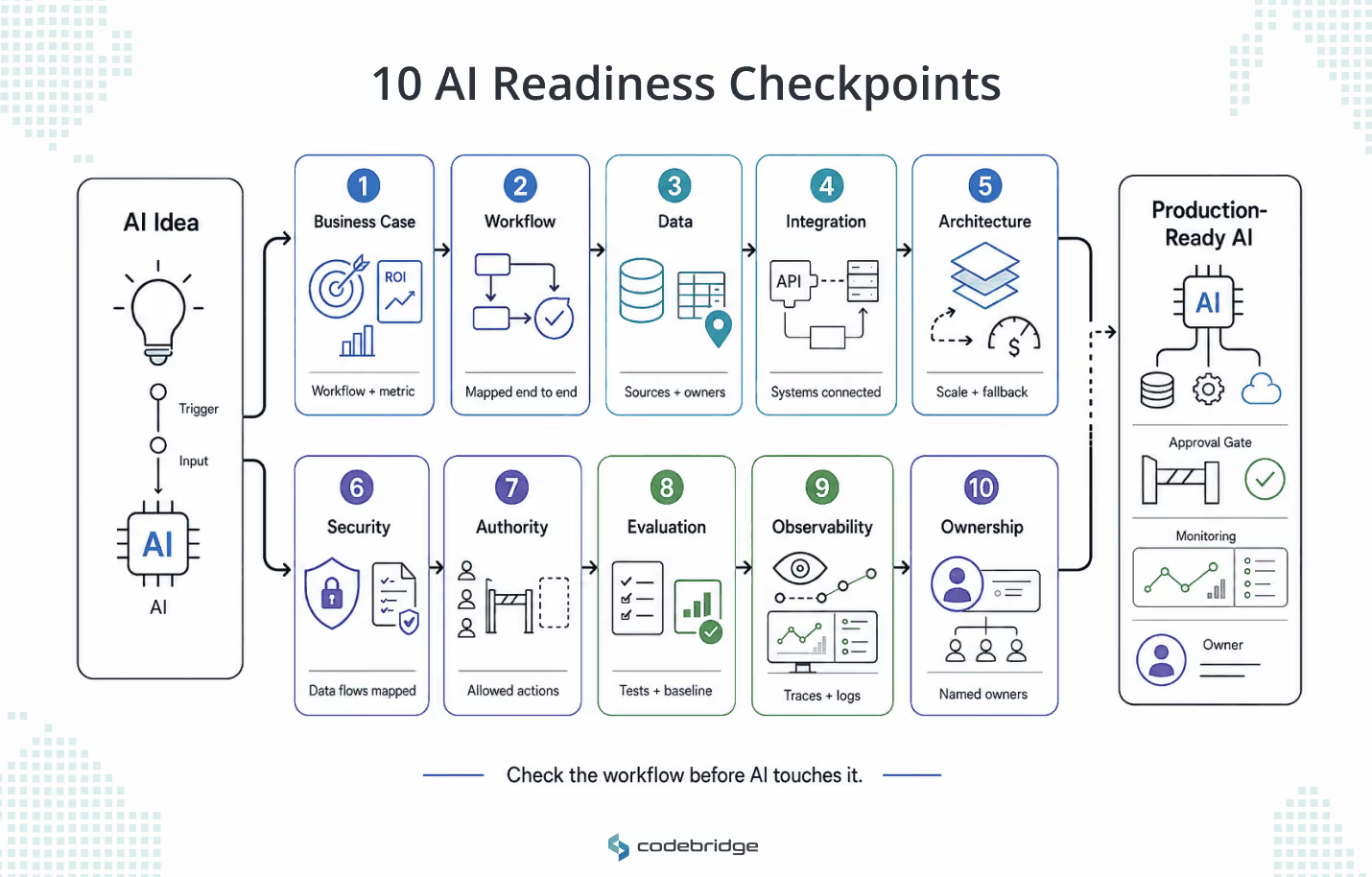
That is why this checklist reviews ten areas of readiness, one workflow at a time: business case, workflow, data, integration, architecture, security and compliance, agent authority, evaluation, observability, and ownership.
This checklist is not built to block AI projects. It is built to separate the workflows that are ready for a pilot from the workflows that need foundation work first.
What is an AI Readiness Checklist?
AI readiness checklist is a structured review of whether your company can build, buy, or deploy AI into one specific workflow, product, or internal system. It reaches past data quality and asks whether the business case holds, whether the process is clear, what the AI is allowed to do, and who owns the result after launch.
That narrower view matters because a company can be ready for one use case and totally unprepared for another.
For example, the same company may be ready to:
- Use AI for internal document search
- Summarize support tickets before a human responds
- Draft sales research notes for an account manager
But it may not be ready to let AI do more complex tasks:
- Update customer records automatically
- Approve refunds
- Send outbound messages without review
- Support a clinical or financial decision
Each of those workflows has different requirements for data, permissions, risk, integrations, evaluation, and ownership. That is why this checklist reviews one workflow at a time.
How to Use This Checklist
First, run the checklist against one specific workflow, not the whole company. Pick a real candidate and name it plainly.
Examples: An AI sales research assistant, an AI document review system, or AI reporting automation for finance.
Score that one workflow and nothing else.
Second, score each of the 40 questions on a simple scale:
- 0 means not ready.
- 1 means partially ready.
- 2 means ready enough for a pilot or an implementation review.
The signals under each checkpoint are your scoring guide. If your answer matches the low-readiness signal, score 0. If it matches the good-readiness signal, score 2. Anything in between is a 1.
Finally, add the scores. The maximum is 80.
A low score is not a verdict on AI, but it usually means the workflow needs preparation before AI is allowed to operate inside it.
Final reminder: score one workflow, not the company, because the same business is ready for one use case and unready for another.
The 40-Question AI Readiness Checklist
This checklist was divided into ten major checkpoints, four questions each. Every checkpoint includes the signals that tell you whether your answers are strong or weak, plus a short example from a real workflow.
Checkpoint 1: Business Case Readiness
AI should start from a business, a very concrete and clear business problem. Good examples will be: slow review cycles, high support volume, delayed reporting, expensive manual research, and a clinical bottleneck.
If you cannot name the problem and the metric attached to it, your project has no floor to stand on.
The questions
- What business problem will this AI system reduce, remove, or improve?
- What baseline metric do you have today?
- What result would make the investment worth it?
- Who owns the business outcome after launch?
Low-readiness signal. The use case comes out as "we want to use AI somewhere in operations."
Good-readiness signal. The team can name the workflow, the baseline, the expected improvement, the owner, and the business impact.
Bad example: "We want an AI assistant for sales," as it tells you nothing you can build against.
Good example: "We want to cut manual account research before outbound campaigns and lift qualified meetings from priority accounts" because it tells you what to build and how to judge it.
Checkpoint 2: Workflow Readiness
Workflow readiness shows whether AI is being added to a process that is actually understood. If the team cannot explain how the work happens today, who makes decisions, and what should happen when something unusual appears, AI can create even more confusion.
So before choosing a model or tool, map the workflow as it really operates. The inputs, handoffs, approvals, exceptions, delays, systems used, and decisions that still need human judgment.
The questions
- Is the current workflow documented from start to finish?
- Do you know where the workflow slows down, breaks, or depends on manual work?
- Are exceptions and edge cases visible?
- Have the people who run the workflow checked the map?
Low-readiness signal. The process lives in Slack threads or spreadsheets.
Good-readiness signal. The map is clear enough to decide which steps AI should assist, automate, escalate, or leave alone.
Good example: A support workflow should show ticket intake, classification, data lookup, response drafting, approval rules, escalation, the CRM update, and quality review.
Checkpoint 3: Data Readiness
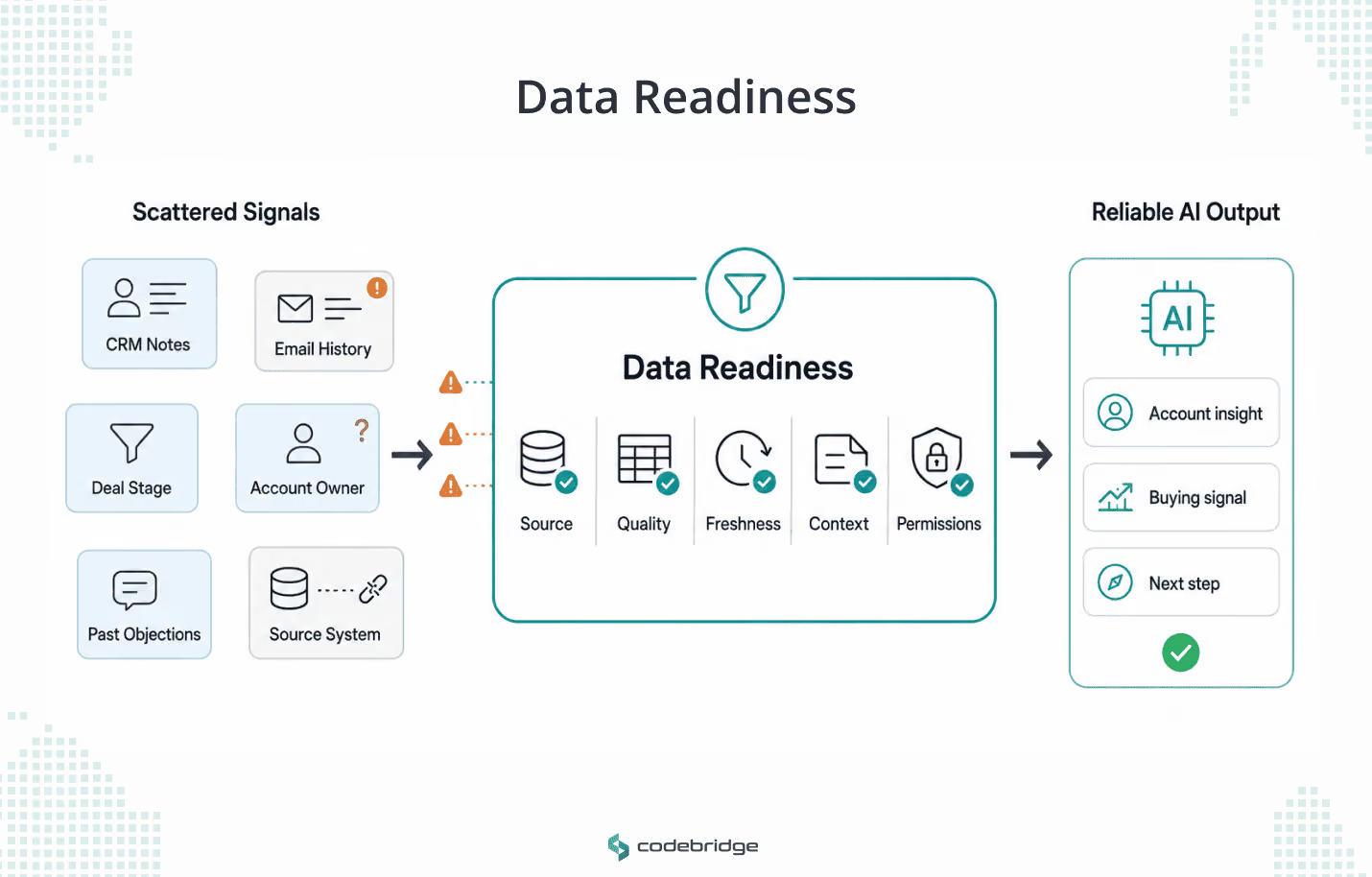
Data readiness for AI is not only about clean databases but also about systems needing the right data, from the right source, with the right context, freshness, permissions, and quality for the decision or action it supports.
This is usually the deepest part of the readiness review, so we break it down separately in our full guide to data readiness for AI.
The questions
- What data does the AI system need to do the job?
- Where does that data live today?
- Is the data accurate, complete, fresh, and clear enough for this use case?
- Can access to the data be controlled and logged?
Low-readiness signal. The team says the data exists somewhere but cannot name the system of record.
Good-readiness signal. The team knows the required sources, their owners, the update frequency, the access rules, and the known quality problems.
Example: An AI sales research assistant may need CRM notes, email history, deal stage, account ownership, and past objections. If those signals sit scattered across tools or go stale, the assistant will produce confident nonsense at speed.
Checkpoint 4: Integration Readiness
Integration readiness checks whether AI can work inside the systems your team already depends on, not next to them. A useful AI workflow usually needs to pull information from CRM, ERP, EHR, documents, or internal tools.
This is where many AI projects become almost useless and, for some companies, expensive. The model may produce a good answer, but if people still have to copy it into another system or fix broken handoffs, the company has not automated anything.
The questions
- Which systems must the AI read from?
- Which systems, if any, can it write to?
- Are APIs, permissions, and data contracts available?
- What happens if a connected system is down or returns bad data?
Low-readiness signal. The AI workflow depends on people copying and pasting between tools.
Good-readiness signal. The integration points are known, access is scoped, failure behavior is defined, and the AI does not spawn a hidden second workflow running next to the real one.
Example. A support agent might retrieve order status, check account history, classify a ticket, suggest a refund path, and update the ticket system. Each of those connections needs its own limit, and each needs a defined behavior for when the upstream system fails.
Checkpoint 5: Architecture Readiness
The architecture checkpoint checks whether the AI system can survive normal business use, not just a demo. Because a production system has to handle real users, real traffic, failed APIs, slow responses, and maintenance after the first engineer moves to another task.
For a CEO or CTO, this checkpoint is about risk and predictability. Can the system stay fast, reliable, affordable, and recoverable enough once it becomes part of the product or operation?
The questions
- Can the current architecture carry the expected AI workload?
- Are latency, uptime, and cost limits defined?
- Is there a fallback path when the model, API, or retrieval layer fails?
- Can the system be maintained without one specific engineer in the room?
Low-readiness signal. The prototype works only when one engineer runs it by hand.
Good-readiness signal. The architecture has clear ownership, deployment logic, observability, error handling, and cost controls.
Example. For an AI tutoring product, voice latency, whiteboard sync, session history, and model cost are product requirements. They belong in the plan, not hidden in the background as technical details.
Checkpoint 6: Security and Compliance Readiness
AI systems reach into sensitive business, customer, financial, legal, and clinical data. Security readiness means that access controls, data handling, logging, vendor review, retention, and compliance are settled before launch.
The questions
- What sensitive data could the AI access or expose?
- Which security, privacy, or regulatory requirements apply?
- Are prompts, outputs, logs, and stored context handled safely?
- Has the team reviewed the known LLM risks: prompt injection, sensitive information disclosure, insecure tool access, and overreliance on AI output?
Use a published baseline rather than your own guesswork. The OWASP Top 10 for LLM Applications (2025) names prompt injection as the top risk for the second edition running, and it folds insecure tool and plugin access into a broader category it calls excessive agency, the risk of giving an AI more functionality, permission, or autonomy than its task requires.
Low-readiness signal. The team assumes the vendor's security page covers it.
Good-readiness signal. The team has mapped data flows, access boundaries, storage, retention, logging, vendor risk, and the points where a human must review output.
Example. A HealthTech workflow may need strict auditability, clinical oversight, data minimization, and explicit limits on what the AI can and cannot recommend.
Checkpoint 7: AI Agent Authority Readiness
Businesses must understand the difference between an AI agent and a chatbot. Chatbots respond to your message. You ask a question or give an instruction, and it gives you an answer back. AI agents can plan, call tools, retrieve data, prepare actions, and sometimes carry them out.
Readiness here is a question of authority. Gartner ties much of its agentic cancellation forecast to inadequate risk controls, and OWASP's Top 10 for Agentic Applications, released in December 2025, puts agent goal hijacking, tool misuse, and identity and privilege abuse near the top of its list.
All three trace back to one cause: an agent holding more authority than the workflow can safely grant.
The questions
- What can the AI read?
- What can the AI suggest or prepare?
- What can the AI execute, and under what approval rules?
- What must the AI never be allowed to do?
A clear authority ladder turns those questions into a model the whole team can hold:
- Read only
- Suggest
- Prepare
- Execute with approval
- Execute low-risk actions
- Never touch
The rungs that protect you most are the bottom two. "Never touch" names the actions an agent must be blocked from regardless of how confident it sounds, and "execute with approval" keeps a human between the agent and anything it cannot reverse.
Low-readiness signal. The team hands the agent broad access before it defines authority levels.
Good-readiness signal. The team has written down a clear authority model and enforces it in the system, not just in a policy document.
Example: A sales agent might draft a follow-up email without approval. It should not change deal stages, offer discounts, or send contract language without a human in the path.
Checkpoint 8: Evaluation Readiness
Five good-looking outputs prove nothing. The team needs test cases, edge cases, acceptance criteria, failure examples, review rules, and a way to compare the AI against the workflow's baseline.
The evaluation readiness checkpoint ensures that the AI is good enough for the actual workflow.
The questions
- What does a good AI output look like for this workflow?
- What failure cases should you test before launch?
- Who reviews AI output quality?
- How will you measure whether the AI improves the workflow?
Low-readiness signal. The team asks the AI five random questions and decides it looks good.
Good-readiness signal. The team has evaluation examples, acceptance criteria, human review rules, and a baseline to measure against.
Example. For an AI document review assistant, evaluation should cover correct extractions, missed clauses, false positives, hallucinated risks, escalation quality, and reviewer time saved. A demo that handles five clean documents tells you almost nothing about the messy sixth.
Checkpoint 9: Observability Readiness
Observability is how you see what the AI did and why. The team should be able to trace what the AI saw, which data it used, what shaped the answer, which tools it called, what it changed, what it cost, and where it failed. We go deeper on this in our work on AI agent observability.
The questions
- Can you trace AI outputs back to their inputs, context, and tool calls?
- Are model errors, latency, cost, and retrieval failures monitored?
- Can you detect risky or unusual agent behavior?
- Is there a feedback loop for correcting outputs and improving the system?
Low-readiness signal. The only monitoring is "users will tell us if something breaks."
Good-readiness signal. The system has traces, logs, metrics, alerts, review workflows, and someone who owns ongoing improvement.
Example. For an AI agent wired into a CRM, observability should show which account data it used, what message it drafted, whether a human approved it, whether it updated the record, and what happened after the update.
Checkpoint 10: Ownership Readiness
Readiness collapses when nobody owns the outcome. The business owns the goal, engineering owns the system, security owns the risk, and operations owns adoption. Those lines have to be drawn before launch, not improvised after the first incident.
The questions
- Who owns the business outcome?
- Who owns technical performance and maintenance?
- Who owns risk, compliance, and incident response?
- Who decides when the AI system should change, pause, or shut down?
Low-readiness signal. Everyone is excited during the pilot, and nobody owns the system once it is deployed.
Good-readiness signal. Ownership is assigned across business, product, engineering, security, and operations.
Example. When a RevOps AI assistant sends a bad recommendation, the company should already know who investigates the error, who fixes the workflow, who updates the evaluation set, and who tells users what changed.
Low-Readiness Signals That Mean You Should Pause
The score gives you a number. These signals give you a faster read. Any one of them is reason to slow down before AI touches the workflow.
- The use case has no measurable baseline.
- The workflow is undocumented.
- The data lives in several systems that disagree with each other.
- The AI needs write access before anyone has designed permission rules.
- Nobody knows who approves AI outputs.
- The team cannot explain what happens when the AI is wrong.
- No rollback path exists.
- No one can trace why the AI produced a given result.
- The CTO carries accountability for AI that business teams adopted without IT visibility.
- The project rides on one enthusiastic person instead of an operating model.
Catching these signals now costs a planning meeting. Catching them after deployment costs a production incident and the cleanup behind it. A checklist that exposes weak foundations has done its job.
What Good AI Readiness Looks Like in Real Workflows
Readiness changes with the workflow. The same ten checkpoints produce different answers in a hospital or a sales team. Here are a few examples from work we know.
AI Readiness in HealthTech
In diagnostic imaging, readiness means far more than model accuracy. The system has to fit the clinical workflow, reach the right data securely, keep an audit trail, and hold a human review step before any clinical decision.
On RadFlow AI, a radiology workflow assistant we built for a Tier-1 imaging provider, that discipline is what let it run for more than nine months in production without a critical failure while cutting average CT reading time from 15.2 to 9.4 minutes at 96 percent detection sensitivity.
The readiness questions were whether the AI can reach the right clinical data safely, whether the system explains what data supported its output, and whether audit logs are available.
AI Readiness in SalesTech
In sales, readiness depends on CRM quality, cross-channel context, message approval, relationship history, and safe automation limits.
For a B2B professional-services client we built a multi-agent sales system where those conditions were settled before scale. Response time to inbound interest fell from 24 hours to under two minutes, first meetings moved from one or two weeks out to two or three days, and the system freed roughly 20,000 selling hours a month.
Executive Checklist Summary
Score the Workflow Before You Build
AI readiness is the condition of a workflow before AI enters it. When the workflow is clear, the data is usable, the integrations are controlled, the authority model is set, and the system can be watched, AI has a real chance to create value inside it.
However, when those foundations are missing, AI runs the broken version faster and at a larger scale, and that is more expensive to undo than it would have been to prevent.
So before you commit to a budget, score one workflow against these 40 questions. If the picture is clear, move. If the score comes back uncertain, that is the moment to review the workflow, data, or production risks before the first line of code.
That review is the work we do at Codebridge, and it is the same work we run before we build anything ourselves.













Heading 1
Heading 2
Heading 3
Heading 4
Heading 5
Heading 6
Lorem ipsum dolor sit amet, consectetur adipiscing elit, sed do eiusmod tempor incididunt ut labore et dolore magna aliqua. Ut enim ad minim veniam, quis nostrud exercitation ullamco laboris nisi ut aliquip ex ea commodo consequat. Duis aute irure dolor in reprehenderit in voluptate velit esse cillum dolore eu fugiat nulla pariatur.
Block quote
Ordered list
- Item 1
- Item 2
- Item 3
Unordered list
- Item A
- Item B
- Item C
Bold text
Emphasis
Superscript
Subscript