The Short Answer
AI for accountants covers the software that takes manual finance work off your team. It includes capturing and coding transactions, matching records, chasing client documents, and preparing the month-end close. Used well, AI in accounting does not replace the accountant. It moves the repetitive processing to software, so your people spend their hours on review and advisory work.
What it costs depends on scope, the state of your data, how many systems it has to connect to, and whether you buy software or build something your firm owns. What it takes is measured in weeks, from a short discovery to a working prototype on your own data to a production build.
The honest state for a mid-market firm is this. Most enterprise AI pilots have delivered no measurable financial return, and the firms that saw results were the ones that automated a specific workflow and kept people in control of the judgment.
This guide covers where AI pays off first, what drives the cost, how long a real build takes, and how to govern the AI agents now entering accounting. By the end, you can self-qualify on cost and timeline and decide whether it is worth a conversation.
The Mid-Market Reality
If you run operations at a firm with 50 to 150 people, most of what you read about AI in accounting was written for someone else. The Big 4 are spending billions on proprietary platforms, and the vendor blogs are selling subscriptions. Neither describes your position. You have a real capacity problem, a partner group that wants an AI answer, and a budget that does not stretch to an enterprise program.
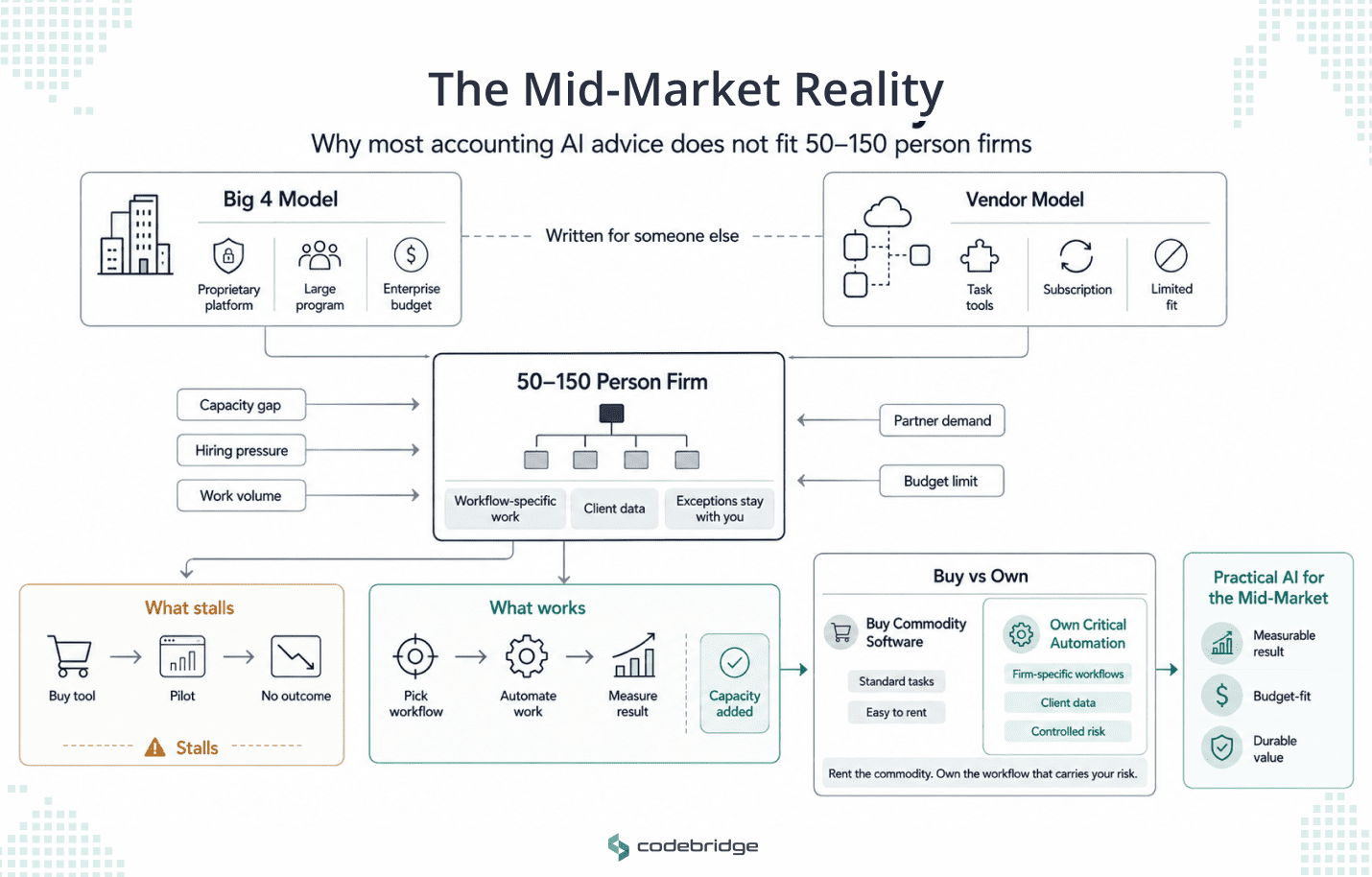
If you run operations at an accounting firm with 50 to 150 people, the main challenge is that you need more capacity, but you cannot solve it by continually adding headcount or funding a Big 4-scale AI program. Off-the-shelf tools may automate individual tasks, but they rarely address the workflows, systems, and client-data requirements specific to your firm. You need an approach that reduces manual work, fits your budget, and produces a result that the partner group can measure.
That capacity pressure is likely why AI has reached your desk. Experienced staff are harder to hire and retain, while the volume of work does not shrink to match. AI is one of the few levers that add capacity without adding headcount, which is why the question is no longer whether to explore it, but where and how to start.
The honest state is less encouraging than the marketing. Most enterprise AI pilots have produced no measurable change to the bottom line, and the pattern behind the failures is consistent. Firms buy a tool, run an open-ended pilot, and never connect it to a workflow that delivers a real outcome. The software a firm rents adds a feature, and the firm still owns the process, the exceptions, and the risk.
That points to the one idea this guide returns to. For the workflows that are specific to how your firm runs, and for the client data you are accountable for, the firms that get durable value tend to own what they build rather than rent another subscription. You buy the commodity software, and you own the automation that carries your risk. The rest of this guide is about deciding which is which, what it costs, and how long it takes.
Where AI in Accounting Pays Off: The Workflows
AI pays off first in the workflows that run at high volume, repeat the same way, and require little judgment on most items. Five stand out for a mid-market firm. This is the shortlist and the order most firms should weigh; the step-by-step on each one sits in a separate guide.
Accounts payable and invoice processing. The highest-volume target in most firms. Software captures the invoice, codes it, matches it against the order, and routes it for approval, leaving your team with the exceptions. AP has its own economics and its own guide, so treat it here as the usual place to start.
Bank and account reconciliation. Recurring, high in volume, and dependent on a clean audit trail. Automated matching handles the entries that follow a rule and surfaces the ones that do not, so a reviewer looks at the exceptions instead of every line.
Client document intake. Collecting and chasing client records is where staff hours disappear during the busy season. Structured requests, automatic reminders, and sorted intake remove the coordination load. Because this workflow carries client data, it is one a firm often chooses to own.
Month-end close preparation. The coordination on top of reconciliation: tracking which clients are ready, routing reviews, and surfacing exceptions before sign-off. The value is visibility into the real state of every close.
Practice-management admin. Onboarding, engagement setup, task assignment, and deadline tracking. No single instance is expensive, but the cumulative drag across every engagement is real, and it produces nothing billable.
Two rules decide the order, and the how-to guide covers both: standardize a workflow before you automate it, and measure your workflows so you start with the most expensive one rather than the most irritating.
Readiness is not the same as impact. A workflow can be ready to automate and still be the wrong place to start if it is not where your hours or your margin go. Rank by cost first, then by readiness, and begin where the two line up.
AI Agents in Accounting, and What a Firm Must Govern
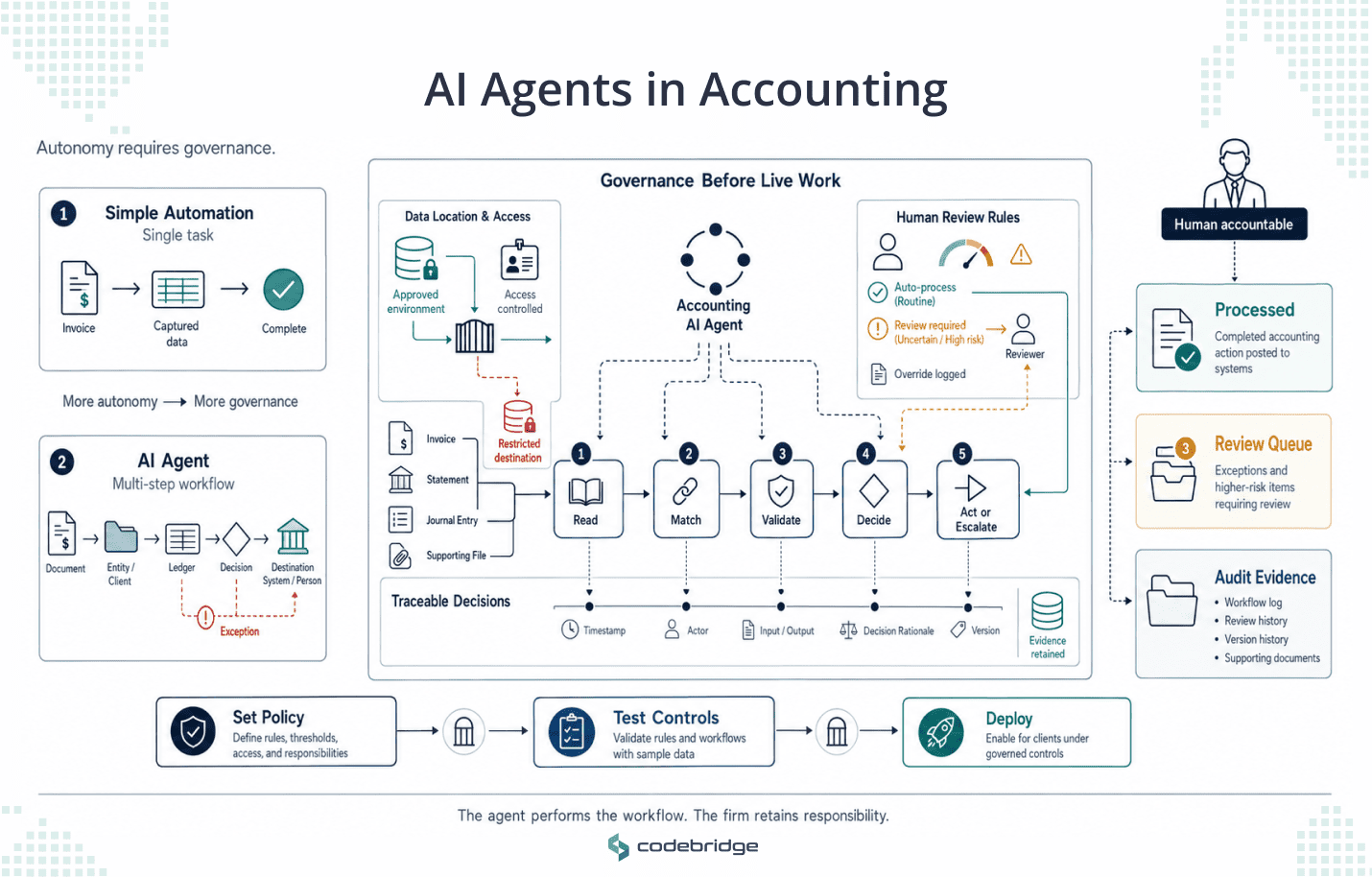
A distinction matters here because the market has moved past simple task automation. An AI agent does more than extract a field or send a reminder. It reasons across documents, matches records to source data, flags exceptions, and carries out a multi-step workflow with limited human intervention.
Agents are now a large part of what AI in accounting means, and the largest firms have built their practices around them. KPMG runs a multi-agent audit platform, Workbench, that logs documentation and accountability at every step. PwC built its Agent OS with governance and compliance at its core. Deloitte deployed Zora AI for finance work, including expense and invoice handling, and EY analyzes entire populations of journal entries rather than samples through its Helix platform.
Naming them makes one point that even the most conservative, regulated firms in the profession decided agents were worth building, and they built governance in from the start.
However, not every workflow needs an agent. Capturing an invoice or sending a reminder is a single task, and simpler automation handles it well. An agent earns its place when a workflow spans several steps and systems and needs a decision at each one, such as matching a document to the right entity, validating it against the ledger, and routing only the exceptions to a person. The more autonomy a workflow hands to software, the more the governance questions below decide whether it is safe to run at all.
In accounting, an agent handles client financial data, produces records that must withstand an audit, and makes decisions that a regulator may later review. That raises three questions a COO must answer before any agent goes near live work.
- Where does the data go, and who can see it?
- What is the policy for when a person reviews an agent's output, and what triggers that review?
- Can you show a regulator the trail of what the agent did and why?
These questions are not hypothetical as in 2025 the UK's Financial Reporting Council found that major firms had embedded AI into audits without formally measuring the effect on audit quality. Regulators have since made accountability explicit by stating that the human accountant remains responsible for the output, regardless of what the tool did, and that auditors are expected to test the controls around AI models the way they test any other control.
Today, the firms that deploy agents safely set clear thresholds for human review, log every override, and keep a documented record of how each model is governed. Data location is the question a COO should press hardest. An agent that sends client records to a general-purpose model in the cloud carries a different risk from one that runs inside systems your firm controls, and that difference decides what you can promise a client about confidentiality.
The main lesson from the giants is the sequence, and it is cheap to copy. Governance, a data policy, and a human-in-the-loop review process come before the agent runs on client work.
The Cost of AI for Accountants
This guide gives you cost drivers, not a price list, because a credible number depends on your scope and your data, and any figure quoted without those is marketing. We determined four things that move the cost of an AI project in accounting.
Scope. One workflow costs less than five. A focused first project on your highest-cost workflow is cheaper to build, faster to prove, and lower in risk than a firm-wide program.
Data readiness. The state of your data is the best predictor of whether an accounting AI project works. Clean, consistent, well-categorized records shorten the build. Messy books, duplicate vendors, and inconsistent coding add weeks because someone has to fix the data before the automation can be trusted with it.
In practice, that means a data-cleanup pass at the start of the project, and it is the most common reason a build runs longer than a firm expected. You can shorten it by checking your vendor master, your chart of accounts, and a sample of recent transactions for consistency before you scope the work.
Integration surface. Every system the automation connects to adds cost. A firm running a general ledger, a bill-pay tool, a practice-management suite, and a document vault is asking the automation to work across systems that were never built to talk to each other.
Build versus buy. Renting software carries a low upfront cost and a rising one over time, as per-seat pricing grows and integration work mounts. Building an automation your firm owns costs more at the start and less to carry, with no lock-in. The choice turns on whether a workflow is standard enough to rent or specific enough to own, and it has its own guide.
Read: Accounting Automation Software: Build vs Buy for Mid-Market Firms
The size of the prize is easier to state in board terms. Industry surveys put net realization for firms above $20 million in fees in the mid-80s, which means a firm loses margin on every point it cannot recover, and a single recovered realization point is worth six figures at this size.
Accounts payable makes the same case at the transaction level. The gap between what a manual invoice costs to process and the best-in-class figure of $2.78 is wide, though the specific economics belong to the AP guide.
The MIT research on enterprise AI found the largest returns came from back-office automation, the exact category these workflows sit in, even though most AI budgets went to sales and marketing.
For a COO, the case rests on arithmetic the board already understands. Recovered capacity from an automated workflow shows up as hours your team no longer spends on processing, and those hours convert into lower overtime during busy season or more client work at the same headcount. A build that takes a recurring processing load off your team pays back in one of those two ways, and the board can see which one.
How Long It Takes: The Timeline
The timeline is where a bounded project separates itself from the pilots that stall. The truth is that the reason most enterprise AI pilots fail has little to do with the technology.
The MIT NANDA study of enterprise AI in 2025 found that 95% of pilots delivered no measurable profit-and-loss impact, and the common cause was an open-ended pilot with no fixed end and no single workflow it had to fix. The same research found that projects run with an outside partner reached production about twice as often as internal builds, and that top performers implemented in roughly 90 days rather than the nine months or more that typical enterprises took.
The gap between partner-built and internal builds comes down to method. A team that has shipped the same kind of automation before brings a definition of done and accountability to a date, which is what turns a promising prototype into a production tool. An internal team building its first automation has to invent that method while doing the build.
A bounded project looks different from the start because it runs on fixed dates and it moves through three stages.
Discovery, about three weeks. A fixed-fee engagement that maps one workflow, checks the data behind it, and builds a working prototype on your own records. You end discovery with proof on your data.
Production build, weeks rather than months. The prototype becomes a production automation, connected to your systems and tested against real work. You get a working tool and the code behind it.
Support, ongoing and optional. Monitoring, updates, and reporting, sized to what you need rather than a fixed retainer you cannot adjust.
The fixed date is the mechanism, not a sales term. A pilot with no end date has no forcing function, so it drifts: scope expands, the workflow it was meant to fix stays half-fixed, and a year later the firm has spent money with no result to show.
A fixed date forces a narrow scope and a yes-or-no decision at the end. The prototype on your own data is the other half. Instead of a demo built on someone else's numbers, you watch the automation run on your invoices, your reconciliations, and your close, and then you decide whether to build.
The Vendor-Failure Problem
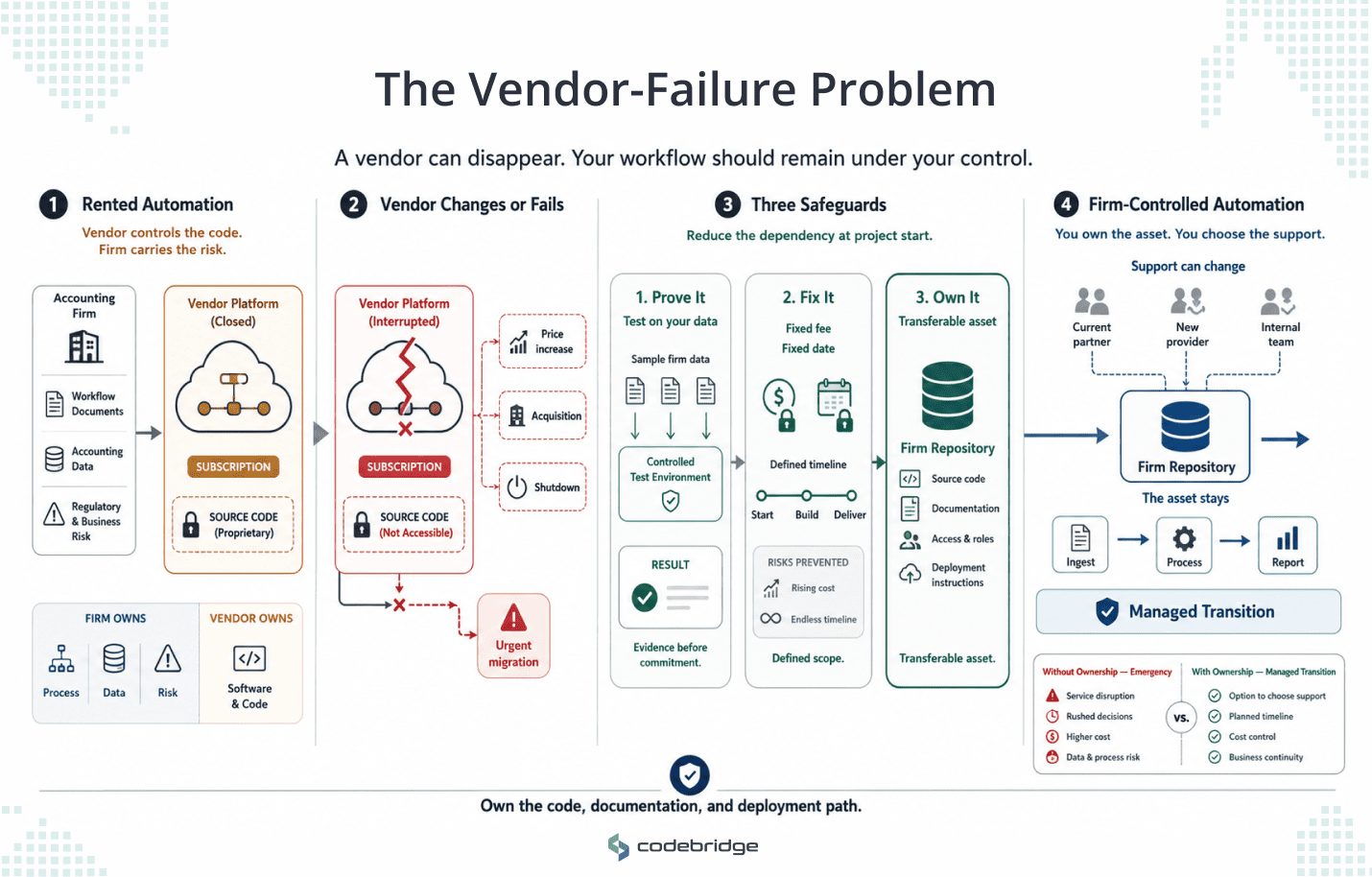
The fear that keeps a COO from signing has little to do with whether AI works. It is the fear of being the person who signed off on the vendor that failed. That fear is reasonable, and the mid-market has already lived the example. When Botkeeper wound down its bookkeeping automation, the firms that had routed their work through it had to migrate under pressure, because they had rented the software and owned none of the code behind it.
Three choices at the start of a project remove most of that risk.
First, prove it on your own data before you commit. A short discovery that runs on your records tells you whether the automation works for your firm, before you spend on a full build. You decide on evidence.
Second, fix the price and the date. A fixed-fee, fixed-date engagement means the cost cannot drift and the project cannot become an open-ended program that consumes a budget without producing a result.
Third, own the code. When the automation and its code belong to your firm, no vendor's price increase, acquisition, or shutdown can strand you. You can maintain it, change who supports it, or bring it in-house on your schedule. Owning the code means the automation lives in a repository your firm controls, documented well enough that another developer can pick it up and maintain it. That is what makes it an asset your firm holds rather than a subscription you keep paying for.
It changes what happens if you are wrong. If you own the code, a vendor's failure stops being an emergency and becomes an inconvenience you manage on your own schedule.
The Benefits of AI in Accounting: What the Results Look Like
The results worth trusting come from research on firms your size, not from vendor case studies. In 2025, researchers at MIT Sloan and Stanford's business school studied 79 small and mid-sized firms using AI accounting software, alongside a survey of 277 accountants. The accountants using AI closed the month-end books 7.5 days faster, shifted 8.5% of their time from routine processing to higher-value work, improved the granularity of their reporting by 12%, and supported 55% more clients per week than those who did not use it.
Two things about that study matter more than numbers. The field data came through one AI software provider, so read it as strong directional evidence rather than an independent audit. And the researchers found that AI helped the most experienced accountants the most, because veterans used it strategically and stepped in when the system's confidence was low. The judgment stayed with the accountants, and it concentrated on the work where experience mattered most.
The largest firms show the same direction at a different scale, which is why the Big 4 built the agent platforms named earlier. The evidence a mid-market firm should weigh is the field research, because it describes practices closer to your own.
How Codebridge Builds AI for Accounting Firms
Codebridge builds custom automation for mid-market firms as a service. We work on your data, alongside your team, and we hand you the code, so the automation belongs to your firm. Our roots are in KPMG, which means we scope a project the way a firm operator does: which workflow costs the most, what a clean version looks like, and what stays with your reviewers.
The engagement starts with a fixed-fee, three-week discovery on one of your workflows, run on your own data. You see the automation work on your records before you commit to a full build, and you decide from evidence. We fix the price and the date, and because you keep the code, there is no lock-in.
If you are weighing where AI fits in your firm, the next step is a 15-minute call. We will tell you which workflow is worth automating first, which you should keep buying off the shelf, and what a bounded project would look like on your numbers.

















Heading 1
Heading 2
Heading 3
Heading 4
Heading 5
Heading 6
Lorem ipsum dolor sit amet, consectetur adipiscing elit, sed do eiusmod tempor incididunt ut labore et dolore magna aliqua. Ut enim ad minim veniam, quis nostrud exercitation ullamco laboris nisi ut aliquip ex ea commodo consequat. Duis aute irure dolor in reprehenderit in voluptate velit esse cillum dolore eu fugiat nulla pariatur.
Block quote
Ordered list
- Item 1
- Item 2
- Item 3
Unordered list
- Item A
- Item B
- Item C
Bold text
Emphasis
Superscript
Subscript