The Short Answer
When a mid-market firm decides to automate accounting, the goal is usually to take the manual coordination and data handling off your team's desk so their hours move to the review and advisory work that clients pay for. Automation moves the invoices, matches the transactions, chases the documents, and tracks the close. Your people keep the judgment.
Two rules decide whether automating your accounting processes works. First, standardize the process before you automate it, because wiring software onto a messy workflow produces mess faster. And second, start with your most expensive repetitive workflow, measured in real hours, ahead of the one that feels most annoying.
This guide covers the five accounting workflows worth automating first for a firm in the 50 to 150 employee range: accounts payable, bank reconciliation, client document intake, month-end close prep, and practice-management admin. For each one you get what the manual version costs you, what automation takes off the desk, and where a person still has to sign off. By the end you can pick a first workflow and a sequence for the rest.
Before You Automate Accounting Processes: Two Rules That Decide Whether It Works
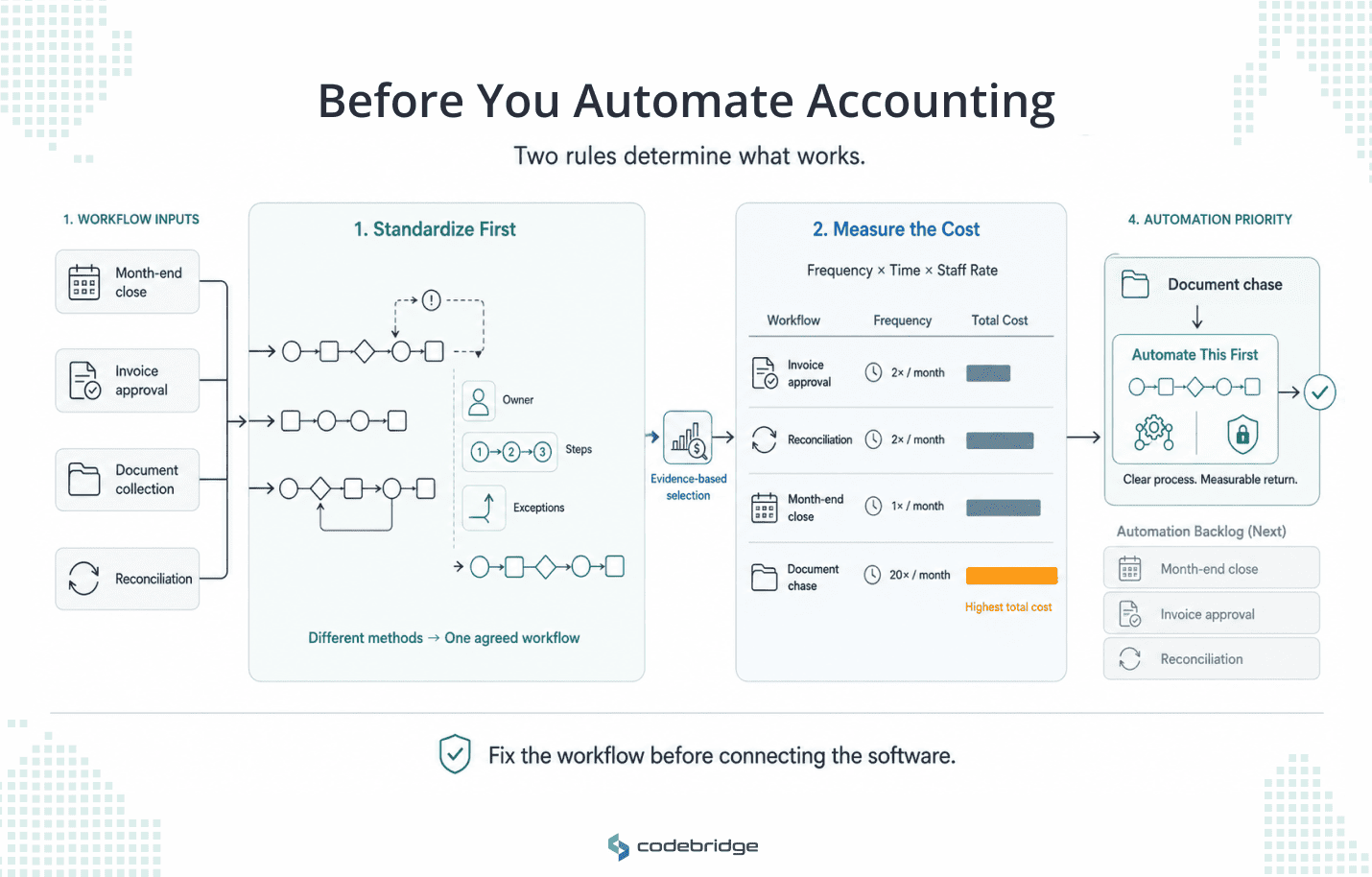
Most automation projects that stall not on the software itself, but on the process underneath it.
Rule one: standardize before you automate. A workflow with no clear owner, no agreed definition of done, and no rule for handling exceptions will not improve when you connect software to it. It will break faster and in more places.
Before you automate a task, write down who touches it, in what order, and what happens when something falls outside the standard case. If three managers run month-end close three different ways, automation will encode all three of them badly.
Fix the process on paper first, then automate the version you agreed on.
Rule two: start with your most expensive workflow. The task that generates the loudest complaints is not always the one draining the most margin. A partner who hates approving invoices will push AP to the top of the list by sheer volume of grumbling.
The real cost might sit in the document chase, which burns staff hours across every engagement without ever generating a complaint. So measure before you choose. Count how many times a month you run each workflow, multiply by the minutes each instance takes, and price it at your loaded staff rate.
The workflow with the biggest number is your first automation.
The Five Accounting Workflows to Automate First
The five workflows below run in the rough order most firms should tackle them. Read each for what it costs you today and what changes when you automate it, then use the table at the end to match the sequence to your own firm.
1. Accounts payable and invoice processing
Picture a 90-person firm running accounts payable out of a shared inbox. An invoice arrives as a PDF. Someone downloads it, types the vendor, amount, date, and line items into the ledger, matches it against the purchase order and the receipt, sends it to a partner for approval, chases that partner when it sits for four days, schedules the payment, and files the record.
Multiply that by a few hundred invoices a month.
The hours leak at four stages in a manual AP process:
- Capture: opening emails, downloading attachments, and keying invoice data by hand
- Matching: comparing each invoice against its purchase order and receipt
- Routing: sending invoices for approval and following up when they stall
- Exceptions: untangling duplicates, mismatches, and unfamiliar vendors
Automating AP clears the first three almost completely. The software captures the invoice, pulls the fields, codes them to the general ledger, matches against the purchase order, and routes for approval on a rule you set. What reaches a person is the short list of exceptions: the payment larger than usual, the vendor nobody recognizes, the invoice that does not match its order. Your team stops typing and starts reviewing.
AP is the canonical first automation because it runs at high volume, repeats the same way every time, and requires little judgment on most invoices. That combination gives you the fastest amd clearest return of any workflow on this list.
The mechanics of three-way matching, the real cost per invoice, and how to choose an approach are their own subjects, and we will cover them in our future accounts payable guide.
Automate AP first if you process a high monthly invoice count by hand and approvals routinely stall in someone's inbox.
2. Bank and account reconciliation
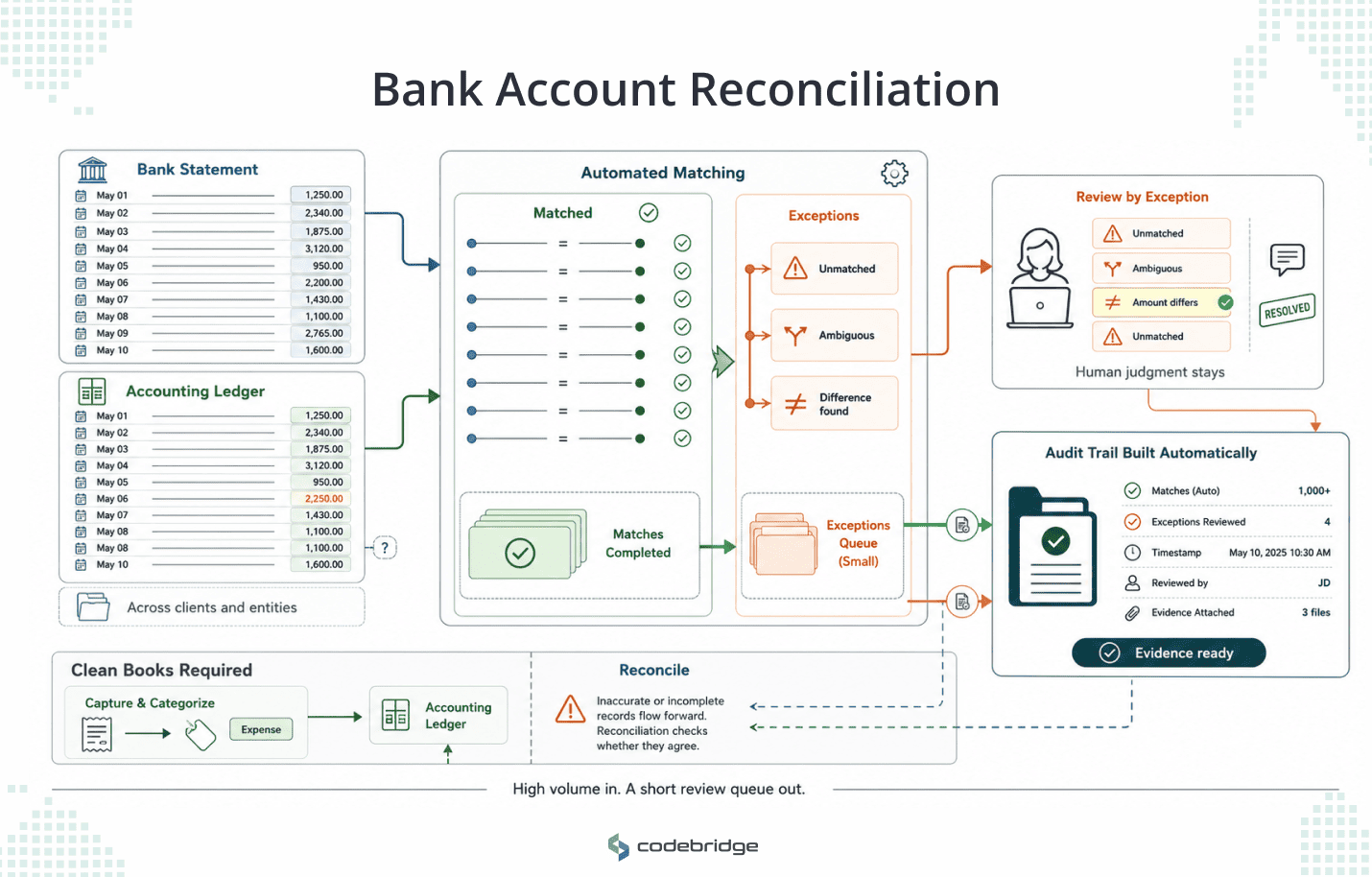
Reconciliation is where the idea of review by exception earns its keep. In a manual close, someone pulls each statement, matches transactions line by line across systems, investigates anything that does not tie out, flags the unmatched items, and documents the trail for the auditors. On a single entity, that is tedious, but across thirty clients, it is a week of someone's month, every month.
Automation changes the shape of the workflow and, at the same time, leaves the judgment intact. The software matches the transactions that follow a clear rule and leaves you the exceptions: the entries that do not reconcile, the ambiguous matches, the ones that need a person to decide. Instead of checking hundreds of lines that were always going to tie out, your reviewer looks at the handful that did not. The audit trail builds as the matching runs, so the documentation an auditor asks for is ready before they ask.
However, one boundary is still worth naming when you scope this. Reconciliation is the matching work. The capture and categorization underneath it, the bookkeeping itself, is a related but separate job. Keep the two distinct, because reconciliation automation cannot fix books that were wrong before it ran.
Automate reconciliation early if your volume is high, you run it across multiple clients or entities, and a clean audit trail matters to your risk.
3. Client document intake and the document chase
Every firm knows the chase. You need a client's bank statements, a signed engagement letter, and the three documents they promised last week. You email, wait, and then you email again. The documents arrive in four formats across two channels, one of them a photo of a receipt taken at an angle.
Someone sorts them, files them, notices two are missing, and starts the chase again. During the busy season, this repeats across hundreds of clients at once, and it is the reason your staff feels underwater in March.
The chase is manual coordination, and coordination is what automation handles best:
- Structured requests go out on a schedule, listing the specific documents each client owes
- Reminders send themselves until the client uploads, with no staffer having to remember to nudge
- Intake lands in one place, sorted and named, in place of files scattered across inboxes
- A live view shows who has submitted and who has not, so nobody wonders where a document sits
What stays with your team is the part that needs a person. It is judging whether a document is complete and correct, and handling the client who needs a careful phone call in place of a fourth automated reminder.
This workflow is a strong candidate to own rather than rent. It carries client data, and it runs the way your firm runs, which a generic tool cannot match. That ownership question is its own decision, and we walk through it in the build-versus-buy guide.
Automate intake before busy season if document collection is where your staff hours disappear into handoffs and follow-ups.
4. Month-end close prep and coordination
The worst moment in a manual close is the late surprise. You tell a client the month is closed, then an exception surfaces two days later and you reopen it.
Manual close prep hides that risk until it is too late to manage. Work gets marked done in a spreadsheet, but whether it is truly done, and whether the numbers underneath hold, stays invisible until a person checks by hand.
Close prep is different from reconciliation. Reconciliation is the matching, and the close prep is the orchestration on top of it: tracking which clients are ready, routing reviews, following up on open items, and knowing the real state of every close at once. That visibility is the whole value.
Automating the coordination layer changes what you can see and when:
Your reviewers keep the judgment that matters: the flux analysis, the sign-off, and the explanation the client hears. Automation makes sure nothing reaches them late or out of order.
Automate close prep once your transactional workflows are stable, because a clean close depends on clean AP and reconciliation feeding it.
5. Practice-management admin
The last workflow never shows up as one high cost because it hides in a hundred small ones. Practice-management admin is the connective work around every engagement: onboarding a new client, generating the engagement letter, setting up their file, assigning tasks, tracking deadlines, and keeping the steps consistent, whether a partner or a first-year runs them.
No single instance of this is expensive, but the cumulative drag is. Across every client and every engagement, the setup and the status-tracking and the deadline-chasing add up to real capacity, and that capacity produces nothing billable.
Automation help companies standardizes the repeatable parts. For example onboarding sequences that fire the same way every time, recurring tasks that generate on schedule, deadlines that cascade from a due date, and a dashboard that shows the state of the work across the firm.
What you keep is the scoping, the relationship, and the judgment on any engagement that does not fit the template.
This is the workflow to automate once the transactional wins are banked. It pays back slowly and steadily, and it is easier to standardize after AP, reconciliation, and intake have already shown your team what good automation feels like.
Automate practice-management admin when coordination drag shows up across every engagement, and your first transactional automations are running cleanly.
Match the five to your firm
Use this to pick where to start.
How to Sequence Your First Automation
You will not automate all five at once, and you should not try. The two rules from the start of this guide tell you how to order them.
Begin by measuring, not guessing. Take the five workflows above and put a real number on each: how many times a month you run it, how long each instance takes, and what that costs at your loaded staff rate.
The workflow with the largest number is your first automation, even if a different one generates louder complaints.
Then standardize the one you chose before you automate anything. Agree on who owns each step, what done means, and how exceptions get handled, and write it down. This is the step firms skip, and it is the step that decides whether the automation holds a year later.
Automate that single workflow, run it on real work for a full cycle, and measure the result against the baseline you took. One workflow done well gives you the credibility and the freed capacity to fund the next. Trying five at once tends to finish none.
Two decisions sit next to this one. The workflows that are specific to how your firm runs, the ones that carry your client data, are the ones worth owning rather than renting, and that build-versus-buy choice has its own guide. And timing, how long a single workflow takes to move from discovery to production, is covered in the main guide to AI for accountants.
How Codebridge Approaches This
Codebridge builds these automations for mid-market firms as a service. We work on your data, alongside your team, and we hand you the code at the end, so the automation belongs to your firm and keeps running, whoever you work with next.
We start small and fixed. Before any commitment to a full build, we run a fixed-fee, three-week discovery on one of your workflows, using your own data. You watch your AP, your reconciliation, or your document intake run inside those three weeks, and then you decide whether to build the rest. You decide from your own numbers instead of a slide.
Our roots are in KPMG, so we scope the work the way a firm operator thinks about it: which workflow costs the most, what a clean version looks like, and what stays with your reviewers.
We price against a fixed date, and because you own the code, there is no lock-in and no risk of a vendor winding down and taking your automation with it.
If you want help deciding which workflow to automate first, book a 15-minute call and we will work through your five with you.

















Heading 1
Heading 2
Heading 3
Heading 4
Heading 5
Heading 6
Lorem ipsum dolor sit amet, consectetur adipiscing elit, sed do eiusmod tempor incididunt ut labore et dolore magna aliqua. Ut enim ad minim veniam, quis nostrud exercitation ullamco laboris nisi ut aliquip ex ea commodo consequat. Duis aute irure dolor in reprehenderit in voluptate velit esse cillum dolore eu fugiat nulla pariatur.
Block quote
Ordered list
- Item 1
- Item 2
- Item 3
Unordered list
- Item A
- Item B
- Item C
Bold text
Emphasis
Superscript
Subscript