The Short Answer
Accounting automation software replaces manual work across a firm's finance workflows: transaction capture and categorization, reconciliation, document intake, month-end close prep, and the admin around practice management. For a mid-market firm, the category holds two questions that most buyers merge into one. The first is whether to build or buy your core accounting system, and that one is settled. You buy it, because no firm should write its own general ledger.
The second question is how to automate the workflows that sit on top of that system, and it has three real answers. You can buy more software and rent another vendor's features. You can try to build something in-house. Or you can commission a custom automation that your firm owns. Each path carries a different cost shape, a different level of control over your client data, and a different exposure if a vendor raises prices or shuts down.
This guide compares the three for a firm in the 50-150 employee range, then gives you a test for deciding which workflow belongs on which path. Buy the commodity layer, and own the workflows that are specific to how your firm runs.
Build or Buy is Two Questions, and Firms Answer the Wrong One
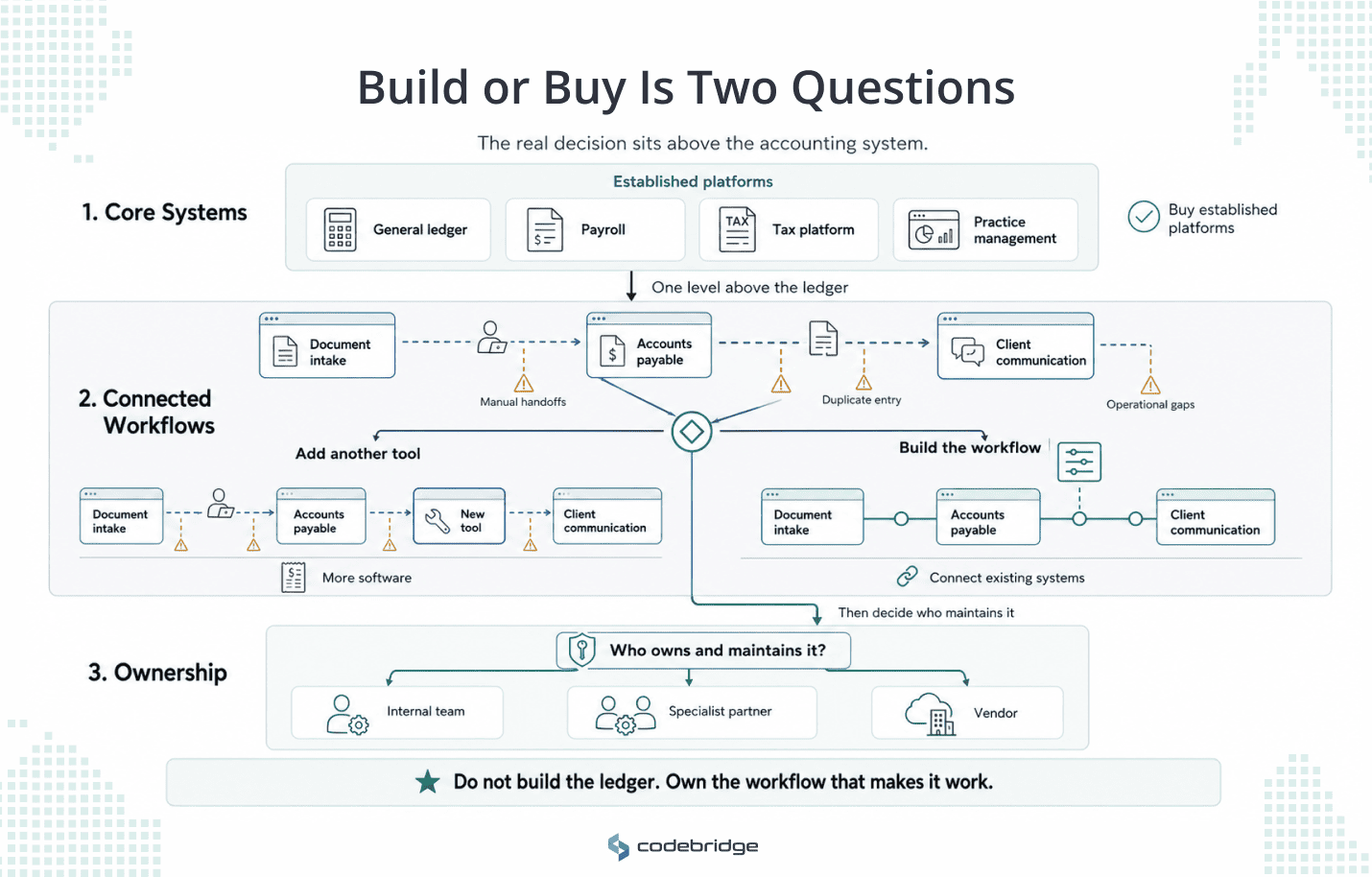
When you search for build-versus-buy advice, you usually find the same rule: build what creates a competitive advantage and buy what has become a commodity. Accounting is often used as the commodity example. At the level of core accounting infrastructure, that advice is correct. No accounting firm should recreate a general ledger, payroll engine or tax calculation platform that established vendors have spent years developing. Buy those systems.
But most firms settled that decision years ago. The question now sits one level above the ledger. It concerns the workflows connecting the systems the firm already owns such as document intake, accounts payable, and client communication. These workflows often cross several applications and contain firm-specific rules. Buying another isolated tool may add a subscription without removing the handoffs, duplicate entry or operational gaps that created the problem.
The word build also needs a different definition in an accounting firm. Most firms do not operate an internal software product organization. Building may mean configuring an automation internally or commissioning a specialist partner to create a tailored workflow that the firm controls. The relevant comparison is therefore not simply custom code versus commercial software. It is a standard product versus a configured, integrated, or commissioned workflow, together with a decision about who will own and maintain the result.
Three Ways to Deploy Accounting Automation Software
Once you treat automation as a real decision with more than one answer, you have three paths to weigh. Each one asks something different of a firm your size.
Path 1: Buy more software
You add another subscription to the stack you already run. The AI features come built-in, the vendor maintains them, and you are running by the end of the week. That speed is real, and for a standard task, it is the right call.
The cost of this path is what you give up:
- Depth. The features are shallow by design because the vendor built them for thousands of firms rather than yours.
- Control of your data. Your client data lives in the vendor's system, under the vendor's terms.
- Your roadmap. The feature you need waits behind the features other customers want more.
- Continuity. You carry the vendor's risk. When Botkeeper wound down its bookkeeping automation, the firms that had routed work through it had to move fast, with no code of their own to fall back on.
Path 2: Build it in-house
The second path is to ask your team to build the automation themselves, maybe with a low-code tool and a technically minded manager. It may seem that you keep full control and pay no license fee. But in practice, this is the path that fails most often.
A 2025 Exclaimer survey of more than 2,000 IT decision-makers found that 71% of in-house software builds are abandoned before they deliver value, and 46% run nearly double their budget. Even organizations with established IT functions struggled to move internal projects into sustained use.
Many accounting firms have IT specialists or technically capable managers, but few have a dedicated software product team responsible for architecture, testing, security, documentation, and ongoing maintenance. Without that structure, the automation can become dependent on the person who created it. When that person changes roles or leaves, the firm may be left with undocumented workflows and a system nobody owns.
Internal control is valuable, but it lasts only when ownership and maintenance are designed into the solution from the beginning.
Path 3: A partner builds it, and you own it
A specialist firm builds the automation on your data, tests it against your workflows, and hands you the code. In the end, you own the whole result. The code sits in your repository, and you can change vendors or bring maintenance in-house later without starting over.
MIT's 2025 NANDA study of enterprise AI found that deployments built with an outside partner reached production about 67% of the time, against 33% for internal builds.
Partner-built is roughly twice as likely to survive contact with real work. You get depth that fits your firm, your data stays yours, and because you hold the code, no vendor can strand you with a pricing change or a shutdown.
The trade-off is that this path costs more than a subscription on day one and asks you which workflow goes on which path. The next two sections deal with both.
The Real Cost of Each Path Over Three to Five Years

The subscription price and the build quote are the numbers you see first, but they are also the least useful because the real cost of each path shows up over three to five years.
Buying looks cheapest at the start. Then the costs stack. Per-seat pricing grows with every hire, the features you need arrive as add-ons or a higher tier, and integration becomes the cost firms underestimate most.
Gartner has found that organizations choosing packaged software underestimate integration costs by 30 to 40%. A firm running a general ledger, a bill-pay tool, a practice-management suite, and a document vault is running four systems that were never designed to talk to each other.
The MuleSoft 2025 Connectivity Benchmark put the average organization at 897 applications, with fewer than a third of them integrated. Every new subscription you buy is another system that has to be wired to the rest.
Building in-house looks free because no invoice arrives. However, the real cost is your team's time, the rework when the first version does not hold, and the maintenance that has no owner once the person who built it leaves.
A partner build costs the most at the beginning and the least to carry. You pay a fixed fee to design and build, then a smaller amount to maintain what you own. Because the code is yours, the switching cost is low, and lock-in is close to zero.
The one question that matters on this path is what workflows justify that level of investment and ownership, which the next section addresses.
The three paths side by side:
How to Decide Which Workflow Goes on Which Path
The generic build vs buy matrices score five weighted factors and hand you a number. For an accounting firm, the decision is simpler and turns on four questions you can answer about any workflow in a few minutes.
- Does a mature tool already do this the way every firm does it? Basic bank-feed capture and standard bookkeeping are solved. Buy them and move on. If your process looks like everyone else's, you gain nothing by owning it.
- Does the workflow carry client data you are accountable for, or produce records you need to defend in an audit? Client confidentiality and a clean audit trail are your obligations, and the more a workflow touches either, the stronger the case for owning how it runs.
- How exposed are you if the vendor changes? Run the test in dollars your Managing Partner would recognize. If a 40% price increase or a shutdown next year would force a painful migration, you are too dependent on something you do not control.
- Can your team maintain this without renting forever? If the honest answer is no, in-house is out, and the choice narrows to buying or a partner build you own.
The rule for a firm your size: buy the workflows that are standard, and own the ones that are specific to how your firm runs, carry client data, or would hurt to lose.
For most firms in the 50-150 range, one or two workflows clear that bar. Those are the ones worth building and owning, and the rest stay bought.
Timing follows from the path you pick, and a partner build runs on a fixed, dated schedule. The full timeline sits in the main guide.
How Codebridge Approaches This
Codebridge builds the third path. We are a software firm with roots in KPMG, and we build custom automation for mid-market firms as a service: on your data, with your team, and we hand you the code at the end. You own what we build. That is the difference between hiring us and subscribing to a tool.
The engagement starts small and fixed. Before any commitment to a full build, we run a fixed-fee, three-week discovery on your own data. You watch the automation run on your own AP or reconciliation during those three weeks, and then you decide whether to build. We price the work as a fixed fee against a fixed date, and you keep the code, so there is no lock-in and no repeat of a vendor winding down and taking your automation with it.
If you are weighing these three paths for your firm, book a 15-minute call and we will tell you honestly which workflows are worth owning and which you should keep buying.

















Heading 1
Heading 2
Heading 3
Heading 4
Heading 5
Heading 6
Lorem ipsum dolor sit amet, consectetur adipiscing elit, sed do eiusmod tempor incididunt ut labore et dolore magna aliqua. Ut enim ad minim veniam, quis nostrud exercitation ullamco laboris nisi ut aliquip ex ea commodo consequat. Duis aute irure dolor in reprehenderit in voluptate velit esse cillum dolore eu fugiat nulla pariatur.
Block quote
Ordered list
- Item 1
- Item 2
- Item 3
Unordered list
- Item A
- Item B
- Item C
Bold text
Emphasis
Superscript
Subscript