AI Answer Summary
Tax prep automation means moving document intake, data entry, research drafting, and review routing off human hands. Calculation stays with a deterministic tax engine. Judgment stays with a licensed preparer. Most firms can automate four of the seven layers in a tax workflow within a single season. Three of them cannot move at all.
The boundary is no longer a matter of opinion. On 24 June 2026, the IRS Office of Professional Responsibility issued its first guidance on artificial intelligence in federal tax practice, mapping six existing Circular 230 duties onto AI-assisted work. The guidance created no new rules, but it confirmed that every duty a practitioner already carries now also applies to machine-generated output.
Also, one thing does not change under any of it. The preparer who signs the return is responsible for that return, regardless of how it was prepared. Only an individual holds a preparer tax identification number, and preparer penalties attach to that person. Everything else in this guide exists to make that signature defensible.
The Real Cost of Tax Season
The 2026 filing season carried the first implementation of the tax law signed in July 2025. Firms worked through a new Schedule 1-A, new deduction categories, and new reporting forms while the IRS was still updating its own FAQs into August. Your staff answered client questions against a target that moved during the season.
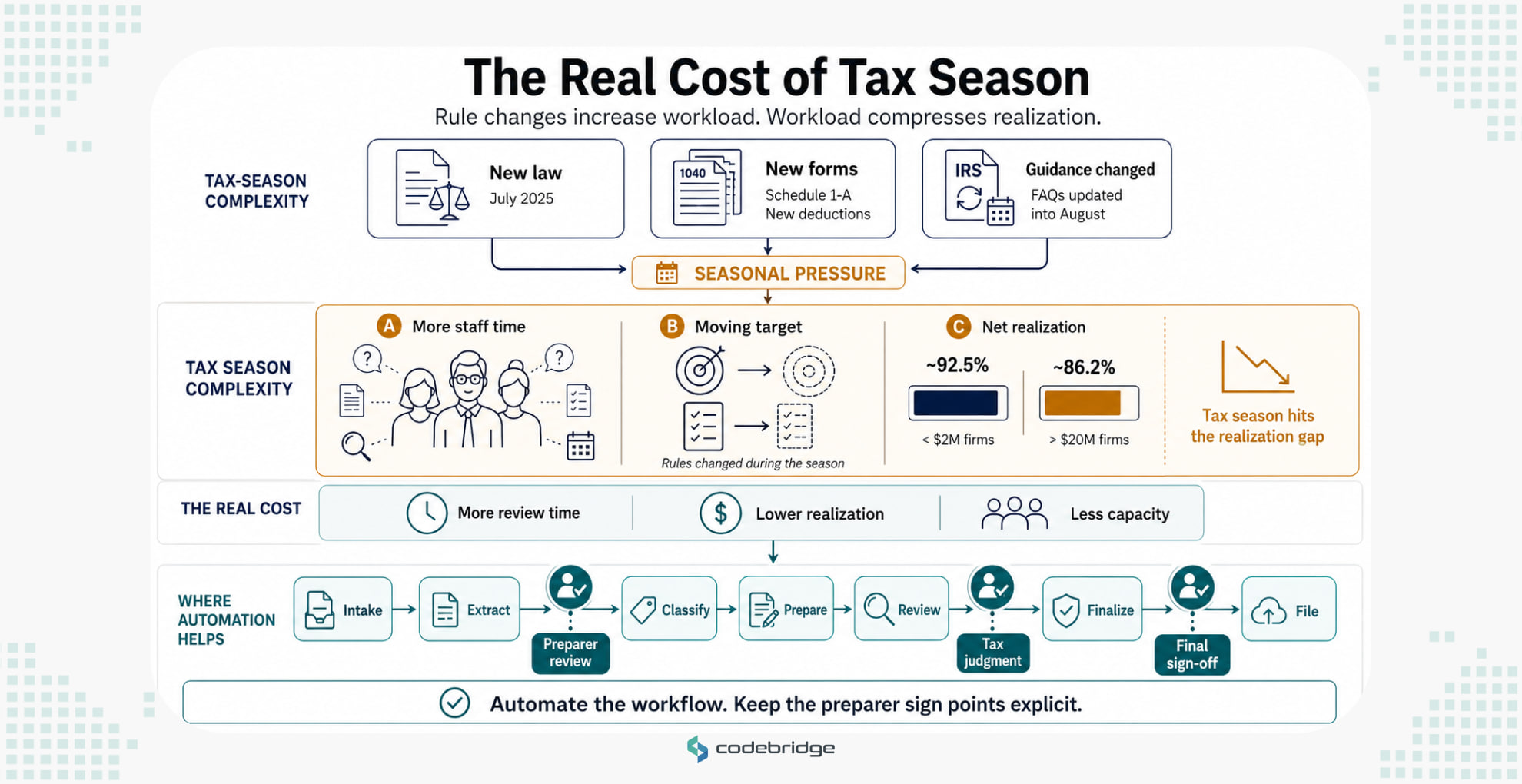
That lands on a margin most partner boards already argue about. The Rosenberg Survey reports net realization by firm size, with firms under $2M in net fees running near 92.5% and firms above $20M closer to 86.2%. For a firm in the second band, the gap between billed and collected work is where a tax season is won or lost.
This guide covers seven steps to automate tax prep, and the three places where a preparer still has to sign.
What Tax Prep Automation Covers
Tax prep automation moves the mechanical work off your staff such as sorting client packages, pulling numbers off source documents, checking those numbers against prior-year returns, drafting first-pass research, and routing exceptions to the right reviewer. However, it leaves two things alone. A deterministic engine still computes the return, and a licensed preparer still takes the positions and signs.
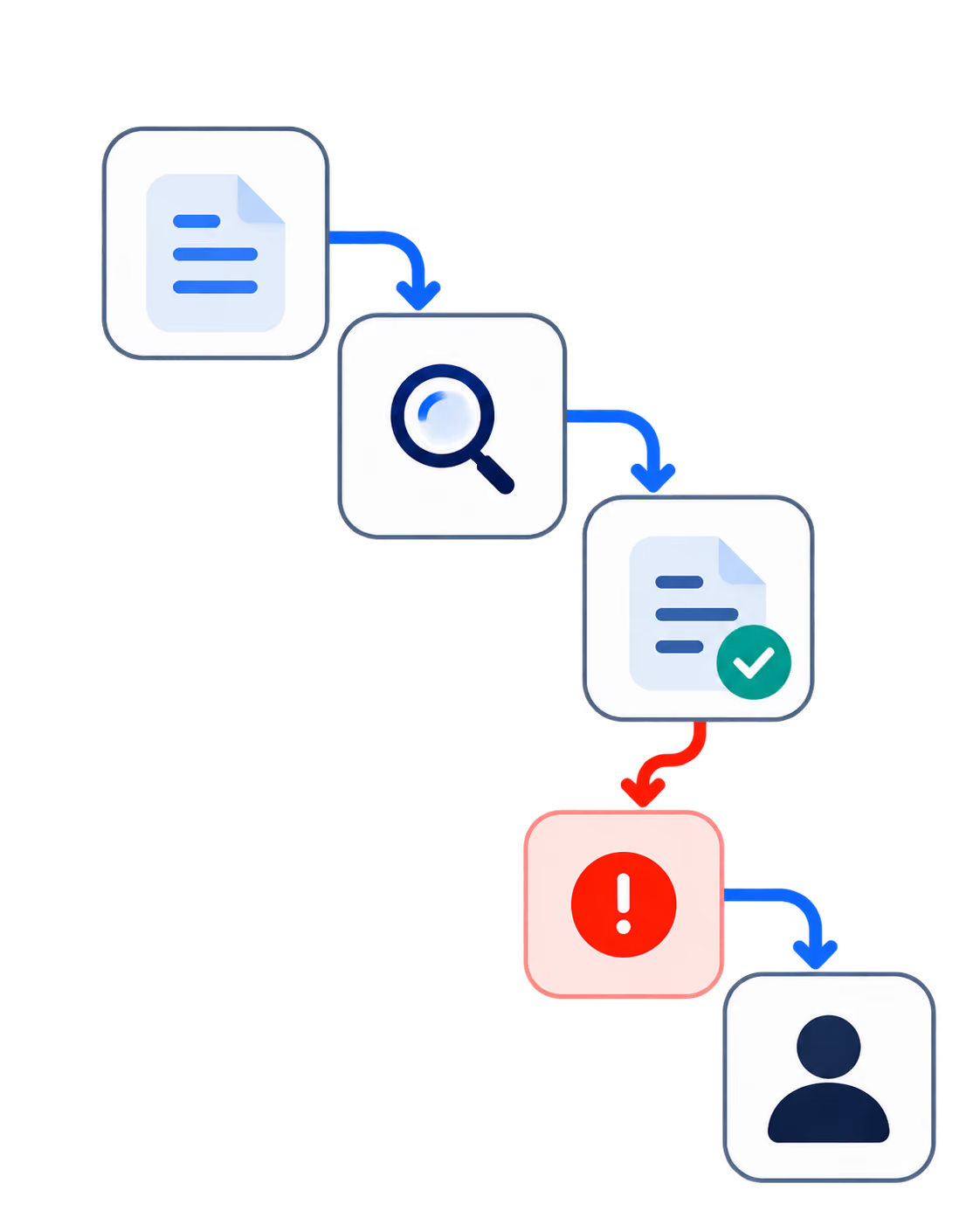
Here is what that looks like on a single return. A client uploads a package with two W-2s, three 1099s, and a K-1. Your system classifies each document by form type and tax year, extracts the fields, compares them against last year's filed return, and flags the two line items that fail to reconcile. A preparer opens the exceptions rather than the whole file.
The layers differ in how ready they are:
Adoption has moved fast on the layers that work. A survey of more than 1,000 US tax professionals fielded in March 2026 by Blue J and CPA.com found 60% using AI for tax research at least weekly, against 33% a year earlier. Vendors across the extraction market report field accuracy in the range of 90% to 95% on standard forms, with results falling on handwritten or poorly scanned documents.
Treat both figures as what they are. One is a practitioner self-report. The other is vendor-reported. The number that carries real weight appears in Step 3, and it comes from an open benchmark you can run yourself.
How to Automate Tax Prep in Seven Steps
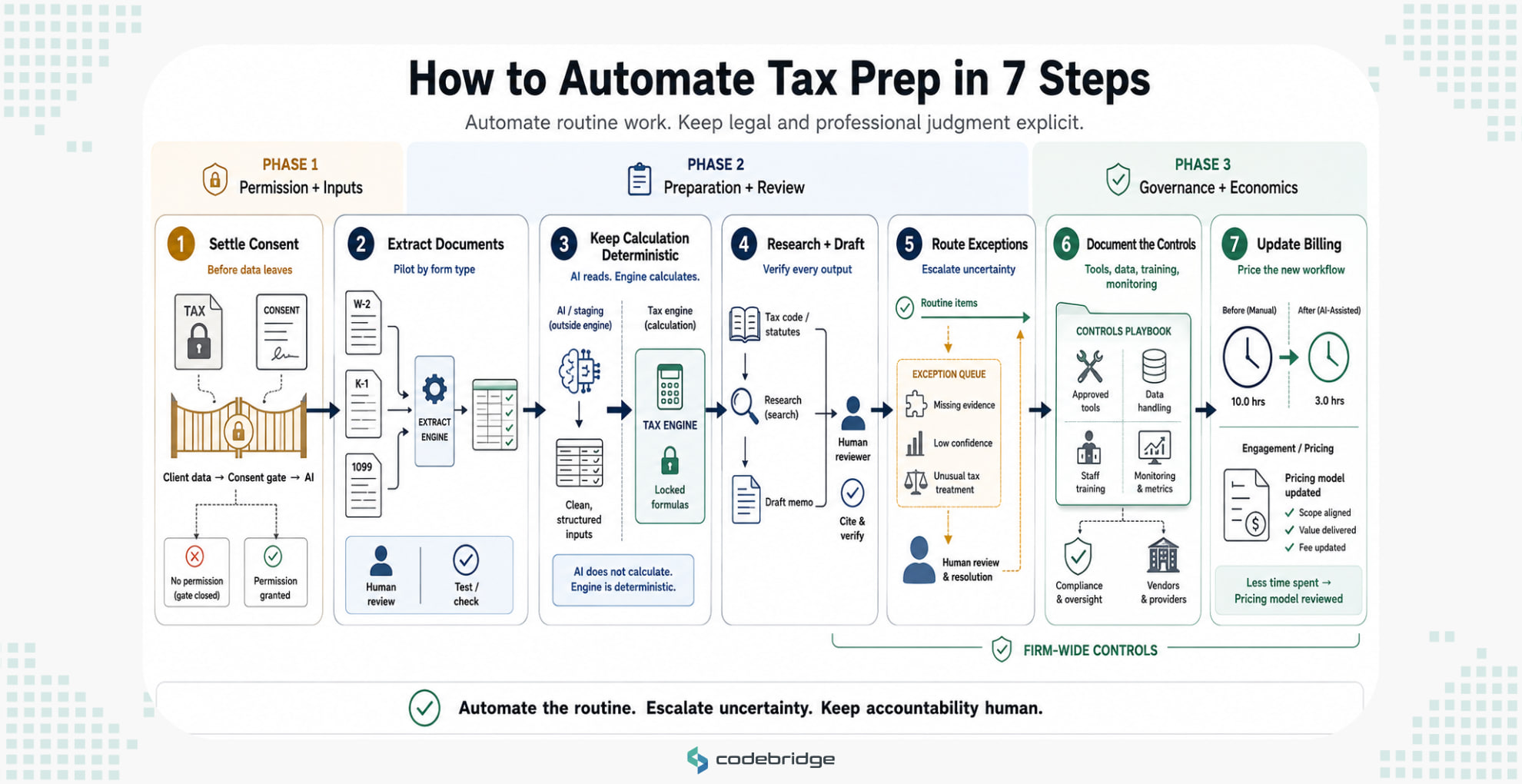
Step 1. Settle the Consent Question Before Any Tool Touches Client Data
Sending tax return information to a third-party AI vendor is very likely a disclosure under IRC §7216. The regulations define disclosure as making tax return information known to any person in any manner whatever, which reaches a paste, an upload, and an API call on its face. Tax return information is defined just as broadly, covering anything furnished for or in connection with preparing the return.
A §7216 violation is a criminal misdemeanor carrying up to one year of imprisonment, a fine up to $1,000, or both, plus the costs of prosecution. Its civil companion at §6713 runs $250 per disclosure with a $10,000 annual cap, and it attaches without any knowing or reckless standard.
Tax preparation software generally falls inside the auxiliary-services exception, because the software exists to prepare the return. Whether a general-purpose AI tool qualifies remains contested, and no IRS ruling resolves it. Where consent is required, the rules set a high bar: knowing, voluntary, written consent obtained before the disclosure, following a prescribed format. For individual returns, that consent has to be a separate signed document. For entity returns, it can live in the engagement letter.
Take this one to counsel before you take it to a vendor. Nothing else on this list starts until you have an answer.
Step 2. Start With Document Intake and Extraction
This is the mature layer, and it carries the least exposure. Pick one form type and one client segment. A pilot that covers everything measures nothing.
Run the tool against returns you already filed last season, where you know the correct answer. Measure field accuracy by form type rather than in aggregate, because a tool that reads W-2s cleanly may struggle with a multi-page K-1. Promote to production only on the form types that clear your own threshold. Extracted data gets reviewed, but it never gets trusted.
Step 3. Keep Calculation Deterministic
This is the step most firms get wrong, and the evidence is unusually clear.
An open benchmark released by a tax-technology company tests whether frontier models can compute a Form 1040 when handed complete, correct inputs. Document collection and data entry are assumed already done perfectly. The set covers 51 federal-only returns in fairly simple situations. When the benchmark was first published in July 2025, the leading model produced a fully correct return under a third of the time. On the current leaderboard, the strongest model reaches roughly 63%.
Line-level accuracy sits near 90%, which sounds better until you read what it means. Roughly one line in ten needs a human's attention, and a single error early in a return cascades through everything downstream. The benchmark also records models producing different answers across identical runs. For work that has to be right every time, that variance is its own failure mode.
Route computation to the engine your firm already files from. Let the model read and stage. Let the engine calculate.
Step 4. Use AI for Research and Drafting, With Verification Built Into the Workflow
Research is the most widely adopted use in tax practice and the one with the sharpest failure mode.
A peer-reviewed study presented at ACL in July 2026 tested frontier models on statutory tax reasoning, then rebuilt the test by changing the numbers inside the statutes and fact patterns. Two findings matter to you. Benchmark scores turned out to be inflated by memorization of the original test data. And when the statutory numbers changed, top model scores fell from the high nineties into the low seventies, while older and less contaminated models barely moved.
Tax law changes every year. The model that performs best against last year's rules is the one carrying the most exposure to this year's.
Circular 230 requires you to verify facts, citations, and calculations, and to read the cases you cite. Build that verification into the workflow rather than leaving it to individual discipline in March.
Step 5. Build the Exception Queue Before You Scale
Research on tax reasoning systems found that letting a system abstain when it cannot verify its own output cuts errors, even when raw accuracy stays flat. Knowing what you do not know turns out to be worth more than getting more answers right.
Design the handoff before you add volume. Define what gets escalated, who receives it, and how quickly they have to clear it. Then measure exceptions per return rather than hours saved, because that is the number predicting whether review time falls.
The queue is the product. Volume without it is risk at scale.
Step 6. Write the Procedures Down
Circular 230 §10.36 obliges whoever holds principal authority over a firm's tax practice to maintain adequate compliance procedures. The June 2026 guidance applies that to AI directly, naming staff training on the technology and its risks, secure data-handling protocols, accuracy monitoring, and vetting of outsourced or third-party AI tools, with every step documented.
You have a second obligation running in parallel. Under Gramm-Leach-Bliley, tax preparers are financial institutions, which puts your firm under the FTC Safeguards Rule at 16 CFR Part 314. That rule already requires oversight of service providers. An AI vendor holding taxpayer data is a service provider.
Name your approved tools in the firm's written information security plan and prohibit everything else. When a client, a carrier, or an examiner asks what your controls are, undocumented governance reads the same as none.
Step 7. Fix the Billing Before the Efficiency Arrives
The most overlooked provision in the June 2026 guidance sits in the fee rules.
Circular 230 §10.27(a) prohibits charging an unconscionable fee. The IRS applied it to AI: billing a client for manual work or time not spent, or double-billing an AI-assisted task, may breach that rule depending on the facts, including whether a pattern shows up across clients and how large the billing differential runs. The guidance goes further, saying cost savings should be passed along openly and credited fairly to the client's account.
Firms moving toward fixed-fee and value-based pricing are ahead of this. Firms holding hourly while automating are walking toward a conversation they have not scheduled. Decide the pricing model in the same quarter you deploy the tools.
What Still Needs a Preparer's Signature
Three things do not move, whatever your stack looks like.
No public disciplinary case against a tax practitioner for AI misuse has surfaced. The IRS built its guidance by reasoning from court sanctions against lawyers and one published consulting report that contained invented quotations and sources. The absence of tax-specific cases tells you the regulator moved before the enforcement wave rather than after it.
And the guidance left one question open. It says nothing about whether you have to tell a client that AI participated in preparing their return. The AICPA has recommended erring toward disclosure. Practitioners are waiting on the IRS.
Five Things That Make This Easier
How Codebridge Approaches This
Apply this article's own criteria to us. We build the intake, extraction, and review-routing layers, and we integrate them with the deterministic engine your firm already files from. We do not build tax calculation engines, because Step 3 explains why nobody should. We do not replace your preparers, and nothing we build signs anything.
Codebridge grew out of Big 4 practice, and that shapes how we scope this work. We deliver implementation as a service rather than as software, we write your controls and documentation alongside the build, and your firm owns the code at the end. Engagements start with a fixed-fee three-week discovery run on your own data, so you see the system working on your returns before you commit to a build.
We have shipped this pattern in other regulated settings. In healthcare, we built clinical workflow tooling under HIPAA-eligible architecture where a clinician reviews every output before it reaches a patient record. In a multi-agent sales system, we built bounded autonomy with a confidence threshold that routes anything uncertain to a person. That second pattern is the exception queue from Step 5, built and running.
If you want to know whether one of your tax workflows fits this shape, book a 30-minute call and we will tell you honestly whether it does.

















Heading 1
Heading 2
Heading 3
Heading 4
Heading 5
Heading 6
Lorem ipsum dolor sit amet, consectetur adipiscing elit, sed do eiusmod tempor incididunt ut labore et dolore magna aliqua. Ut enim ad minim veniam, quis nostrud exercitation ullamco laboris nisi ut aliquip ex ea commodo consequat. Duis aute irure dolor in reprehenderit in voluptate velit esse cillum dolore eu fugiat nulla pariatur.
Block quote
Ordered list
- Item 1
- Item 2
- Item 3
Unordered list
- Item A
- Item B
- Item C
Bold text
Emphasis
Superscript
Subscript