The Short Answer
The best AI for accountants depends on the workflow companies are trying to fix, so this list is organized by workflow rather than as one ranking. For accounts payable, Vic.ai handles high-volume invoice processing. For reconciliation, Rima runs reusable workflow templates across clients, with Numeric as an option for in-house close work. For client document intake, TaxDome and Keeper cut the collection chase. For month-end close, FloQast and Adopt AI coordinate the work. For practice-management admin, Karbon AI adds an AI layer inside the firm's workflow.
Every tool here automates the manual processing around accounting work. None replaces the accountant's judgment, and each is built for the standard version of its workflow, because a vendor serving thousands of firms builds for the middle of the market. That matters for how you read the list.
This guide covers eight tools, grouped by the five workflows a mid-market firm should automate first. Each entry says what the tool does, who it fits, and who it does not fit. The last section covers the workflows that no tool on this page will fit well, which is a different decision.
How We Chose These Tools
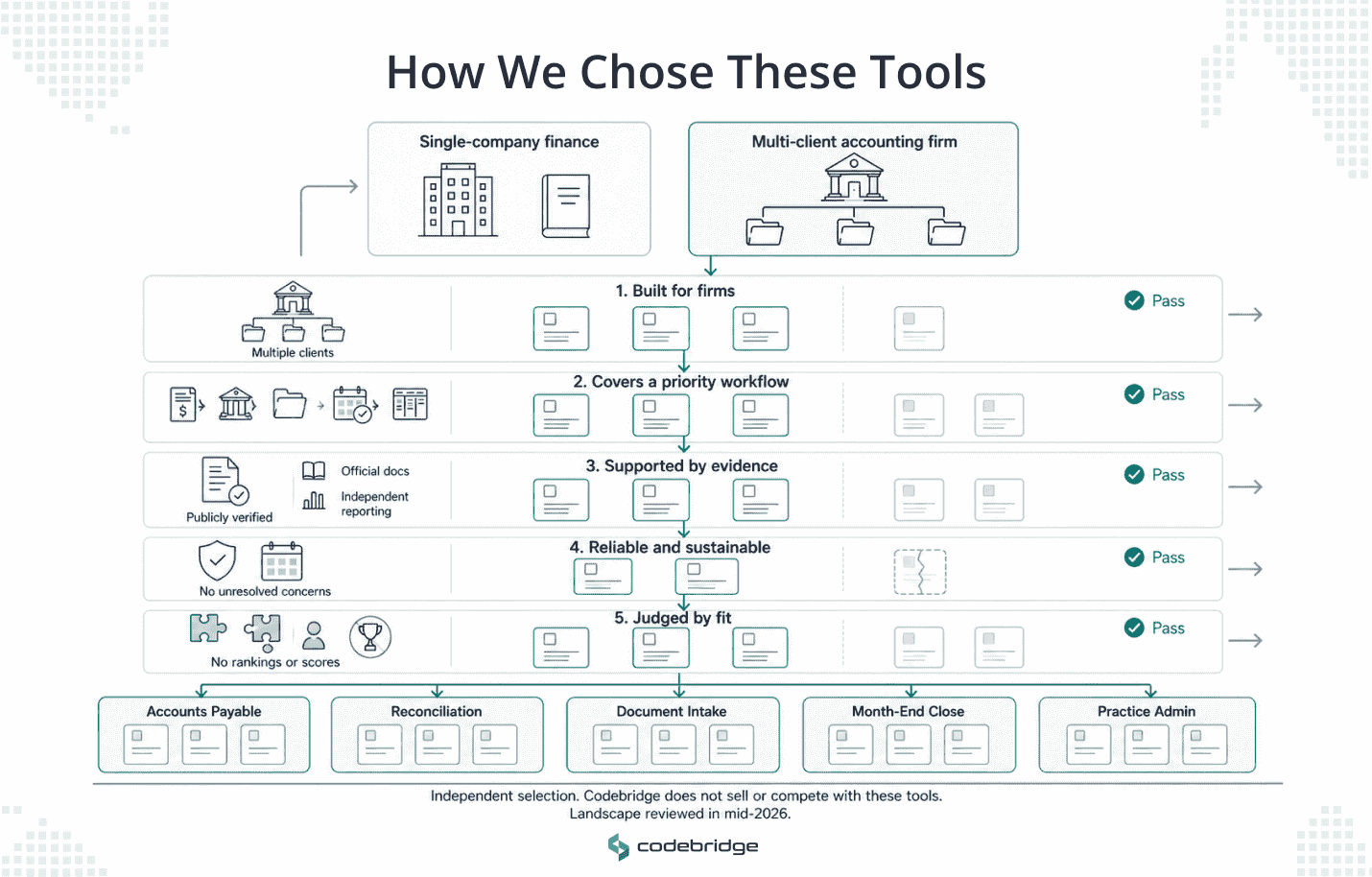
A search for the best AI tools for accountants returns lists that mix two different buyers: the controller automating one company's books, and the firm automating many clients' books at once. Those buyers need different software. We focused on five main rules that kept this list focused on the second buyer, the accounting firm.
- Built for firms serving multiple clients. Tools designed for a single company's internal finance team were left off, which removes most of what appears on other lists.
- Maps to one of the five workflows worth automating first. Accounts payable, reconciliation, document intake, month-end close, and practice-management admin. A tool that does not touch one of these did not make the list.
- Backed by public documentation or independent reporting. No tool is here on a single blog's say-so.
- No unresolved continuity or reliability concerns at the time of writing. A tool your firm depends on has to still be there next year.
- Judged on fit rather than ranked by superlative. There is no number-one here, no star ratings, and no invented scores. Each tool gets a plain note on who it suits and who it does not.
One disclosure. Codebridge sells none of these tools and competes with none of them. We build custom automation for firms, which is a different decision, and the last section explains when it is the one you need. Tool capabilities move quickly, so these notes reflect the landscape as of mid-2026.
The Shortlist at a Glance
The full shortlist in one view, with each tool covered in detail below:
Best AI Tools for Accounting Firms by Workflow
As we mentioned before, the tools below are grouped by the five workflows a mid-market firm should automate first, the same five that the rest of this cluster is built around. Read each group for the tool's real capability and its honest fit, because the wrong-sized tool is a common and expensive mistake.
AP and Invoice Processing: Vic.ai
Accounts payable is the highest-volume workflow in most firms, and Vic.ai is built for the top end of that volume. It uses machine learning to improve as it processes more of your data and can:
- capture invoices
- code invoice data
- route and process invoices with limited human involvement
The vendor reports that firms reach around 78% touchless processing after a four-week learning period. However, this number should be treated as a vendor-reported figure rather than an independently verified benchmark.
The honest fit note is about volume. Vic.ai earns its keep on high invoice counts, and it is widely described as overkill below roughly 1,000 invoices a month. Many mid-market firms sit under that line, so the question is less whether Vic.ai is capable and more whether your volume justifies it, or whether a lighter approach fits better.
The deeper economics of AP automation, including cost per invoice and how matching works, will be covered in our dedicated AP guide, which we will release soon.
Reconciliation and Document Automation: Rima and Numeric
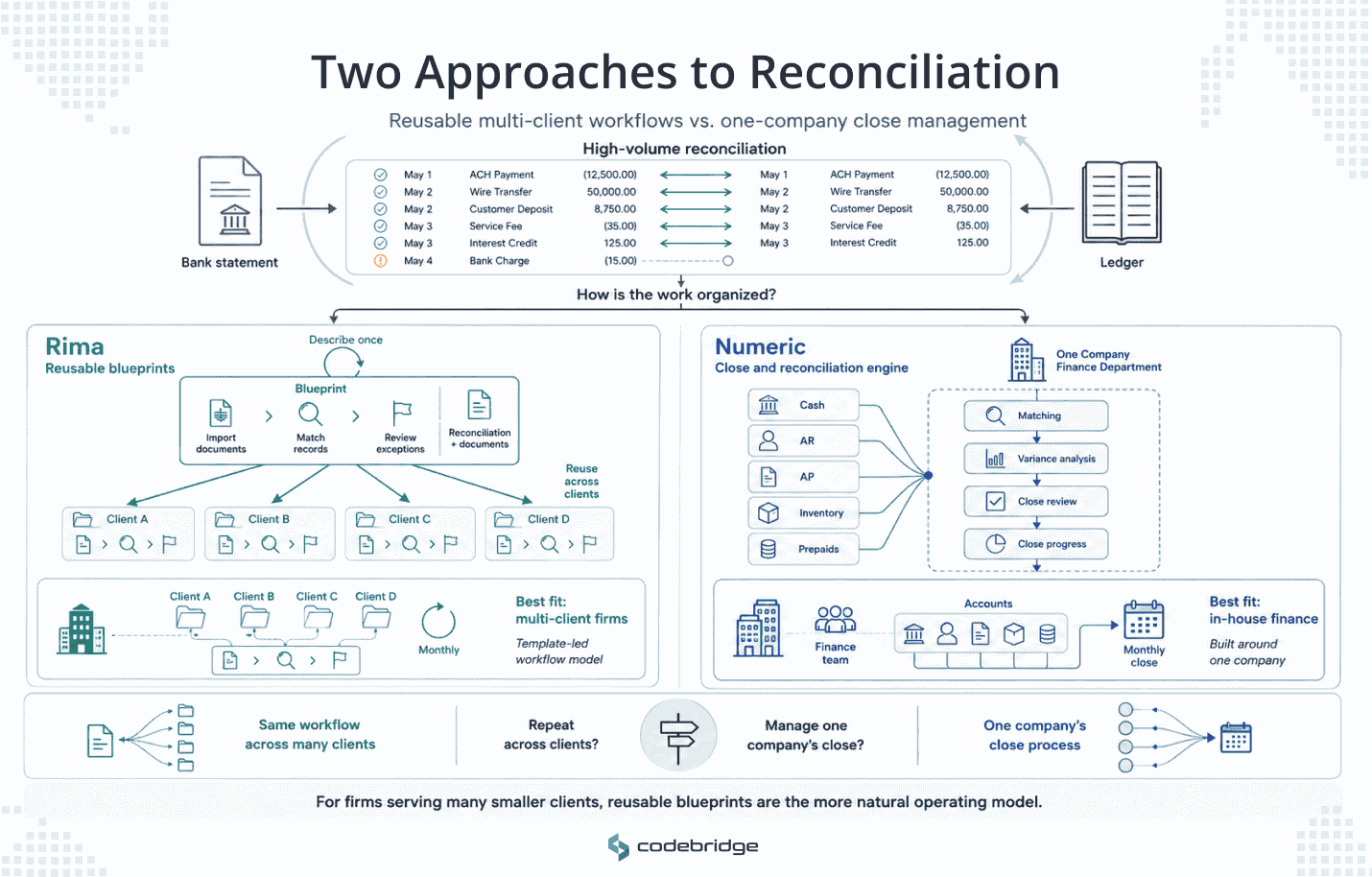
Reconciliation is repetitive, high in volume, and easy to get wrong at scale, which makes it a strong automation target. Rima and Numeric approach the workflow differently.
Rima’s blueprints can be reused across clients and extend beyond reconciliation into document automation. For firms processing similar workflows for many clients each month, this structure maps cleanly to how the work is already organized.
Numeric is included because firms offering client accounting services are likely to encounter it. It may still be worth evaluating for a client accounting service line. Still, the firm should assess it with the understanding that its primary audience is an internal finance team running one company’s close.
For firms serving many smaller clients, Rima’s reusable template approach is generally the more natural fit.
Client Document Intake: TaxDome and Keeper
The document chase is where firm hours disappear during the busy season. TaxDome and Keeper both reduce that burden, but they are built for different types of practices.
TaxDome replaces much of the email back-and-forth that consumes filing season. Clients complete pre-filing questionnaires and upload documents directly through the portal, giving the firm a more structured intake process. Its strongest fit is tax-focused firms, because the product is designed more around tax preparation than broader accounting operations.
Keeper helps keep a large number of smaller engagements moving by bringing communication, document collection, and return-status tracking into one workflow. Its natural home is the solo practitioner or small practice handling a high volume of individual returns.
For a 90-person firm, Keeper is likely below the required scale. TaxDome or a broader practice-management suite will usually be the more appropriate fit.
Month-end Close Prep: FloQast and Adopt AI
Month-end close prep is coordination work: tracking which clients are ready, routing reviews, and surfacing exceptions before sign-off. Two tools sit at different ends of the market.
FloQast is the established choice for close coordination, with checklists, readiness tracking, and review routing. It is widely adopted and quick to implement, which is why it shows up as the default recommendation for firms that want to organize the close without rebuilding it.
FloQast tracks and coordinates the close. It does not execute the underlying work, which keeps it lightweight and also means the processing still has to happen elsewhere.
Adopt AI is the more ambitious option. Its agent platform runs multi-step workflows across client engagements, from document intake through workpaper generation and filing prep, and the vendor reports a deployment at a Top 25 CPA firm that cut per-client processing time by 85% and freed 50,000 hours a year.
Treat those figures also as vendor-reported from a large-firm deployment.
Adopt AI is proven at a large-firm scale and high client volume, so a mid-market firm should weigh it against its own volume rather than assume the same result.
Practice-Management Admin: Karbon AI
Practice-management admin is the connective work around every engagement. It includes onboarding, task assignment, deadlines, and status. Karbon AI adds an AI layer to the broader Karbon practice-management suite. Its capabilities include:
- summarizing client emails
- drafting content and responses
- automating administrative tasks
- surfacing relevant client information inside the firm’s workflow
Karbon AI improves the suite a firm already runs its practice on, so its value depends on whether you run, or would move to, that kind of platform.
For a firm consolidating its workflow, client communication, and task management into one system, the AI layer is a natural addition. For a firm content with its current setup, it means adopting the platform rather than adding a feature. Judge it as part of the suite, since that is how it works.
The Full Comparison
The same eight tools, with the limits spelled out:
When No Tool on This List Fits
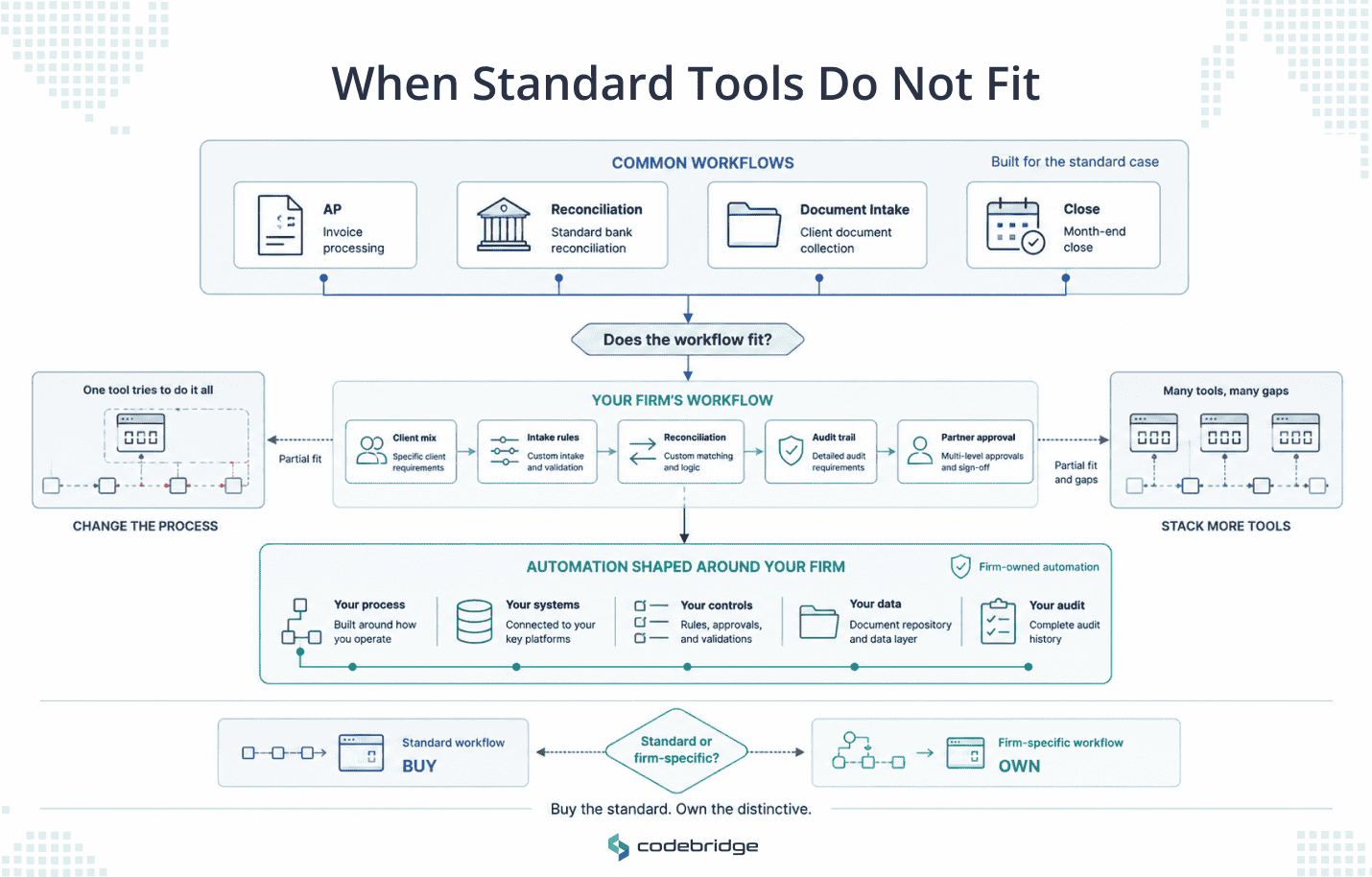
Every tool above shares a limit, and it is structural. A vendor building software for thousands of firms has to build for the standard version of each workflow, the shape most firms share. That is why the tools cluster around common jobs: high-volume AP, standard reconciliation, tax-season intake. They are good in the middle of the market.
However, the workflows that cost your firm the most are often the ones that do not sit in the middle. The intake process is built around your particular client mix. The reconciliation that has to carry your audit trail. The close that runs the way your partners insist it runs. For those, a general tool is either a poor fit or a partial one, and you end up bending your process to match the software or stacking three subscriptions to cover what one workflow needs.
That is a different decision from buying a tool. It is the decision to build an automation your firm owns, shaped to how you work, with your data staying in systems you control. Which workflows to buy off the shelf and which to own is its own question, and we cover the framework for it separately.
Read: www.codebridge.tech/articles/accounting-automation-software-build-vs-buy
Codebridge builds these custom automations as a service. We work on your data, alongside your team, and we hand you the code, so the automation belongs to your firm rather than a vendor whose roadmap and pricing you do not control. The engagement starts with a fixed-fee, three-week discovery on one of your workflows, run on your own data, so you see it work before you commit.
If a workflow on your desk does not fit anything on this page, that is the conversation to have. Book a 15-minute call and we will tell you whether it is a buy or a build.

















Heading 1
Heading 2
Heading 3
Heading 4
Heading 5
Heading 6
Lorem ipsum dolor sit amet, consectetur adipiscing elit, sed do eiusmod tempor incididunt ut labore et dolore magna aliqua. Ut enim ad minim veniam, quis nostrud exercitation ullamco laboris nisi ut aliquip ex ea commodo consequat. Duis aute irure dolor in reprehenderit in voluptate velit esse cillum dolore eu fugiat nulla pariatur.
Block quote
Ordered list
- Item 1
- Item 2
- Item 3
Unordered list
- Item A
- Item B
- Item C
Bold text
Emphasis
Superscript
Subscript