The thesis of this article: conversational UX for a WhatsApp Business portal fails when you design it as a polished chatbot facade. It succeeds when you design it as a hybrid surface — structured quick-replies for the 80% high-frequency intents, free-text NLU for the long-tail — sitting on async, durable infrastructure with a first-class human-handoff primitive. Everything below is the playbook to get there.
The portal feels polished. The operators are drowning.
A small-business owner in Kuala Lumpur posted a complaint in the NextUpAsia group that probably sounds familiar if you consult in this space:
"We all use WhatsApp for business but honestly, it can be a total nightmare sometimes — 50+ chats going and managing orders through chat is the worst."
NextUpAsia community member, Facebook NextUpAsia group
The portal she is using almost certainly has a unified inbox, tag chips, and a search box. None of that scales past roughly 50 concurrent conversations, because the customer surface (chat threads, voice notes, receipts pasted as images) and the operator surface (CRM-style table views) speak two different grammars. The thread doesn't reveal how she resolved it. What it reveals is the gap most WhatsApp Business portals leave open.
KEY TAKEAWAYS
Raw inbox UIs collapse around ~50 concurrent threads. Operators need conversation-aligned blocks, not a CRM table view.
Meta's webhook contract requires a fast 200 OK. Synchronous LLM inference violates it and causes endpoint demotion.
Template approval rules differ by category (Utility vs Marketing vs Authentication). Authoring UX without pre-check linting compounds rejection delay into a delivery problem.
Human handoff is a primitive, not a fallback. It needs a visible affordance, queue SLA, and bot-to-agent state transfer.
Hybrid intent routing outperforms pure chat or pure forms. Quick-replies cover the top 80% of intents; NLU is reserved for contextual long-tail.
The hidden problem: a customer-facing channel grafted onto an enterprise-style backend
The conversational layer (what the customer sees) is real-time, asynchronous, media-rich, and identity-bound to a phone number. The operator layer (what your portal shows) usually inherits the conventions of email-era CRMs: rows, columns, filters, statuses. That mismatch is structural, not cosmetic.
It also collides with hard limits in the platform itself. Meta's Cloud API webhook documentation specifies that your endpoint must acknowledge events promptly with HTTP 200; missed acks trigger retries and, if the pattern persists, endpoint health degradation. Template review enforces category-specific rules — Utility messages have to carry user context, Marketing templates trigger tighter promotional-language checks, Authentication is its own track. None of these constraints are negotiable. They shape the UX whether your portal acknowledges them or not.
The architecture that makes this work is unsurprising once you see it. The diagram below shows the thin webhook contract and where async work belongs:
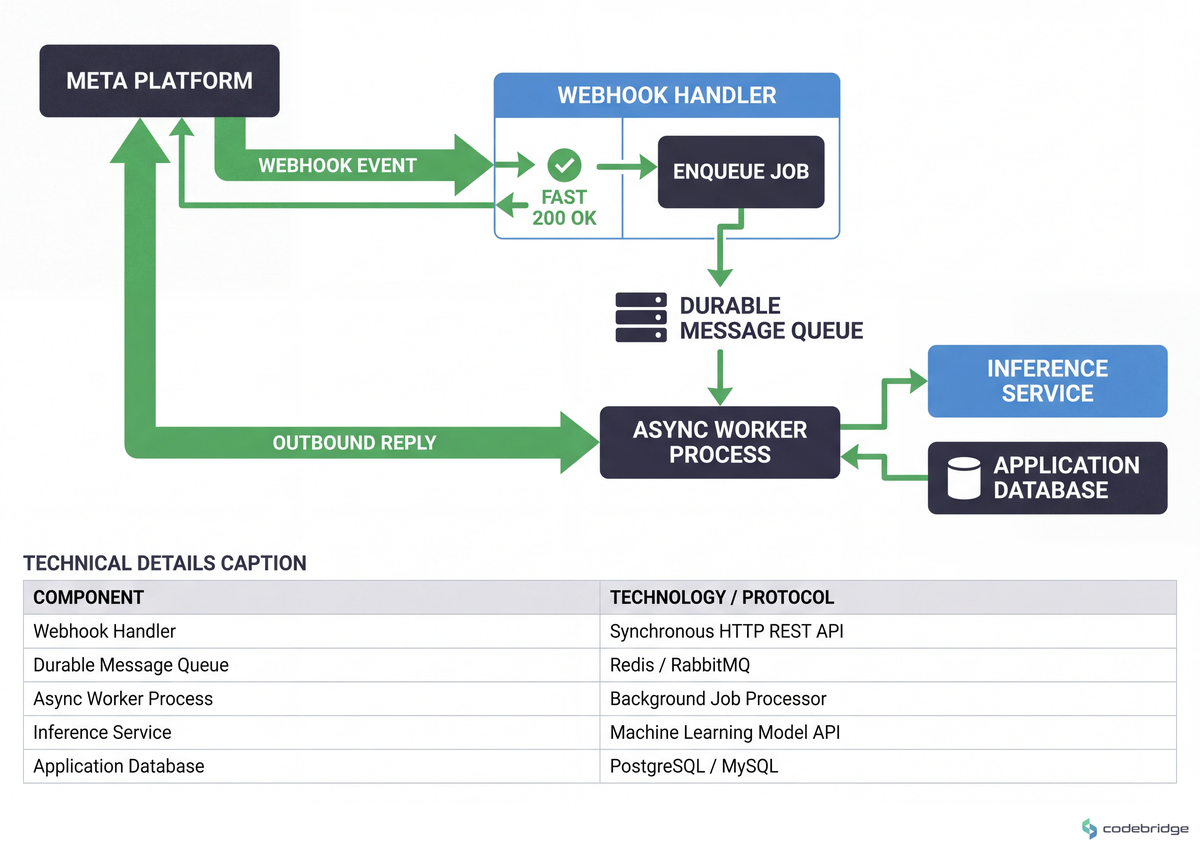
Most portals you'll audit will have inverted this — synchronous LLM calls inside the webhook, no durable queue, conversation state stored in process memory that dies with the worker. That's the failure mode behind half the "our bot just stops responding" tickets.
Real stories: three patterns we keep seeing
On r/WhatsappBusinessAPI, a developer building a multi-tenant chatbot platform — each business gets its own bot — described hitting a wall on programmatic onboarding:
"I'm building a WhatsApp chatbot solution where each business can have their own automated bot — right now I'm hitting some [walls]."
r/WhatsappBusinessAPI poster, Reddit
The thread doesn't tell us how they solved it. The pattern, though, is well-known: per-tenant onboarding cannot be fully automated full in 2026. Number verification, brand verification, and template review still have human checkpoints inside Meta's pipeline. The portal UX implication is direct — surface those manual steps as guided checkpoints with status, owner, and ETA. Hiding them behind a "one-click setup" button creates the support load you'd expect when a polished UI promises something the platform won't deliver.
A second pattern shows up around media. From the same Malaysian thread:
"A client sends you a receipt or file and you forget — and the files expire after a certain time. Annoying nonetheless."
NextUpAsia community member, Facebook
Treat media as first-class artifacts in the portal. The moment a webhook reports an inbound media event, fetch the asset, persist it to your own object store, attach it to the conversation record, and index its metadata. WhatsApp's native retention is not a storage layer for your business — it's a transport layer.
The third recurring story is the rejection-and-broadcast loop. From a 2026 industry write-up on common Business API frustrations:
"Why are my WhatsApp templates getting rejected? Why is my broadcast not delivering?"
Chati.ai blog, 2026
By the time a rejection comes back, the campaign window is half-burned. The fix is to move the validation forward — into the authoring UX itself.
The pattern: design the operator portal in the customer's grammar
The teams whose WhatsApp portals scale past the ~50-conversation cliff have one architectural choice in common. They stop treating the portal as a CRM with a chat tab grafted on, and start treating it as a conversation-first surface that exposes operator tools through chat-aligned blocks.
That maps onto established usability principles. Nielsen Norman's ten usability heuristics — visibility of system status, user control and freedom, error prevention, recognition over recall — apply to messaging UIs as cleanly as they ever did to dashboards. The portals that miss this cram every choice onto one screen, then wonder why operators tab-switch into burnout.
If your portal can answer "what state is this conversation in?" only by reading the last message, your conversation-state model lives in your operator's head. That doesn't scale.
Framework: five design moves that hold up under load
1. Make the webhook handler a thin enqueue-and-ack layer
The handler receives the event, writes it to a durable queue (Redis Streams, SQS, NATS — pick one and stick with it), returns 200, and exits. Inference, template lookup, and outbound messaging happen in workers. Set the conversation-state TTL in your cache to align with WhatsApp's 24-hour service-window policy so context expires when the messaging policy expires. Signal you've already paid the cost of not doing this: any week where you've seen unexplained webhook retries in your logs.
2. Build a hybrid intent surface — structured for the top 80%, free-text for the rest
Quick-reply buttons and list messages handle high-frequency intents (status check, balance, reschedule, opening hours). Free-text NLU handles the contextual long-tail (the customer with constraints that don't fit a button — "small child, appointment day before, hate rain"). The diagram below shows how to allocate intents across the two modalities:
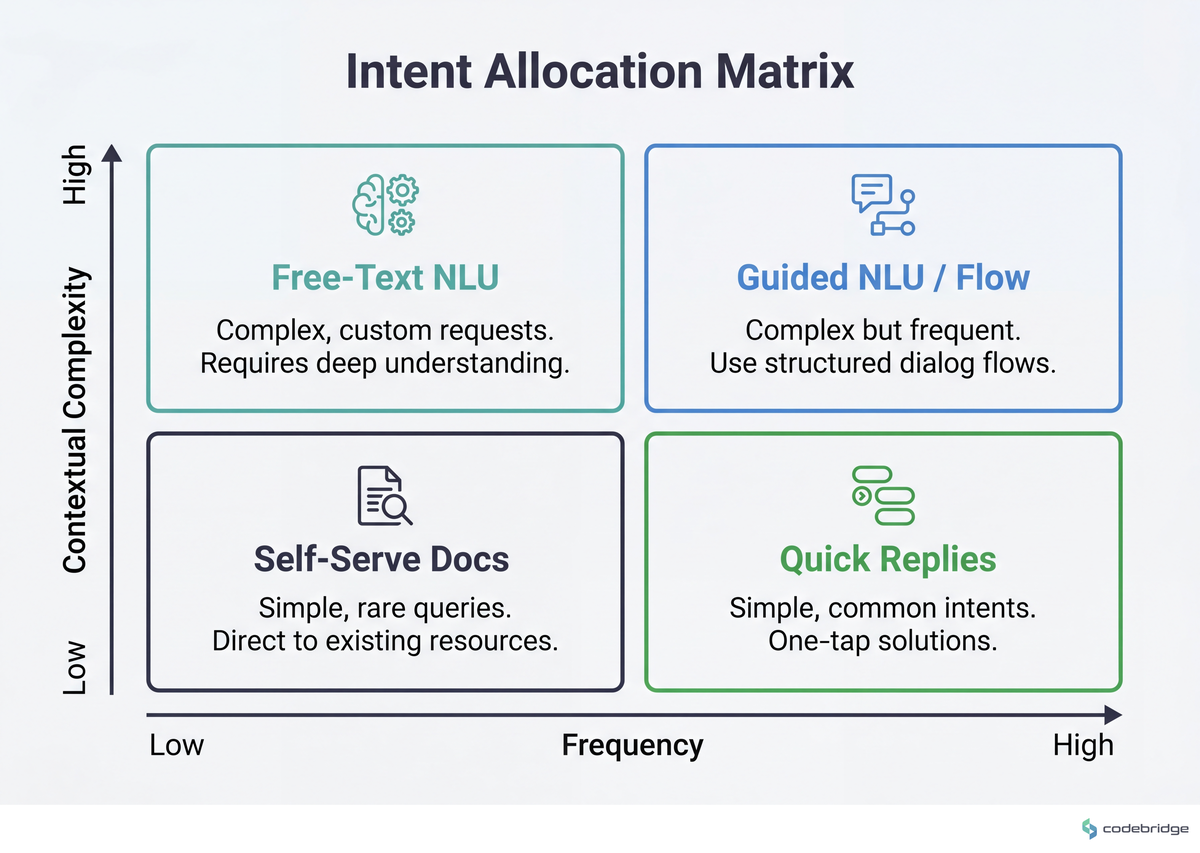
Measurable signal: instrument intent coverage per modality. If less than 70% of monthly volume lands on a structured path, your buttons are wrong. If more than 95% does, you are losing the long-tail customers and don't know it yet.
3. Lint templates inside the authoring UX, before submission
Build a pre-check that flags promotional language in Utility templates, urgency words in any category, missing user-context variables, and category-specific issues per Meta's template guidelines. Split the template editor by category at the top — Utility vs Marketing vs Authentication — and bind the lint rules to the category selection. Threshold to act: if your last quarter's template rejection rate is >15%, you're paying for an authoring UX that doesn't yet exist.
4. Persist media on receipt, indexed by conversation
On every inbound media webhook, fetch the asset within minutes, store it in your own bucket with a content-addressable key, and attach it to the conversation record with at least: sender, conversation ID, MIME type, original filename if present, and inbound timestamp. Expose a media-search view per conversation and globally per tenant. Worked example of cost-of-not-doing-this: if your operators handle 200 conversations/day with one missing-attachment lookup per twenty conversations, that's ten "where's the receipt" support requests a day per agent. Most of them will end with the file already gone.
5. Make handoff a primitive, not a button
Required surface area: a visible "talk to a human" affordance in the customer flow, a routing queue with SLA timers visible to ops leads, and a handoff state machine that hands the agent the bot's prior context (intent history, last 10 turns, identified entities) on accept. Track two metrics as core: handoff rate (how often the bot escalates) and deflection rate (how often a started conversation resolves without handoff). If handoff rate is <2% your escape hatch is hidden; if >40% your bot scope is too wide.
Close: what to do this week
The Malaysian operator who opened this article was drowning in 50+ threads with no state model around her. Going back to her now and saying "we never found out how it ended" is honest but unhelpful. So here is what is in your control instead, anchored to actual days.
Tomorrow morning (Monday): open your webhook handler and read it line by line. Count every operation that happens before the 200 is returned — DB writes, LLM calls, template lookups, anything synchronous. If the count is more than two (parse the payload, enqueue), you have your week's first project.
Wednesday: pull last quarter's template rejection log. Bucket the rejections by reason. The top three reasons become the first three lint rules in your authoring UX. Estimate the engineering cost. Compare it to the campaign-day cost of a single rejected broadcast.
By Friday: walk one operator through ten live conversations and ask, after each one, "what state was this thread in before you opened it?" If they have to read messages to answer, you've confirmed your conversation-state model lives in their head — and you have the artifact to take into next week's design review. That artifact, in under thirty minutes of work, is the unlock for everything else in this playbook.
Auditing a WhatsApp Business portal and not sure which of these gaps to close first?
Talk to our team about a focused conversational-UX review.
Diagnostic checklist
Run these against your current portal. Score one point per "yes" on the risk-side answer. 0-2: healthy. 3-4: at risk. 5+: rebuild candidate.
Does your webhook handler perform any synchronous work (LLM call, external HTTP, complex DB write) before returning 200? Yes / No
If a template gets rejected by Meta, how long until your authoring UI would have flagged the same issue pre-submission? Never / >24h / <1h — score 1 if Never or >24h.
Can an operator locate a media file a customer sent 30 days ago in under 30 seconds, without leaving the portal? Yes / No — score 1 if No.
Is your conversation state (resolved / awaiting-customer / awaiting-agent / in-handoff) stored server-side and rendered as a first-class element above the message thread? Yes / No — score 1 if No.
What is your handoff-rate over the last 30 days? <2% or >40% scores 1 (hidden escape hatch, or bot scope is wrong).
Is intent coverage measured per-intent (with a per-intent NLU confidence threshold), or only as an aggregate accuracy number? Per-intent / Aggregate only — score 1 if Aggregate only.
Has your portal ever silently lost an inbound media file because of WhatsApp's retention window expiring before fetch? Yes / Don't know / No — score 1 if Yes or Don't know.
REFERENCES














Heading 1
Heading 2
Heading 3
Heading 4
Heading 5
Heading 6
Lorem ipsum dolor sit amet, consectetur adipiscing elit, sed do eiusmod tempor incididunt ut labore et dolore magna aliqua. Ut enim ad minim veniam, quis nostrud exercitation ullamco laboris nisi ut aliquip ex ea commodo consequat. Duis aute irure dolor in reprehenderit in voluptate velit esse cillum dolore eu fugiat nulla pariatur.
Block quote
Ordered list
- Item 1
- Item 2
- Item 3
Unordered list
- Item A
- Item B
- Item C
Bold text
Emphasis
Superscript
Subscript