Anthropic's data shows users approve 93 percent of permission prompts. Anthropic calls this approval fatigue: people stop reading what they sign off on. The control is present. It no longer does any work.
This is the real failure mode for agentic systems in production. Teams rarely break because they added too few approvals. They break because they gated the wrong steps, automated the ones that should have paused, and left the dangerous operations inside a single trust boundary that a human click was never going to hold.
OpenClaw takes a position on this that holds up under load. Its approval model sits on top of tool policy and elevated gating rather than standing in for them, so an approval only fires after the allowlist and active policy already agree the action should be reviewable. That design matches how production systems need to behave. It also makes OpenClaw harder to configure than most teams expect on a first pass, because every layer has to be set correctly for the next one to mean anything.
But in this article we focus on the decision that comes before configuration: which steps in a production workflow deserve a human pause, which ones can run autonomously, and which ones an agent should never touch.
Where OpenClaw Approvals Belong in a Production Workflow
Two failure modes show up repeatedly in production. In the first, an agent has broad execution rights with no approval layer, and one day a prompt drifts or a retrieved document carries injected instructions, and the agent runs a command against a real host that nobody reviewed.
In the second, every tool call fires an approval prompt: read a file, list a directory, call a safe API. The operator starts clicking Approve reflexively. This is what the 93 percent figure captures. The prompt appears. No one reads it. One failure is a gap, the other is a ritual, and both end in the same place.
The fix is placement. Approvals earn their operational cost only where they are the last layer left between an agent and a consequential action. OpenClaw builds this as an agreement between three components. Suppose an agent proposes to run psql production -f migration.sql. OpenClaw first checks the active policy: is exec allowed on this host for this tool, and does this command class require approval? If policy denies, no approval prompt ever fires. If policy allows with approval required, OpenClaw checks the allowlist to confirm the specific command pattern is eligible. Only then does an approval request reach a human. All three have to say yes. A human clicking Approve does not override a policy that said no. The approval is a safety interlock on top of rules that have already done most of the filtering.
This matters because approvals and security boundaries are not the same thing. An approval catches an agent that was about to do something it shouldn't: a misread instruction, a prompt-injected retrieval, a confused tool selection. It does not stop an agent that has been deliberately compromised, and it does not isolate one tenant from another on a shared host. Those problems live one layer down, in sandboxing and identity. A team that treats approvals as their primary defense has confused a guardrail with a wall.
OpenClaw also ships with a break-glass path. An operator can set /elevated full for a session and skip approvals entirely. This is useful during an incident when every second of prompt-click latency matters, or when a trusted engineer is debugging the agent's tool configuration interactively. The hazard is cultural. If break-glass becomes the routine answer to approval fatigue, the audit trail degrades and the approval layer stops meaning anything. The right operational rule is that elevated sessions are short, logged, and reviewed after the fact, not a mode anyone leaves running.
Why OpenClaw Approvals Are Not a Security Boundary on Their Own
The approval layer only works when the layers underneath it already do.
Security teams sometimes treat human-in-the-loop as a complete answer. If an action is risky, add an approval. The reasoning feels tight and it is wrong. OpenClaw's three-component model is deliberately a last-layer check, which means it depends on the layers below it behaving correctly. When they don't, approval prompts become expensive decoration.
Three dependencies are worth naming:
- Tool policy. If the exec tool is denied in policy, no approval request is ever minted. That is the correct default for most production hosts, and it means the approval layer is not the right place to enforce "this tool should never run here." That decision belongs in the policy file. Teams that leave exec globally permitted and plan to catch the dangerous calls via approval will catch some and miss others.
- Sandboxing. An approved command runs with whatever permissions the execution environment grants it. Approvals reduce the probability of a bad action. Sandboxing reduces the cost of one. If the agent runs as a user with broad file-system or network access, a single mis-reviewed approval can do damage far beyond the command's literal intent.
- Approval drift. A 2026 OpenClaw security advisory flagged that approval persistence in allowlist mode could quietly broaden trust over time. An operator approves deploy staging once; the pattern is cached loosely enough that deploy staging --force later matches the same approval, and the reviewable moment is gone. The operational check is simple: compare the patterns you've persisted against the commands actually running under them, and tighten until the two match.
The fail-closed default is where these layers show their design intent. If the companion UI is unavailable and an operation requires an approval prompt, OpenClaw denies the action rather than queuing it or proceeding. This is the inverse of break-glass. Break-glass is an operator choosing to bypass approvals knowingly; fail-closed is the system refusing to bypass them when no one is there to decide. The two together define the contract.
A Three-Tier Model for OpenClaw Approval Design
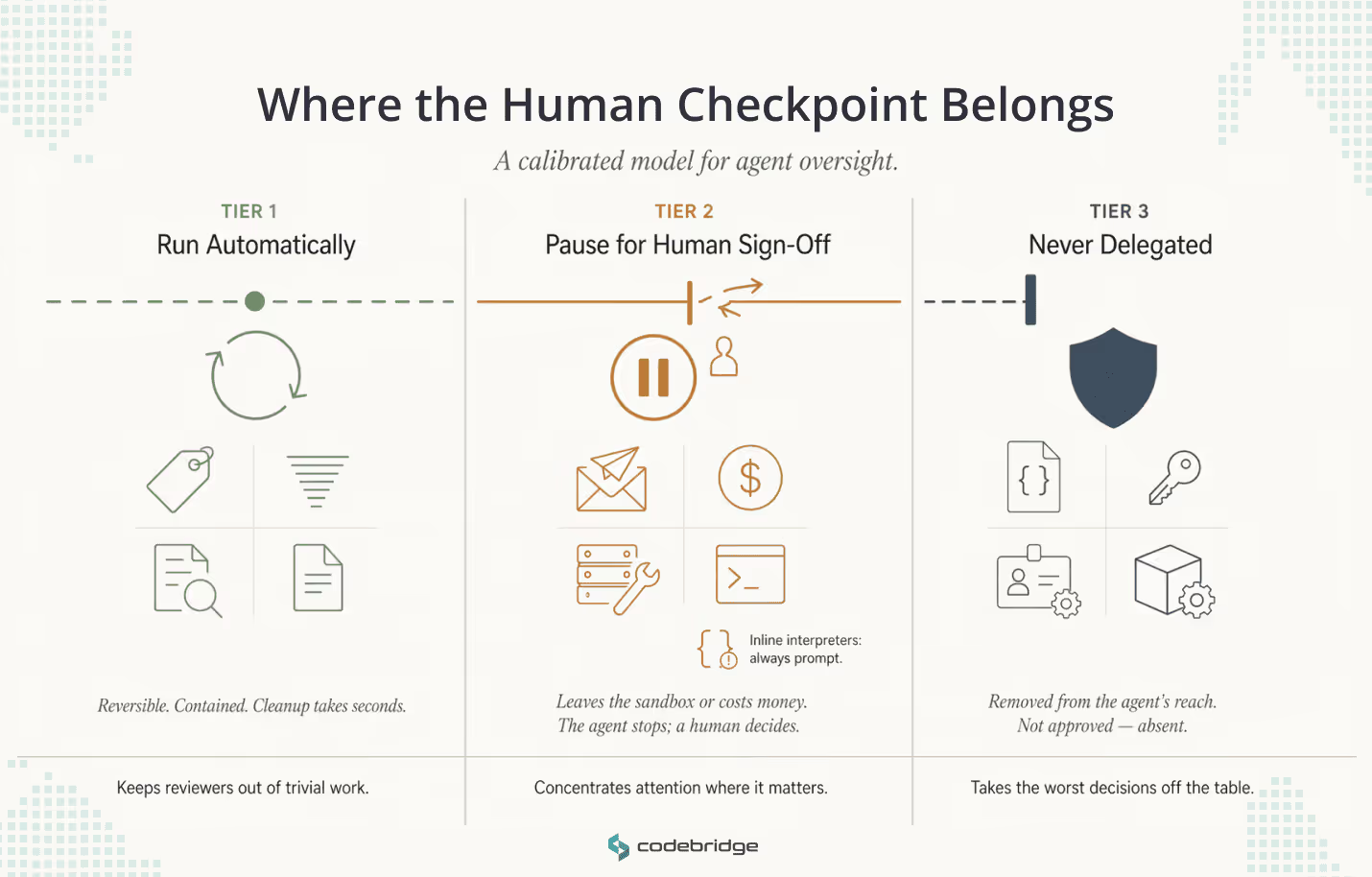
A usable model has three tiers. Tier 1 actions run without review. Tier 2 pause for human sign-off. Tier 3 sits outside the agent's reach entirely. The tiers are decisions about where a human checkpoint earns its operational cost, given everything the policy-and-sandbox stack has already filtered out below it.
Tier 1: Run Automatically
Tier 1 actions are reversible and contained within the agent's own workspace. A misfire produces a bad draft, a wrong tag, or a stale summary. Someone notices, edits, and moves on. Cleanup takes seconds.
Typical examples: classification and tagging of incoming work, summarization of internal threads, read-only queries against workspace data, and proposal generation that stays in draft. The draft distinction matters.
Drafting a customer email is Tier 1. Sending it is Tier 2. The same logical action sits in two tiers depending on whether the output crosses a boundary.
Under-automating this tier is its own failure mode. Every unnecessary approval prompt in Tier 1 eats up reviewer attention that Tier 2 will need later.
Tier 2: Pause for Human Sign-Off
Tier 2 covers actions that cross a boundary the agent cannot walk back. External communications, financial transactions, infrastructure modifications, and executions that touch a real host all belong here. The operational signal is if the action leaves the sandbox or costs money, it pauses.
Tier 2 is where teams configure OpenClaw's exec.ask setting. At on-miss, it triggers a prompt whenever the requested command doesn't match an existing allowlist entry. At always, it prompts for every exec call regardless of policy state. Teams typically start at always during initial deployment and tighten toward on-miss once allowlist patterns have stabilized.
One category inside Tier 2 deserves separate attention: mutable interpreters. Commands like python3 -c "..." or bash -c "..." pass a code payload inline rather than referencing a file. OpenClaw's approval binding cannot lock the file operand, because there is no file operand. The reviewer sees the payload at approval time, but nothing prevents a later variant from running under the same loose pattern. The operational answer is to treat inline interpreter invocations as always-prompt regardless of other policy, or to route them through script files the approval layer can bind properly.
The reviewer-side experience matters as much as the trigger logic. When a Tier 2 prompt fires, the reviewer should see the proposed command, the agent's reasoning, the context documents used, and the working directory. The action blocks until a decision, so the reviewer controls cadence rather than racing a timeout. Each review should be cheap enough to do carefully. It should also be rare enough that no reviewer's muscle memory takes over. If Tier 2 prompts arrive faster than a human can read them, the tier is mis-scoped.
Tier 3: never delegated
Tier 3 actions change the control system itself. If an agent can modify policy files, edit allowlist patterns, grant broader access rights, or read raw secrets from the environment, the approval layer on top becomes ornamental. A compromised or drifting agent can broaden its own permissions and then operate under those broader permissions without ever tripping a review.
The examples are familiar: editing ~/.openclaw/exec-approvals.json or equivalent policy files, handling SSH keys or .env files directly in prompts, modifying IAM grants, changing sandbox configurations. These should not appear in the agent's tool inventory at all. The answer at Tier 3 is scope: the agent doesn't have the tool, so there is nothing to misuse.
Break-glass habits turn dangerous at this tier. If operators routinely use /elevated full to skip approvals, and the elevated session holds tools that could touch policy or secrets, the Tier 3 boundary collapses without alerting anyone. The audit trail records that a session happened. It does not record that any Tier 3 protection was in force during it.
When the Three Tiers Work Together
A calibrated tier model makes each approval prompt a real signal. It is rare, it arrives loaded with context, and it appears only when the policy and sandbox layers below have already said the action should pass through to a human. Tier 1 keeps reviewers out of work they should never have to touch. Tier 2 concentrates their attention on the moments that actually need it. Tier 3 takes the most dangerous decisions off the table structurally. A team that gets these three calibrated correctly is the team whose approval layer still works six months after deployment.
OpenClaw Human Approval Workflow in Practice: Customer Support and Ops
The tiers only mean something when they operate together inside a live workflow. Consider a HealthTech or FinTech support product, where interactions touch personal or financial data, and the audit trail has to hold up under external review.
A single ticket moves through all three tiers:
- Tier 1 – runs automatically. The agent classifies priority, tags the topic, retrieves relevant documentation, checks account context, and drafts a proposed response inside the workspace. All of this is reversible and stays inside the sandbox. A misfire produces a bad draft that a reviewer rewrites in seconds.
- Tier 2 – pauses for approval. The agent proposes to send the response, update the ticket status, and close the case. This blocks until the on-shift support lead decides. The reviewer sees the proposed message, the documentation the agent drew from, the fields it plans to update, and the reasoning chain. They approve, edit and approve, or reject. OpenClaw's binding locks the exact message and ticket update at approval time, so the agent cannot send a different payload under the same approval.
- Tier 3 – never delegated. The agent cannot read PII outside the specific ticket, modify the billing schema, access another customer's records, or edit the policy file that governs support actions. These tools aren't in its inventory. An auditor asking what prevents cross-ticket access gets a structural answer rather than a procedural one.
When this calibration holds, a support lead handling twenty tickets a day makes twenty focused decisions instead of two hundred distracted ones. The approval prompts that fire are the ones that matter, the audit trail records exactly what a human signed off on, and the Tier 1 work that surrounds each review stays invisible to anyone who doesn't need to see it.
Conclusion
Approval design is the easiest part of an agent deployment to get visibly wrong and the hardest part to get quietly right. The visible failure is the one everyone notices: a customer email sent without review, a production command run against the wrong host, an audit finding that lands on someone's desk. The quiet failure is reviewer attention eroding over weeks until approvals become reflex, at which point the control layer has already stopped working and nobody has been told.
The tier model is how teams avoid both. Tier 1 keeps reviewers out of work that doesn't need them. Tier 2 concentrates its attention on the moments that actually cross a boundary: a customer-facing message, a financial transaction, a command against a real host. Tier 3 takes the dangerous decisions off the table by removing the tools from the agent's inventory, not by gating them behind a prompt that a rushed operator might click through.
OpenClaw supplies the mechanism for all of this. Policy, allowlist, approval binding, fail-closed defaults, and session-scoped elevation. The platform does the enforcement. The decision about which actions belong in which tier, and what the approval scope looks like for each one, is a design choice specific to each workflow. That choice is where production agent deployments either hold under load or start drifting toward the failure modes this article has described.















Heading 1
Heading 2
Heading 3
Heading 4
Heading 5
Heading 6
Lorem ipsum dolor sit amet, consectetur adipiscing elit, sed do eiusmod tempor incididunt ut labore et dolore magna aliqua. Ut enim ad minim veniam, quis nostrud exercitation ullamco laboris nisi ut aliquip ex ea commodo consequat. Duis aute irure dolor in reprehenderit in voluptate velit esse cillum dolore eu fugiat nulla pariatur.
Block quote
Ordered list
- Item 1
- Item 2
- Item 3
Unordered list
- Item A
- Item B
- Item C
Bold text
Emphasis
Superscript
Subscript