Logo Codebridge
AI

OpenClaw Security Issues: What Actually Breaks When You Run It Without Governance

Konstantin Karpushin
Last update:
October 23, 2026
|
6
min read
Share
text
Link copied icon
table of content
Man with short brown hair and beard wearing a white collared shirt against a dark background.
Myroslav Budzanivskyi
Co-Founder & CTO

Get your project estimation!

OpenClaw is an architecturally ambitious platform, designed to serve as a single long-lived gateway for AI agents across diverse surfaces, including WhatsApp, Telegram, Slack, and Discord. By connecting these messaging layers to local nodes and execution tools, it offers founders and CTOs a powerful path toward autonomous workflows. However, the security profile of OpenClaw is frequently misunderstood by the teams deploying it into high-stakes environments.

KEY TAKEAWAYS

Trust model mismatch, the security problem starts when a one-operator personal gateway is deployed into shared or production workflows without rebuilding isolation and governance.

Self-hosting is not governance, where the bytes live does not by itself map risk, measure controls, or assign incident ownership.

Shared surfaces leak context, default session routing in shared channels can expose one user’s earlier conversation context to another user.

Risk rises structurally, operator sharing, tool reach, and data sensitivity each raise the control level required in deployment.

OpenClaw's own documentation is explicit: the gateway treats authenticated callers as trusted operators, and a single instance is not a hostile-tenant security boundary. When CTOs plug this personal-tier design into shared team inboxes or customer-facing workflows without redesigning isolation and governance, they inherit a trust model that doesn't match the job the system is doing.

This article covers the operational failure modes that follow from that mismatch, plus a meta-failure that amplifies them: treating self-hosting as a substitute for governance.

What Security Issues in OpenClaw Really Look Like
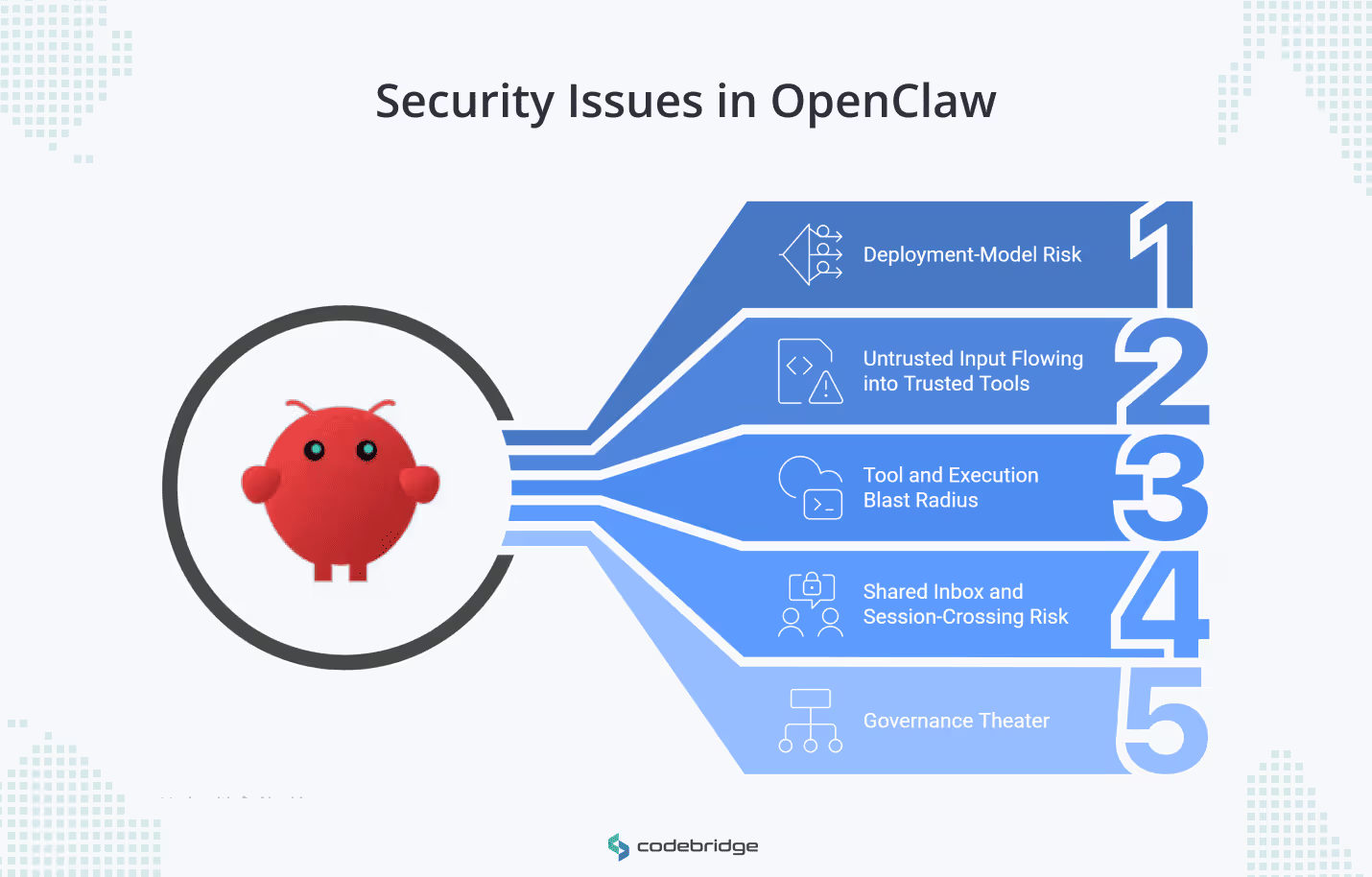
Diagram showing five security issues in OpenClaw: deployment-model risk, untrusted input flowing into trusted tools, tool and execution blast radius, shared inbox and session-crossing risk, and governance theater.
Five operational security risks in OpenClaw, from deployment-model weakness and untrusted input handling to execution blast radius, session leakage, and governance gaps.

To evaluate if OpenClaw is safe for a specific use case, businesses must move beyond the search for named vulnerabilities and look at five distinct categories of operational failure.

1. Deployment-Model Risk

OpenClaw's documentation is explicit: a single gateway is not a multi-tenant security boundary, and running one for mutually untrusted or adversarial operators isn't supported. On a shared instance, one operator can see another's session history and tool calls, and depending on configuration, their credentials. A team that deploys this as a production boundary has a shared workstation, not a segmented service.

⚠️

Shared gateway is not segmentation, a shared instance behaves like a shared workstation, not a segmented production boundary.

2. Untrusted Input Flowing into Trusted Tools

Any bytes reaching the agent from a messaging channel, a web search, an email, or an attachment are attacker-controlled until proven otherwise. This is prompt injection, and the mechanism is mundane. A page the agent is asked to summarize contains instructions to email the contents of another document to an outside address, and the model follows them. OpenClaw treats inbound content as untrusted by design. Most teams don't configure the surrounding tools to enforce that boundary in practice.

3. Tool and Execution Blast Radius

Teams give OpenClaw agents shell access, node commands, and filesystem reach because the workflows demand it. The platform ships exec approvals and allowlists as guardrails, and they work for their intended purpose: stopping an operator from firing a destructive command by accident. They are not designed to contain a hostile user driving the same agent. 

GHSA-48wf-g7cp-gr3m illustrates the gap. An exec-guard bypass via env -S let the policy analyzer see a different command than the runtime executed. Allowlists built on static analysis of shell semantics have a recurring history of this class of mismatch. Treating them as a security boundary for untrusted input means accepting that bug category as a live risk.

4. Shared Inbox and Session-Crossing Risk

OpenClaw routes incoming messages to sessions. In a shared Slack channel or group chat, the default routing pins multiple users to a single "main" session, which means one user's question can surface context from another user's earlier conversation, including document contents and tool results. The fix is one config line: session.dmScope: 'per-channel-peer'. Most teams don't set it because the default produces no error. There's no alert, just leakage.

🧩

Default routing can leak context, in shared channels, the default main-session routing can surface earlier document contents and tool results across users.

5. Governance theater

The preceding four risks are technical. The fifth is organizational and sits above them: treating "we self-host" as a meaningful security statement. Self-hosting determines where the bytes live. It doesn't map risks, measure controls, or establish ownership of incident response when an agent executes a command it shouldn't have. Teams that skip this layer end up with infrastructure they operate and agent behavior they can't explain, which is the condition that produces the worst postmortems.

Where OpenClaw Security Risk Starts to Rise

Three variables drive OpenClaw risk in practice: the number of operators sharing the instance, the agent's capability surface, and the sensitivity of the data passing through it. Each raises required control levels independently. Scaling any one of them while leaving the others untreated produces a deployment that runs cleanly right up until the first incident.

  • Gateway sharing. The moment two independent operators touch the same instance, you need per-operator isolation or a separate gateway per team.
  • Local infrastructure access. When the agent can read local files, capture a screen, or run system.run on a node, treat every tool as a privilege to design, not a convenience to enable.
  • Public or semi-public channels. Any participant in a Slack room or group chat becomes part of the attack surface. One of them only needs the agent to read something.
  • Regulated data. Once customer PII, financial credentials, or NDA-bound material enter the flow, the question isn't whether you need governance but whether the governance you have is reviewable.
Scenario Likely Risk Level Why Risk Rises Minimum Control Response
Single founder, low-privilege personal tasks Low Minimal blast radius; one trusted operator Token auth, loopback bind
Shared team assistant in Slack or Telegram Medium Multi-user ingress, delegated tool authority Per-channel-peer DM scoping, mention gating
Agent with shell or node command access High Direct host compromise path Mandatory sandboxing, strict exec approvals
Regulated or internal-data assistant Critical PII, API keys, or NDA material in the loop Per-user VM isolation, audit logging with redaction
🔒

Reviewability matters under regulated data, once customer, financial, or NDA-bound data enters the flow, the issue becomes whether governance is reviewable.

How to Reduce OpenClaw Risk Before It Reaches Production

These risks are real, and it is far better to address them before they turn into incidents. At Codebridge, we recommend starting with the controls below to reduce OpenClaw risk and build a stronger security baseline.

  • Separate trust boundaries. One gateway per user group at a minimum. One VPS or OS user per group when the data sensitivity demands it. Don't share a gateway across teams with different authority levels.
  • Strip tool permissions by default. Start every workflow on a minimal profile and add capabilities only when the use case demands them. Set tools.fs.workspaceOnly: true to contain the filesystem reach to a specific directory.
  • Treat messaging as hostile input. Enable session.dmScope: 'per-channel-peer' on any shared surface. Sandbox any agent that reads web pages, emails, or attachments the team didn't produce.
  • Keep credentials out of prompts. Use environment variables or an encrypted secret provider. A secret pasted into a prompt is now part of the transcript, the logs, and potentially the context of whatever model processed it.
  • Establish reviewable governance. Map the agent's capabilities, track how often approvals fire, and assign ownership for incidents. The NIST AI RMF (Govern, Map, Measure, Manage) is a reasonable scaffold if you don't already have one.

OpenClaw Production Hardening Checklist

One gateway instance per trust boundary.

session.dmScope: 'per-channel-peer' set on all shared surfaces.

Tool profile set to messaging or minimal by default.

Exec approvals set to always or ask for high-impact tools.

Sandbox enabled for every session handling untrusted content.

Credentials stored outside the prompt filesystem.

Audit logging on with redactSensitive: 'tools'.

Human-in-the-loop required for irreversible actions.

Do You Need an OpenClaw Security Review Yet?

The maturity of your security posture should match the complexity of your deployment.

Needs review now Can wait
Slack, WhatsApp, or iMessage connected to business workflows Single-operator instance
Multiple operators on the same gateway One sandboxed assistant, no shared surface
Agent can run shell commands or reach internal APIs No access to sensitive systems or data
Customer or regulated data in the loop Experimental, personal use only
Auditability required for executive or regulator sign-off No high-impact tools enabled

Conclusion

OpenClaw isn't insecure. Its documentation is clear about the trust model it was built for: one operator, one gateway, personal scope. The security problem is structural and starts when a team deploys that model into shared inboxes, customer-facing flows, or workflows with shell access and regulated data in them, without rebuilding the isolation and governance those contexts require.

The work to close that gap is known. Separate trust boundaries. Strip tool permissions. Treat inbound content as hostile. Keep credentials out of prompts. Maintain governance you can review. The question for most teams isn't whether to do this work, but whether to do it themselves.

If you're running an OpenClaw deployment against real workloads and want a second set of eyes on the architecture, book a call with a secure integration specialist. Thirty minutes is usually enough to tell whether the current deployment needs hardening, replatforming, or just configuration changes.

Assess one workflow before you automate at scale.

Book a domain-specific agent review

Is OpenClaw insecure by default?

No. The article states that OpenClaw is not inherently insecure. The issue is structural: teams create risk when they deploy a trust model built for one operator and one gateway into shared workflows, customer-facing flows, or environments with shell access and regulated data.

What are the main OpenClaw security issues in production use?

The article identifies five categories of failure: deployment-model risk, untrusted input flowing into trusted tools, tool and execution blast radius, shared inbox and session-crossing risk, and governance theater.

Why does risk increase when multiple people share one OpenClaw instance?

Because a single gateway is not a multi-tenant security boundary. On a shared instance, one operator may be able to see another operator’s session history, tool calls, and, depending on configuration, credentials.

Why is untrusted input a security problem in OpenClaw workflows?

The article explains that any content coming from messaging channels, web pages, emails, or attachments should be treated as attacker-controlled until proven otherwise. Without surrounding controls, that input can influence agent behavior and reach trusted tools.

What makes shell access especially risky in OpenClaw?

When agents can run shell or node commands, the platform gains a direct path to host-level impact. The article stresses that approvals and allowlists help reduce accidental misuse, but they are not a security boundary against hostile input.

What are the minimum controls to reduce OpenClaw risk before production?

The article recommends separating trust boundaries, stripping tool permissions by default, treating messaging as hostile input, keeping credentials out of prompts, and establishing reviewable governance.

When should a team get an OpenClaw security review?

According to the article, a review is needed when OpenClaw is connected to business messaging workflows, used by multiple operators on the same gateway, able to run shell commands or access internal APIs, handling customer or regulated data, or requiring auditability for executive or regulator sign-off.

OpenClaw Security Issues: What Actually Breaks When You Run It Without Governance

Heading 1

Heading 2

Heading 3

Heading 4

Heading 5
Heading 6

Lorem ipsum dolor sit amet, consectetur adipiscing elit, sed do eiusmod tempor incididunt ut labore et dolore magna aliqua. Ut enim ad minim veniam, quis nostrud exercitation ullamco laboris nisi ut aliquip ex ea commodo consequat. Duis aute irure dolor in reprehenderit in voluptate velit esse cillum dolore eu fugiat nulla pariatur.

Block quote

Ordered list

  1. Item 1
  2. Item 2
  3. Item 3

Unordered list

  • Item A
  • Item B
  • Item C

Text link

Bold text

Emphasis

Superscript

Subscript

AI
Konstantin Karpushin
Rate this article!
Thank you! Your submission has been received!
Oops! Something went wrong while submitting the form.
67
ratings, average
4.9
out of 5
May 5, 2026
Share
text
Link copied icon

LATEST ARTICLES

Ignition Integrations for Accounting Firms: What Syncs After a Proposal Is Signed?
October 27, 2026
|
17
min read

Ignition Integrations for Accounting Firms: What Syncs After a Proposal Is Signed?

What Ignition's integrations sync after a proposal is signed, how native connections, Zapier and the Ignition API compare, and what to test before go-live.

by Konstantin Karpushin
Legal & Consulting
Read more
Read more
Karbon Integrations: What Syncs, in Which Direction, and When to Go Custom
October 27, 2026
|
13
min read

Karbon Integrations: What Syncs, in Which Direction, and When to Go Custom

Compare Karbon integrations by data, sync direction, and workflow. Learn when native connections, Zapier, or custom development fit your accounting firm best.

by Konstantin Karpushin
Accounting
Read more
Read more
Sage Intacct Integrations: 7 Workflows to Automate, and When You Need Custom Development
October 26, 2026
|
13
min read

Sage Intacct Integrations: 7 Workflows to Automate, and When You Need Custom Development

Explore seven Sage Intacct integration workflows, compare prebuilt connectors with custom APIs, and learn when automation or AI agents make sense for your team.

by Konstantin Karpushin
Accounting
Read more
Read more
Invoice Validation: Checks, Common Failures, and What to Automate
October 26, 2026
|
16
min read

Invoice Validation: Checks, Common Failures, and What to Automate

Which invoice validation checks to run, what a passed check proves, why invoices fail or cannot be verified, and what to automate around the ERP you already have.

by Konstantin Karpushin
Accounting
Read more
Read more
Invoice Approval Workflow: Design, Thresholds, and Controls
October 20, 2026
|
14
min read

Invoice Approval Workflow: Design, Thresholds, and Controls

How to design an invoice approval workflow that holds: matrix tiers, segregation of duties, exception routing, and which invoices should never be auto-approved.

by Konstantin Karpushin
Legal & Consulting
Read more
Read more
Non-PO Invoice: Examples, Approval Process, and What to Automate
October 20, 2026
|
14
min read

Non-PO Invoice: Examples, Approval Process, and What to Automate

What a non-PO invoice is, the five situations behind a missing PO, how to verify and approve each one, a worked example, and what AP teams can automate safely.

by Konstantin Karpushin
Accounting
Read more
Read more
Audit Documentation Checklist: 25 Checks Before Review and Sign-Off
October 14, 2026
|
11
min read

Audit Documentation Checklist: 25 Checks Before Review and Sign-Off

A 25-point audit documentation checklist mapped to AS 1215, AU-C 230 and ISA 230, with review stages, statuses and a downloadable template for your firm to use.

by Konstantin Karpushin
Accounting
Read more
Read more
Best Accounts Payable Automation Software in 2026: 7 Tools Compared and When to Go Custom
October 14, 2026
|
17
min read

Best Accounts Payable Automation Software in 2026: 7 Tools Compared and When to Go Custom

Seven AP automation tools compared on strengths, limitations, pricing and fit, plus a seven-invoice test to run before you buy, and when to go custom instead.

by Konstantin Karpushin
Accounting
Read more
Read more
Vendor Statement Reconciliation: How to Find, Explain, and Resolve AP Discrepancies
October 13, 2026
|
17
min read

Vendor Statement Reconciliation: How to Find, Explain, and Resolve AP Discrepancies

How vendor statement reconciliation works, a worked example, why supplier balances differ from AP, and who approves each fix when a firm reconciles for clients.

by Konstantin Karpushin
Accounting
Read more
Read more
Audit Workpapers: How to Build Review-Ready Files and What to Automate
October 12, 2026
|
18
min read

Audit Workpapers: How to Build Review-Ready Files and What to Automate

What audit workpapers must contain, a worked example, PCAOB, AICPA and ISA documentation rules compared, and how to automate preparation with a full trail.

by Konstantin Karpushin
Accounting
Read more
Read more
Logo Codebridge

Let’s collaborate

Have a project in mind?
Tell us everything about your project or product, we’ll be glad to help.
call icon
+1 302 688 70 80
email icon
business@codebridge.tech
Attach file
By submitting this form, you consent to the processing of your personal data uploaded through the contact form above, in accordance with the terms of Codebridge Technology, Inc.'s  Privacy Policy.

Thank you!

Your submission has been received!

What’s next?

1
Our experts will analyse your requirements and contact you within 1-2 business days.
2
Out team will collect all requirements for your project, and if needed, we will sign an NDA to ensure the highest level of privacy.
3
We will develop a comprehensive proposal and an action plan for your project with estimates, timelines, CVs, etc.
Oops! Something went wrong while submitting the form.