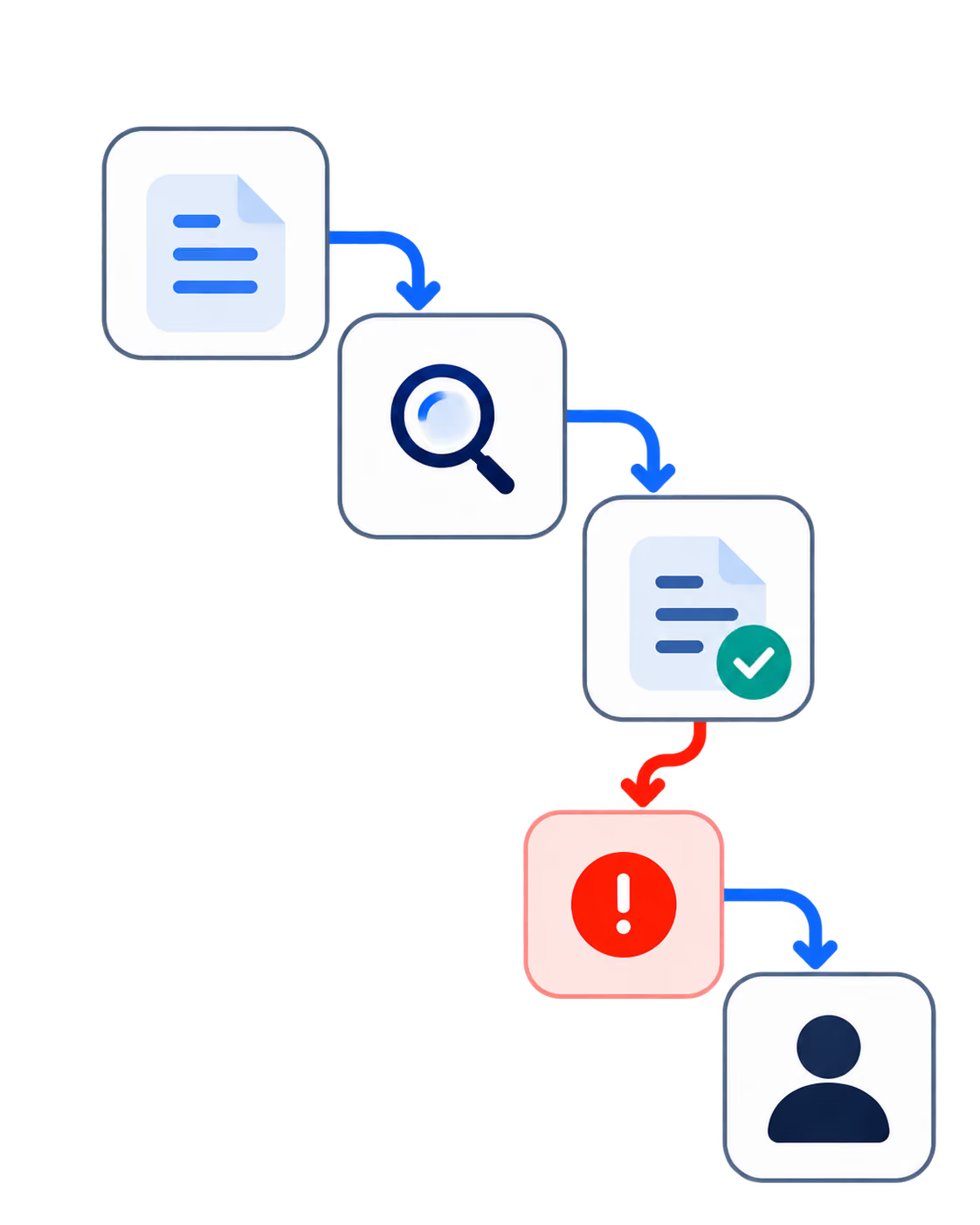
If you're running more than two coding agents on OpenClaw and they're starting to collide on shared files, lose context between reboots, or torch tokens overnight on retry loops, you've outgrown the standalone setup. Paperclip can sit around OpenClaw as an orchestration and governance layer when the OpenClaw adapter and webhook path are configured correctly.
This guide walks through wiring the two together: the webhook configuration that matters, the failure signals to check first, and how to verify session persistence before you trust the schedule.
What is the OpenClaw + Paperclip Integration?
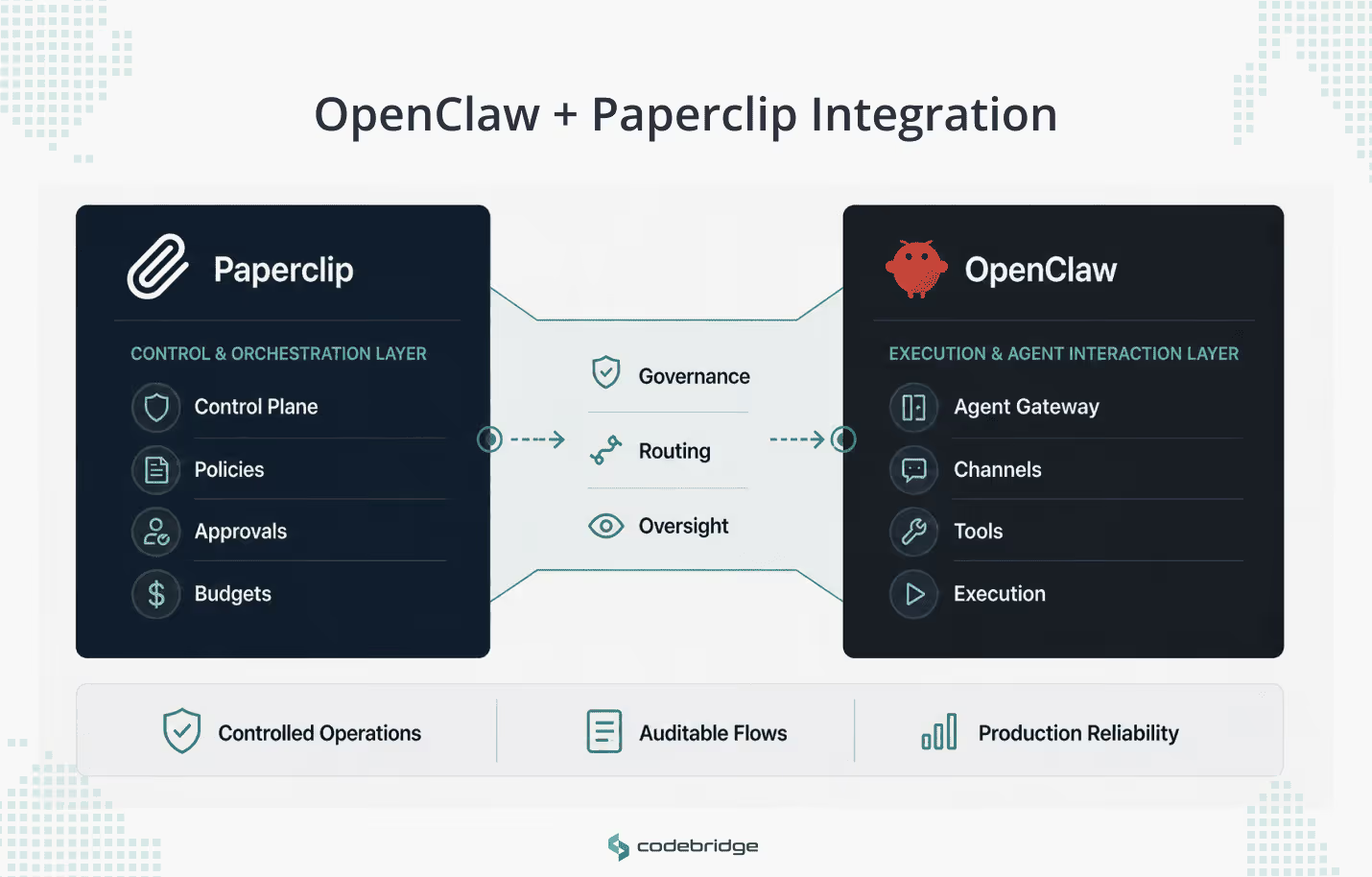
The OpenClaw + Paperclip integration is a webhook-based connection that places Paperclip's orchestration and governance layer on top of OpenClaw's agent runtime. Paperclip assigns work, enforces budgets, and runs agents in heartbeat cycles. OpenClaw executes the actual coding tasks against your repositories and returns session state for the next cycle.
In a correctly configured setup, the two systems can split responsibilities this way:
- Paperclip handles orchestration and governance: task assignment, agent roles and reporting lines, heartbeat scheduling, hard budget limits, and human-in-the-loop approvals for high-impact actions.
- OpenClaw handles the agent execution path: receiving the task through its gateway or hook endpoint, routing it to the configured agent, and returning adapter-specific execution state when session resumption is supported.
- The integration can add three operational benefits when configured and supported by the adapter: session continuity across heartbeat cycles, per-cycle run visibility that ties work to a run and task, and budget controls that can pause agents before costs compound.
Why OpenClaw Alone Stops Being Enough in Multi-Agent Operations
Standalone OpenClaw becomes harder to manage once teams move beyond one or two agents. The main problem is that each agent instance runs in its own terminal, with its own context window, against its own slice of the codebase. No instance knows what the others are doing. In practice, this leads to three concrete problems.
Duplicate and Conflicting Work
Two agents working on the same service can produce incompatible changes to shared files because neither has visibility into the other's session. You catch this at code review or, worse, at deploy time.
Cost Exposure
An agent stuck in a retry loop or exploring a dead-end implementation path will burn through API tokens until someone notices. Without budget boundaries at the agent level, a single bad run can generate hundreds of dollars in charges.
No Session Continuity Across Restarts
When a machine reboots or a terminal session drops, the agent loses its working state. You can restart it, but it starts cold, with no memory of what it completed or what decisions it made in prior runs. At scale, operators spend more time re-establishing context than the agents spend executing.
These are infrastructure problems rather than model problems. OpenClaw gives you a capable gateway and agent runtime, but coordination, budgeting, and cross-agent operating discipline usually need to be designed around it rather than assumed from the runtime alone. That's the layer Paperclip adds.
What Paperclip Adds on Top of OpenClaw
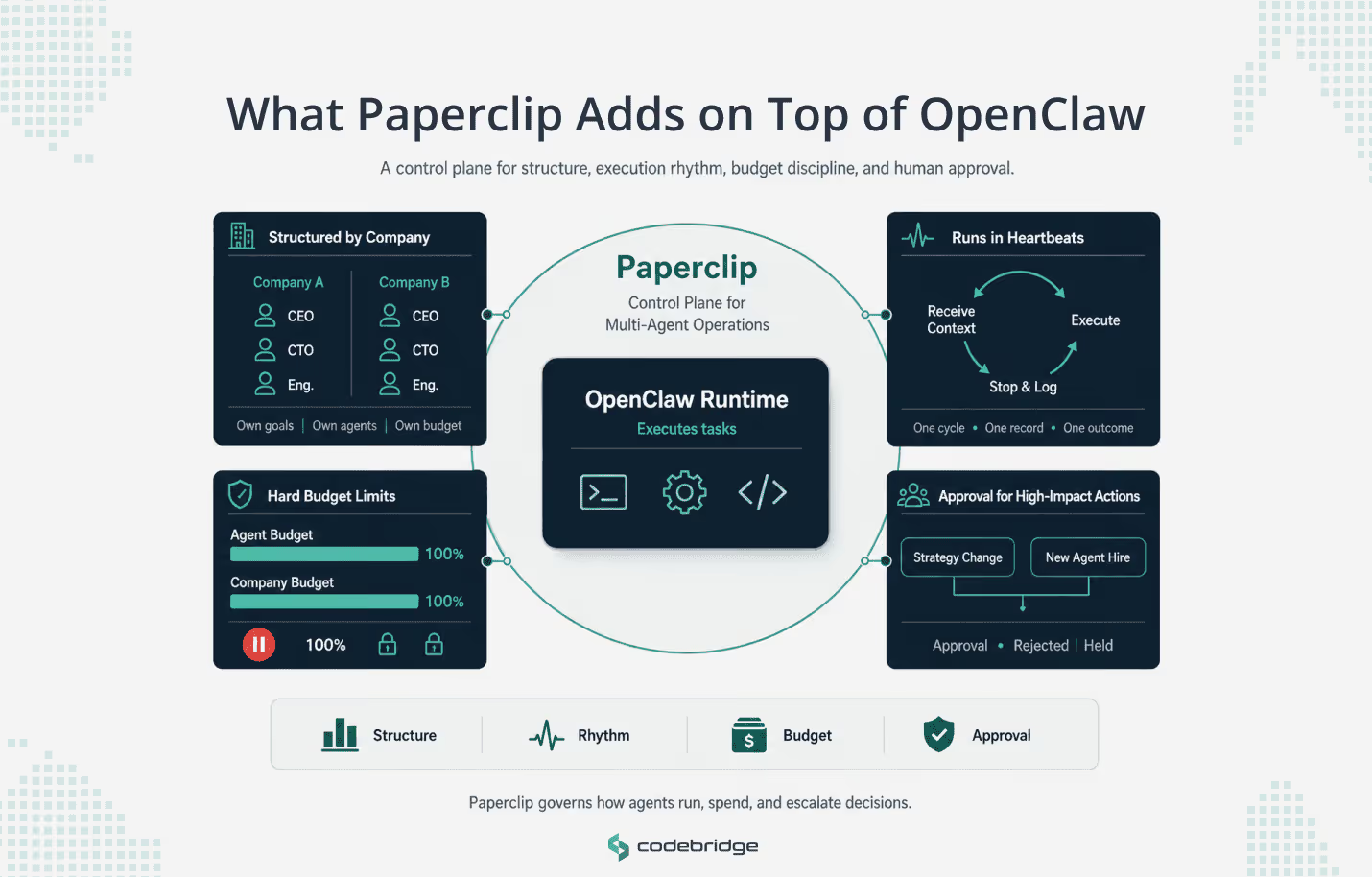
Paperclip acts as a control plane around OpenClaw. It decides what work is assigned, when agents run, how much budget they can use, and which actions need human approval.
Organizational Structure
Paperclip organizes agents into isolated units called Companies. Each company has its own goal set, its own agent roster, and its own budget. Agents within a company carry job titles and reporting lines. A typical setup might assign a CEO agent to define strategy, a CTO agent to break that strategy into technical tasks, and a Founding Engineer agent to execute implementation work.
The application-level boundary matters here. Paperclip can separate companies by goals, agents, tasks, sessions, and budgets, but this should not be treated as a hostile multi-tenant security boundary unless the deployment also separates credentials, gateway access, and runtime infrastructure.
This lets you run parallel workstreams (say, a product company and an infrastructure company) without cross-contamination, and tear down or restructure one without affecting the other.
Execution Rhythm (Heartbeats)
Paperclip doesn't let agents run continuously. Every agent executes in discrete cycles called heartbeats. During a single heartbeat, the agent receives its current context (active goals, assigned tasks, remaining budget), makes decisions or executes work, and then stops. The next heartbeat triggers a new cycle.
This design solves two problems. Continuous execution makes it difficult to inspect what an agent did or why. Heartbeats produce a clear audit record: one cycle, one set of inputs, one set of outputs. It also reduces the risk of uncontrolled continuous execution because each run has a bounded cycle that can be inspected before the next heartbeat is triggered.
If a heartbeat completes with an error, the operator can inspect the logs and decide whether to re-trigger, reassign, or intervene before the next cycle fires.
Budget Discipline
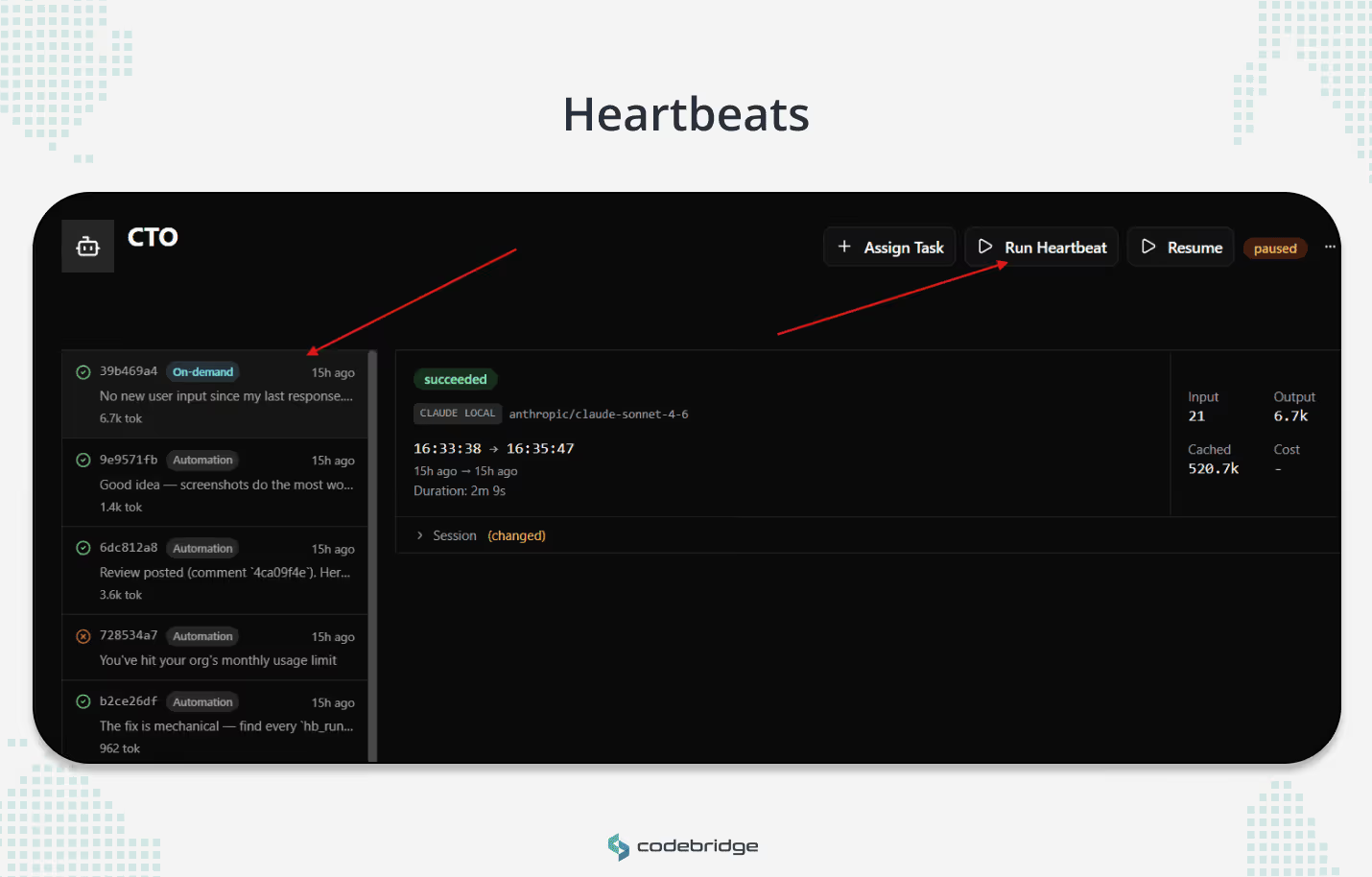
Unchecked autonomous agents can incur massive token costs in short order. Paperclip enforces hard budget limits at the agent and company levels. If an agent hits 100% of their monthly budget, Paperclip pauses that agent and blocks all future heartbeats. Execution only resumes after a human operator (acting as a board member in Paperclip's governance model) reviews the spend and explicitly re-enables the agent.
The budget limit should be treated as a control-plane constraint: once the agent reaches its configured limit, Paperclip should pause further execution until a human operator reviews and changes the budget state. This is a deliberate constraint for teams running agents on overnight or weekend schedules, where a stuck loop could otherwise accumulate token costs for hours without anyone watching.
Governance and Approvals
The human operator in the Paperclip ecosystem acts as the "Board of Directors". High-impact actions, such as the CEO's proposed company strategy or the hiring of new agent employees, require explicit board approval. This helps keep autonomous agents within human-defined operating boundaries, but approvals should be treated as one governance control, not as a substitute for least-privilege credentials, scoped tools, audit logs, and infrastructure-level isolation.
How the OpenClaw-Paperclip Integration Works
Easiest Current Method: Invite OpenClaw from Paperclip
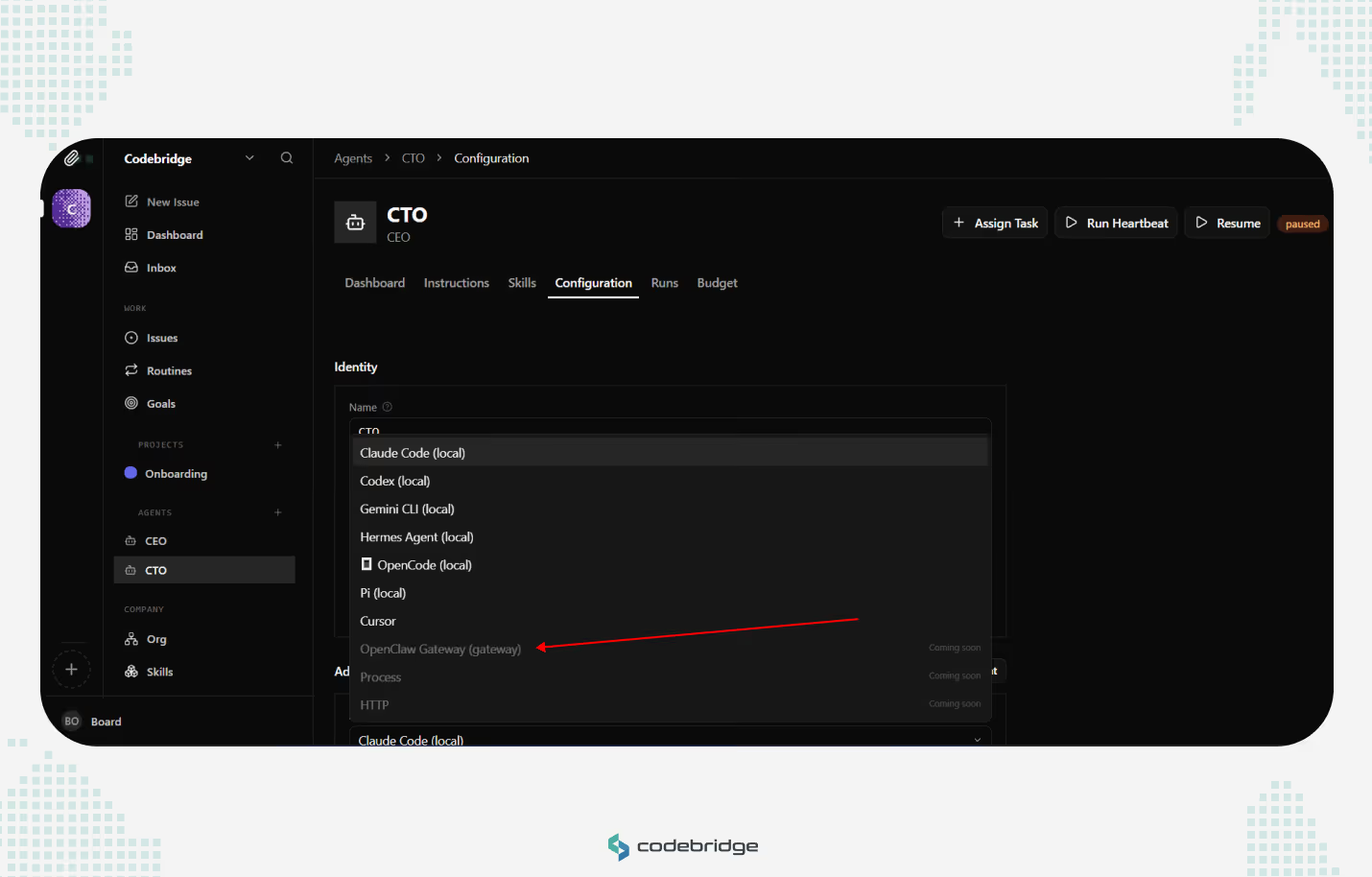
In the current Paperclip dashboard, OpenClaw does not appear to be available as a directly selectable dashboard adapter yet. In the agent configuration screen, OpenClaw Gateway, Process, and HTTP are shown as “Coming soon,” while local agent options such as Claude Code, Codex, Gemini CLI, OpenCode, and others are available.
The easiest current path is therefore invitation-based. From Company Settings → General → Invites, Paperclip provides a Generate OpenClaw Invite Prompt option. This generates an invitation prompt that can be copied and pasted into the OpenClaw chat or runtime environment. Instead of configuring OpenClaw through a dashboard adapter, you invite OpenClaw into the Paperclip company context so it can understand the company, agent role, goals, and expected operating boundaries.
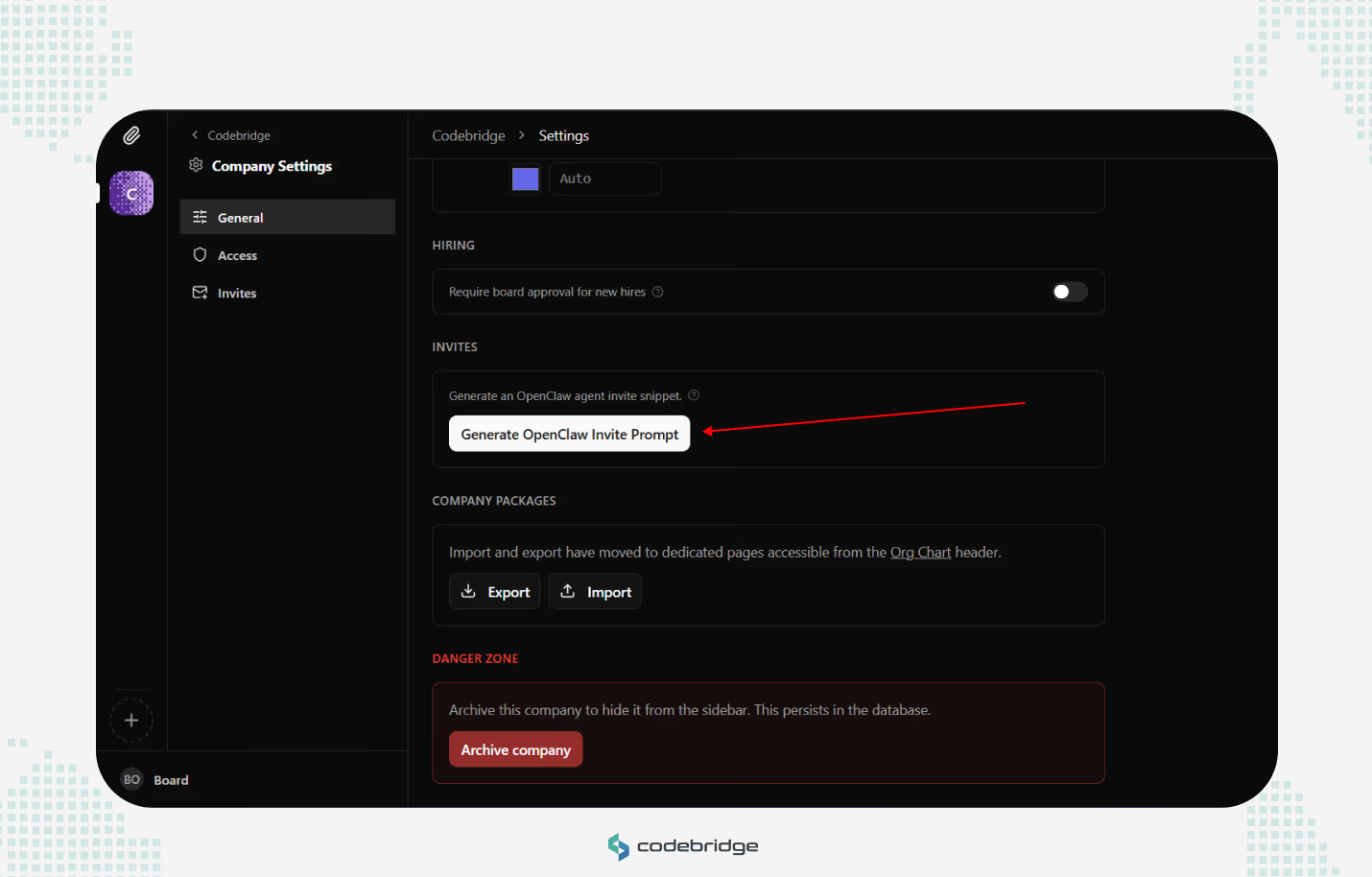
This method is useful for initial setup because it avoids manual webhook configuration, endpoint routing, and payload mapping. It is the safer starting point for non-engineering users or teams that want to validate the Paperclip/OpenClaw workflow before building a more direct adapter or webhook-based execution path.
Advanced Setups
For more advanced setups, Paperclip may connect to OpenClaw through an OpenClaw adapter or HTTP webhook-style execution path, depending on the Paperclip and OpenClaw versions in use. This path is more technical than the invite-based method because it requires a verified endpoint, authentication, routing fields, payload mapping, and session-handling behavior. Where supported, the OpenClaw adapter extends the base webhook model with a structured payload format that separates Paperclip orchestration metadata from execution context, plus adapter-level session tracking for resumable heartbeat cycles.
Request flow
Each heartbeat can trigger a POST request from Paperclip to the configured OpenClaw hook endpoint. The exact payload shape is adapter-version specific. In current OpenClaw hook examples, the endpoint expects an executable message plus routing fields such as the target agent ID; Paperclip metadata can be included for traceability if the adapter supports it.
The payload shape looks like this:
{
  "message": "Work on task task_impl_auth_module using the provided Paperclip context.",
  "agentId": "main",
  "deliver": true,
  "paperclip": {
    "runId": "a1b2c3d4-e5f6-7890-abcd-ef1234567890",
    "paperclipAgentId": "agent_cto_01",
    "taskId": "task_impl_auth_module"
  }
}
This separation is useful because OpenClaw should receive the fields it needs for execution and routing, while Paperclip-specific metadata remains available for traceability. Do not assume OpenClaw will ignore arbitrary root-level fields; keep the executable message and routing fields aligned with the adapter’s expected schema.
Synchronous vs. asynchronous execution
If the adapter supports both synchronous acknowledgement and asynchronous completion, the choice should depend on expected task duration.
For most coding work, you'll use the async pattern. The sync path is primarily useful for decision-making heartbeats where the agent evaluates priorities or reviews task status without executing against the codebase.
Session persistence
Depending on the OpenClaw adapter version, Paperclip may store adapter-specific session state and pass it into later heartbeats. Confirm the exact session key, response field, and restore behavior for your OpenClaw/Paperclip versions before relying on continuity across restarts.
If a session becomes invalid (the OpenClaw host restarted, the session timed out, or the workspace was manually cleared), the gateway returns an error on the next invocation. Paperclip responds by dropping the stored session data and retrying the heartbeat with a clean context. The agent loses its prior working state in this case, but the heartbeat cycle continues rather than stalling on a dead session reference. Operators can monitor for session reset events in the heartbeat run logs to catch environments that are dropping sessions too frequently.
The Key Configuration Elements: Webhook URL, Auth, Payload, Timeout
The adapter configuration usually depends on four practical elements: the OpenClaw hook endpoint, authentication, payload mapping, and timeout behavior. Getting any of them wrong typically produces a silent failure: the heartbeat fires, the request fails, and the agent never executes.
A minimal working configuration looks like this:
{
  "adapter": "openclaw",
  "webhookUrl": "http://127.0.0.1:18789/hooks/agent",
  "webhookAuthHeader": "Bearer ${secrets.openclaw_gateway_token}",
  "payloadTemplate": {
    "agentId": "main",
    "deliver": true
  },
  "timeoutSec": 30
}
The exact field names may differ by Paperclip version. Verify them against your installed Paperclip adapter before publishing this configuration as final.
{
  "hooks": {
    "enabled": true,
    "token": "paperclip-hook-token",
    "path": "/hooks",
    "allowedAgentIds": ["main"]
  }
}
The OpenClaw side must also allow the hook endpoint and the target agent. In production, avoid broad wildcard access unless the gateway is already isolated behind strong network and credential controls.
Here's what each field controls and where the common mistakes are.
webhookUrl
This is the address of the OpenClaw hook endpoint, not just the gateway root. For local development, a typical endpoint may look like http://127.0.0.1:18789/hooks/agent, assuming OpenClaw is listening on that port and hooks are enabled. For production, you'll point this at a remote host, usually over a private network. Tailscale is a common pattern for teams that want to avoid exposing the gateway to the public internet.
The most frequent setup failure is a webhookUrl that resolves correctly from the operator's machine but isn't reachable from the Paperclip server. If your first heartbeat run returns a connection error, verify that the gateway process is running on the target host, listening on the expected port, and that network rules allow inbound traffic from wherever Paperclip is hosted.
Be careful with127.0.0.1: it only works when Paperclip and OpenClaw run on the same host or inside the same network namespace. If Paperclip runs in Docker, on another VM, or as a hosted service,127.0.0.1points to Paperclip’s own environment, not the OpenClaw host.
webhookAuthHeader
The hook endpoint should be protected with the OpenClaw hook token or gateway authentication mechanism configured for your deployment. Configure this using Paperclip's secret reference syntax (${secrets.openclaw_gateway_token}), not a raw token string. Paperclip encrypts secret values at rest and redacts them from heartbeat run logs. A hardcoded token in the adapter config will appear in plaintext in every log entry that includes the request payload.
Each Paperclip-to-OpenClaw connection needs valid authentication, and the OpenClaw hook configuration should allow the target agent ID. If you add a new agent and skip this step, the heartbeat will fire but the gateway will reject the request with an authentication error. Check the errorCode field in the heartbeat run record if you see agents failing immediately after provisioning.
payloadTemplate
If supported by your Paperclip adapter, the payload template can add or override fields in the request sent to OpenClaw. The standard payload (execution context plus the paperclip metadata key) ships by default. The template merges on top of it.
Use this when you need the OpenClaw runtime to route or configure execution based on metadata that Paperclip doesn't include natively. A practical example: if you run gateway instances across multiple environments, you can pass a target environment in the template so the runtime selects the correct workspace.
"payloadTemplate": {
  "agentId": "main",
  "deliver": true,
  "metadata": {
    "environment": "staging",
    "priority": "high"
  }
}
Most teams leave this empty at initial setup and add fields later as their routing needs become more specific.
timeoutSec
This sets how long Paperclip waits for the gateway to respond before marking the heartbeat run as failed. A 30-second timeout is usually reasonable for the initial handshake or lightweight synchronous work, but confirm the actual default in your Paperclip configuration.
If you're using the synchronous execution pattern for heavier tasks, increase this to 120–300 seconds depending on the complexity of the work. If you're using the async pattern (202 Accepted with callback), the timeout only applies to the initial handshake, so 30 seconds is usually sufficient. The gateway just needs to acknowledge receipt, not complete the work.
A useful rule of thumb: if you find yourself pushing timeoutSec past 300 seconds to keep sync heartbeats from failing, switch to async. The sync pattern wasn't designed for workloads that take that long, and a dropped connection at the five-minute mark loses the entire result.
How to Test the Integration with Heartbeat Runs and Logs
A manual heartbeat run is the primary way to verify that the full execution path works. Mock payloads and unit tests won't catch the configuration, networking, and session issues that cause failures in production. Run a real heartbeat against a real gateway before you hand off any agent to an automated schedule.
Step 1: Trigger a single heartbeat
Use the Paperclip CLI to fire one heartbeat against the agent you want to test:
paperclipai heartbeat run --agent-id agent_cto_01This command sends the POST request to your configured gateway URL and streams the run output to your terminal. For a synchronous heartbeat, it blocks until the gateway responds. For an async heartbeat, it returns after the 202 handshake and then polls for the callback result.
Verify this command against your installed Paperclip CLI withpaperclipai --helpandpaperclipai heartbeat --help; CLI names and flags may change between versions.
A passing run looks like this:
[heartbeat] agent_cto_01 | run_id: hb_run_7f3a...
[heartbeat] POST http://127.0.0.1:18789/hooks/agent → 200 OK (4.2s)
[heartbeat] session: ses_abc123 (resumed)
[heartbeat] exitCode: 0
[heartbeat] result: task_impl_auth_module marked complete
This is illustrative output. Confirm the exact log format in your Paperclip version.
The fields to check on a successful run: exitCode: 0 confirms the agent executed without errors. The session line tells you whether the agent started a new session or resumed an existing one. The response time (4.2s in this example) gives you a baseline for timeout tuning.
A failing run surfaces the problem in the errorCode field:
[heartbeat] error: connection refusedUse the exact error code or message emitted by your Paperclip/OpenClaw version. Do not assume normalized error-code names unless they are documented.
If your first heartbeat fails, check the errorCode before investigating further. The most common failure categories on initial setup are:
Step 2: Verify session persistence
A first successful heartbeat confirms connectivity and authentication. A second one helps confirm that session state is actually being carried forward. Run this command:
paperclipai heartbeat run --agent-id agent_cto_01On the second run, check whether the adapter reports a resumed session or reused external run/session ID. The exact field name may differ by runtime. If the agent started a fresh session, Paperclip either didn't store the session ID from the first run or the gateway invalidated it between cycles.
Second, verify in the dashboard or run logs that the second heartbeat reused the expected external run ID or session identifier.
If the session ID doesn't carry over, the most common causes are: the gateway returned a response without a sessionId field (check the full response payload in the heartbeat logs), or the request is missing the correct OpenClaw routing field, such as the target agentId, causing the gateway to route the request to the wrong or default agent.
Step 3: Inspect the full request and response payloads
Run logs stream live to your terminal during paperclipai heartbeat run. To inspect a completed run, open the Paperclip dashboard and navigate to the Heartbeat Runs view for the agent. Filter by run ID to find the record and expand the request/response payloads from there
When to consider the integration stable: your agent completes two consecutive heartbeats successfully, the second run shows the expected session or external-run continuation where supported, and the request/response payloads match the adapter schema for your installed versions.
At that point, you can move the agent to an automated heartbeat schedule with reasonable confidence that the execution path is sound.
Common Failure Points and What to Check First
Even a well-designed integration can fail for routine operational reasons. The following checklist represents the most frequent failure points in production environments:
Conclusion
Where to go from here depends on where you are. If you're past the 1-or-2 stage and want a second pair of eyes on your endpoint, adapter payload, authentication, routing, and session behavior before you put agents on a schedule, we run 45-minute architecture reviews with a Codebridge engineer, no slides, no sales deck, just your config and ours.
If you're earlier than that, still evaluating whether multi-agent orchestration is the right shape of solution at all, start with our AI Agent development services instead.

















Heading 1
Heading 2
Heading 3
Heading 4
Heading 5
Heading 6
Lorem ipsum dolor sit amet, consectetur adipiscing elit, sed do eiusmod tempor incididunt ut labore et dolore magna aliqua. Ut enim ad minim veniam, quis nostrud exercitation ullamco laboris nisi ut aliquip ex ea commodo consequat. Duis aute irure dolor in reprehenderit in voluptate velit esse cillum dolore eu fugiat nulla pariatur.
Block quote
Ordered list
- Item 1
- Item 2
- Item 3
Unordered list
- Item A
- Item B
- Item C
Bold text
Emphasis
Superscript
Subscript