Most LLM chat interfaces treat every session as a blank slate. That works for one-off questions. It fails when you need an agent to hold a departmental mandate across Finance, Sales Operations, or DevOps. The agent forgets its role between sessions. It loses tool-specific guidance. It drops context that took three conversations to establish.
For Founders and CTOs leading AI agent development in line-of-business workflows, the operational question has moved past model selection. The harder problem is building an environment where the agent’s role, tools, and memory persist and can be reviewed by the team.
OpenClaw is a self-hosted gateway built around that problem. Its agent behavior is defined in explicit workspace files: Markdown documents that specify persona, tool configuration, operating instructions, and memory. The files live in the workspace, go into version control, and are injected into the agent's context on every turn. Nothing is hidden in a configuration database. Everything is auditable.
This article shows how OpenClaw can turn an agent from a one-off prompt into a reusable part of a team workflow.
Why Domain-Specific Agents Need More Than a Prompt
A prompt works for one session. Once the session ends, the agent loses its role, tool guidance, and working context. For one-off tasks, that's acceptable. For a departmental workflow in Finance or DevOps, it's a reliability gap.
An agent that operates as a departmental resource needs four layers: a defined role, verified capabilities, operating guidance specific to your environment, and persistent context that survives between sessions.
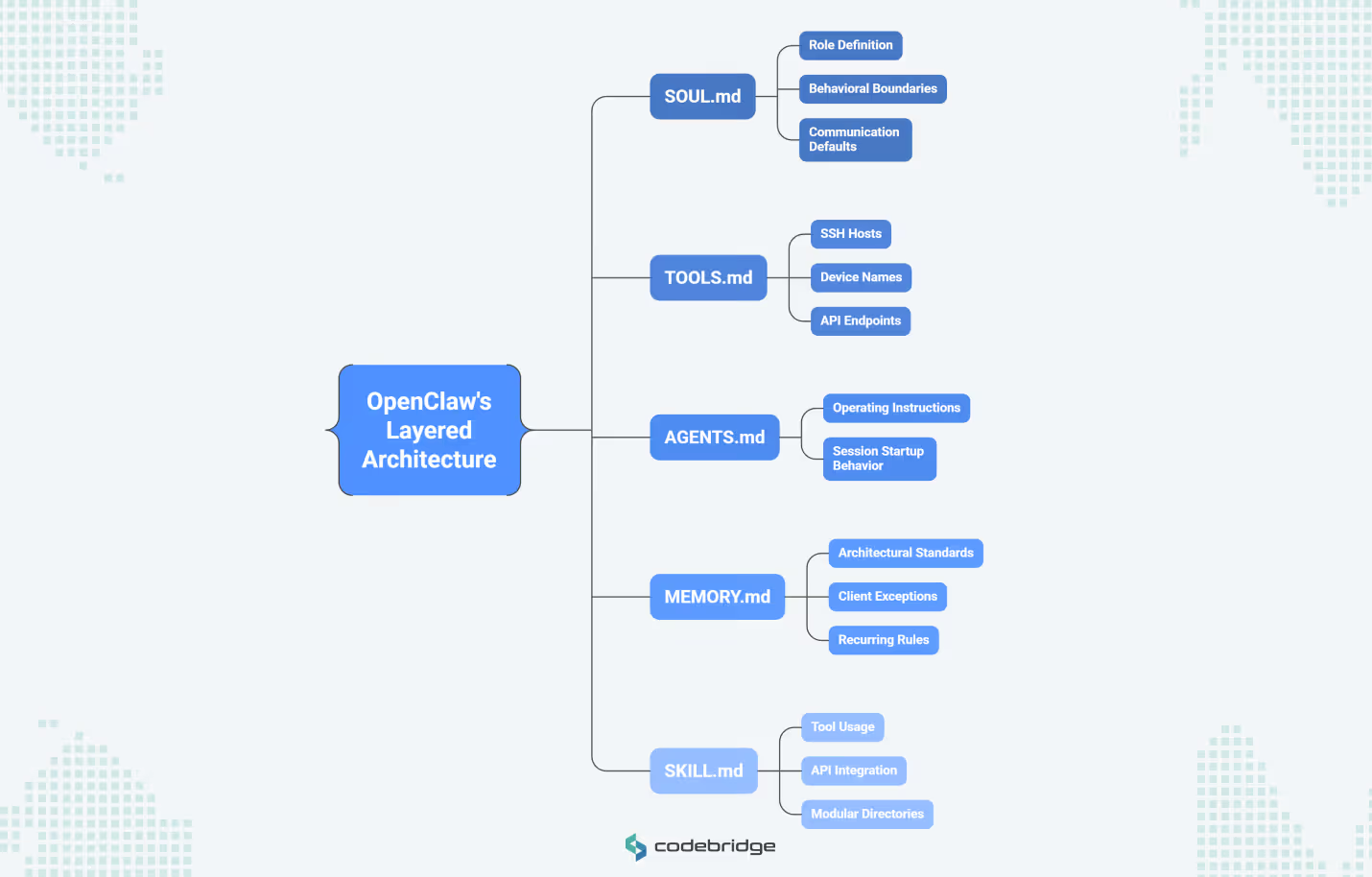
OpenClaw implements each layer as a separate Markdown file, loaded into the agent's context on every turn:
- SOUL.md sets the agent's role, behavioral boundaries, and communication defaults. Separating persona from tool configuration means you can change how the agent communicates without touching its capabilities.
- TOOLS.md holds environment-specific details: SSH hosts, device names, API endpoints, preferred defaults. This keeps infrastructure context out of reusable skill definitions, so skills stay portable across agents and teams.
- AGENTS.md contains the core operating instructions and controls session startup behavior. This is the file that determines what the agent does when a conversation begins.
- MEMORY.md stores durable facts (architectural standards, client exceptions, recurring rules). Daily log files in a memory folder capture short-term operational context that can be reviewed, summarized, or pruned over time.
- SKILL.md files package reusable capabilities into modular directories. Each skill teaches the agent how to use a specific tool or API, and skills can be layered: a bundled default, a team-level override, or a project-specific version.
This separation means the agent definition goes into version control like any other piece of software. You can update a skill without changing the agent's role or adjust the memory policy without rewriting operating instructions. Each file has a single responsibility, and your team can review changes through the same process they use for code.
How OpenClaw Composes a Domain-Specific Agent
OpenClaw works like an operating system for AI agents. The LLM handles reasoning and language. OpenClaw handles everything around it: which instructions load, which tools are available, what the agent remembers, and how it behaves when a session starts.
These responsibilities map to five workspace files. Each file has a single concern, and OpenClaw loads all of them into the agent's context on every conversational turn. Understanding how these layers stack is what separates a well-governed agent from a collection of config files.
Skills define reusable capabilities
A skill is a directory containing a SKILL.md file with YAML frontmatter and natural-language instructions. Those instructions tell the agent when and how to invoke a specific tool, whether that's bash, a browser session, or an external API.
Skills follow a three-tier override model. Bundled skills ship with the installation and cover common capabilities. Local skills in ~/.openclaw/skills can override or extend bundled defaults for your organization. Workspace-level skills override both, scoping a capability to a specific agent or project. A DevOps agent might inherit standard Google Workspace skills from the bundled tier but run a custom CI/CD Monitoring skill defined at the workspace level, tuned to your internal pipeline.
SOUL.md defines the operating persona
SOUL.md controls two things a CTO should care about. First, communication defaults: the agent responds directly rather than opening with filler, or it writes concise log summaries but detailed architecture explanations. Second, and more relevant for governance, decision boundaries. The SOUL.md file specifies when the agent can act on its own and when it must escalate. One rule might require the agent to investigate fully before escalating, while another may forbid any external action without user confirmation. That tension between autonomy and constraint is the core design decision in any departmental agent, and SOUL.md is where you encode it.
OpenClaw monitors this file for changes and alerts the user when it detects a modification. For teams treating agent definitions as controlled artifacts, that's a useful guardrail.
TOOLS.md captures local operating reality
Teams building agents often hard-code environment-specific details into skill files: server addresses, device names, API endpoints. That makes the skill non-portable. When another team or agent needs the same capability, they inherit your infrastructure assumptions.
TOOLS.md solves this by holding local setup context in a separate file. A skill defines how to query a database. TOOLS.md holds the connection string, the preferred read replica, and the timeout policy for your specific environment. Skills stay portable. Infrastructure details stay local.
Memory provides continuity without hidden state
OpenClaw stores agent memory as plain Markdown. MEMORY.md holds durable facts: architectural standards, approved terminology, recurring client exceptions. Daily log files (memory/YYYY-MM-DD.md) capture session-level observations and volatile context.
The practical consequence for governance: your team can run git blame on an agent's memory. If the agent makes a decision based on a faulty assumption, you trace it to a specific line in a text file, edit it, and commit the fix. No embedding database to debug. No opaque vector index to audit. The canonical source of truth is the file your team can read.
Designing SOUL.md for a Real Department
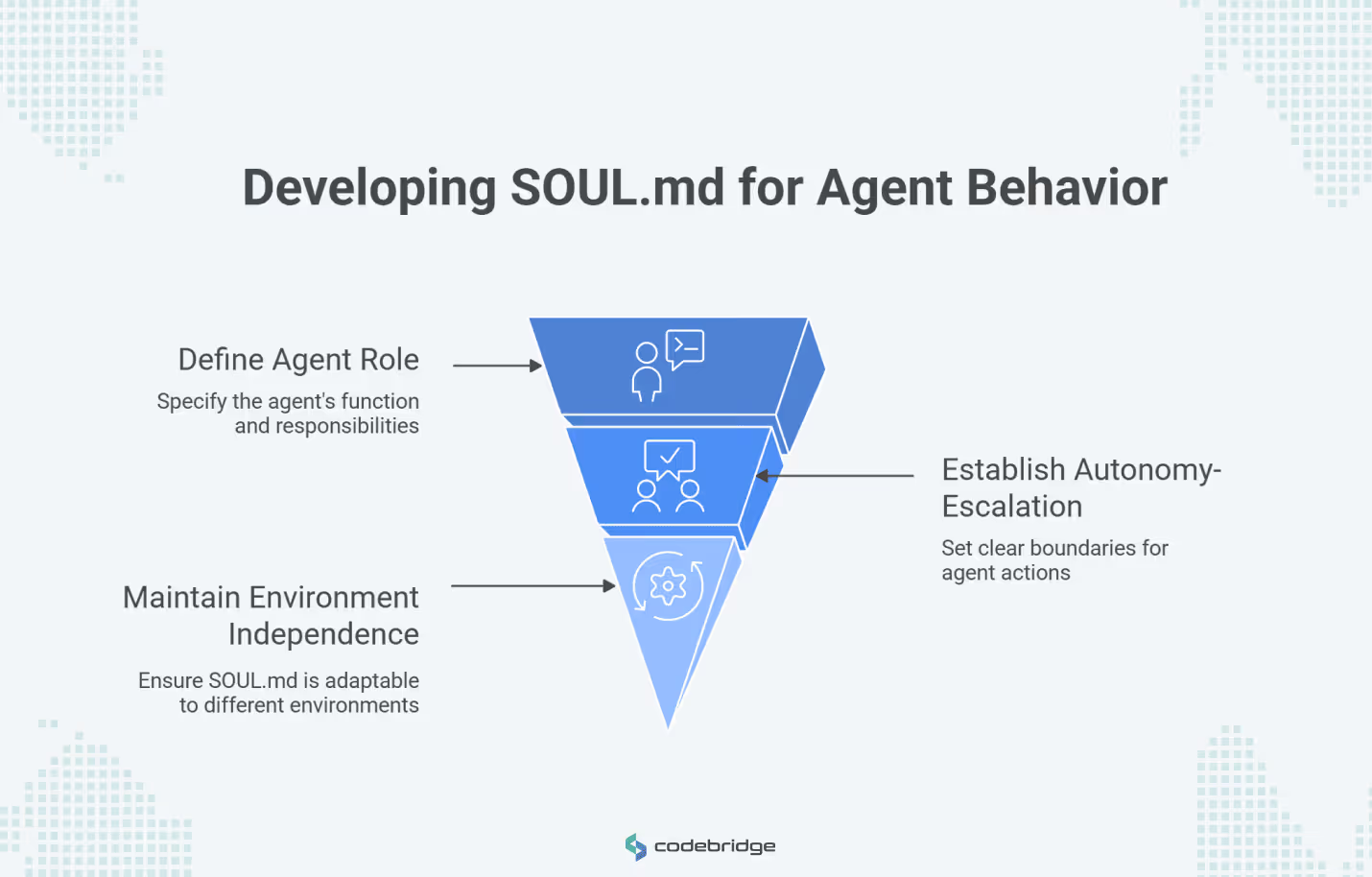
A SOUL.md file translates a departmental mandate into behavioral policy the agent follows on every turn. Writing one well requires answering four questions about the specific department: What is this agent's role? When can it act, and when must it escalate? How should it communicate in different contexts? What actions are prohibited regardless of circumstances?
The answers become the file's content. A few principles keep the file clean and maintainable.
Scope the role to a specific function. "You are an assistant" is too broad to govern. "You are the triage coordinator for the SRE team, responsible for classifying incoming alerts and routing them to the correct on-call engineer," gives the agent a boundary it can operate within. When a request falls outside that boundary, the agent knows to escalate rather than guess.
Encode the autonomy-escalation boundary as explicit rules. This is the highest-stakes design decision in any departmental SOUL.md. The file should state which categories of action the agent can perform without confirmation and which require human approval before execution. Vague instructions like "be careful with sensitive operations" produce unpredictable behavior. Specific constraints produce auditable behavior.
Keep environment details out. If a value changes when you move the agent to a different server, team, or client, it belongs in TOOLS.md. The SOUL.md should describe what the agent does and how it decides, not where it connects or which credentials it uses. A SOUL.md written for your finance department's agent should work for another company's finance department with zero edits to the role and policy sections.
How SOUL.md Changes Across Finance, Sales, and DevOps
Each department's SOUL.md reflects a different operating risk, and the file's structure should make that risk visible.
- Finance Operations: The core design constraint is write-access governance. Every action that modifies financial data requires explicit human confirmation. A finance SOUL.md specifies rules like: "Double-check every ledger entry against the source PDF before presenting a summary. Never execute a bank transfer without multi-factor human confirmation. Flag any invoice amount that deviates more than 15% from the rolling average for that vendor." The agent reads, summarizes, and flags. It does not write, pay, or approve.
- Sales Operations: The core design constraint is context continuity. Leads move through qualification stages over days and weeks, and the agent needs to track where each one stands. A sales SOUL.md specifies rules like: "Surface any lead that hasn't been contacted in 48 hours. Apply the current qualification criteria stored in memory when evaluating inbound signals. Log every status change with a timestamp and the reason for the change." Here, the SOUL.md defines the behavioral rules, and MEMORY.md stores the qualification criteria and account history the rules reference.
- DevOps Agent: A DevOps SOUL.md specifies rules like: "Run git diff before every commit and surface the changes for review. Escalate to the on-call engineer for any 500-series error that persists longer than 5 minutes. Never restart a production service without explicit approval from the incident lead." The default posture is read-only. Write actions require human confirmation tied to a specific role.
How to Add Skills Without Creating Sprawl
Every skill added to an agent creates a new dependency that has access to the agent's tools and context. Treating skill installation casually creates the same supply-chain risk that package managers introduced to software development, except here the dependency can execute shell commands, read files, and call APIs on the agent's behalf.
When selecting skills, organize around the business capability they serve:
Start with capability categories
Technical leaders should organize skill selection around business-centric categories:
- Search and Research: Web search for market intelligence or technical documentation lookup.
- Messaging and Ticketing: Integrations with Slack, Discord, or Linear for team communication workflows.
- Internal Documentation: Reading and summarizing PDFs, spreadsheets, or wiki content.
- Workflow Coordination: Tools like mcporter for managing external backends and multi-agent handoffs.
Use official and community discovery carefully
ClawHub is the primary public registry for finding and installing skills. While the community-maintained awesome OpenClaw skills list offers thousands of potential capabilities, it is critical to note that these are curated, not audited. Technical teams must treat third-party skills as untrusted code execution.
This risk is not theoretical. The "ClawHavoc" campaign involved malicious skills published to community registries, disguised as legitimate tools. They harvested API keys and wallet credentials from agents that installed them.
Selection criteria for enterprise readers
Before adding a skill to a production environment, teams should ask:
- Does the skill solve a repeated, high-value workflow rather than a novelty task?
- Can the skill be isolated to a specific department-agent workspace?
- Does it significantly reduce the manual glue code required between systems?
- Can the engineering team explain exactly what data and permissions the skill touches?
Structuring Memory for Reliability and Auditability
Memory is where an agent transitions from a "bot" to a "teammate." Proper memory structure is a governance requirement for regulated industries.
Separate durable facts from working notes
The split between MEMORY.md and daily log files is an architectural decision about the information lifecycle. MEMORY.md holds facts that should influence the agent's behavior across sessions: approved terminology, recurring client exceptions, architectural standards, and qualification criteria. Daily logs (memory/YYYY-MM-DD.md) hold session-level observations, volatile context, and working notes that your team reviews, summarizes, or prunes on a regular schedule.
Treat MEMORY.md as controlled operational memory
Keeping MEMORY.md small and curated matters for performance. Every line in the file loads into the agent's context window on each turn. Bloated memory degrades reasoning quality. Teams should enforce a promotion policy: information starts in the daily log and moves to MEMORY.md only after review confirms it as a durable operating fact.
Why plain Markdown matters
The decision to use Markdown for memory keeps the agent’s working context visible to human operators. The memory system chunks and indexes these files into a local retrieval index, combining full-text and vector search, but the Markdown files remain the canonical source of truth. If the AI makes a mistake based on a faulty memory, you do not need to debug an opaque embedding database; you simply edit the text file.
Backup and review discipline
To ensure auditability, technical leaders should treat the agent workspace as a Git repository. This allows the team to track how the agent's memory evolves over time, review memory flushes where daily info is promoted to long-term storage, and roll back if the agent adopts an incorrect operating assumption.
Change Management When Agents Replace Manual Routines
A departmental agent carries more organizational weight than the script it replaces. Scripts execute a fixed procedure. An agent holds a role definition, tool access policies, communication norms, and persistent memory. When something goes wrong with a script, one person debugs it. When something goes wrong with an agent, the team needs to know who owns the definition, what changed, and which review process failed.
What changes organizationally
That ownership question is the central governance shift. Changes to SOUL.md, TOOLS.md, or memory policy should go through code review. Agent definitions need the same rollout, rollback, and monitoring discipline your team applies to production infrastructure.
Four questions worth answering before any departmental agent goes live:
- Who owns the agent's definition files, and who approves changes?
- How does the team distinguish between a temporary workaround in the daily log and a durable policy that belongs in MEMORY.md?
- Which action categories (shell commands, outbound emails, database writes) require human approval before execution?
- What does the audit and update process for the agent's memory rules look like in practice?
Where OpenClaw GDN Fits
For technology-driven companies that see the value in these patterns but are not ready to stand up and operate the internal platform plumbing themselves, OpenClaw GDN offers a lower-overhead path.
OpenClaw GDN is a managed deployment layer that provides a zero-access architecture. After the initial provisioning of a dedicated VM, the platform removes its own SSH access, ensuring that API keys and chat history stay on the customer's infrastructure. It supports over 25 AI providers and multiple channels, offering fast set up and convenience without sacrificing the control of a self-hosted agent.
In a managed context, teams can focus on defining workflows, approval logic, and data boundaries while the GDN platform handles the underlying orchestration, resource monitoring, and secure, approval-based software updates. This represents the fastest route to piloting domain-specific workflows in a production-ready, managed environment.
Conclusion
The real value of OpenClaw for an organization lies in its separation of role, capability, setup guidance, and memory into explicit, human-readable components.
By moving away from opaque agent setups and toward structured, readable definitions, companies can build domain-specific teammates that are transparent and auditable.
This architecture makes departmental AI agents a realistic option for Finance, Sales, and DevOps teams, turning the potential of autonomous agents into an integrated reality of business operations.

















Heading 1
Heading 2
Heading 3
Heading 4
Heading 5
Heading 6
Lorem ipsum dolor sit amet, consectetur adipiscing elit, sed do eiusmod tempor incididunt ut labore et dolore magna aliqua. Ut enim ad minim veniam, quis nostrud exercitation ullamco laboris nisi ut aliquip ex ea commodo consequat. Duis aute irure dolor in reprehenderit in voluptate velit esse cillum dolore eu fugiat nulla pariatur.
Block quote
Ordered list
- Item 1
- Item 2
- Item 3
Unordered list
- Item A
- Item B
- Item C
Bold text
Emphasis
Superscript
Subscript