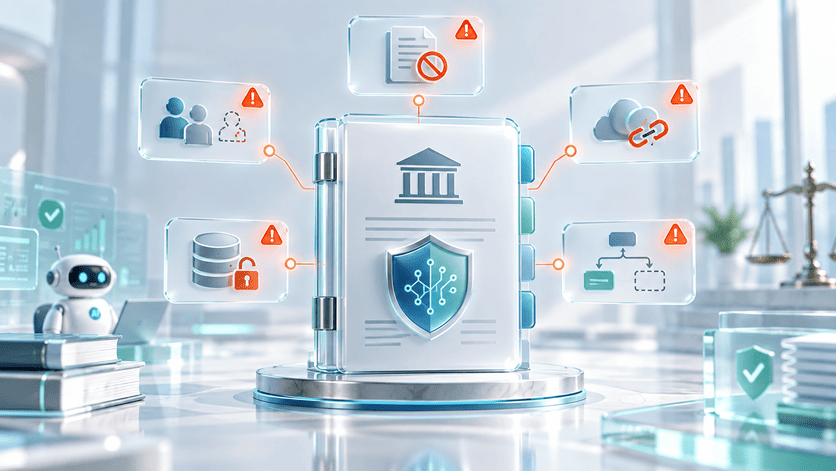
OpenClaw gives an LLM the ability to run shell commands, read file systems, and operate across messaging channels like WhatsApp, Telegram, and Slack. That capability is why teams adopt it, and why a careless deployment can cause operational damage before anyone notices.
Most teams treat OpenClaw the way they treat any new developer tool: install it, connect it, start building. The security conversation happens later, if it happens at all. That sequencing is the root of nearly every serious exposure we see in production OpenClaw environments. This is not a chatbot with integrations bolted on. It is a system with delegated authority over your infrastructure, running on your host and using the credentials and scope you assigned during setup.
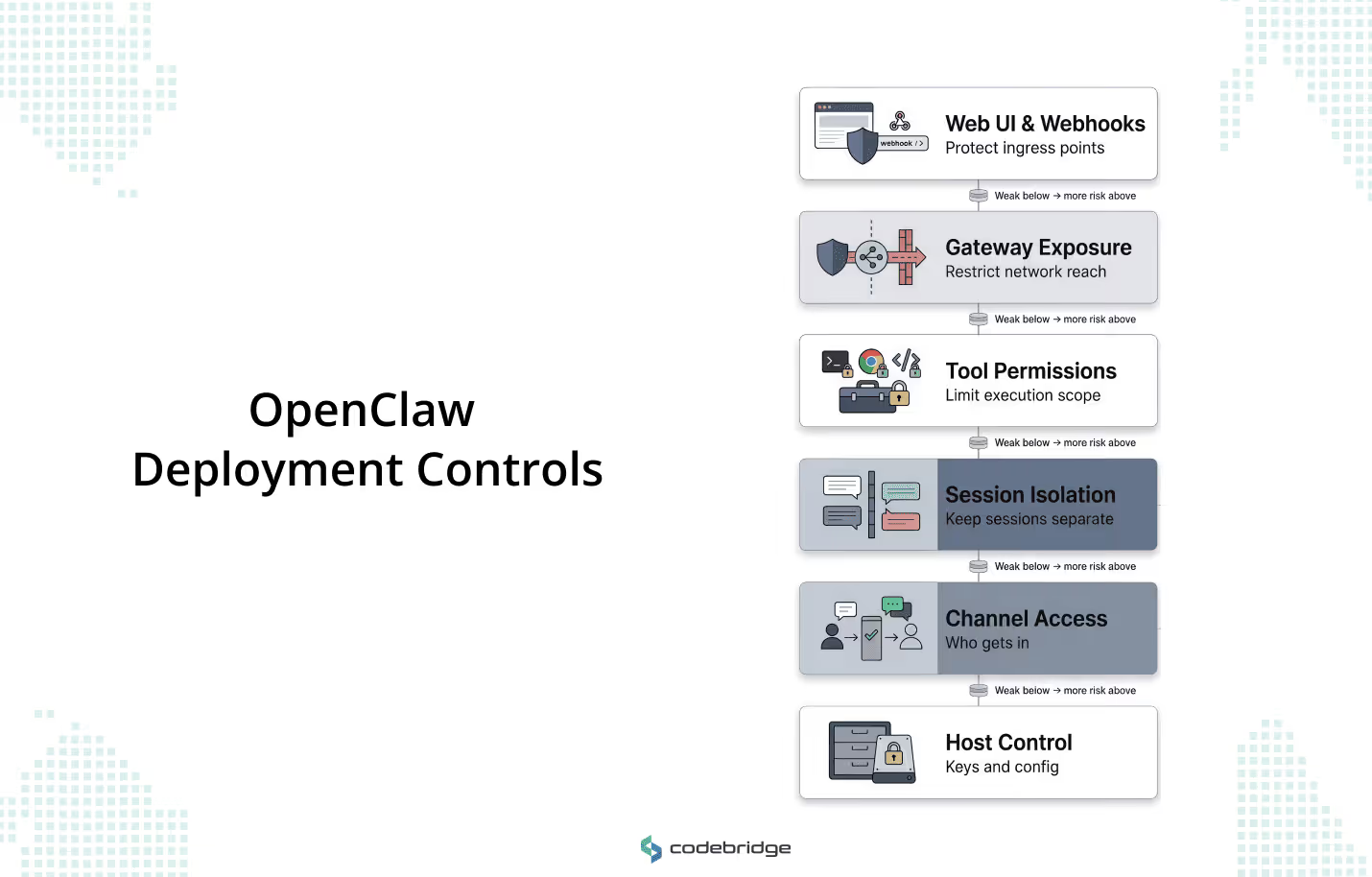
This article walks through what a disciplined OpenClaw deployment requires across six surfaces: channel access, session isolation, tool permissions, network exposure, webhook and UI hardening, and host-level credential control. The goal is to give technical leaders a usable framework for getting the boundary design right before the system goes live.
Why OpenClaw Security Is Different From Basic AI Safety
Most conversations about AI security focus on content-layer issues: hallucinated facts, toxic outputs, and prompt injections that lead to embarrassing responses. But those risks assume a sandboxed environment where the worst outcome is bad text. OpenClaw operates in a different category. It sits on your host OS, holds your API keys, and connects to messaging surfaces where it can receive instructions from anyone you've allowed to reach it. When a prompt injection lands in a sandboxed chatbot, you get a strange reply. When the same injection lands in an OpenClaw deployment with access to shell execution, you get unauthorized code running on your infrastructure.
That distinction — between a system that generates language and a system that takes action — is what makes OpenClaw's security posture an architectural problem. The framework bridges persistent sessions, file systems, and local hardware nodes (cameras, screens, peripheral devices) across channels like Slack, Telegram, and WhatsApp. A single gateway instance can manage calendars, read inboxes, fetch and process web content, and execute code. Each of those capabilities is a permission surface. Each one carries a different blast radius if misused or exploited.
Content filtering and output guardrails still matter, but they operate on the wrong layer for this class of risk. You can't moderate your way out of an agent that has been tricked into running a shell command. The governing question in OpenClaw security is simple: what have you authorized the model to do, and under what conditions could that authority be triggered by someone you did not intend to trust?
What a Secure OpenClaw Deployment Actually Needs to Control
OpenClaw's security model assumes that the host and its configuration boundary are trusted. If someone can edit openclaw.json, they are an operator. They have full control over what the agent can do, who it listens to, and which tools it can invoke. Every other security decision in the system sits downstream of that assumption.
This means your deployment security is your configuration discipline. There is no separate governance layer that intervenes between a misconfigured gateway and a live agent acting on production systems. You govern the system by governing how it is set up. And that setup spans six distinct surfaces, each with its own failure modes and scope of impact.
- Channel Access and Sender Control: Determining who can reach the gateway through its connected messaging platforms and under what conditions the system will accept instructions from them.
- Session Isolation: Ensuring that context and data from one user or task do not leak into another.
These two surfaces define the system's trust perimeter: who gets in, and whether they stay separated once inside.
- Tool Permissions and Execution Risk: Defining which capabilities (exec, browser, and web_fetch) are available to which agents, and how large the blast radius is if any one of those capabilities is misused.
This is the surface where the most consequential mistakes happen, because tool scope tends to be set once during initial configuration and then forgotten.
- Gateway Exposure and Remote Access: Hardening how the network path between the operator and the self-hosted gateway is protected, and whether the gateway is reachable from places it shouldn't be.
- Web UI and Webhook Surface: Protecting the Control UI and any HTTP ingress points that accept inbound requests, both of which are vulnerable to unauthorized access and cross-origin attacks if left in their default state.
- Host-Level Control and Credential Locality: Managing where API keys, state files, and configuration data physically reside on the host, and what file system permissions protect them.
This surface is the foundation that the other five depend on. If host-level control is compromised, the other five are moot.
These surfaces form a dependency chain. Host-level control underpins everything. Channel access and session isolation define the trust perimeter. Tool permissions determine the blast radius inside that perimeter. Gateway exposure and the webhook surface govern how the system interacts with the outside network. A gap in any one layer compounds the risk in the layers above it.
The First Boundary to Lock Down Is Inbound Access
OpenClaw connects to public messaging surfaces. Any user on Telegram, WhatsApp, or Slack who can find the bot's account can send it a message. That is the starting condition, and it's the reason inbound access control has to be the first thing you configure.
The framework handles this through a pairing model. On direct message (DM) capable channels, unknown senders receive a short-lived pairing code. The agent ignores everything they send until a trusted operator approves them through the CLI. This is a strong default, and the most common mistake teams make is weakening it — broadening the allowlist to cover an entire Slack workspace, or setting a wildcard policy on group channels because individually approving users feels like friction. That friction is the security model working as intended.
Shared environments are where this gets dangerous. When every member of a Slack workspace can message a tool-enabled agent, every one of those members can initiate tool calls. A user who sends a crafted message can trigger actions that affect shared state, read files the agent has access to, or push data out through the agent's web-fetching capability. The sender didn't need to compromise anything. They just needed to be on the allowlist.
Allowlists should use numeric identifiers (Telegram user IDs, not usernames) to prevent spoofing. Access should be scoped more narrowly than your first instinct suggests. And for any deployment where multiple users interact with the same gateway, the target is per-channel-peer isolation: each user gets a separate context, a separate session, and no ability to read or influence another user's interaction.
Controlling What the Agent Can Execute
Once you've defined who can reach the gateway, the next step is to define what happens when they get through. Every capability OpenClaw exposes to an agent, whether shell execution, file-system access, browser automation, or web fetching, creates its own permission surface and blast radius.
An agent with access to exec can run arbitrary commands on the host. An agent with fs access can read anything the OpenClaw process user can read. These are the default behaviors if you provision tools without restricting the scope.
The pattern that causes the most damage in production is a team that configures broad tool access during initial setup, plans to tighten it later, and never does. The permissive configuration becomes permanent because it works — agents complete tasks, users are satisfied, and nobody revisits the tool profile until something goes wrong. By that point, the agent has been operating with more authority than anyone intended.
OpenClaw provides the machinery to prevent this. The tools.profile: "minimal" setting establishes a restrictive baseline where high-risk capabilities are disabled by default. From that baseline, you enable specific tools for specific agents based on what they actually need. An agent that summarizes untrusted web content should run as a reader, with access to web fetching and nothing else. No shell tools, no sensitive file paths, no browser automation.
An agent that manages internal workflows on trusted data might need broader access, but even then, the scope should be defined per agent rather than inherited from a global default. For any agent handling untrusted input, OpenClaw supports sandboxed execution through Docker-isolated containers, which prevent the agent from reaching the host's primary file system or network. That mode is opt-in, and it should be the default for any deployment that processes external content.
The execution surface extends beyond built-in tools.. OpenClaw's capabilities extend through a skills system (directories containing instruction files and scripts) and a plugin architecture that runs code in-process with the gateway. Both execute with the same permissions as the OpenClaw process itself. Installing a skill from ClawHub, the framework's community marketplace, is operationally equivalent to running third-party code on your server with your credentials. Self-hosting gives you control over your infrastructure, but it does nothing to vet the code you choose to run on it.
This is a supply-chain risk, and it has already materialized. Cisco's AI security research identified third-party skills that performed data exfiltration and prompt injection without the operator's knowledge. OpenClaw has responded by partnering with VirusTotal to scan skills published to ClawHub, which catches known malware signatures and obvious malicious patterns. What it does not catch is the more sophisticated vector: skills that pass an initial audit cleanly, then fetch and execute new code from external sources at runtime. These secondary downloads bypass the scan entirely because the malicious payload doesn't exist in the skill directory at install time. It's retrieved later, during execution, from a remote source the operator never reviewed.
The countermeasure is to treat every skill folder as trusted code with the same review discipline you'd apply to a production dependency. Restrict write access to skill directories. Run static analysis that flags any outbound network calls or dynamic code execution patterns. Audit installed skills on a regular cadence, not just at installation.
The ClawHub marketplace and VirusTotal scanning reduce the baseline risk, but they don't eliminate it. The operator is the final trust boundary for anything that runs inside the gateway process.
Broad Access vs Restricted Access
A Practical Framework for Secure OpenClaw Deployment
The sections above explain why each control surface matters and what goes wrong when it's misconfigured. This section puts those controls into the order in which you should address them when standing up a new OpenClaw environment or auditing an existing one.
Boundary
Define which users, messaging channels, and operators belong inside a single trust boundary. For mixed-trust teams, the recommended practice is to split trust boundaries by using separate gateways or separate OS users.
Access
Determine who can message the gateway and which devices are allowed to pair as nodes. Allowlists should be explicit and numeric (e.g., Telegram user IDs rather than usernames) to prevent spoofing.
Permissions
Apply the principle of least privilege to tools, services, and files. Use the tools.profile: "minimal" setting as a baseline and selectively enable high-risk tools like exec or browser only for agents operating on trusted data.
Exposure
Ensure the gateway is loopback-first. Default to binding to 127.0.0.1 and use secure tunnels like Tailscale or SSH for remote access. Never expose the Gateway unauthenticated on 0.0.0.0.
Isolation
Use per-agent sandbox isolation to prevent one agent's context from leaking into another. For sensitive operations, enforce agents.defaults.sandbox.scope: "agent" or "session".
Verification
Implement continuous auditing. Regularly run openclaw security audit --deep to detect configuration drift and exposure risks. For enterprise-grade deployments, utilize formal verification models (like TLA+) to check that authorization and session isolation policies are being enforced.
Recovery
Define the path for containment and recovery. If a compromise is detected, the immediate response must include stopping the process, closing network exposure (binding to loopback), and rotating all credentials, including Gateway tokens and model API keys.
OpenClaw GDN: Accelerating Deployment Without Security Drift
The framework above is the right way to deploy OpenClaw. For most teams it is also a significant amount of work. Each step requires infrastructure decisions, configuration discipline, and operational practices that compound quickly — especially for organizations without a dedicated platform or MLOps function. A non-technical founder who sees the value of autonomous workflows can stall at step one because nobody on the team owns host-level hardening. A CTO with a capable engineering team can still lose weeks to the gap between "we understand the architecture" and "the deployment is production-ready with the right guardrails."
Codebridge’s OpenClaw-based platform exists to close that gap. It is a managed deployment layer where each instance runs as a dedicated, isolated VM with the foundational controls from this framework already in place: firewalled network boundaries, encrypted credential storage, loopback-first gateway binding, identity-header authentication via Tailscale, DDoS protection, and automated hourly backups. The infrastructure you would otherwise configure by hand across steps one through three is pre-built.
This changes the deployment timeline from months of experimentation to a controlled pilot in days. You choose the workflows, the approval logic, and the data boundaries. The tool handles orchestration, monitoring, and safe execution.
If you want to evaluate how quickly your organization can move from framework to live OpenClaw-powered workflow, explore OpenClaw GDN.
Conclusion
Secure OpenClaw deployment is not about adding a hardening layer after the system is live. It begins with trust-boundary design, access discipline, and the principle of minimal privilege.
Teams that approach OpenClaw as an infrastructure problem, governing identity, reach, and capability with the same rigor they apply to a production database, can move faster and with fewer surprises. Those who prioritize convenience over architecture tend to discover their security model only after the system has acquired more reach than intended.
In the era of autonomous agents, the first line of defense is the operator’s ability to define the limits of its action. Secure the boundary first; the capability will follow.
















Heading 1
Heading 2
Heading 3
Heading 4
Heading 5
Heading 6
Lorem ipsum dolor sit amet, consectetur adipiscing elit, sed do eiusmod tempor incididunt ut labore et dolore magna aliqua. Ut enim ad minim veniam, quis nostrud exercitation ullamco laboris nisi ut aliquip ex ea commodo consequat. Duis aute irure dolor in reprehenderit in voluptate velit esse cillum dolore eu fugiat nulla pariatur.
Block quote
Ordered list
- Item 1
- Item 2
- Item 3
Unordered list
- Item A
- Item B
- Item C
Bold text
Emphasis
Superscript
Subscript