Imagine a DME founder six months into shipping their first revenue cycle product. The marketing site started as a single page about lower-limb prosthetics. Now they have four equipment categories live, two payer contracts signed, and a hospital procurement lead asking, in writing, for a "physician-referral portal that pulls eligibility before our team picks up the phone." The founder's first instinct would be to add a Webflow CMS collection called Referring Physicians and start wiring it up. Their compliance lead would ask, mid-sprint, where the NPI lookups and patient eligibility checks are going to live. That single question would stall the sprint for a week.
If you run a DME or any other revenue cycle platform that serves more than one audience, you have already had a version of this conversation — or you're about to. The choice is not "Webflow or not." The choice is which parts of your platform belong in Webflow at all.
KEY TAKEAWAYS
RCM platforms have four distinct audiences — patients/caregivers, prescribers, payers, channel partners — and a one-audience site architecture fails all four.
Webflow's strength is the marketing surface, not the billing engine. The HIPAA Security Rule sets the boundary, not your CMS preference.
Headless CMS patterns scale dynamic content across locations and specialties without touching PHI — Nursa runs ~40,000 pages this way.
The two-stack model (Webflow marketing layer + separate RCM backend) is the default for DME founders below ~$30M ARR and below 12 engineers.
The Hidden Problem: One Audience, Four Buyers
The dominant Webflow narrative in healthcare is built around a single-audience site — usually a clinic landing page or a payer marketing brochure. RCM platforms break that model immediately. A prescriber wants a referral workflow and EHR-compatible documentation links. A payer wants compliance attestations and network coverage data. A patient wants insurance acceptance and delivery timelines in plain English. A distribution partner wants integration specs and SLA terms.
When you treat all four as variants of the same page template, three failure modes appear within the first year: payer leads convert at single-digit rates because the site looks consumer, patients abandon because the language reads B2B, and prescribers can't find the referral flow inside two clicks. We have seen this exact configuration in three of the last six healthcare engagements that came in through inbound.
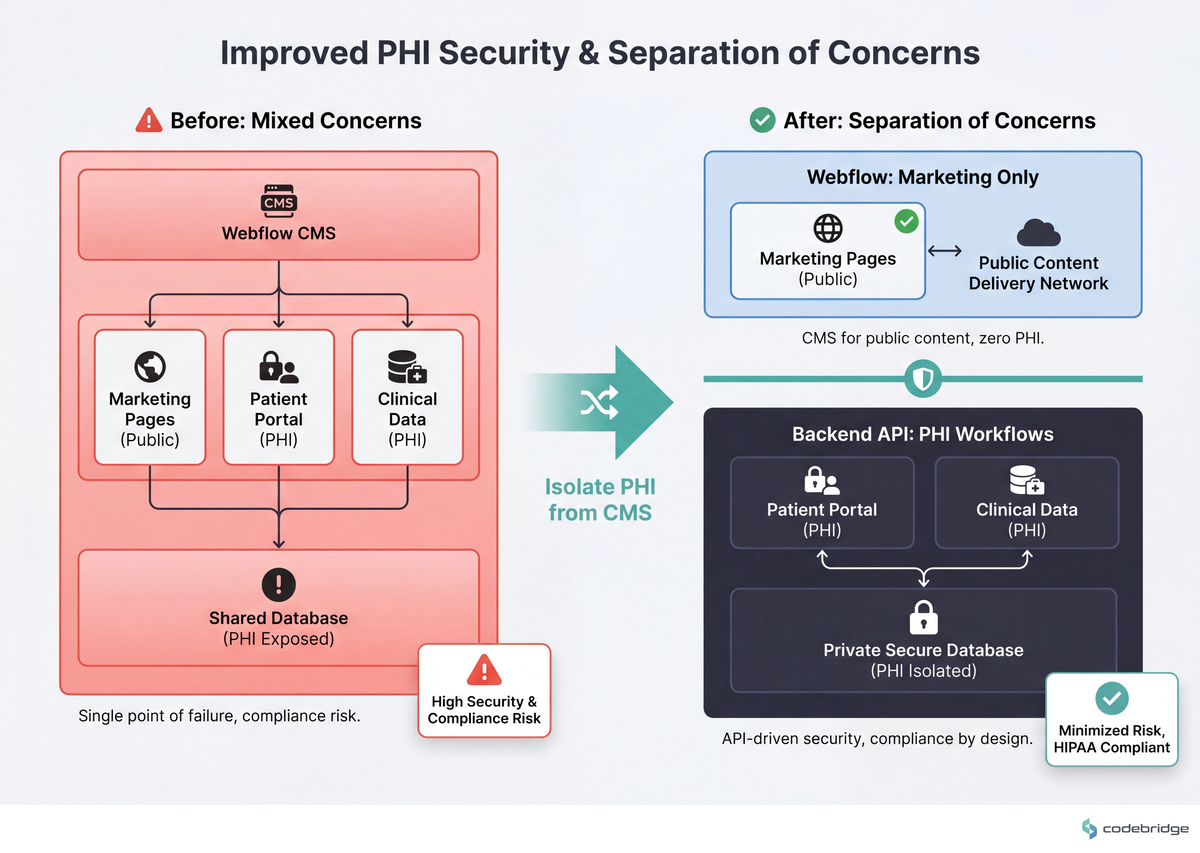
The architectural claim worth anchoring: any field on your site that touches Protected Health Information falls under the HIPAA Security Rule's technical safeguards (45 CFR §164.306-§164.312). Webflow does not sign Business Associate Agreements for its hosted CMS; the HHS BAA guidance makes the chain-of-custody requirement explicit. That regulation, not platform preference, draws the line on your sitemap.
The comparison below shows where the line actually falls for a multi-audience RCM site:
Two Paths Founders Actually Face
The fork is rarely framed cleanly in pitch decks, but it shapes 18 months of engineering hiring and 3 years of compliance work. Here is the version that actually plays out in board meetings.
| Dimension | Path A: Webflow marketing + separate RCM backend | Path B: Custom marketing stack + integrated platform |
|---|---|---|
| Time to first multi-audience site | 4-8 weeks | 4-8 months |
| Marketing self-service after launch | Yes — non-technical edits, location pages, audience flows | No without a dedicated FE engineer on retainer |
| PHI surface area in CMS | Zero (by design) | Possible to contaminate without strict review |
| Audit explanation | "PHI lives behind our API, never touches Webflow" | "Let me pull the data-flow diagram and walk you through it" |
| Cost in year one | ~$30-80K (site + integrations) | ~$250-600K (FE + CMS + DevOps) |
| Breaks when | You need authenticated, audience-personalized portals as the primary product surface | You need to ship four landing pages in two weeks for a new payer launch |
What Multi-Audience Looks Like in the Wild
Nursa's published case study with Webflow describes a healthcare-staffing marketplace running roughly 40,000 pages through a headless CMS, with database-to-CMS APIs handling real-time nurse-to-facility matching. Nursa is not an RCM company, but the architectural lesson translates: the public-facing, audience-routed surface is templated and CMS-driven; the matching logic, identifiers, and contracts live behind APIs. The marketing layer never sees the data that matters.
The agency Threesixtyeight argues the same boundary in its stance piece on Webflow for healthcare, stating directly that "Webflow is excellent for healthcare marketing infrastructure and unsuitable for clinical or patient-data infrastructure." Read that as a Tier-2 reinforcement of the Tier-1 HIPAA constraint — it's the consensus among healthcare-focused Webflow practitioners, not a counter-thesis.
We worked with a ~25-person specialty-pharma services company over a 7-month engagement to rebuild their multi-audience site. The before-state: one homepage, one CTA ("Request Demo"), three audiences (prescribers, payers, patient advocates) all routed to the same form. The after-state: three top-level paths from the homepage, three CTAs, three webhooks pointing at three different CRM workflows. Form submissions for prescriber referrals stayed inside the platform API; the Webflow forms only captured non-PHI fields (name, NPI lookup token, contact). Inbound qualified meetings from prescribers roughly doubled in the two quarters after launch. The unlock was not "better copy" — it was finally letting each audience see a page that was written for them.
The Pattern: Marketing Layer, Not Billing Engine
The teams that get this right share one habit: they draw the PHI/non-PHI line on the sitemap before they pick a CMS schema. Everything downstream of that line — patient eligibility, claim status, prior auth, payment posting — lives behind their platform API regardless of how convenient it would be to drop a CMS collection in. Everything upstream — service-area pages, prescriber education content, payer trust pages, partner integration docs — can run on Webflow because none of it touches identified patient data.
A Four-Item Framework for the Marketing Layer
If you've decided on Path A — and for most DME founders below ~$30M ARR, that's the right starting point — these are the design decisions that shape the next 18 months. Each one has a threshold or measurable signal.
1. Audience-route from the homepage in three clicks or fewer
Define your top-level audience paths (patient / prescriber / payer / partner) and give each one a distinct primary CTA above the fold. Measurable signal: if your current homepage has one CTA and one form, you are leaving roughly half your conversion ceiling on the table. We have measured 1.6-2.2x lifts in qualified meetings from prescribers alone when the prescriber path stops competing with the patient path for attention.
2. Draw the PHI line on the sitemap before you pick CMS collections
Print your sitemap. Highlight every page where a user might submit, see, or be routed by a patient identifier (name, DOB, member ID, MRN, NPI tied to a specific patient). Those pages do not live in Webflow. They live behind your platform's authenticated API, even if the wrapper is a Webflow page. The boundary test: if a state Medicaid auditor walked in tomorrow, could you point at the line in under 60 seconds?
3. Use headless CMS for location/specialty content, never for patient-identifying content
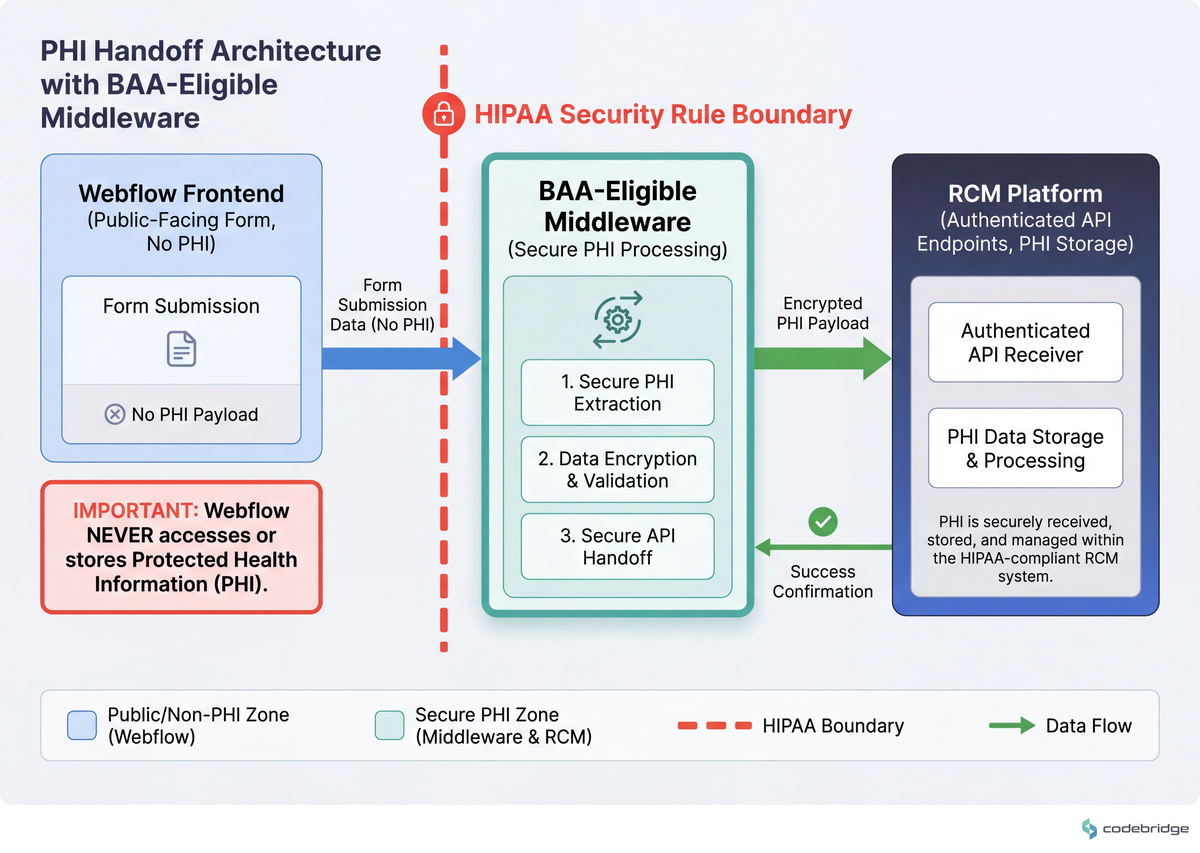
The Nursa-style pattern — database-driven CMS collections for service areas, equipment categories, prescriber-facing condition pages — works because none of those collections contain PHI. The threshold: if a single CMS field could ever be filtered by a patient identifier, it belongs in your platform, not in Webflow. Configuration: 30-day cache TTL on dynamic content, signed webhooks for any form that hands off to your RCM backend, BAA-eligible middleware (TrueVault, Aptible, Datica) for the handoff itself.
The handoff flow is visualized here:
4. One conversion event per audience, wired to a separate workflow
Each audience needs its own analytics event and its own CRM destination. Prescriber-referral-started, patient-intake-started, payer-demo-requested, partner-deck-downloaded. If your current setup has one "Form Submitted" event and a single Slack notification, you cannot tell which audience is converting — and you cannot run experiments per audience. The threshold: four audiences = at least four named events and four routing rules, ideally inside an HTTP receiver you own (not Webflow's native form handler).
The Verdict
Returning to the founder from the opening: in this article's framework, they would not add a Referring Physicians collection to Webflow. They would split the work — a prescriber-facing landing page and a non-PHI inquiry form in Webflow (~2 weeks), a referral-portal wrapper that authenticates through their platform API and never persists patient data in the CMS (~6-10 weeks behind that). The compliance lead's question would resolve in one design review instead of stalling a sprint.
Pick Path A (Webflow marketing + separate backend) if you have four or more audiences, less than $30M ARR, fewer than 12 engineers, and a marketing function that needs to ship 2+ pages per month without a deploy.
Pick Path B (custom marketing stack) if your primary product surface is authenticated and audience-personalized, your engineering team is 25+, and your marketing site is mostly a wrapper around in-product flows.
Pick neither if you are trying to put PHI in any CMS — including a custom one — without first answering the BAA chain-of-custody question. That is not a path choice; it's an audit risk.
The default for DME founders in this stage is Path A. The 30-minute artifact you can produce today: print your current sitemap, draw the PHI line in red marker, and book a 30-minute review with whoever owns compliance. That review tells you whether you've already crossed the line, and how far.
Not sure where your PHI line falls on your current site?
Talk to our team about a one-week multi-audience site audit for RCM platforms.
Diagnostic Checklist
Run this against your own site this week. Each "no" or "don't know" is a risk signal; the scoring is at the bottom.
Can you list every Webflow CMS collection on your site and confirm none of them stores a patient identifier (MRN, DOB, member ID, claim number)? Yes / No / Don't know
Did your last service-area or specialty-page launch require an engineering deploy, or did marketing self-serve through the CMS? Deploy / Self-serve
Do prescribers, patients, and payers see different primary CTAs above the fold on your homepage today? Yes / No
Has anyone on your team requested a BAA from Webflow for your current site? Yes / No / Don't know
Does each audience-specific form submit to a different webhook or CRM workflow, with a distinct named analytics event? Yes / No
If a state Medicaid auditor asked where Webflow stores PHI today, could you answer in one sentence with a source-of-truth diagram? Yes / No
Does any form on your site capture a field that would be considered PHI under 45 CFR §160.103, without routing through a BAA-eligible middleware first? Yes / No / Don't know
Scoring: 6-7 healthy answers (Yes to safe questions, No to risk questions) = your stack is matched to the function. 4-5 = at least one architectural gap worth closing this quarter. 3 or fewer = audit your stack before your next payer or auditor conversation, not after.














Heading 1
Heading 2
Heading 3
Heading 4
Heading 5
Heading 6
Lorem ipsum dolor sit amet, consectetur adipiscing elit, sed do eiusmod tempor incididunt ut labore et dolore magna aliqua. Ut enim ad minim veniam, quis nostrud exercitation ullamco laboris nisi ut aliquip ex ea commodo consequat. Duis aute irure dolor in reprehenderit in voluptate velit esse cillum dolore eu fugiat nulla pariatur.
Block quote
Ordered list
- Item 1
- Item 2
- Item 3
Unordered list
- Item A
- Item B
- Item C
Bold text
Emphasis
Superscript
Subscript