In today's digital landscape, users interact with applications across a multitude of devices and platforms, from smartphones and tablets to desktops and wearables. Designing for a seamless user experience (UX) across these diverse platforms presents a significant challenge. One of the primary considerations in this context is the balance between maintaining consistency and embracing platform specificity. This article explores the nuances of cross-platform design, examining the importance of consistency and the value of tailoring experiences to the unique characteristics of each platform.

Understanding Cross-Platform Design
Cross-platform design refers to the practice of creating user experiences that work across multiple devices and operating systems. The goal is to ensure that users can seamlessly transition between different platforms while maintaining a coherent experience. This approach requires a deep understanding of both the commonalities and differences between platforms, as well as the needs and behaviors of users.
The Importance of Consistency in Cross-Platform Design
Brand Identity and Recognition
- Unified Brand Experience: Consistency in design helps to reinforce brand identity across different platforms. When users encounter familiar elements such as logos, colors, typography, and layout structures, they develop a stronger connection with the brand.
- User Confidence: A consistent design builds user confidence. Familiarity with the interface elements and navigation patterns reduces the learning curve, making it easier for users to interact with the application across different platforms.
Usability and User Experience
- Predictable Interactions: Consistent design patterns ensure that users know what to expect, regardless of the device they are using. Predictable interactions lead to a smoother user experience and reduce frustration.
- Efficiency: When users can transfer their knowledge from one platform to another, they can perform tasks more efficiently. This transferability is especially important for applications that users access frequently across multiple devices.
Reducing Cognitive Load
- Simplified Decision-Making: Consistent design reduces the cognitive load on users by simplifying decision-making processes. Users do not have to relearn how to navigate the application on different platforms.
- Enhanced Focus: By minimizing differences in design, users can focus on the content and functionality of the application rather than adjusting to new interfaces.
The Case for Platform Specificity
Leveraging Platform Strengths
- Native Capabilities: Each platform has unique capabilities and design conventions. By tailoring the design to leverage these native features, designers can create more intuitive and efficient user experiences. For example, iOS and Android have distinct navigation patterns and gestures that users are accustomed to.
- Optimized Performance: Platform-specific design can optimize performance and responsiveness. Applications that adhere to the guidelines and standards of a particular platform tend to run more smoothly and efficiently.
Meeting User Expectations
- Platform Familiarity: Users have specific expectations based on the platform they are using. An iOS user expects certain interactions, such as swipe gestures and tab bars, while an Android user may look for navigation drawers and floating action buttons. Meeting these expectations is crucial for user satisfaction.
- Contextual Relevance: Tailoring the design to the context in which it will be used can enhance usability. For instance, a wearable device may require a different interaction model than a desktop application due to the constraints and capabilities of the device.
Enhancing Accessibility
- Platform Accessibility Features: Each platform provides unique accessibility features that can improve the user experience for individuals with disabilities. By designing with these features in mind, applications can be more inclusive and accessible.
Balancing Consistency and Platform Specificity
Establishing a Core Design System
- Design Principles and Guidelines: A core design system establishes fundamental principles and guidelines that ensure consistency across platforms. This system includes elements such as color schemes, typography, iconography, and spacing.
- Reusable Components: Developing a library of reusable components that adhere to the core design system can streamline the design process and maintain consistency. These components can be adapted to fit the specific requirements of each platform.
Adapting to Platform Conventions
- Platform-Specific Adjustments: While the core design system provides a foundation, it is essential to make platform-specific adjustments to align with native conventions. For example, adjusting navigation elements to match the expected patterns of each platform can enhance usability.
- Contextual Adaptations: Consider the context in which the application will be used and adapt the design accordingly. For instance, a mobile version of a web application may prioritize touch interactions and simplified layouts, while the desktop version may leverage keyboard shortcuts and more complex layouts.
User-Centered Design
- User Research: Conducting user research to understand the preferences, behaviors, and pain points of users on different platforms is crucial. This research informs design decisions and helps balance consistency with platform specificity.
- Iterative Testing: Continuous testing and feedback loops ensure that the design meets user expectations and provides a seamless experience across platforms. Iterative testing allows for adjustments based on real user interactions.
Case Studies in Cross-Platform Design
Airbnb
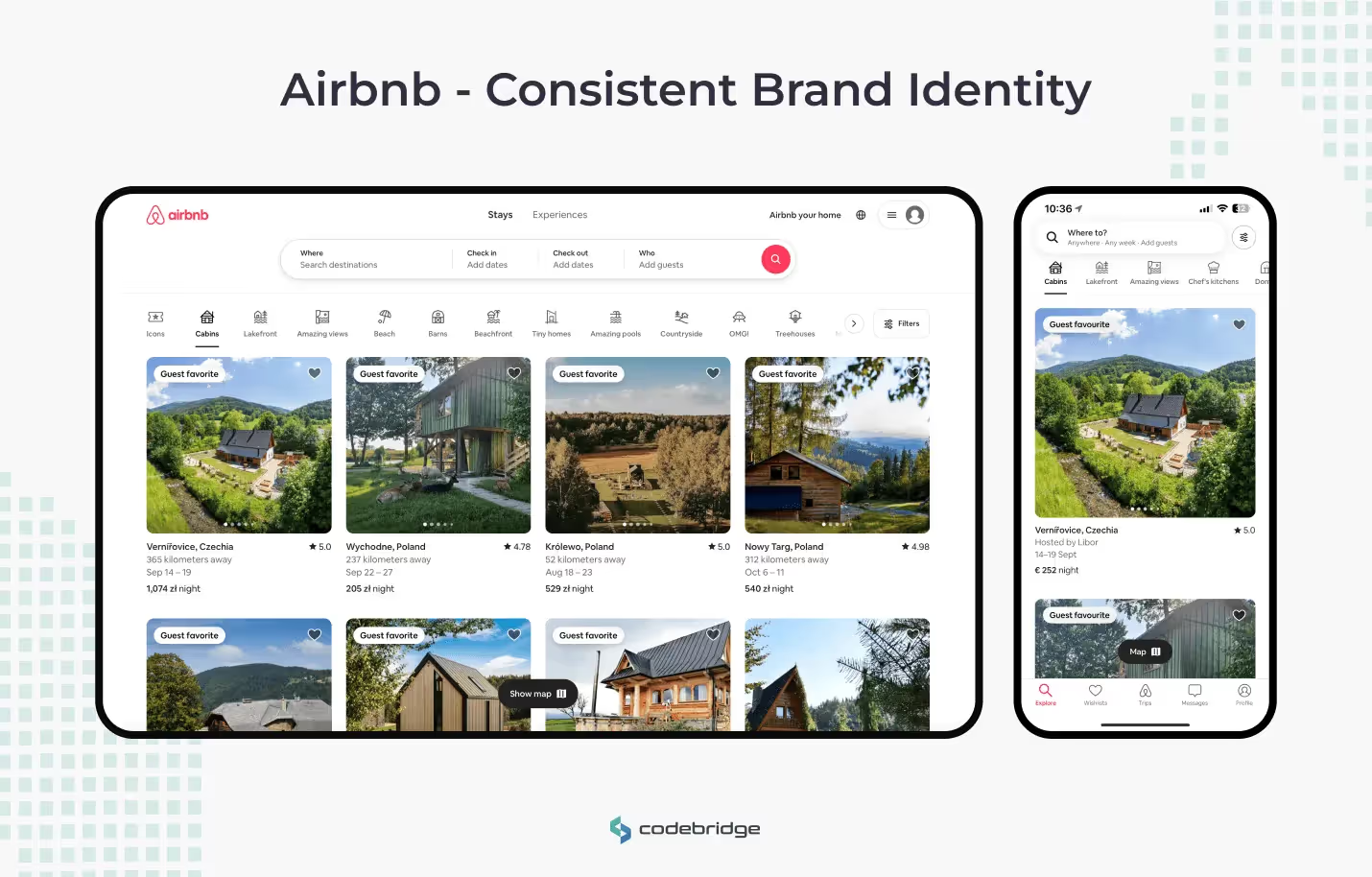
- Consistent Brand Identity: Airbnb maintains a consistent brand identity across its mobile and web applications. The use of a unified color palette, typography, and iconography ensures a coherent experience.
- Platform-Specific Interactions: Despite the consistency, Airbnb adapts its design to leverage platform-specific features. For example, the mobile app utilizes native navigation patterns and gestures, while the web version takes advantage of larger-screen real estate for more detailed listings.
Slack
- Unified User Experience: Slack provides a unified user experience across desktop, mobile, and web platforms. The core design elements, such as colors, icons, and layout structures, are consistent across all platforms.
- Contextual Adaptations: Slack adapts its interface to suit the context of each platform. The mobile app prioritizes touch interactions and streamlined navigation, while the desktop version offers more advanced features and keyboard shortcuts.

Best Practices for Designing Cross-Platform User Experiences
Prioritize User Needs
- User-Centered Approach: Focus on the needs, preferences, and behaviors of your users. Conducting user research and testing helps to understand how users interact with your application on different platforms.
- Inclusive Design: Consider accessibility from the outset. Ensure that the design is inclusive and caters to users with diverse abilities and preferences.
Develop a Flexible Design System
- Modular Components: Create a modular design system with reusable components that can be adapted to different platforms. This approach maintains consistency while allowing for platform-specific customizations.
- Scalable Design: Design for scalability, ensuring that the application can evolve and adapt to new devices and platforms.
Embrace Platform Guidelines
- Native Guidelines: Familiarize yourself with the design guidelines and best practices of each platform. Adhering to these guidelines enhances usability and aligns with user expectations.
- Customization Balance: Find a balance between customization and adherence to platform conventions. Customize where necessary to meet specific needs, but avoid deviating too far from established patterns.
Continuous Improvement
- Iterative Design: Adopt an iterative design process, continuously testing and refining the user experience. Regular updates and improvements ensure that the application remains relevant and effective across platforms.
- User Feedback: Actively seek and incorporate user feedback. Understanding user pain points and preferences helps to make informed design decisions.
Creating a seamless user experience means blending consistency with platform specificity, crafting an intuitive journey for users across all devices.
Conclusion
Designing for cross-platform user experiences requires a delicate balance between maintaining consistency and embracing platform specificity. Consistency reinforces brand identity, reduces cognitive load, and enhances usability, while platform specificity leverages native capabilities, meets user expectations, and optimizes performance. By establishing a core design system, adapting to platform conventions, and prioritizing user needs, designers can create seamless and engaging experiences across multiple platforms. Through continuous improvement and a user-centered approach, organizations can navigate the complexities of cross-platform design and deliver exceptional user experiences.
FAQ
What does cross-platform user experience design mean?
Cross-platform UX design focuses on delivering a cohesive user experience across multiple platforms such as web, iOS, Android, and desktop. The goal is to ensure usability and brand consistency while respecting platform differences.
Why is consistency important in cross-platform design?
Consistency helps users recognize the product, understand interactions quickly, and move between platforms with minimal learning effort. It builds trust and reinforces brand identity.
What is platform specificity and why does it matter?
Platform specificity means adapting design patterns to align with native platform guidelines and user expectations. This ensures interfaces feel natural and intuitive on each platform.
How can designers balance consistency and platform-specific design?
Designers can maintain consistent core elements such as branding, terminology, and user flows while adjusting navigation patterns, gestures, and UI components to match each platform.
What are common mistakes in cross-platform UX design?
Common mistakes include forcing identical layouts across platforms, ignoring native behaviors, and overlooking accessibility standards. These issues can lead to poor usability and user frustration.
What tools or frameworks support cross-platform UX design?
Design systems, component libraries, and cross-platform frameworks help maintain consistency. Prototyping and usability testing on each platform ensure designs meet user expectations.














Heading 1
Heading 2
Heading 3
Heading 4
Heading 5
Heading 6
Lorem ipsum dolor sit amet, consectetur adipiscing elit, sed do eiusmod tempor incididunt ut labore et dolore magna aliqua. Ut enim ad minim veniam, quis nostrud exercitation ullamco laboris nisi ut aliquip ex ea commodo consequat. Duis aute irure dolor in reprehenderit in voluptate velit esse cillum dolore eu fugiat nulla pariatur.
Block quote
Ordered list
- Item 1
- Item 2
- Item 3
Unordered list
- Item A
- Item B
- Item C
Bold text
Emphasis
Superscript
Subscript