Customer service is becoming a place where AI does more than wear a label. The work is high-volume, heavy with repetitive questions, and under constant cost pressure. A function like that looks built for automation.
The market has already placed its bet. In June 2026, Salesforce agreed to acquire Fin, the customer agent company formerly known as Intercom, for roughly $3.6 billion in a deal expected to close in early 2027. Fin's agent already resolves close to 76% of support volume without a human. When the CRM market leader spends that kind of money on a support agent, it is telling you where the first wave of enterprise agents will land.
The research points the same way. Deloitte's 2026 State of AI in the Enterprise report, built on a survey of 3,235 leaders across 24 countries, names customer support as the function where leaders expect agentic AI to have its highest impact. The same study found that only one in five organizations has a mature governance model for the agents they are already deploying.
Hold those two facts together. The function with the most expected upside is also the function where most companies are flying without instruments.
The rest of this guide closes that gap. It defines the category, walks the highest-value use cases and where they create risk, shows how to tell whether your business is ready, and explains how to measure whether any of it paid off.
What Are Customer Service AI Agents?

A customer service AI agent is an AI system that understands a customer request, draws on company knowledge and customer data, works with business tools, takes or prepares a support action, and hands off to a human when needed.
IBM describes an AI agent as a system that performs tasks on a user's behalf by designing its own workflow and using the tools available to it. In support, that workflow is a support process: read the account, check the policy, decide the next step, then either resolve the ticket or route it to the right person.
This is what separates an agent from a help-center bot. An FAQ bot matches a question to a stored answer. An agent reasons over context. It can detect intent, pull a customer's order history, confirm a subscription status, summarize a long ticket thread, apply a refund policy, and, in some setups, complete an approved action inside another system.
The word agent signals a system trying to complete a goal inside a workflow, not one returning a block of text. That single shift is the source of most of the value in this category, and most of the risk.
3. Customer Service AI Agent vs Chatbot vs Agent Aassist
Three things get lumped together under "support AI," but they are not the same tool. The distinction matters because each one carries a different level of business responsibility. The table below separates them.
Chatbots are still useful. They answer a known question fast and cheap, and for a high-traffic help center that is worth a lot. They are also shallow, and they cannot follow a process that branches across systems.
Agent assist is often the safer first move for companies with complex or sensitive support, because the human stays in the loop on every decision. The agent drafts, summarizes, and suggests. The person approves and sends. You get speed without handing over judgment.
A full customer service AI agent earns its place when it can connect three things a chatbot cannot touch: live customer context, company policy, and a support action it can prepare or complete.
Trouble starts when a company asks chatbot-level architecture to carry agent-level responsibility, like approving refunds or making a commitment a customer will hold you to, and then wonders why the system invents a policy that does not exist.
4. Common Customer Service AI Agent Use Cases
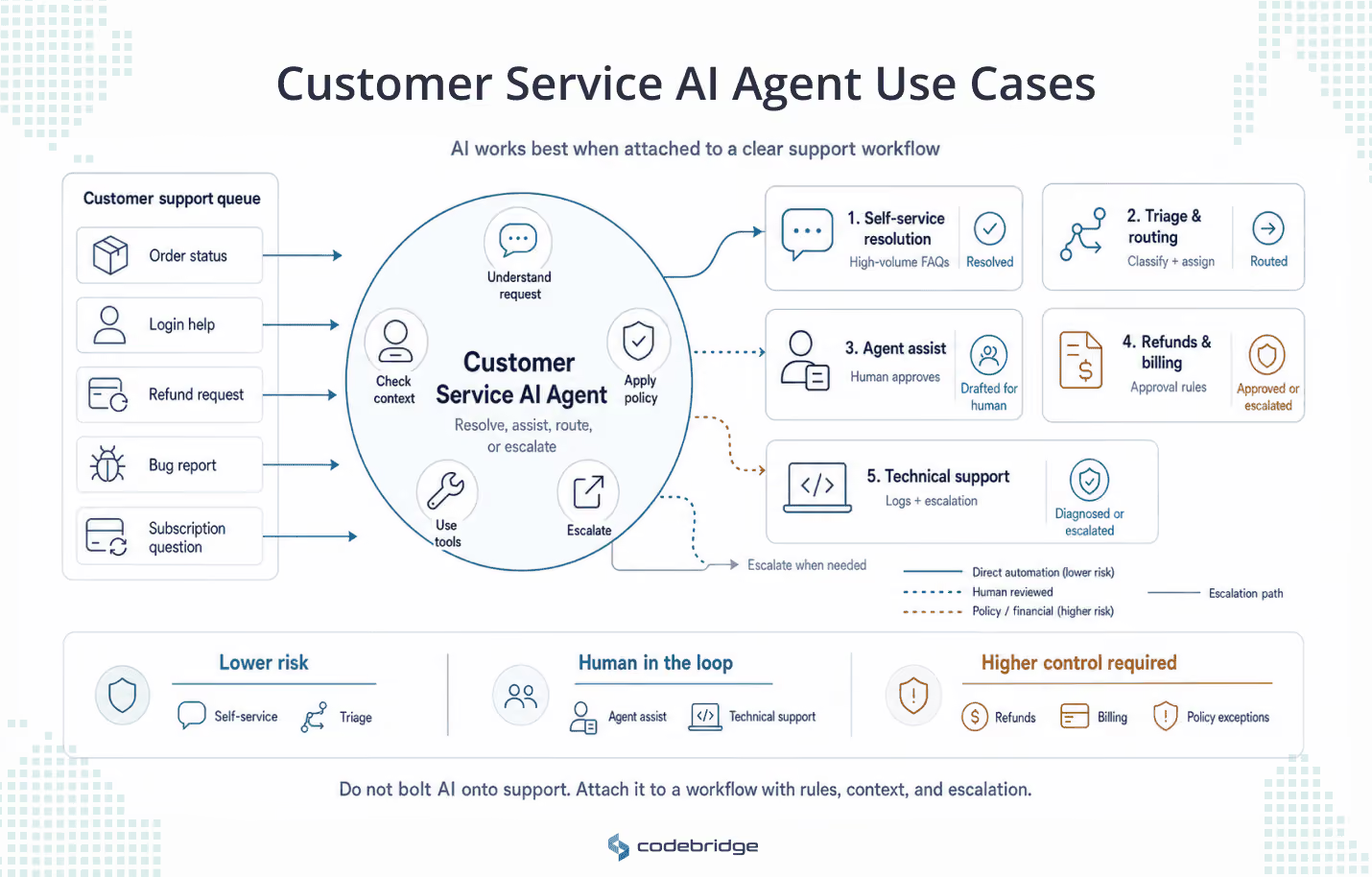
Customer service AI agents are becoming one of the most popular places to deploy AI, and they are also where many companies make the first mistake. They bolt AI onto a helpdesk, connect it to a knowledge base, and expect the backlog to disappear. More often it just creates a faster way to deliver incomplete answers.
These agents work best when they sit on a clear workflow. The agent needs to know what it is solving, what information it can trust, what systems it can reach, what action it can take, and when it must hand the case to a human. The use cases below are the ones where that pays off.
4.1 Self-service resolution
This is the entry point most companies reach for first, with good reason. The agent handles the high-volume, low-stakes requests that fill a support queue: order and delivery status, account and subscription questions, password and login help, product setup, returns eligibility, the same forty questions a team answers a thousand times a week. The requests repeat, the answers live in a knowledge base, and a wrong answer rarely costs more than a follow-up message.
How to implement it:
- Connect the agent to a current, deduplicated knowledge base and retrieve answers from it rather than letting the model improvise.
- Ground every response in an approved source, and have the agent admit it does not know, then escalate, when it cannot find one.
- Set a confidence threshold below which the agent hands off instead of guessing.
- Design the handoff to carry full context, so the customer never re-explains the problem to the human who picks it up.
- Start with a narrow set of intents, measure, then widen.
When to start here: you have real volume of repetitive questions, a knowledge base worth trusting, and clear escalation rules. If the knowledge base is stale or self-contradictory, fix that first. The agent will scale whatever is in it.
The reference case, for both its success and its correction, is Klarna. In February 2024 the fintech announced that its OpenAI-powered assistant had, within a month, handled about two-thirds of its customer service chats, roughly 2.3 million conversations, work the company equated to 700 full-time agents. Klarna reported average resolution time falling from 11 minutes to under 2, a 25% drop in repeat inquiries, customer satisfaction on par with human agents, support across more than 35 languages, and a projected $40 million profit improvement for the year. It became the most-cited proof point in enterprise support AI.
The second chapter matters more. By May 2025, CEO Sebastian Siemiatkowski told Bloomberg the company had leaned too far on automation, that quality had slipped on harder cases, and that Klarna was hiring human agents again so a customer could always reach a person. This was a scope correction, not a retreat. The AI stayed on the high-volume tier; humans returned for the complex and high-value cases where the model had not held parity. The lesson for anyone starting here is to tune for the quality of the automated subset, not the raw automation rate. An agent that handles 60% of contacts well beats one that "handles" 80% while degrading the cases that decide whether a customer stays.
4.2 Ticket triage and routing
Triage is the safest place to put an agent to work, because it never speaks to the customer and changes nothing. It reads the incoming ticket, works out what it is and how urgent it is, and sends it to the right place with a label attached. A company nowhere near autonomous resolution can run this with little risk.
How to implement it: triage needs a clean ticket taxonomy and a defined set of intents and routing rules before any model touches it. The agent classifies; your existing rules decide where the ticket lands. When the taxonomy is messy, the routing inherits the mess.
When this is the right first step: you have meaningful ticket volume, a backlog that suffers from misrouting and rework, and a team not yet comfortable letting AI answer customers directly. Triage delivers measurable value while the higher-risk use cases are still being designed.
4.3 Agent assist
Agent assist keeps a human in every decision and uses the model to make that human faster: drafting replies, summarizing a long thread, pulling the key facts out of an account, suggesting the next step. Nothing reaches the customer without a person approving it, which is why companies with complex or regulated support often start here instead of with resolution.
The strongest evidence for this pattern comes from a field study. Researchers tracked more than 5,000 customer support agents at a Fortune 500 company as a generative-AI assistant rolled out, and found that access to the tool raised issues resolved per hour by about 14% on average. The gains were uneven. The newest and least-experienced agents improved by around 34%, while the most experienced changed little. The assistant worked by spreading the habits of the best agents to everyone else, and it also improved customer sentiment and lifted agent retention.
How to implement it: surface suggestions inside the tools agents already use, keep the human as the sender, and log which suggestions get accepted, edited, or discarded so the system learns from real behavior.
When to use it: when full automation carries too much risk, when your support is judgment-heavy, or when you want a fast, low-risk win before committing to autonomous resolution. Klarna's eventual hybrid model is this pattern at scale, with AI on the volume and humans on the cases that need them.
4.4 Refunds, returns, cancellations, and billing
Here the agent stops talking and starts touching money, and that changes the risk profile. Explaining a refund policy is low-stakes. Promising one that does not exist is a liability. This is the use case where controlling what the agent is allowed to do on its own becomes essential.
The cautionary example is well documented. Air Canada's website chatbot told a grieving customer he could buy full-fare tickets and claim a bereavement discount retroactively, within 90 days of travel. The airline's actual policy barred retroactive claims. When Air Canada refused the refund, the customer took it to British Columbia's Civil Resolution Tribunal, which in February 2024 found the airline liable for negligent misrepresentation and ordered it to pay about C$812. Air Canada argued the chatbot was a separate entity responsible for its own statements. The tribunal rejected that, ruling that the company was responsible for everything on its website, a static page and a chatbot alike. The bot came down soon after.
The model worked as designed. The control around it did not exist. Air Canada let an agent state policy with no mechanism ensuring the policy was real, and that created a legal obligation the company had to honor. Implement this use case with the controls built in:
- The agent reads and explains policy from a single approved source, never from patterns in old tickets.
- It prepares refund and cancellation requests but finalizes nothing above a set threshold without human approval.
- Exceptions, disputes, and anything touching fraud route to a person by default.
- Every action it takes leaves an audit trail.
When to attempt it: only once policy is centralized and current, the agent's access to billing and account systems is controlled, and escalation thresholds are agreed with finance. Until then, keep the agent at "explain and prepare," not "decide and execute."
4.5 Technical support
Technical support asks more of the agent than any front-of-house use case, because resolving an issue often means reading real system state. A capable technical-support agent collects logs and error messages, asks structured diagnostic questions, checks status and configuration, matches symptoms against a known-issues database, walks the customer through documented fixes, and, when none of that lands, escalates to engineering with the diagnostic context already assembled.
That last step is where the value concentrates. An engineer who receives a ticket with the logs, the reproduction steps, and the ruled-out causes attached starts solving instead of investigating. A wrong answer here costs twice, because it burns the customer's time and an engineer's, so the bar for data quality and system access sits higher than anywhere else on this list.
When to use it: when you have structured product and diagnostic data the agent can read, a maintained known-issues knowledge base, and a clean escalation path into engineering. Without those, the realistic starting point is agent assist for your support engineers rather than a customer-facing technical agent.
5. Where Customer Service AI Agents Create Risk
Everything above is the part that demos well. What follows is the part that decides whether the agent survives contact with real customers. Deloitte's read on the moment is blunt: agentic AI is scaling faster than the guardrails meant to govern it.
The useful thing about these risks is that they are diagnosable. Each one below comes with the same three questions: why it hurts, how to tell whether you already have it, and what to do about it.
The confident wrong answer
Why it's a risk. A human who is unsure hedges, asks a colleague, or says they will check. An agent does not pause. It delivers a wrong answer in the same fluent, assured tone it uses for a correct one, and the customer cannot tell the difference. The damage compounds when the knowledge base feeds it bad input. Two help articles written two years apart say different things, the agent picks one, and a single stale answer reaches thousands of customers before anyone notices.
How to find out if you have it. Sample the agent's transcripts against ground truth, not against customer satisfaction. A high CSAT can sit on top of confidently wrong answers, because customers rate the experience, not the accuracy. Then audit the knowledge base for duplicate and conflicting articles. The contradictions the agent surfaces were usually there before it arrived.
How to mitigate it. Ground answers in a retrieved, approved source and have the agent decline and escalate when it cannot find one. Deduplicate and date the knowledge base so there is one current answer per question. Set a confidence threshold for handoff. Treat the knowledge base as a living system with a named owner, because the agent will only ever be as accurate as what it reads.
Invented policies and commitments
Why it's a risk. When an agent states a refund window, a cancellation term, or a compensation offer, the customer treats it as the company's word, and courts have started to agree. This is the risk behind the Air Canada case in the previous section: the agent stated a policy that did not exist, and the airline was held to it. A made-up promise is worse than a wrong answer. The customer does not shrug it off, and the company either honors the commitment or breaks trust by refusing it.
How to find out if you have it. Look at every place the agent discusses policy, pricing, refunds, or guarantees, and ask where those statements come from. If the source is the model's training or whatever it inferred from old tickets, rather than a controlled policy document, the risk is already live. Test whether a persistent customer can talk the agent into an exception, which reveals whether policy is enforced or only suggested.
How to mitigate it. Pull policy from a single approved source the agent quotes rather than paraphrases, and block it from generating commitments that are not in that source. Anything that creates a financial or contractual obligation moves to the prepare-and-approve path instead of autonomous execution. This is where controlling the agent's authority stops being theory and starts preventing incidents.
Data the agent should never have touched
Why it's a risk. To be useful, the agent needs customer data. Give it too much, or fail to scope what it can reach, and it becomes a privacy and compliance exposure: pulling another customer's record into a reply, surfacing payment details, acting on data it had no business reading. Deloitte found that leaders deploying these systems rank data privacy and security as their top AI concern, and support agents sit closer to sensitive customer data than almost any other deployment.
How to find out if you have it. Map what the agent can reach against what each task requires. If it holds broad, standing access to customer records "just in case," the scope is too wide. Check whether access is tied to the authenticated customer in the conversation, or whether the agent can pull any record it is asked about. Review logs for retrievals that were never needed to answer the question in front of it.
How to mitigate it. Tie data access to identity and access management, scoped to the task and the verified customer. Grant the narrowest read the agent needs and nothing standing. Mask sensitive fields it does not require. Log every retrieval so an over-broad query shows up in monitoring instead of in a breach notice.
Escalation that fires too late, or never
Why it's a risk. The handoff is where agents fail in the way customers remember. Escalate too late and an angry customer repeats themselves through three rounds of unhelpful replies before reaching a person. Refuse to hand off at all and the customer is trapped in a loop, and a small problem becomes a churn event and a public complaint. Part of Klarna's correction traced back to exactly this: quality slipped on the complex cases the AI would not release.
How to find out if you have it. Measure escalation accuracy and timing, not escalation volume. Take the cases that ended in a complaint, a cancellation, or a low rating, and count how many the agent held past the point it should have handed off. Check whether a customer who asks for a human gets one quickly, or gets argued with first.
How to mitigate it. Design escalation as an explicit trigger system rather than a fallback, firing on low confidence, customer anger, repeated failure, legal language, high-value accounts, and any direct request for a person. Give each trigger a destination and a context package so the human starts informed. The goal is to hand off before the customer has to ask twice.
False resolution and hidden rework
Why it's a risk. An agent that closes a ticket has resolved nothing if the customer returns two days later with the same problem. This is the most expensive risk to miss, because it hides inside the metrics meant to prove success. Deflection up and reopen rate up at the same time means the agent is closing tickets, not solving them, and pushing the work downstream where it costs more. Inconsistent answers across chat, email, and phone make it worse, since the customer hears a different story in each channel and opens a fresh ticket for each one.
How to find out if you have it. Watch reopen rate and repeat-contact rate next to deflection and resolution rate, never alone. If automation is up and reopens are up, the resolution numbers are inflated. Trace a sample of "resolved" tickets to see whether the customer got what they needed or gave up in that channel and tried another.
How to mitigate it. Define resolution by outcome, not by ticket closure, and hold the agent to reopen rate as a primary quality metric. Give it consistent knowledge and policy across every channel so the answer does not change with the medium. Tune for the quality of what the agent handles rather than the share it handles, the same lesson Klarna learned in reverse.
No trail when something goes wrong
Why it's a risk. When an agent makes a costly mistake, the first question is what it did and why. If the system cannot answer that, you cannot fix the cause, defend the decision, or show a regulator or a customer what happened. An agent running without an audit trail is an unmonitored process making decisions that spend money and shape the brand, and the gap only shows up at the worst possible moment.
How to find out if you have it. Take a real past interaction and try to reconstruct it end to end: what the agent read, which sources it used, what it decided, what action it took, and where a human stepped in. If you cannot assemble that from logs, the trail does not exist. Ask whether you could explain a specific agent decision to a customer or an auditor a month later.
How to mitigate it. Log the agent's inputs, retrievals, decisions, actions, and handoffs as a first-class part of the build. Bolt it on afterward and the trail has gaps exactly where you need it. Surface failures, overrides, and reopened tickets on a monitoring dashboard so problems appear there instead of in a complaint. On a system that can spend money and shape the brand, monitoring is part of running it.
None of these is an argument against AI in support. Each is an argument for designing the operation before switching it on. The same three questions run through every one: what the agent is allowed to know, what it is allowed to do, and when it has to stop. The next section turns those questions into a readiness check you can run before you build.
6. When Customer Service AI Agents Are Worth Implementing
A customer service AI agent costs real money, engineering time, and operational risk, and not every company is positioned to earn that back yet. The table below is built to be read against your own situation, so a leader can see quickly whether the conditions are in place or whether building one now would burn budget on a system the business is not ready to support. If most of your reality sits in the right-hand column, the smart move is to fix those conditions first, not to launch.
The right column is a to-do list, not a verdict. None of those conditions is permanent. A company with outdated policies and a messy ticket taxonomy can still get real value from an agent, once it fixes the policies and the taxonomy.
7. How to Measure ROI From Customer Service AI Agents
The prize is real. Gartner projected that by 2026, conversational AI in contact centers would cut agent labor costs by $80 billion, and that the saving would land even though only about one interaction in ten is automated, up from roughly 1.6% in 2022. A small automation rate moves such large numbers because labor runs as high as 95% of a contact center's cost. Take work off agents and you move the biggest line on the page.
That aggregate figure is not your ROI. Your ROI depends on your volume, your cost per contact, and which kind of value the agent produces for your business. Sometimes that value is cash saved. Sometimes it is time freed. Sometimes it is revenue protected or a costly mistake avoided. Calculating it honestly takes five steps.
Step 1: Set the baseline
You cannot prove an improvement without a clear "before." Capture these for the 60 to 90 days ahead of any rollout, broken down by channel and by intent, since the agent will perform very differently across them:
- Contact volume, split by type
- Fully loaded cost per contact, including tools, management, and overhead, not only wages
- Average handle time and first response time
- Self-service or deflection rate
- Reopen rate and repeat-contact rate
- Escalation rate and escalation accuracy
- CSAT or NPS, and churn rate after a support interaction
Without these, every number you report later is a guess dressed as a result.
Step 2: Decide what counts as value
The most common ROI mistake is to count deflected tickets and miss everything else. Value shows up in several forms, and the ones that matter most are rarely the easiest to measure.
Decide which rows apply before you build, because they determine what you instrument and what you optimize for.
Step 3: Run the numbers
The core formula is simple. The discipline is in the inputs.
Net annual value = (cost avoided + time value realized + revenue protected + failures avoided) − (build or license + integration + ongoing evaluation and monitoring + the human tier you keep + rework)
Here is a worked example, with illustrative inputs you would swap for your own. Say a SaaS support team handles 20,000 contacts a month at a fully loaded cost of $8 per contact.
- The agent cleanly resolves 40% of contacts, or 8,000 a month.
- Reopen rate on those runs 6%, so net clean resolutions come to about 7,520.
- Cost avoided: 7,520 × $8 ≈ $60,000 a month, roughly $720,000 a year.
- On the remaining 12,000 contacts, the agent assists human staff. A field study of more than 5,000 support agents found about a 14% gain in issues resolved per hour, concentrated in newer staff. That 14% is capacity, not cash, until the team either grows into it without new hires or is resized.
Notice what the example refuses to do. It does not bank the 8,000 gross resolutions, only the 7,520 that stayed solved. It does not book the agent-assist gain as a saving unless headcount changes. Gross deflection flatters the board deck. Net resolution is the number that pays for the system.
Step 4: Subtract the real cost
Most ROI cases overstate the return by treating the agent as nearly free to run. It is not. Subtract every line:
- Build or platform license
- Integration into CRM, billing, and helpdesk systems, which Gartner pegs at roughly $1,000 to $1,500 per conversational AI flow
- Ongoing evaluation and monitoring, which is continuous rather than a one-time setup
- The human-in-the-loop tier you keep for escalations
- Rework from the errors the agent makes
Then add one cost almost no business case models: the price of unwinding a deployment that went too far. Klarna cut human support hard, then rehired once quality slipped. Recruiting and retraining that capacity cost more than keeping a sensible human tier would have.
Step 5: Track the metrics that expose fake ROI
Once the agent is live, watch the numbers that tell you whether the value is real. Each answers a specific question.
Automation rate alone is not ROI. An agent that resolves tickets which reopen a week later is not reducing work. It is moving the work out of sight and counting it as a win. Reopen rate, override rate, and churn after contact are what separate real resolution from a number that looks good in a board deck.
Two of these carry more weight than the rest: reopen rate and human override rate. A climbing deflection rate next to a climbing reopen rate means the agent is closing tickets, not solving problems. The honest ROI number is always net, measured by outcome, and read against the metrics that catch work being hidden rather than removed.
8. Why Customer Service AI AgentsNneed More Than a Chat Interface
Step back from the mechanics, because the way a company frames this work shapes the result. When a company treats a customer service AI agent as a customer operations system rather than a chat widget, the work changes. The questions become how the agent reads a customer's situation, how it respects business rules, and what trail it leaves for the next person and the next audit.
This is how we approach it at Codebridge. We build customer service AI agents with the discipline of enterprise consulting and the execution speed of a software engineering team. Our roots in the Big Four, at KPMG, show up in how we handle customer-facing AI. We treat it as a governed workflow where customer context, business rules, escalation paths, permissions, and auditability are decided at the start, before the first incident forces the question.
In practice that means mapping the workflow before writing a prompt, defining what the agent is allowed to do before granting access, designing escalation around real risk, wiring the agent into the systems support runs on, and instrumenting it so its behavior stays visible in production. The chat interface is the smallest part of the build. The operations system behind it is the work.
Conclusion
Customer service AI agents can take real, repetitive work off your team and speed up the rest. They do it only when the workflow, data, and integrations are designed before launch, rather than discovered after a customer receives the wrong refund.
Codebridge helps software-driven companies design and build customer service AI agents as governed customer operations systems, with clear workflows, enforceable guardrails, real business-system integration, and ROI you can measure.















Heading 1
Heading 2
Heading 3
Heading 4
Heading 5
Heading 6
Lorem ipsum dolor sit amet, consectetur adipiscing elit, sed do eiusmod tempor incididunt ut labore et dolore magna aliqua. Ut enim ad minim veniam, quis nostrud exercitation ullamco laboris nisi ut aliquip ex ea commodo consequat. Duis aute irure dolor in reprehenderit in voluptate velit esse cillum dolore eu fugiat nulla pariatur.
Block quote
Ordered list
- Item 1
- Item 2
- Item 3
Unordered list
- Item A
- Item B
- Item C
Bold text
Emphasis
Superscript
Subscript