The Short Answer
People search for a Bill.com alternative for three reasons, and all three show up consistently across public reviews: payments held during automated risk review, support that becomes hard to reach at exactly the moment a hold happens, and pricing that stacks per user and per transaction at the same time.
Real alternatives exist, and three of them are worth naming. Tipalti, Stampli, and Ramp each solve a different version of the problem, and each has a shape of business it fits and a shape it doesn't.
The part most pages on this subject omit is that switching platforms does not eliminate the risk that probably brought you here. Every alternative below is a payment business running its own risk engine, with its own hold triggers and its own review timelines that you have no visibility into. Moving platforms changes whose process reviews your money. It doesn't get you out of the process.
Why People Look for a Bill.com Alternative
We noticed that three complaints recur often enough, across enough independent sources, to treat as patterns rather than noise.
1. Payments Held During Risk Review
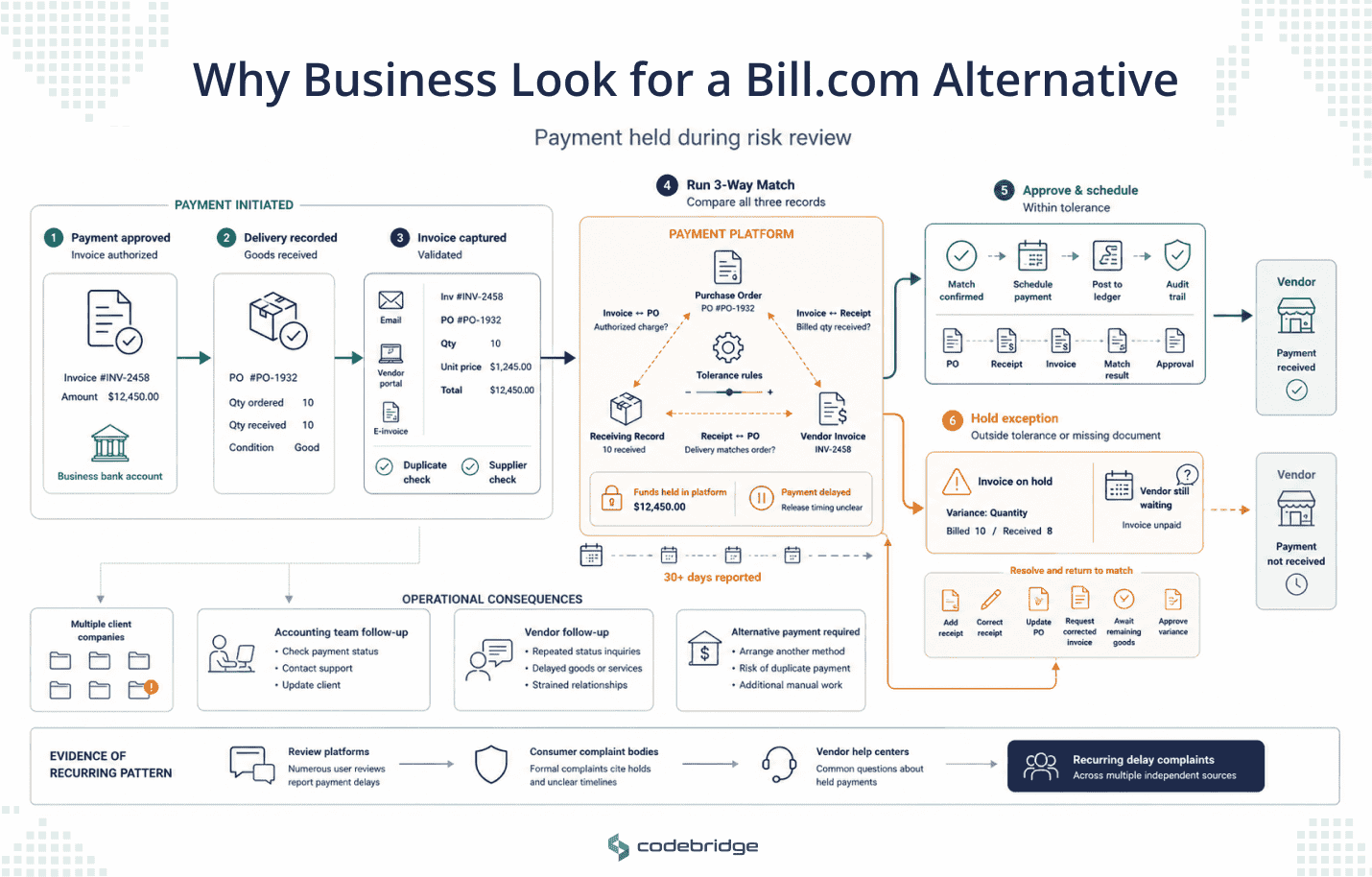
This is the one that generates the strongest reactions. Trustpilot reviews describe accounts frozen without notice for suspected fraudulent activity that turned out to be legitimate, funds held for 30 days or longer, and businesses calling vendors to arrange alternative payment methods while waiting.
Better Business Bureau complaints include one from an accounting firm processing payments for several client companies, describing funds not released after a client had already paid. Bill.com's own help center carries standing articles on why a payment is delayed and what to do when a vendor hasn't received one, which tells you this happens often enough to warrant permanent documentation.
2. Support That's Hard to Reach When it Matters
Slow response and difficulty getting a substantive answer come up across TrustRadius and Trustpilot alike. Complaints tend to describe adequate service during normal operation and a sharp drop the moment something goes wrong.
Bill.com maintains an Office of Executive Escalations that responds to public complaints individually on the BBB, which is a reasonable thing for a company to do and also a signal about where resolution tends to happen.
3. Cost That Compounds From Two Directions at Once
Per-user subscription pricing plus per-transaction fees on every payment method. Neither is unusual on its own. But together they add up faster than the headline seat price suggests, which is why several competitors lead with a flat-rate, unlimited-user pitch aimed squarely at this structure.
Now the balance, because the complaint pattern above is specific. Bill.com holds a 4.4 out of 5 on G2 and an 8.2 out of 10 on TrustRadius across more than 370, with ease of use, document handling, and accounting integrations praised consistently. This is not a broadly disliked product, but it has a specific, well-documented failure mode around holds and the support experience that follows them.
What Bill.com Costs
Verify current rates before making a decision. Pricing in this category moves.
Here is a simple example we calculated to show how the pricing can add up in practice. Using round numbers rather than figures from a real client invoice, a five-user finance team sending 300 ACH payments per month would pay roughly $225 in seat fees and $177 in transaction fees. That brings the estimated cost to about $400 per month, or approximately $4,800 per year, before adding a single check, card payment, or international transfer.
The point is that the two pricing dimensions multiply against each other as you grow, so a cost that looked fine at five users and 100 payments looks different at twelve users and 600. Run the arithmetic with your own numbers before you compare anything.
Three Alternatives Worth Considering
These platforms are not ranked because they are designed around different accounts payable problems. The right choice depends on where the friction sits in your current process.
Tipalti is built for businesses that regularly pay vendors across multiple countries and currencies. It brings payment execution, supplier onboarding, and tax-compliance steps into the same workflow. Its pricing is based on a monthly platform fee with unlimited users rather than a separate charge for every seat, which may be attractive as the finance team grows.
It is a strong fit for businesses with a meaningful volume of international vendor payments. But for a small company paying only domestic suppliers, the platform may provide more functionality and complexity than the process requires.
Stampli is organized around the invoice. Capture, coding, matching, approvals, and the conversations surrounding a particular bill are kept together which gives the finance team a clearer record of what happened and who made each decision.
It is most relevant when the main AP problem is coordination: invoices sitting in inboxes, approvers responding late, and staff struggling to track questions or decisions across email and chat. It is less directly suited to a business whose primary requirement is international payment coverage.
Stampli promotes implementation in days rather than months, but that is a vendor claim that should be validated against the complexity of your own systems and through customer references.
Ramp comes at this from spend management first, pairing corporate cards with bill pay rather than starting from AP and adding cards later.
It is particularly well suited to organizations where card and employee spending represent a large part of the finance team’s workload. A company with high invoice volumes, complex matching requirements, or several layers of AP approval should examine carefully whether Ramp’s workflow depth is sufficient for those needs.
The products differ, but one limitation applies to all three. Each provider still conducts its own risk and compliance reviews under its own policies. Moving to a different platform may change how payments are submitted and managed, but it does not remove the possibility that a payment will be delayed or restricted by the provider.
The Problem Switching Doesn't Solve
Payment holds are not unique to one platform. Companies that move money must comply with anti-money-laundering and fraud-prevention rules, which means they use automated risk systems to review and sometimes delay transactions. Because those controls are intentionally difficult to predict, even legitimate payments can be caught in the process.
Switching providers may change the product experience, but it does not remove this underlying risk. Tipalti, Stampli, Ramp, and similar platforms all operate their own review systems, with their own thresholds and escalation processes. In every case, part of the decision about when a vendor is paid sits outside the customer’s direct control.
From Codebridge’s perspective, that trade-off is acceptable for most businesses. Using established payment infrastructure is usually faster and more economical than building an alternative. However, when supplier continuity is critical, the more important question is which parts of the surrounding workflow, including approvals, payment routing, vendor communication, and contingency planning, should remain under the company’s control so that a delayed payment can be managed rather than simply waited out.
How Codebridge Approaches This
We don't sell a payments platform, which means we have no reason to tell you Bill.com, Tipalti, Stampli, or Ramp is the wrong choice. For most businesses, one of them is right, and if this page has helped you work out which, it's done its job.
What we build is the part none of them cover. We build the workflow around payments that's specific to how your business runs. Exception handling for when a payment gets held and a vendor relationship is on the line. Approval logic that matches your actual authority structure rather than a template. The connective work between your accounting system and whatever platform sits underneath it. We work on your data, alongside your team, and hand over the code, so what gets built belongs to you.
If a payment hold has ever put a real vendor relationship at risk, that's the conversation worth having. Book a 30-minute call and we'll look at where your exposure sits.

















Heading 1
Heading 2
Heading 3
Heading 4
Heading 5
Heading 6
Lorem ipsum dolor sit amet, consectetur adipiscing elit, sed do eiusmod tempor incididunt ut labore et dolore magna aliqua. Ut enim ad minim veniam, quis nostrud exercitation ullamco laboris nisi ut aliquip ex ea commodo consequat. Duis aute irure dolor in reprehenderit in voluptate velit esse cillum dolore eu fugiat nulla pariatur.
Block quote
Ordered list
- Item 1
- Item 2
- Item 3
Unordered list
- Item A
- Item B
- Item C
Bold text
Emphasis
Superscript
Subscript