AI Answer Summary
Automated legal intake covers five stages: first contact, information capture, the conflicts check, engagement, and completing the matter file. Most products on the market address the first two. The stage where mid-market firms lose the most days is usually the last one.
Mid-market law firms have three approaches to automate legal intake. The intake module inside your practice management platform suits firms already on that platform with moderate inquiry volume. A dedicated intake platform suits high-inquiry practices where a faster response converts. A custom build suits firms whose delay sits after capture, or whose conflicts screening has to reach data no product can see.
One sequencing point applies to all three. The conflicts check runs before anyone asks the prospective client for detail about the matter, and the reason is a conduct rule about imputed disqualification rather than a matter of housekeeping.
What Automated Legal Intake Covers, Stage by Stage
Automated intake has five stages.
First contact is the inquiry arriving, by phone, web form, or referral. Information capture is collecting contact details, matter type, and enough facts to decide whether to proceed. The conflicts check screens the prospective client and the adverse parties against your existing and former clients. Engagement covers scope, fee terms, and signature. File completion is the unglamorous work of chasing the documents that turn an inquiry into something a lawyer can act on.
Approach 1: Your Practice Management Intake Module
If your firm already runs a practice management platform, its intake module is the cheapest place to start and often enough.
From this automation, you get forms that feed the matter record directly, e-signature, scheduling, automated reminders, and no duplicate data entry because the platform is already your system of record. For firms running Clio, which is one of the platforms we integrate with, that module is sitting in the subscription tier or available as an add-on.
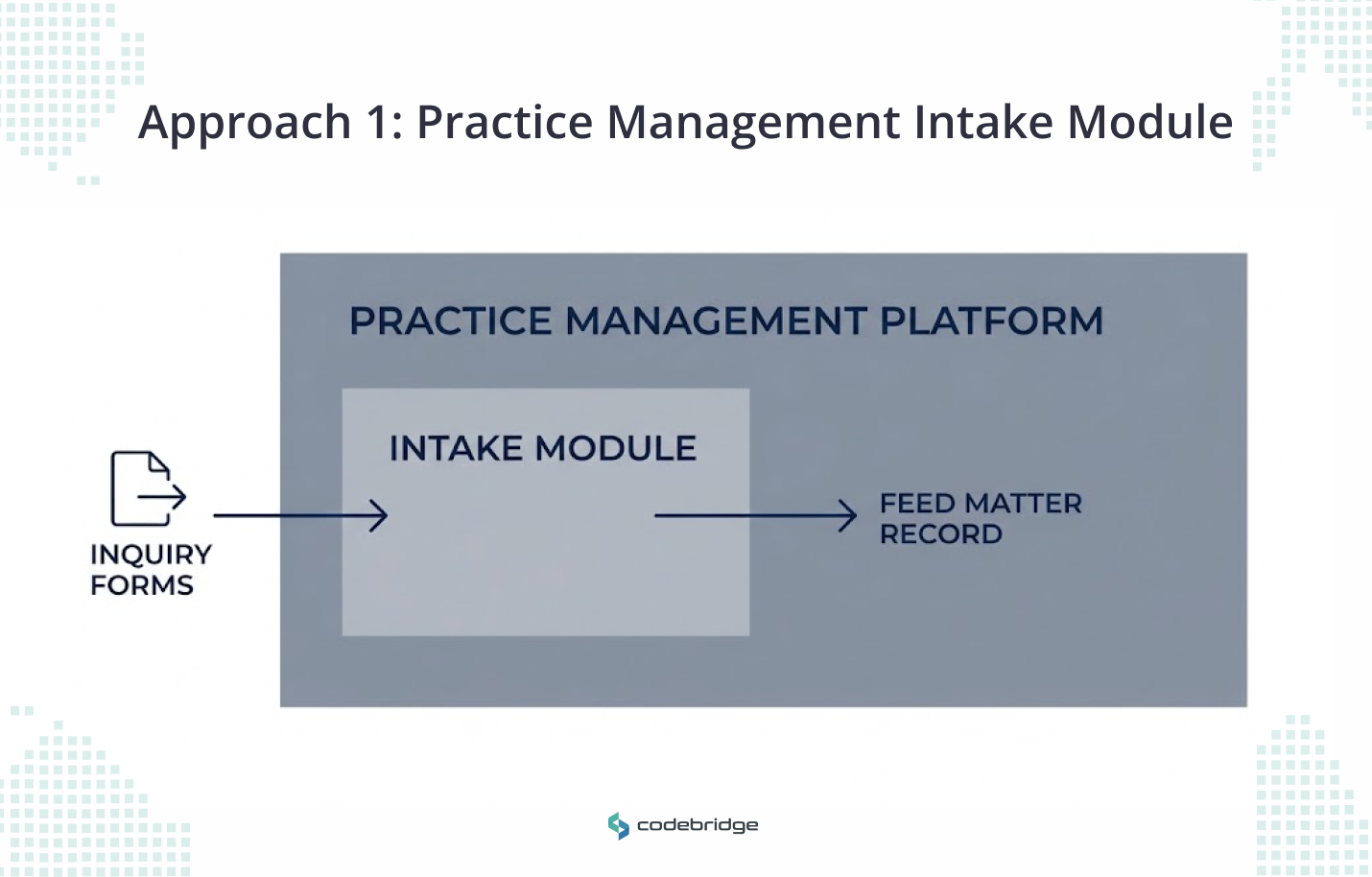
These modules capture and route, but they do not check whether an arriving file is complete, and the conflicts function is usually a name search against the client list rather than a screen across former matters and adverse parties. That distinction matters more than it sounds, and section six explains why.
Best for: firms on a single platform, with moderate inquiry volume and a stable set of matter types.
Cost shape: included in your tier, or a per-seat add-on. Worth knowing before you start comparing: almost nobody in this category publishes a price, so a quote is the only way to find out what you would pay.
Approach 2: A Dedicated Intake Platform
A separate intake platform earns its place when inquiry volume is high enough that response speed changes revenue. Below that threshold, it adds a system without solving a problem.
What the category adds over a module: campaign attribution so you know which marketing produced the inquiry, lead scoring, drip follow-up sequences, call handling, and adaptive questionnaires that branch based on the answers a person gives.
Two cautions, and neither is a criticism of the products.
The first is a category problem. Several tools that appear on legal intake roundups are built for corporate in-house legal departments triaging internal requests, not for firms winning new matters. The two jobs look similar in a feature list, but they are unrelated in practice. Check who the vendor sells to before you book a call.
The second is the adaptive questionnaire, which is the category's headline feature and also the one that collides with a conduct rule. A form that branches deeper based on what someone tells you is a form designed to gather more.
Best for: consumer-facing or high-inquiry practices where answering in minutes rather than hours converts.
Cost shape: per-user monthly, usually with a seat minimum, plus an implementation fee.
Approach 3: A Custom Intake Build
Build when the delay sits after capture, when intake has to cross systems that do not talk to each other, or when the conflicts screen has to reach data no product can see.
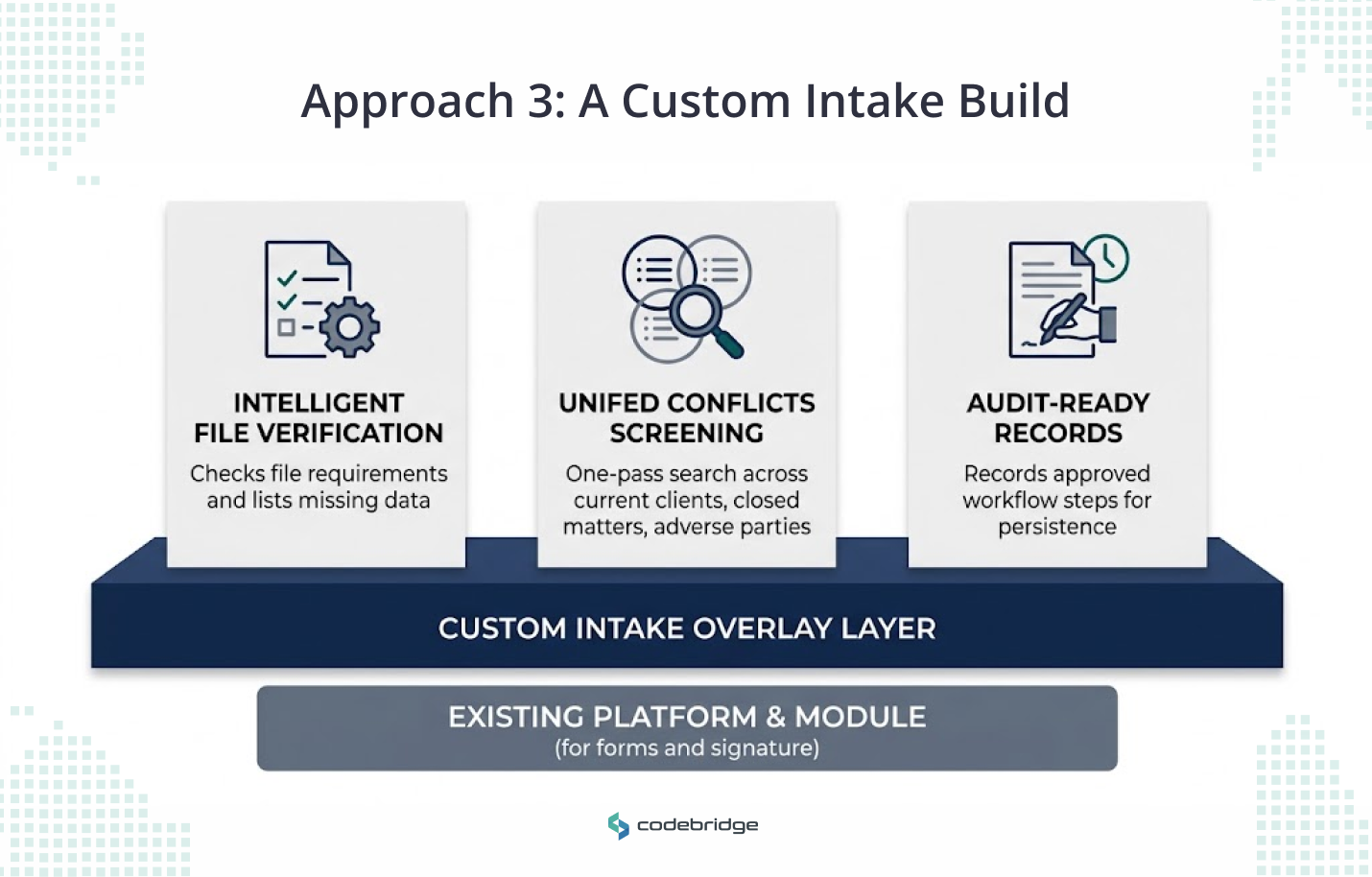
What a build does that the other two approaches do not: it checks an arriving file against what that matter type requires and names what is missing, it screens conflicts across the current client list, closed matters, and adverse parties in one pass, and it records who approved what in a form that survives a future audit.
What it does not do is replace your platform. Most firms we work with keep the module for forms and signatures, and build the layer that sits above it. Anyone selling you a full replacement for a system your staff already knows is selling you a migration you did not ask for.
Best for: firms whose partners are absorbing intake chasing as unbilled time, and firms where a lateral wave or a merger has left the conflicts list unreliable.
Cost shape: a fixed project fee, then optional support.
Timeline: three weeks to a first live workflow.
How to Choose: Criteria, Cost Shape, and Timeline
Pick by where your intake stalls, and ignore feature counts. Here are the questions that separate the three approaches, with what each answer points to.
Here are also four questions that we recommend asking any provider, whether you are talking to a platform vendor or a build shop:
- How does the system behave when someone says they already have a lawyer
- What warnings appear on screen before the form asks about the matter
- What happens to the information if your firm declines the matter
- Whether the system retains inputs, and whether those inputs can surface in someone else's session
On cost, compare shapes rather than numbers. Because a module is a recurring per-seat charge, a platform is a recurring charge plus implementation, and a build is a fixed project cost with optional support afterwards.
Firms routinely put a monthly subscription next to a one-off project fee and conclude the subscription is cheaper, which is arithmetic. Run all three across three years and the picture changes.
Where the Conflicts Check Has to Sit
Run the conflicts screen before anyone, or anything, asks the prospective client for details about their matter. The reason is imputation.
The rule
Under ABA Model Rule 1.18, a person who consults your firm about a possible representation becomes a prospective client and receives confidentiality protection whether or not you take the matter. If a lawyer receives information that could be significantly harmful to that person, the lawyer cannot then act against them in the same or a substantially related matter, and that disqualification can be imputed across the firm.
What limits the damage
ABA Formal Opinion 510 addresses the "reasonable measures" that stop a single lawyer's conflict from spreading firm-wide. The guidance is to ask prospective clients for the minimum information reasonably necessary to decide whether to accept the matter, and to warn them against volunteering more than was requested. Seeking and obtaining information without limitation falls short of the standard. What counts as reasonable is fact-sensitive, so this is a design principle rather than a checklist.
Where this collides with the product
Intake tools sell the opposite instruction. Capture more, qualify deeper, branch the questionnaire on the answers. Run that before a conflicts screen, and your firm accumulates disqualifying information about people it never represented and cannot bill.
Three requirements for anything client-facing
Florida Bar Opinion 24-1, issued in January 2024, is the one US ethics opinion that addresses intake chatbots directly. It is advisory, and it is one state, so treat it as the clearest available thinking rather than as binding authority outside Florida. It says a firm should:
- Tell the person they are communicating with an AI program and not with a lawyer or a firm employee
- Keep the system to gathering factual information, referring legal questions back to a lawyer
- Consider screening questions that stop the conversation if the person is already represented by another lawyer
The opinion makes a further point that should worry anyone with a chatty form on their website. Inviting someone to submit information about a potential representation, without clear warnings limiting the firm's obligations, is likely to have created a consultation. It warns specifically against an "overly welcoming" system that might give advice, fail to identify itself, or omit those warnings, and notes the risk of a relationship forming without the lawyer knowing about it.
One architecture point
A system that retains what users type raises the possibility that a prospective client's information surfaces in a later session. Ask where inputs go, and get the answer in writing, before the form goes live.
Delegation does not shed the duty
Firms cannot escape prospective-client conflicts by routing first contact through non-lawyer staff, because the supervising lawyers remain responsible for work done through others. The same reasoning applies when the first contact is software.
Why the Intake Cycle Is Eight Days
The delay is usually the wait for a file to become workable. One caveat before the breakdown. We could not find a reliable public dataset on intake cycle times in mid-market firms. Every figure we chased traced back to a vendor blog with no study behind it. What follows comes from intake processes we have mapped in engagements, so read it as a working model to test against your own numbers rather than as an industry benchmark.
Take a firm trying to get from eight days to four. The eight days tend to break down like this. Hours, sometimes a day, to first response. Then three or four days waiting on documents the client has not sent, often because nobody told them precisely which ones. Then a partner review that queues behind billable work. Then a conflicts check that happens late, because it needs a party name that nobody has entered yet.
Automating capture compresses the first slice, which is the smallest one. Firms buy a form, watch response time drop from a day to a minute, and find the cycle still runs seven days. That is the most common disappointment in this category, and it is predictable from the arithmetic.
What compresses the rest: a completeness check that gives the client one accurate list of the three missing documents on day one instead of day four, and a conflicts screen that runs on arrival rather than at the engagement letter.
Before you buy anything, count files per month, days per stage, and whose hours those days consume. Without that baseline, no approach can be shown to have worked.
How Codebridge Builds Intake and Conflicts Workflows
We build the layer above the platform. Conflicts screening across the current client list, closed matters, and adverse parties in a single pass. File completeness checking against what each matter type requires, so a client receives one accurate list of what is missing. The approval checkpoint gets designed in during the first conversation, with a record an auditor can read later.
One workflow goes live in three weeks, wired into the systems your firm already runs. Your firm owns the repository, the prompts, and the configuration from day one.
Here is our case study and what it does and does not prove. Knowledge Cloud, which we built for a Big Four tax and legal practice, runs an expert review queue with an immutable audit log, so a senior practitioner approves each answer before the firm acts on it. That is a research platform, not an intake system.
What it demonstrates is the review pattern we apply to conflicts output, which is the part of an intake build that carries the professional risk.
Our founding team spent more than a decade at KPMG, which is where we learned what a partner will and will not sign off on.
If you want to work out which intake stage is costing your firm the most, book a 20-minute call and we will map it with you.

















Heading 1
Heading 2
Heading 3
Heading 4
Heading 5
Heading 6
Lorem ipsum dolor sit amet, consectetur adipiscing elit, sed do eiusmod tempor incididunt ut labore et dolore magna aliqua. Ut enim ad minim veniam, quis nostrud exercitation ullamco laboris nisi ut aliquip ex ea commodo consequat. Duis aute irure dolor in reprehenderit in voluptate velit esse cillum dolore eu fugiat nulla pariatur.
Block quote
Ordered list
- Item 1
- Item 2
- Item 3
Unordered list
- Item A
- Item B
- Item C
Bold text
Emphasis
Superscript
Subscript