AI Answer Summary
Legal document automation means two unrelated things, and the difference decides what a firm should spend money on. The first is generating the documents your firm writes: engagement letters, NDAs, pleadings, leases. The second is processing the documents your firm receives, which arrive from clients, opposing counsel, and third parties, and which fit no template because your firm did not write them.
For the first job, the software category is mature, and buying is usually the right call. For the second, no equivalent product exists at mid-market scale, so firms either configure something heavily or build it.
On accuracy, independent benchmarking in 2025 found that these systems read and summarize documents more completely than a control group of practising lawyers, and still lose to those lawyers on amending documents. Either way, the supervising lawyer keeps the accountability for what leaves the firm.
What Legal Document Automation Means for a Law Firm
There are two jobs that share one term, but most product pages only describe the first. That difference is very important to understand as it decides how the money gets spent.
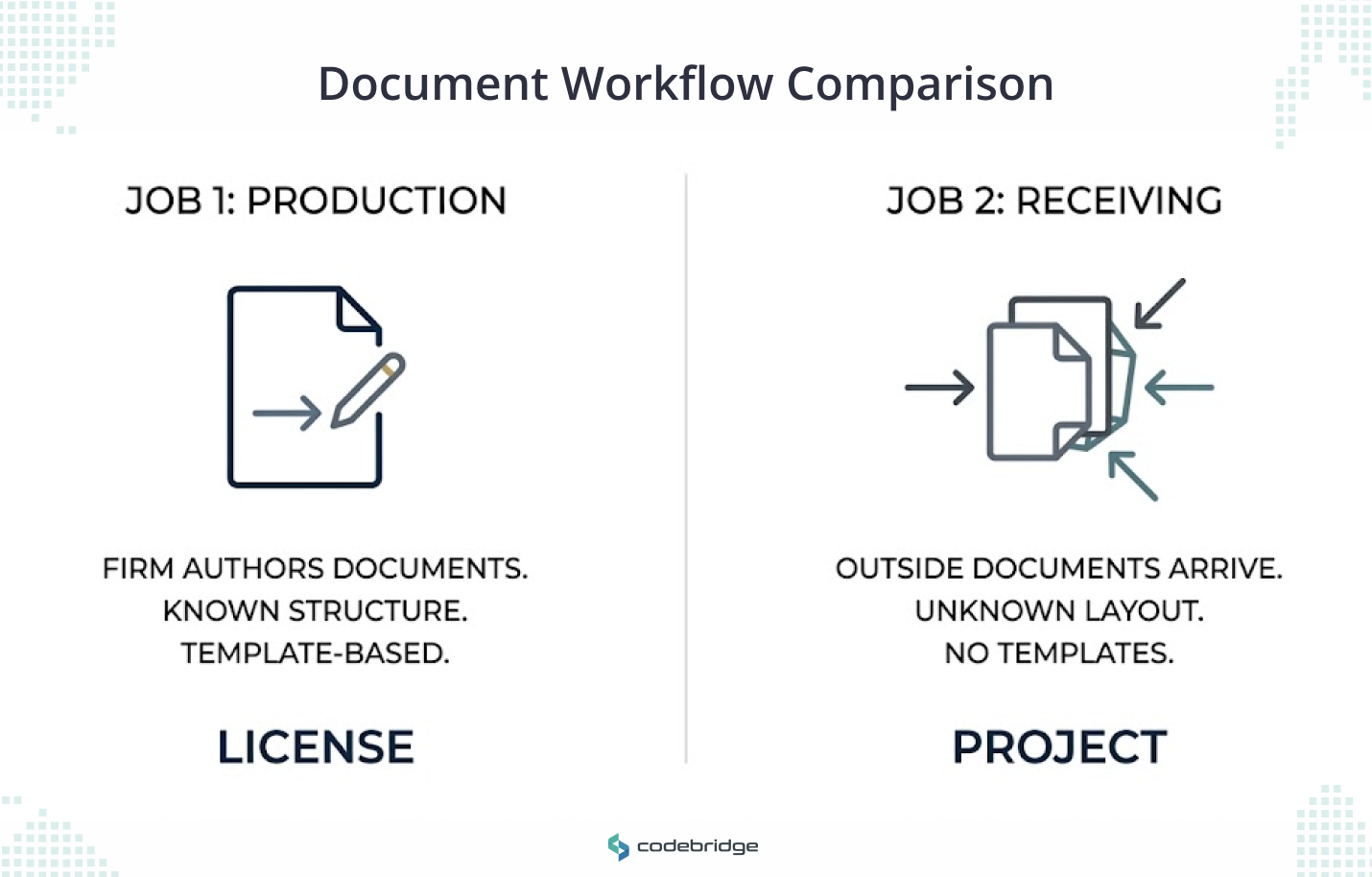
On the production side sit the documents your firm authors. Engagement letters, NDAs, pleadings, estate packets, leases, corporate filings. The structure is known because your firm wrote it. For example, someone fills in a questionnaire and a document comes out.
On the receiving side sit documents that arrive from outside. Discovery productions, client files at intake, opposing counsel's redlines, deposition transcripts, records from a hospital or a bank. Nobody at your firm decided how these would be laid out, which means there is no template waiting to be populated.
The first job is a licence and the second is a project.
Legal Document Automation Software or a Custom Build: How to Choose
Buy when your firm authors the document and the format holds steady. Build when the document arrives from outside, crosses more than one system, or needs a recorded lawyer sign-off before it goes anywhere.
Here are the criteria behind them, so you can check them against your own matters.
Software suits firms whose bottleneck is drafting throughput across a stable set of document types. A build suits firms whose bottleneck is an inbound queue that partners are quietly absorbing as write-downs.
We also prepared four questions that are worth settling before you commit to either route, and they come up in every engagement we run:
- Who approves the output before it reaches a client or a court, by name and by role?
- What that approver sees on screen: the source passage next to the generated text, or the generated text on its own?
- Whether the approval is recorded somewhere that survives an audit two years later?
- Whether the contract assigns the configuration and code to your firm, or only describes the work being done?
Most mid-market firms need both routes eventually. The expensive mistake is buying assembly software, watching it work well on engagement letters, and then expecting the same product to clear a discovery pile.
What Legal Document Automation Software Does Well, and Where Templates Break Down
If your firm produces the same document more than a few times a month, assembly software pays for itself, and there is no case for building your own.
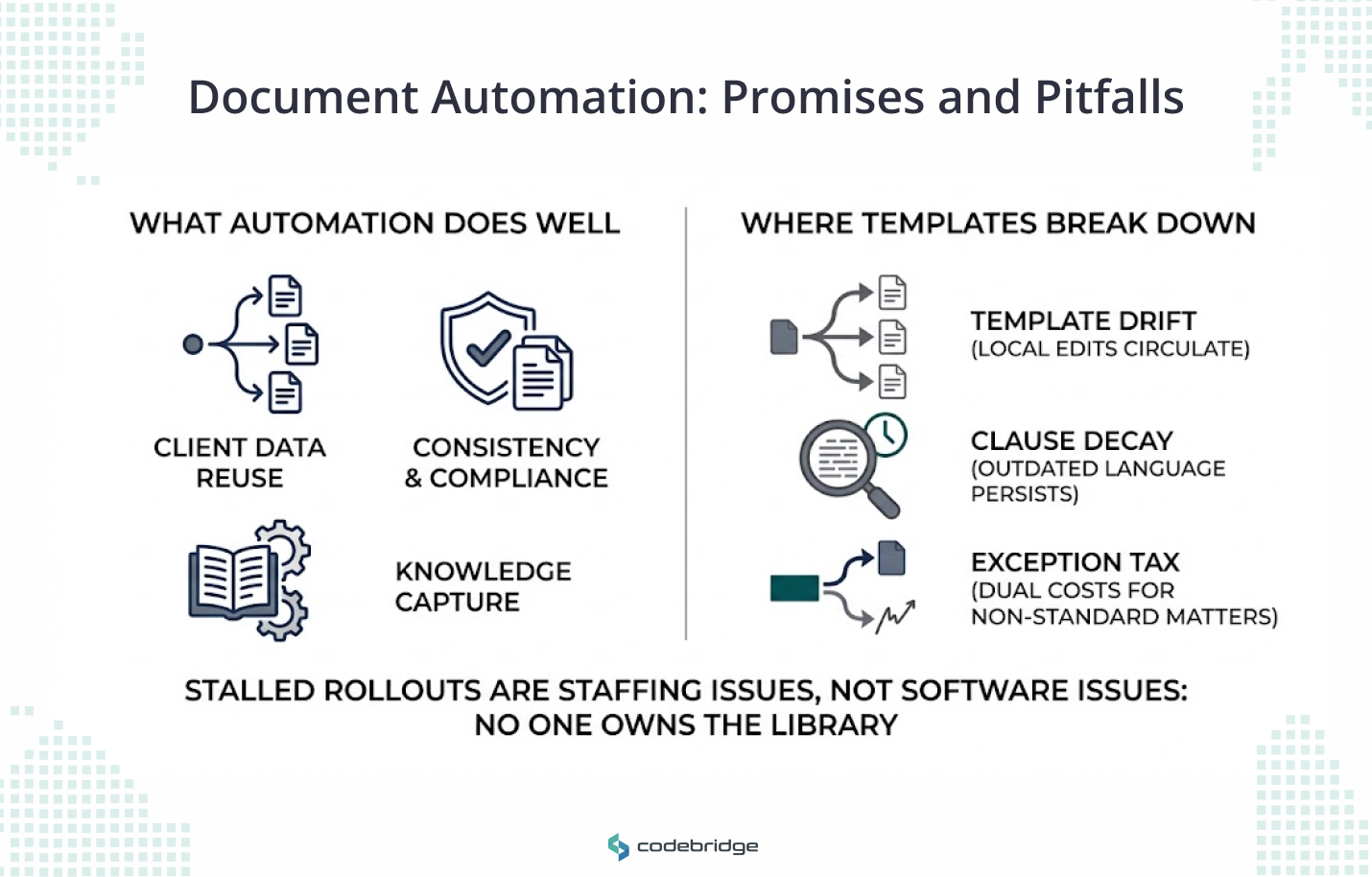
What it does is unglamorous and reliable. Client and matter data gets entered once in the practice management system and flows into every document that needs it. Versions stay consistent across the firm. Know-how stays behind when a lawyer leaves, because the reasoning sits in the template rather than in that person's saved folder. New hires get productive faster. Approval and signature steps chain together instead of running over email.
You will find this capability inside the practice management and document management platforms most firms already license, which is usually the cheapest place to start.
Vendors advertise large percentage savings here. We would ignore those numbers and look at the mechanism instead: what gets saved is the time someone spent opening last month's version of a document and changing the names.
Where these systems fail is maintenance. Here are three patterns that show up repeatedly:
- Template drift. Nobody owns the library. A partner edits a local copy for one matter, saves it, and two versions start circulating.
- Clause decay. A standard or a statute changes, and the template keeps producing the old language until someone reads a generated document closely.
- The exception tax. Matters that do not fit the questionnaire get drafted by hand anyway, so the firm carries the cost of both routes.
When an assembly rollout stalls, the cause is usually that no one inside the firm owns the template library. That is a staffing decision, and replacing the software will not fix it.
AI Document Review Against a Lawyer: What Independent Benchmarking Shows
These systems read documents better than the lawyers in the control group, but they still can’t amend documents as people do.
The evidence comes from the Vals Legal AI Report, published in February 2025 by Vals AI with Legaltech Hub. Eight law firms built the dataset from their own work, and the lawyer baseline came from practising lawyers sourced through an alternative legal services provider who were not told they were part of a study. They received the questions as ordinary client work.
Look at what separates the top of that table from the bottom. Every task the tools won involves reading a document that already exists. The one clear loss, redlining at 79.7% for the lawyers against 65.0% for the strongest tool, involves changing one.
The report's explanation of the redlining result is worth reading if you are considering a drafting tool. The tools performed reasonably when a clause arrived as labelled plain text. Hand them a single formatted document with tracked changes in it, and they struggled to tell the edits from the original.
On the harder amendments, where a clause had to satisfy several competing requirements at once, they tended to paste in standard wording rather than balance the requirements.
But there are two limitations to hold onto. First, vendors chose which tasks to enter, so no product was measured on everything. Second, redlining was tested through general-purpose assistants rather than through the dedicated redlining features some products ship.
And this is a February 2025 snapshot of a field that moves fast. The products evaluated were CoCounsel from Thomson Reuters, Harvey Assistant, Vincent AI from vLex, and Oliver from Vecflow.
How to Automate the Legal Documents Your Firm Receives
Pick one pile, measure it before you touch it, and test the ugly files first.
Inbound document work is mainly reading work. Sort the files, pull the facts out, summarize what each one says, put events in order, route what needs a human. Those are precisely the tasks sitting above the line in the table above, which is why this half of the problem responds well to automation.
Choosing the first pile is where firms lose time. Four things to work through, in this order:
- Find the work someone is absorbing. The best first candidate shows up as write-downs and unbilled hours.
Three come up repeatedly in mid-market firms: first-pass review triage, where a high-volume set reaches a reviewer sorted and labelled instead of raw; intake file completeness, where a new matter gets checked for what is missing before a partner opens it; and chronology building from a records set, which the benchmark scored at parity with lawyers and which takes a person days.
- Count it before anyone builds anything. Files per month, hours per file, and whose hours they are. That baseline is much easier to capture now than to reconstruct in month four. Without it, you can’t tell your partners whether the work paid off.
- Check whether the output leaves the firm. A chronology an associate works from needs a lighter review gate than a summary that goes into a filing. That single answer decides how much of the budget goes on review tooling.
- Hand over your worst files during evaluation. Not the clean ones.
We would like to expand the last point, because it is where pilots quietly mislead people. The benchmark's transcript task used scanned court transcripts rather than clean, machine-readable text, sometimes with several transcript pages photographed onto a single page. Any tool that scored well there had to reconstruct page order and work out who was speaking before it could answer anything.
Your discovery sets and client records look the same way. Ask a provider how their workflow handles a scanned exhibit with a stamp across the text, and treat a pilot run only on tidy PDFs as untested.
What you end up buying here is a workflow wired into the systems you already run, with a gate in the middle and a number attached to it. That combination is why this half gets built.
Legal Document Automation and ABA Opinion 512: Billing, Consent, and Review
Your obligations stay where they were. ABA Formal Opinion 512, issued on 29 July 2024, created no new rules and applied the existing Model Rules to generative tools. Two of its provisions catch firms out, and neither appears on a vendor page.
Billing. You cannot bill a client for time your people spend learning a tool for general use across the practice. If a specific client asks you to use a specific tool on their matter, learning that tool becomes billable to them. The cost of the tool itself can sit in overhead, or be charged in part or per use, provided you explain the arrangement in advance, and the client agrees to it.
Confidentiality. The opinion recommends getting informed consent before client confidences go into a tool, and it says plainly that boilerplate language buried in an engagement letter does not count as that consent.
On the scale of the verification problem, a public database of court decisions involving AI-fabricated material recorded 805 decisions attributable to lawyers out of 2,022 total when it last updated in early September 2026.
Most of the remainder involve self-represented litigants, so the lawyer figure is the one that matters for your firm. It also counts only the cases a court noticed and wrote up, which makes it a floor.
Firms regulated in England and Wales should read the SRA's warning notice on the misuse of AI, published on 17 August 2026, which covers the same ground under the Codes of Conduct and adds a section on confidentiality and privilege.
How Codebridge Builds Legal Document Workflows
We build the inbound half. Document review triage, intake and conflicts file preparation, and billing narrative cleanup are the three workflows mid-market firms ask us for most often. One workflow goes live in three weeks, wired into the systems the firm already runs, with the approval checkpoint designed in during the first conversation. Your firm owns the repository, the prompts, and the configuration from day one.
The closest thing we have to a reference for this kind of work is Knowledge Cloud, a research platform we built for a Big Four tax and legal practice. It covers 229,000 documents across 51 jurisdictions, returns a sourced answer in a median of 18 seconds, and cites the primary source behind every answer. A senior practitioner approves each answer through a review queue with an immutable audit log before the firm acts on it. It has run in production since 2022.
Our founding team spent more than a decade at KPMG, which is where we learned what a partner will and will not sign off on.
If you want to work out which workflow is worth automating first, book a 20-minute call and we will name it with you, along with what a three-week sprint would cover.

















Heading 1
Heading 2
Heading 3
Heading 4
Heading 5
Heading 6
Lorem ipsum dolor sit amet, consectetur adipiscing elit, sed do eiusmod tempor incididunt ut labore et dolore magna aliqua. Ut enim ad minim veniam, quis nostrud exercitation ullamco laboris nisi ut aliquip ex ea commodo consequat. Duis aute irure dolor in reprehenderit in voluptate velit esse cillum dolore eu fugiat nulla pariatur.
Block quote
Ordered list
- Item 1
- Item 2
- Item 3
Unordered list
- Item A
- Item B
- Item C
Bold text
Emphasis
Superscript
Subscript