NEW YEAR, NEW GOALS:   Kickstart your SaaS development journey today and secure exclusive savings for the next 3 months!
Check it out here >>
White gift box with red ribbon and bow open to reveal a golden 10% symbol, surrounded by red Christmas trees and ornaments on a red background.
Unlock Your Holiday Savings
Build your SaaS faster and save for the next 3 months. Our limited holiday offer is now live.
White gift box with red ribbon and bow open to reveal a golden 10% symbol, surrounded by red Christmas trees and ornaments on a red background.
Explore the Offer
Valid for a limited time
close icon
Logo Codebridge
AI

Claude Code Remote Control: What Tech Leaders Need to Know Before They Use It in Real Engineering Work

April 14, 2026
|
11
min read
Share
text
Link copied icon
table of content
photo of Myroslav Budzanivskyi Co-Founder & CTO of Codebridge
Myroslav Budzanivskyi
Co-Founder & CTO

Get your project estimation!

Agentic coding sessions now run longer than any engineer can sit at a desk. METR clocked Claude Opus 4.6 at a 14.5-hour complexity ceiling. When a refactor takes that long, you face a practical question: do you stay anchored to your terminal, or do you hand off the session to a cloud environment that lacks your local toolchain?

KEY TAKEAWAYS

Execution stays local, the remote interface controls a session that still runs on the original machine.

Environment fidelity matters, Remote Control is most useful when work depends on local tools, files, databases, or MCP servers.

Approval friction is real, the current model keeps a human in the loop but limits unattended execution.

Task routing matters, teams should define when to use Remote Control, cloud sessions, or CI/CD.

Claude Code Remote Control, released as a research preview in February 2026, offers a third option. A developer starts a session in a local terminal and then supervises it from a phone or browser, while execution stays on the original machine. The local filesystem, MCP servers, env files, and project-specific tooling remain intact. Nothing moves to the cloud.

For engineering leaders evaluating this workflow, the questions that matter are operational: where does execution live, what can the agent access, and who controls the session lifecycle? This article breaks down Remote Control's architecture, compares it against cloud-based sessions, and walks through the trade-offs and governance considerations you should settle before rolling it into your team's workflow.

What Claude Code Remote Control Actually Is
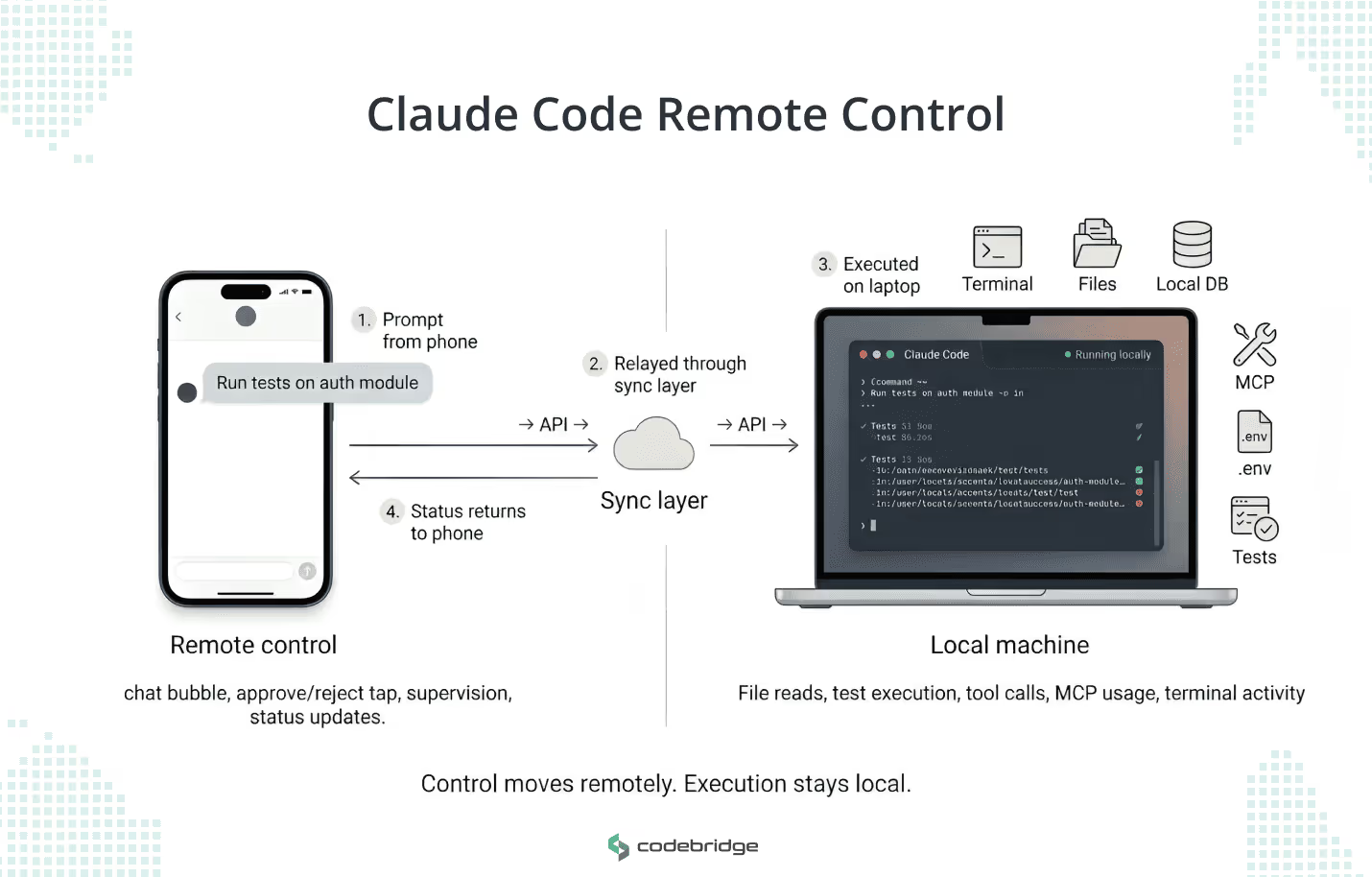
Diagram showing Claude Code Remote Control as a phone-based control interface connected through a sync layer to a laptop where Claude Code runs locally with access to terminal, files, local database, MCP tools, .env, and tests.
Claude Code Remote Control keeps execution on the local machine while the phone or web interface acts as a remote supervision layer through the API sync path.

Claude Code Remote Control is a synchronization layer that links a running Claude Code session on a user’s local machine to the Claude mobile app (iOS/Android) or the claude.ai/code web interface. It is critical to understand that the remote surface is not the execution environment itself.

It runs on macOS, Linux, and WSL with no port-forwarding or inbound network configuration. Under the hood, the local Claude Code process opens an outbound HTTPS connection to the Anthropic API and registers the session. From there, it polls for incoming instructions. When you send a prompt from your phone, the API relays it to the local process, which executes the work on your hardware: reading files, running tests, calling MCP servers. Nothing runs on Anthropic's infrastructure.

Access is restricted to paid Claude plans (Pro and Max), requires a full-scope claude.ai login rather than API keys, and necessitates explicit admin enablement for Team and Enterprise organizations.

The Problem Remote Control Solves

Most people hear "Remote Control" and think "coding from a phone." The real use case is different. Modern engineering context lives in places that don't move easily: repo state, .env files, local databases, dev containers, private MCP servers. You can't replicate that stack in a cloud-hosted VM without significant setup cost, and for many teams, some of those resources can't leave the local machine at all.

Remote Control keeps execution on your workstation and makes the session reachable from your phone or browser. You start a multi-hour refactor at your desk, then walk into a meeting and continue approving file changes or course-correcting from the mobile app. The conversation stays in sync across devices. When you switch interfaces, you don't re-explain the task or re-establish tooling.

With sessions now capable of running for 14+ hours, expecting an engineer to stay desk-bound for the full duration stalls delivery. Remote Control turns that into a supervised, mobile workflow where the engineer stays in the loop without being physically locked to a terminal. It fits best in the middle of active work, not as a default starting point for every task.

Key Benefits of Claude Code Remote Control in Real Development Workflows

A three-column infographic titled "Key Benefits of Claude Code Remote Control." Column 1, "Production Accuracy," features icons for .env files, databases, MCP servers, and build tools, with text stating it works with existing local configs and skips cloud reconstruction. Column 2, "Session Resilience," shows a laptop with a checkmark, a Wi-Fi signal, and a progress bar, noting it tolerates laptop sleep and network drops while preserving context. Column 3, "Automatic Governance," displays icons for CLAUDE.md, git hooks, local configs, and guardrails, highlighting that it respects team rules automatically. A footer states, "Material weekly time savings from compounding operational gains.
The operational advantages of Claude Code Remote Control. By delegating control to a remote interface while maintaining local execution, engineering teams bypass costly cloud environment reconstruction, protect active sessions from network interruptions, and automatically enforce existing security and development guardrails.

Keeping the session local via Remote Control is an operational decision with measurable impact on delivery speed, environment reliability, and governance overhead.

Your environment stays production-accurate.

When the agent runs locally, it works against the same .env files, databases, MCP servers, and build tooling your team uses in real development. Move that session to a cloud VM, and someone has to reconstruct that environment first, then verify it matches. 

For teams running private MCP integrations or custom build pipelines, that reconstruction cost can eat hours per session. If your engineering context is complex enough that onboarding a new developer takes more than a day, your agentic sessions carry the same weight. Keep them local, and you skip the reconstruction entirely.

Sessions survive interruptions without losing progress. 

The connection tolerates laptop sleep and brief network drops. When the machine reconnects, work picks up where it stopped. This means a multi-hour refactor doesn't reset because an engineer closed a laptop lid for a 30-minute meeting. 

Without this, you're looking at re-prompting the agent, re-establishing file context, and losing the reasoning chain the model built over prior turns. For long sessions, that reset can cost 20-40 minutes of wasted compute and developer attention.

The agent follows your team's rules without extra configuration. 

If your team enforces conventions through custom git hooks, CLAUDE.md project files, or local config layers, the agent respects those constraints automatically during a remote session. You don't need to replicate governance rules in a separate cloud environment or worry that the agent is operating outside your team's guardrails. For engineering leaders who care about consistency across agentic and human-driven work, this is where local execution earns its keep.

Each of these gains compounds. For example, if a team avoids a 30-minute environment reset across several daily sessions, the weekly time savings can become material.

Claude Code Remote Control Limitations and Trade-Offs

Remote Control also adds failure modes that are easy to overlook during a pilot and painful to discover during active delivery. These are ordered by the damage they can cause.

The session URL is a credential, and most teams won't treat it like one. 

When you start a Remote Control session, Claude Code generates a URL that grants full control over that session: reading files, writing code, approving changes. Anyone who has the URL has those permissions. There's no additional authentication layer. If an engineer pastes that URL into a Slack channel or an unencrypted message, they've handed session control to everyone in that channel. 

Your security policy should treat session URLs the same way it treats SSH keys. Don't share them in group channels. Rotate them between sessions. If your org has compliance requirements around code access, document how these URLs are scoped and distributed.

🔑

Key risk, a session URL grants full control over a running session, so it should be handled with the same discipline as other access credentials.

Every tool call requires manual approval, even from a phone. 

In the current research preview, the --dangerously-skip-permissions flag does not carry over to Remote Control sessions. That means every file write, every test run, every MCP call triggers an approval prompt on your phone. 

For short steering sessions, this works fine. For a multi-hour refactor generating dozens of file changes, you're stuck in a loop: the agent proposes, you approve, the agent proposes again. Plan for this friction. Remote Control, in its current state, is a supervised steering tool, not an unattended execution channel. If your workflow depends on autonomous runs, keep those on the desktop terminal where --dangerously-skip-permissions applies.

Closing a terminal kills the session with no recovery. 

Remote Control is a running process, not a background service. If someone closes the terminal window, the laptop sleeps and kills the process, or the OS terminates it, the remote session ends. No warning, no auto-save of the agent's position. 

To fix this, run every Remote Control session inside tmux or screen, and configure laptop power settings to keep terminal processes alive when the lid closes. Make this part of your team's onboarding doc for agentic workflows. Skipping it may lead to someone losing a 3-hour session to a closed laptop.

🧱

Structural limitation, Remote Control is a running process, not a background service, so session continuity depends on how the local machine is configured and managed.

Concurrent sessions in the same directory create conflicts. 

Each Claude Code process supports one remote connection. You can run up to 32 concurrent sessions using the --spawn flag, but if two sessions target the same working directory, file edits will collide. 

The agent in session A writes to a file while session B reads the old version, and you get silent drift between what each session thinks the codebase looks like. If your team runs parallel agentic sessions, assign each one a separate branch or working directory. 

Treat concurrent sessions like concurrent developers. They need isolation to avoid stepping on each other's work.

Claude Code Remote Control vs. Claude Code on the Web

These are two distinct execution models, not two versions of the same feature. Choosing between them is a decision that affects what the agent can access and how you manage the session lifecycle. Here's how they compare across the dimensions that matter for production engineering work:

Remote Control Claude Code on the Web
Execution Your local machine Anthropic-managed cloud VM
Environment access Full local filesystem, .env files, local databases, private MCP servers, custom toolchains Fresh GitHub clone. No access to local tools, private resources, or project-specific config unless explicitly set up
Session lifecycle Ends when the local process stops. Requires tmux or equivalent to survive laptop sleep Persists independently. Keeps running even if you close the browser or shut down your machine
Approval model Every tool call requires manual approval from the remote device (no --dangerously-skip-permissions in current preview) Supports autonomous execution depending on plan and configuration
Collaboration Single user, single connection per session Sessions can be revisited and shared more flexibly
Plan requirement Pro or Max plan, full claude.ai login, admin enablement for Team/Enterprise Available across paid plans with cloud compute allocation
Best fit Work that depends on your local environment, private resources, or in-progress repo state Self-contained tasks, async bug fixes, parallel workstreams that do not depend on a specific machine

How to Decide 

Ask two questions. 

  1. Does this task depend on resources that only exist on a specific machine? If your agent needs access to local databases, private MCP servers, or environment variables that aren't in version control, use Remote Control. 
  2. Does this task need to keep running after you walk away for hours or overnight? If yes, use cloud sessions. Your laptop going to sleep shouldn't determine whether a refactor finishes.

Most teams will use both. For instance, Remote Control for environment-sensitive work during active hours, cloud sessions for self-contained tasks you want to fire and forget. Define which task categories go to which execution model, write it into your team's agentic workflow guidelines, and revisit the split as the approval model for Remote Control evolves past the current preview limitations.

When to Use Claude Code Remote Control (and When Not To)

Remote Control fits a specific band of engineering work, such as tasks that depend on local resources, run long enough that you can't sit through them, and still need a human in the loop for decisions. Here's what that looks like in practice.

Debugging against local infrastructure. 

Your backend lead kicks off a bug investigation at 2 pm. The agent needs the local Postgres instance and application logs that aren't replicated in staging. At 3 pm, she has a product review she can't skip. From her phone, she watches the agent narrow the search to a failing webhook handler, approves a query against the transaction table, and confirms the fix direction before the meeting ends. 

Without Remote Control, that investigation sits idle for an hour, or she reconstructs the full environment in a cloud session and loses 30 minutes to set up.

Steering a multi-hour refactor. 

A team is migrating an authentication module from a monolith to a standalone service. The agent is working through 40+ files, and at several points it needs a human call: should it preserve backward compatibility with the old session store, or cut over cleanly? The engineer starts the session at their desk in the morning, walks to lunch, and approves three architectural decisions from the mobile app between noon and 1 pm. 

The refactor keeps moving. The alternative is pausing the session every time the engineer steps away, losing the model's reasoning chain, and restarting the context when they return.

Running tasks against pre-production tooling. 

Some teams have MCP integrations, custom build scripts, or local test harnesses that haven't been formalized into CI/CD yet. If the agent needs those tools to do the work, execution has to stay local. 

Remote Control lets you supervise those sessions without being physically at the workstation. This is common in early-stage teams where local tooling evolves faster than pipeline configuration.

Where it doesn't fit 

Remote Control is a single-user, single-machine tool. If your workflow needs two engineers collaborating on the same session, or if the task should keep running overnight without anyone approving changes, this isn't the right mode. 

Use cloud sessions for unattended async work. Use your CI/CD pipeline for deployment. Remote Control belongs in the development loop: the space between writing the first prompt and opening a pull request.

Use this table to route tasks to the right execution mode:

Scenario Use Remote Control? Why
Refactor that needs local .env, databases, or MCP servers Yes Execution must stay on the machine where those resources live
Bug investigation against local logs or infrastructure Yes Agent needs access to files and services that do not exist in cloud environments
Multi-hour session where you’ll step away but can check your phone Yes You stay in the loop for approvals without sitting at the terminal
Task using local build scripts or test harnesses not yet in CI/CD Yes Pre-production tooling only exists on the local machine
Self-contained bug fix on a public repo with no local dependencies No. Use cloud sessions Nothing ties execution to a specific machine. Let it run independently
Task that should keep running overnight without human approval No. Use cloud sessions Remote Control requires manual approval for every tool call. Unattended work needs autonomous execution
Deployment, release, or pipeline-stage promotion No. Use CI/CD This is infrastructure work, not development-loop work. Keep it in your pipeline
Two or more engineers need to collaborate on the same agentic session No. Use shared cloud sessions or pair at a workstation Remote Control supports one user and one connection per session
Rapid prototyping on a new repo with no local setup yet No. Use cloud sessions There is no local environment to preserve. Cloud VMs spin up faster than configuring a local workspace
⏸️

Workflow constraint, the current approval model makes Remote Control better suited to supervised steering than unattended execution.

Pre-Rollout Checklist

Run through these before adding Remote Control to your team's workflow. Each one maps to an operational decision you'll need to make, not a feature to evaluate.

Audit your environment dependencies. List which projects rely on local databases, private MCP servers, .env files, or build tools that are not replicated in cloud environments. Those projects are your first candidates for Remote Control.

Classify tasks by persistence requirements. If a task needs to run overnight or through a weekend without someone approving changes, route it to cloud sessions. Remote Control requires a running local process and an active human.

Set up session durability before the first real use. Install tmux or screen on every machine that will run agentic sessions. Update laptop power settings to keep terminal processes alive on lid-close. Do not learn this lesson by losing a 4-hour session.

Confirm admin enablement. Team and Enterprise plans require an admin to turn on Remote Control. Check whether your Anthropic org admin has enabled it and whether your policy allows or restricts --dangerously-skip-permissions mode.

Define a session URL handling policy. Session URLs grant full control over a running session. Decide where engineers can and cannot share them, and treat them with the same discipline you apply to SSH keys or access tokens.

Document which task types go to which execution mode. Write a one-page internal guide that maps task categories such as environment-sensitive work, async fixes, and overnight runs to execution modes such as Remote Control, cloud sessions, and desktop terminal. Update it quarterly as the tooling evolves.

Run a bounded pilot before broad rollout. Pick one team, two to three projects, and one week. Track session drop rates, approval friction, and hours saved on environment reconstruction. Use those numbers to decide whether to expand.

Conclusion

Remote Control is a tool that solves a specific problem: your engineering context is local, your agent sessions run longer than you can sit at a desk, and you need to stay in the loop without reconstructing your environment somewhere else. It keeps execution on your machine and puts the steering interface in your pocket.

The feature works. The harder question is where it belongs in your team's workflow and where it doesn't. Define which tasks route to Remote Control, which go to cloud sessions, and which stay on the desktop terminal. Treat that decision as infrastructure policy, not individual preference. Then pilot it on a small team, measure what you gain, and expand from there.
Need to decide where this fits in your engineering workflow?

Review your AI engineering options with Codebridge →

What is Claude Code Remote Control?

Claude Code Remote Control is a synchronization layer that connects a running Claude Code session on a local machine to the Claude mobile app or the claude.ai/code web interface. The session is controlled remotely, but execution stays on the original machine.

Does Claude Code Remote Control run code in the cloud?

No. The article explains that prompts are relayed through the API, but the actual work happens on the local machine. That includes reading files, running tests, and calling MCP servers.

When should a team use Claude Code Remote Control?

It is best suited for work that depends on local resources, runs long enough that an engineer may need to step away, and still requires human oversight during the session.

What are the main advantages of keeping the session local?

The article highlights three main advantages: the agent keeps access to the real development environment, sessions can continue through short interruptions, and the agent follows local rules and project constraints without extra setup.

What are the main limitations of Claude Code Remote Control?

The main limitations described in the article are manual approval for every tool call, session loss if the local process stops, and the risk of conflicts when multiple sessions work in the same directory.

How is Claude Code Remote Control different from Claude Code on the Web?

The article presents them as two different execution models. Remote Control keeps execution on the local machine and is better for environment-sensitive work, while Claude Code on the Web runs in an Anthropic-managed cloud VM and is better for self-contained, async tasks.

Is Claude Code Remote Control suitable for unattended overnight work?

No. According to the article, Remote Control is not the right mode for unattended execution because every tool call requires manual approval in the current preview.

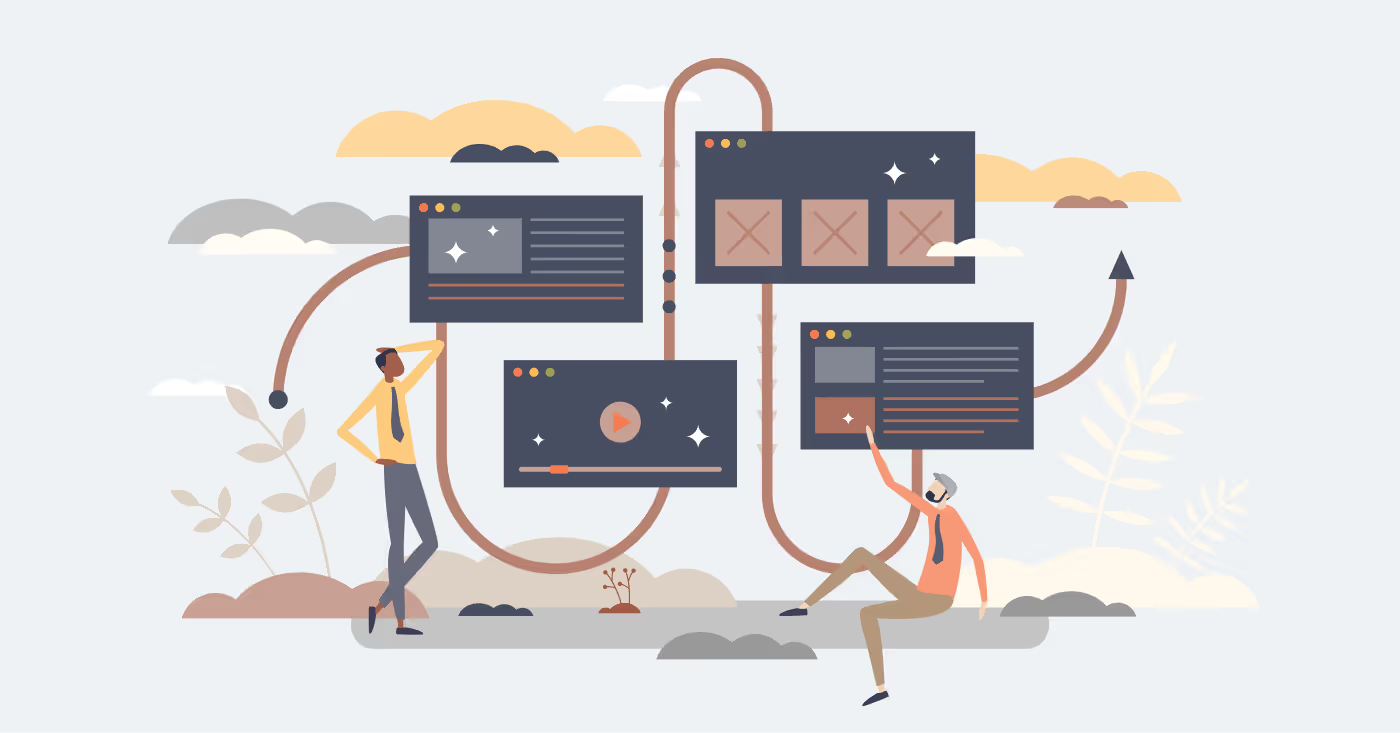
Stylized illustration of two people interacting with connected software windows and interface panels, representing remote supervision of coding work across devices for Claude Code Remote Control.

Heading 1

Heading 2

Heading 3

Heading 4

Heading 5
Heading 6

Lorem ipsum dolor sit amet, consectetur adipiscing elit, sed do eiusmod tempor incididunt ut labore et dolore magna aliqua. Ut enim ad minim veniam, quis nostrud exercitation ullamco laboris nisi ut aliquip ex ea commodo consequat. Duis aute irure dolor in reprehenderit in voluptate velit esse cillum dolore eu fugiat nulla pariatur.

Block quote

Ordered list

  1. Item 1
  2. Item 2
  3. Item 3

Unordered list

  • Item A
  • Item B
  • Item C

Text link

Bold text

Emphasis

Superscript

Subscript

AI
Rate this article!
Thank you! Your submission has been received!
Oops! Something went wrong while submitting the form.
91
ratings, average
4.8
out of 5
April 14, 2026
Share
text
Link copied icon

LATEST ARTICLES

Overhead view of a business team gathered around a conference table with computers, printed charts, notebooks, and coffee, representing collaborative product planning and architecture decision-making.
April 13, 2026
|
7
min read

Agentic AI vs LLM: What Your Product Roadmap Actually Needs

Learn when to use an LLM feature, an LLM-powered workflow, or agentic AI architecture based on product behavior, control needs, and operational complexity.

by Konstantin Karpushin
AI
Read more
Read more
OpenClaw integration with Paperclip for hybrid agent-human organizations
April 10, 2026
|
8
min read

OpenClaw and Paperclip: How to Build a Hybrid Organization Where Agents and People Work Together

Learn what usually fails in agent-human organizations and how OpenClaw and Paperclip help teams structure hybrid agent-human organizations with clear roles, bounded execution, and human oversight.

by Konstantin Karpushin
AI
Read more
Read more
group of professionals discussing the integration of OpenClaw and Paperclip
April 9, 2026
|
10
min read

OpenClaw Paperclip Integration: How to Connect, Configure, and Test It

Learn how to connect OpenClaw with Paperclip, configure the adapter, test heartbeat runs, verify session persistence, and troubleshoot common integration failures.

by Konstantin Karpushin
AI
Read more
Read more
Creating domain-specific AI agents using OpenClaw components including skills, memory, and structured agent definition
April 8, 2026
|
10
min read

How to Build Domain-Specific AI Agents with OpenClaw Skills, SOUL.md, and Memory

For business leaders who want to learn how to build domain-specific AI agents with persistent context, governance, and auditability using skills, SOUL.md, and memory with OpenClaw.

by Konstantin Karpushin
AI
Read more
Read more
OpenClaw and the future of personal AI infrastructure with user-controlled systems, local deployment, and workflow ownership
April 7, 2026
|
6
min read

What OpenClaw Reveals About the Future of Personal AI Infrastructure

What the rise of OpenClaw reveals for businesses about local-first AI agents, personal AI infrastructure, runtime control, and governance in the next wave of AI systems.

by Konstantin Karpushin
AI
Read more
Read more
OpenClaw vs SaaS automation comparison showing differences in control, deployment architecture, and workflow execution
April 6, 2026
|
10
min read

OpenClaw vs SaaS Automation: When a Self-Hosted AI Agent Actually Pays Off

We compared OpenClaw, Zapier, and Make to see when self-hosting delivers more control and when managed SaaS automation remains the smarter fit for businesses in 2026.

by Konstantin Karpushin
AI
Read more
Read more
secure OpenClaw deployment with configuration control, access boundaries, and operational safeguards for agent systems
April 2, 2026
|
12
min read

Secure OpenClaw Deployment: How to Start With Safe Boundaries, Not Just Fast Setup

See what secure OpenClaw deployment actually requires, from access control and session isolation to tool permissions, network exposure, and host-level security.

by Konstantin Karpushin
AI
Read more
Read more
Office scene viewed through glass, showing a professional working intently at a laptop in the foreground while another colleague works at a desk in the background.
April 1, 2026
|
6
min read

AI Agent Governance Is an Architecture Problem, Not a Policy Problem

AI agent governance belongs in your system architecture, not a policy doc. Four design patterns CTOs should implement before shipping agents to production.

by Konstantin Karpushin
AI
Read more
Read more
Modern city with AI agent guardrails for production systems. Kill switches, escalation paths, and recovery controls that reduce risk and improve operational resilience.
March 31, 2026
|
8
min read

AI Agent Guardrails for Production: Kill Switches, Escalation Paths, and Safe Recovery

Learn about AI agent guardrails for production systems. Kill switches, escalation paths, and recovery controls that reduce risk and improve operational resilience.

by Konstantin Karpushin
AI
Read more
Read more
CEO of the business company is evaluating different options among AI vendors.
April 3, 2026
|
10
min read

Top 10 AI Development Companies in USA

Compare top AI development companies in the USA and learn how founders and CTOs can choose a partner built for production, governance, and scale. See how to evaluate vendors on delivery depth and maturity.

by Konstantin Karpushin
AI
Read more
Read more
Logo Codebridge

Let’s collaborate

Have a project in mind?
Tell us everything about your project or product, we’ll be glad to help.
call icon
+1 302 688 70 80
email icon
business@codebridge.tech
Attach file
By submitting this form, you consent to the processing of your personal data uploaded through the contact form above, in accordance with the terms of Codebridge Technology, Inc.'s  Privacy Policy.

Thank you!

Your submission has been received!

What’s next?

1
Our experts will analyse your requirements and contact you within 1-2 business days.
2
Out team will collect all requirements for your project, and if needed, we will sign an NDA to ensure the highest level of privacy.
3
We will develop a comprehensive proposal and an action plan for your project with estimates, timelines, CVs, etc.
Oops! Something went wrong while submitting the form.