Logo Codebridge
AI

How to Prepare Your Team for AI Implementation: Strategy, Policies, and Adoption

Konstantin Karpushin
June 29, 2026
|
8
min read
Share
text
Link copied icon
table of content
Man with short brown hair and beard wearing a white collared shirt against a dark background.
Myroslav Budzanivskyi
Co-Founder & CTO

Get your project estimation!

A company can buy AI licenses, announce a new internal AI initiative, and wait for productivity to improve. For a few days, people test prompts or ask AI to explain documents. But then the old workflows return, as some employees keep using AI quietly and others stop completely. Leadership cannot tell what changed, what improved, or what new risks were created.

This problem usually caused by a weak preparation.

The market data already shows why this matters. McKinsey reported that employee AI use at work rose from 30% in 2023 to 76% in 2025. Also, Deloitte's 2026 enterprise AI report points to the same gap saying that worker access to AI rose by 50% in 2025, but the AI skills gap remains the biggest barrier to integration, and only one in five companies has mature governance for autonomous AI agents.

The problem is operational integration. Leaders are giving teams AI tools faster than they are preparing the operating system around them.

Preparing a team for AI implementation is about making AI usable inside real work, with enough structure that people know how to use it safely and enough discipline that leadership can see whether it is creating value.

AI Answer Summary

AI implementation works best when leaders prepare the team before giving everyone access to tools. That preparation should include workflow selection, authority boundaries, a usable AI policy, role-based training, and a post-launch adoption rhythm.

The goal is to make AI useful inside specific workflows where it can improve speed, quality, consistency, or decision-making without creating uncontrolled risk. This article explains five practical steps CEOs, CTOs, and decision-makers can use to prepare teams technically, operationally, and psychologically for AI adoption.

KEY TAKEAWAYS

AI implementation starts before tool rollout.

The best first use case is a workflow with visible friction, available data, manageable risk, and measurable value.

Every AI workflow needs an authority boundary that defines what AI can assist, recommend, prepare, or execute.

A usable AI policy should answer practical employee questions, not sit as a legal document nobody reads.

AI adoption needs a post-launch rhythm: owner, metrics, feedback, and a scale/fix/stop decision.

Preparation area Question leaders must answer
Workflow Where exactly should AI enter the work?
Authority What is AI allowed to do?
Policy What rules make safe use clear?
Training What does each role need to practice?
Adoption How will usage and value be reviewed after launch?

Why Team Preparation Matters Before AI Implementation

AI use is already spreading inside companies, and the risk is not only that employees will avoid it. The larger risk is that adoption can become shallow or uncontrolled.

When employees receive AI access without workflow rules, three things usually happen:

  1. Some people ignore it because they do not know where it fits.
  2. Some people use it for low-value tasks that do not change business outcomes.
  3. Some people use it quietly with sensitive data, unclear review, or no quality control.

The goal of preparation is to prevent all three outcomes.

The first mistake leaders make is assuming that AI adoption begins when the tool is launched. But it begins earlier, when the company decides which workflows AI should touch and how success will be measured. Without that preparation, AI becomes either a toy, a shortcut, or a quiet governance problem.

This is why AI implementation should be treated as a change in work design.

Step 1 - Start with Workflows, Not Tools
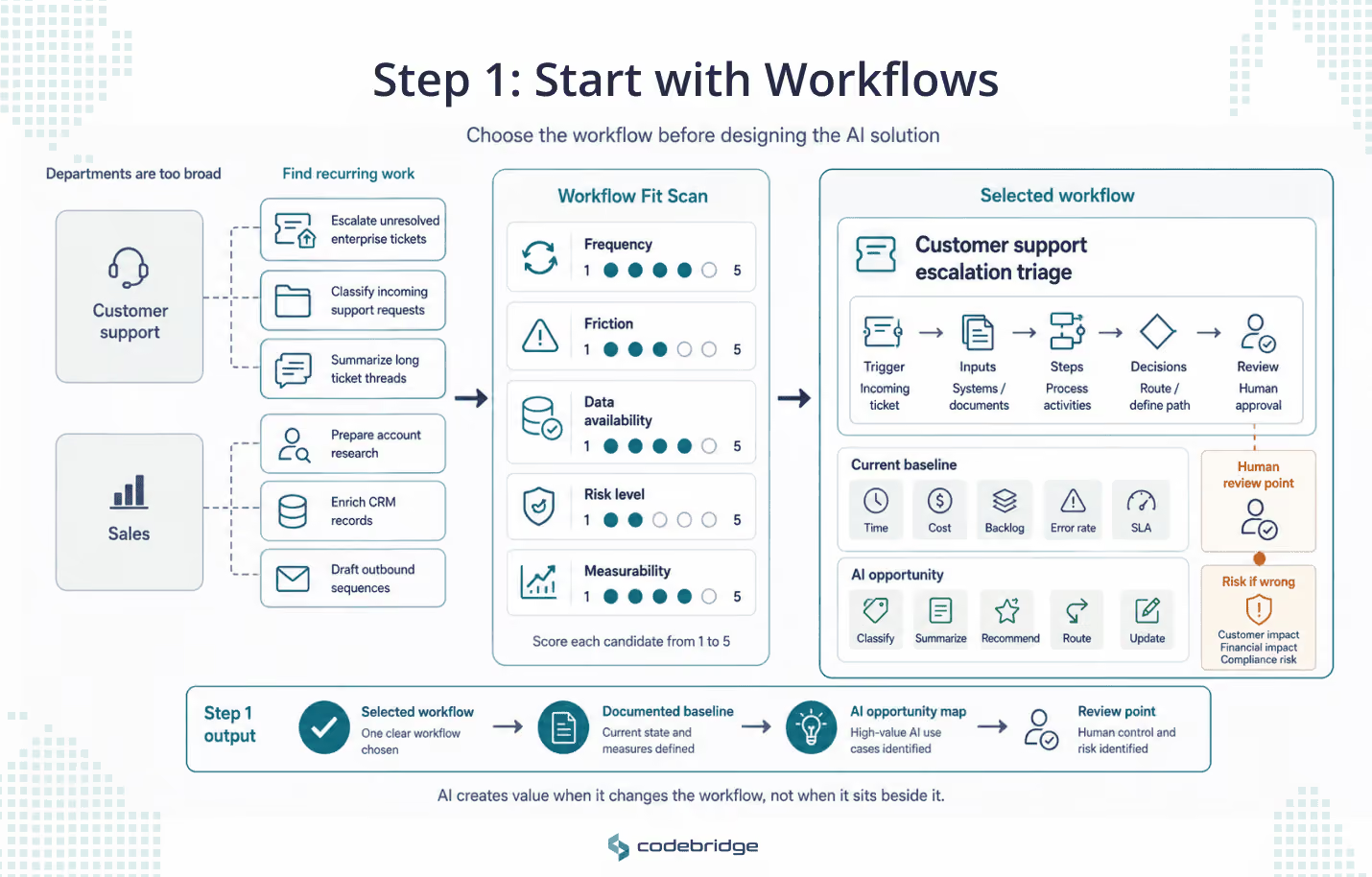
Workflow-first AI selection diagram showing departments broken into specific recurring workflows, scored through a workflow fit scan, and narrowed into a selected customer support escalation triage workflow with baseline metrics, AI opportunities, risk, and review points.
AI implementation should start with a specific workflow, not a tool purchase. A workflow fit scan helps teams compare recurring work by frequency, friction, data availability, risk, and measurability before selecting one workflow for baseline documentation and AI opportunity mapping.

The first AI decision should be: "Which workflow is broken, slow, repetitive, expensive, inconsistent, or overloaded enough to justify AI?"

AI creates business value when it changes a workflow, not when it sits next to the workflow. If employees have to leave their real work and manually update the original system, adoption will fade quickly. The team may still use AI occasionally, but the business will not feel a structural improvement.

Start by identifying 5 to 10 candidate workflows. Do not begin with departments. Begin with recurring work. A department is too broad. 

"Customer support" is not a workflow. "Escalating unresolved enterprise support tickets" is a workflow. 

"Sales" is not a workflow. "Preparing account research before an outbound sequence" is a workflow.

Use a simple Workflow Fit Scan and score each candidate workflow from 1 to 5 across five criteria.

Criteria Question to ask Why it matters
Frequency Does this workflow happen often enough to matter? Low-volume workflows rarely justify implementation effort.
Friction Where do people lose time, context, quality, or consistency? AI should remove real operating drag.
Data availability Is the information needed for the task accessible, current, and reliable? AI cannot fix missing or messy context by magic.
Risk level What happens if the AI output is wrong? Higher-risk workflows need stronger review and control.
Measurability Can we measure before-and-after performance? Without a baseline, leaders cannot prove value.

The best first workflow is frequent enough to matter, painful enough to justify change, and measurable enough to prove whether AI helped.

After choosing the workflow, describe it before designing the AI solution. This prevents the team from automating a vague idea.

Field What to document
Workflow name Example: “Customer support escalation triage”
Current owner Team or role responsible today
Trigger What starts the workflow
Inputs Systems, documents, tickets, messages, CRM records, policies
Current steps What humans do from start to finish
Pain points Delays, rework, missed context, errors, bottlenecks
Decisions made What judgment happens inside the workflow
Current baseline Time, cost, quality, backlog, error rate, SLA, conversion, etc.
AI opportunity Draft, summarize, classify, recommend, retrieve, check, route, update
Risk if wrong Customer harm, compliance issue, financial loss, operational confusion
Human review point Where a person must approve, correct, or override

By the end of this step, the company should have one selected workflow with a documented baseline.

Step 2 - Define What AI Is Allowed to Do Before People Start Using It

Every AI implementation needs an authority boundary. Without it, employees will make their own assumptions about what AI can draft, decide, approve, or automate.

This is where technical and psychological preparation should connect. People need to know what is safe, what is expected, and what remains their responsibility. Because AI uncertainty creates fear for some employees and overconfidence for others. Both are dangerous. Fear blocks adoption. Overconfidence creates risk.

Here is an authority ladder that helps leaders define how much responsibility AI can have in a workflow.

AI authority level What AI can do Human responsibility Example
Level 1: Assist Help brainstorm, summarize, search, or draft Human owns everything AI summarizes meeting notes
Level 2: Recommend Suggest a decision or next action Human decides AI recommends which tickets need escalation
Level 3: Prepare action Generate an update, response, report, or task Human approves before execution AI drafts a customer reply
Level 4: Execute with guardrails Take limited action inside approved rules Human monitors and handles exceptions AI routes low-risk tickets
Level 5: Autonomous action Make and execute decisions independently Human audits only Usually inappropriate for early rollout

For the first serious AI implementation, most companies should stay between Level 1 and Level 3 unless the workflow is low-risk, tightly bounded, and easy to reverse. A support summary, draft report, or internal recommendation is usually a better starting point than unsupervised external communication or autonomous decisions.

Leaders should answer these questions before the team starts using AI:

  • Can AI only assist, or can it recommend?
  • Can AI change records in business systems?
  • Can AI communicate with customers, candidates, vendors, or patients?
  • Can AI approve anything?
  • What actions always require human approval?
  • What data is AI never allowed to use?
  • What happens when employees disagree with AI output?
  • Who is accountable when AI output creates damage?

The practical output of this step is a one-page AI authority boundary for the selected workflow.

For this workflow, AI is allowed to:

  • summarize
  • classify
  • draft
  • recommend
  • retrieve relevant internal knowledge

AI is not allowed to:

  • send external messages without approval
  • approve discounts, refunds, hires, diagnoses, payments, or legal decisions
  • override human judgment
  • use confidential data outside approved systems
  • make irreversible changes without review

Human review is required when:

  • confidence is low
  • the decision affects money, contracts, health, employment, compliance, or customer trust
  • the output will be sent outside the company
  • the AI conflicts with policy, system records, or human knowledge

This section should should be visible inside the workflow, as employees adopt AI better when they know where responsibility starts and ends.

Step 3 - Create an AI Policy People Can Actually Use
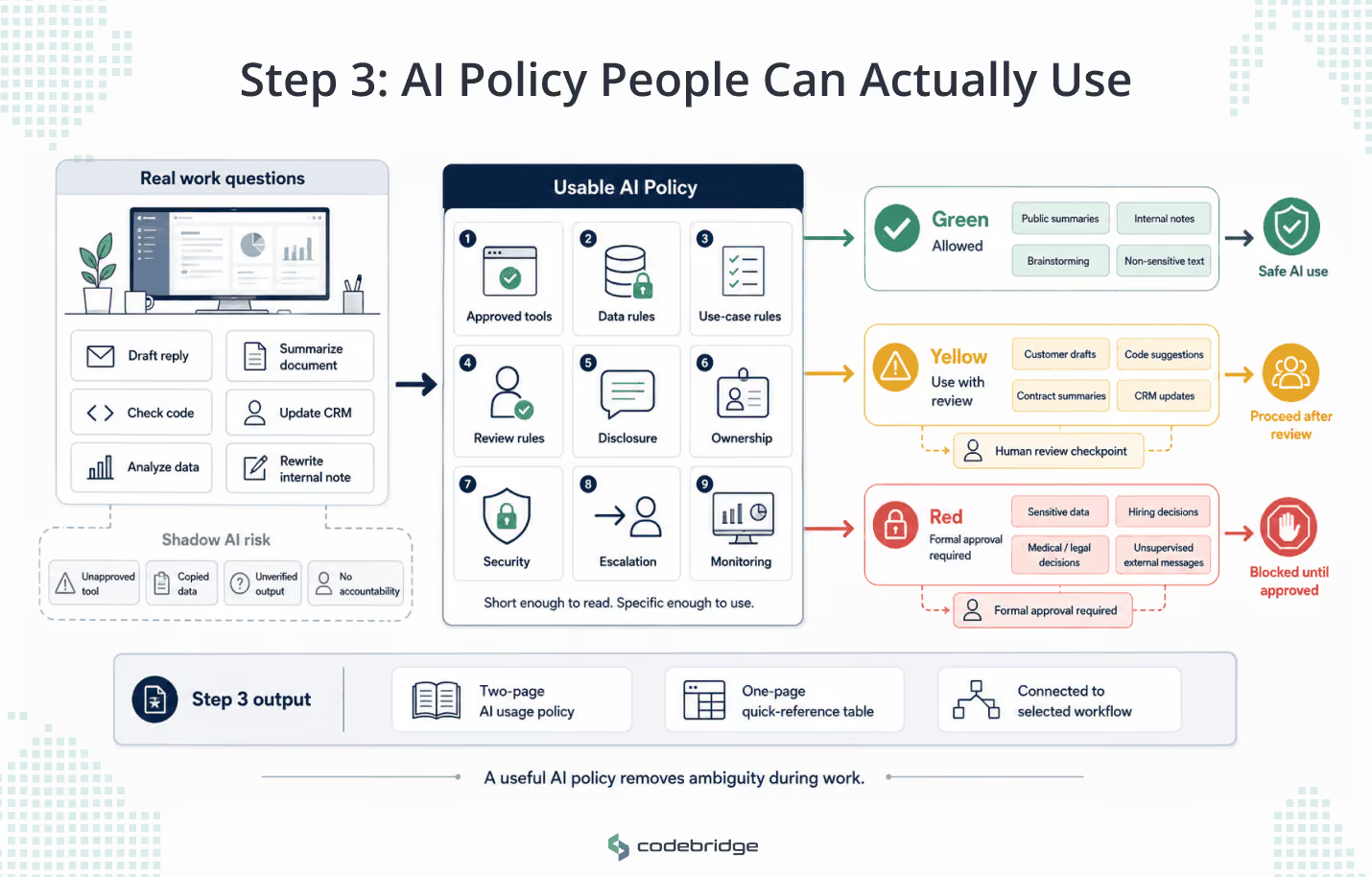
AI policy operating guide diagram showing employee work tasks routed through a usable AI policy into green allowed use, yellow human review, and red formal approval categories, with shadow AI risks shown when guidance is missing.
A practical AI policy helps employees decide what AI use is allowed, what needs review, and what requires formal approval. The goal is to make safe AI adoption visible and easy while reducing shadow AI, copied data, unverified outputs, and unclear accountability.

In matyre comapnies AI policy  is a practical operating guide that answers the questions employees face during real work.

If the policy is too abstract, employees more likely to ignore it. But if the policy is too restrictive, they use AI quietly. If there is no policy, the company gets shadow AI: unofficial tools, copied data, unverified outputs, and unclear accountability.

Also, a useful AI policy should exist to remove ambiguity. Employees should know which tools are approved, what data is off-limits, when review is required, and who owns the final output. It should be short enough to read and specific enough to use during work.

The policy should cover the practical areas employees actually face.

Policy area Practical question it must answer
Approved tools Which AI tools can employees use?
Data rules What information can and cannot be entered into AI tools?
Use-case rules Which tasks are approved, restricted, or prohibited?
Review rules When must a human check the output?
Disclosure rules When should AI use be disclosed internally or externally?
Ownership Who owns AI-generated work and final decisions?
Security How should employees handle credentials, customer data, source code, contracts, or private documents?
Escalation Who should employees ask when unsure?
Monitoring How will usage, incidents, and improvements be reviewed?

A simple Green / Yellow / Red model can make the policy easier to use.

Category Meaning Examples
Green Allowed with normal judgment Summarizing public articles, drafting internal notes, brainstorming ideas, rewriting non-sensitive text
Yellow Allowed with review or approved tools only Customer communication drafts, code suggestions, contract summaries, CRM updates, support recommendations
Red Not allowed without formal approval Uploading sensitive customer data, automated hiring rejection, medical or legal decisions, financial approvals, unsupervised external communication

The important nuance is that companies should not respond to AI risk by banning AI broadly. Broad bans often create hidden use, especially when employees believe AI helps them work faster. The better approach is to make safe use easy and risky use explicit.

By the end of this step, the company should have a two-page AI usage policy plus a one-page quick-reference table for employees. The policy should be connected to the selected workflow, not written as a generic corporate artifact.

Step 4 - Train Teams by Role, Not with Generic AI Workshops

When the trainin is generic it may create curiosity, but very rarely it would bring real results. What companies has to complement is a role-based AI training as it creates real adoption.

A CEO, support agent, salesperson, QA engineer, and finance manager do not need the same AI training. If everyone receives the same AI workshop session, people may leave with interest, but not with a changed workflow.

Training should have three layers.

Training layer Audience Purpose
AI basics Everyone Understand capabilities, limits, risks, and company policy
Role-based workflows Specific teams Apply AI to real recurring tasks
Review and judgment Managers and owners Learn how to validate AI output, manage risk, and improve adoption

The most important layer is role-based workflow training where employees should practice AI in tasks they already recognize.

Role / team Useful AI training focus
Engineering Code review support, test generation, documentation, debugging assistance, architecture research
Product User feedback clustering, PRD drafts, release-note summaries, competitor research
Sales Account research, CRM hygiene, follow-up drafts, call-note summarization
Customer support Ticket summaries, escalation detection, suggested replies, policy retrieval
Marketing Content briefs, repurposing, SEO research, campaign analysis
HR / recruiting Candidate screening support, interview-note summaries, job description drafts, but with strict human review
Finance / operations Report summaries, variance explanations, invoice checks, scenario drafts
Executives Decision support, board memo drafts, risk summaries, KPI analysis, scenario planning

Each team should leave training with one documented AI workflow:

  • task name
  • current pain
  • approved AI tool
  • prompt or workflow pattern
  • required input data
  • expected output
  • human review point
  • quality checklist
  • metric to track

For a customer support team, the exercise could look like this:

  • Task: summarize long ticket history before escalation
  • AI input: ticket thread, account tier, SLA, internal policy
  • AI output: issue summary, customer sentiment, attempted fixes, recommended escalation path
  • Human check: support lead verifies accuracy before escalation
  • Metric: time to escalation, misroute rate, SLA breach rate

This is also where leadership should address psychological readiness in mature business language. Employees need to hear that AI is not being introduced to expose incompetence. It is not automatically replacing judgment. It will change some tasks, but unclear use creates more risk than honest use. The company expects people to learn, question, correct, and improve AI workflows. Human accountability remains visible.

The psychological mistake is pretending AI adoption is only technical. People need to understand what changes in their work, what does not change, and where they remain responsible. If leadership avoids that conversation, employees will fill the silence with fear, rumors, or passive resistance.

By the end of this step, the company should have a role-based AI training plan with one approved workflow per team.

Step 5 - Build an Adoption Rhythm After Launch

AI implementation does not end when the tool goes live. It starts when the team begins using it in real workflows, and leadership starts measuring what changed.

The problem when AI got forgotten after one week happens because companies launch AI but do not create a rhythm around usage, feedback, improvement, and accountability. 

The first version of an AI workflow will rarely be perfect. Inputs will be missing and prompts might need adjustment. But that is normal. What matters is whether the company has a rhythm for learning from it.

A simple 30-60-90-day structure is enough for most first implementations.

Timeline Leadership focus Output
First 30 days Controlled use in one workflow Baseline, owner, policy, first user feedback
Days 31–60 Fix friction and improve usage Updated prompts or workflow, better training, issue log
Days 61–90 Decide whether to scale Scale, stop, or redesign decision

For the first month, the workflow owner should ask these questions every week:

  • Are people using the AI workflow?
  • Where do they still avoid it?
  • What outputs are wrong, weak, or risky?
  • What data is missing?
  • What review steps slow people down?
  • What measurable improvement is visible?
  • What should be changed before scaling?

The metrics should cover more than usage. A tool can be used often and still fail to improve the workflow.

Metric type Examples
Adoption Active users, repeat usage, workflow completion rate
Efficiency Time saved, backlog reduction, faster response time
Quality Fewer errors, fewer rewrites, better consistency
Risk Override rate, escalation rate, incorrect output rate
Business value Cost reduction, faster cycle time, improved SLA, higher conversion, better retention

At the end of 90 days, leadership should make one of three decisions:

  1. Scale the workflow because adoption and value are visible.
  2. Fix the workflow because the use case is valid but execution is weak.
  3. Stop the workflow because the value is too small, the risk is too high, or the team does not need it.

Common Mistake: Treating AI Implementation as Access Plus Announcement

Many companies think they implemented AI because they:

  • bought licenses
  • announced an internal AI initiative
  • held one training session
  • created a policy
  • encouraged employees to experiment

But this is just a new access and not the implementation at all. 

Access is not adoption, training is not adoption, and a policy is not adoption. Real adoption is when AI changes a workflow, people know how to use it, leaders know how to measure it, and the company knows where human judgment remains mandatory.

This creates the appearance of progress without changing the company. A team can have AI tools and still work through the same bottlenecks, the same manual handoffs, the same inconsistent data, and the same unclear decisions. When that happens, AI becomes another layer of activity on top of a workflow that was never repaired.

Where Codebridge Fits

At Codebridge, we usually do not start AI conversations with the model. We start with the workflow. Where does the business lose time, quality, context, or control? What data does the system need? Who owns the decision? What must stay human? What should be measured after launch?

These questions might be less exciting than a demo, but they are the questions that decide whether AI survives real use.

Many AI initiatives become fragile before the model is chosen because the workflow, authority model, and adoption plan are unclear. Codebridge helps software companies and technology leaders prepare and implement AI around real workflows, with a focus on architecture, governance, integration, human oversight, and production readiness.

The work is to make AI fit the system around it.

Before you introduce another AI tool to your team, make sure the workflow, policy, ownership, and adoption rhythm are ready.

Codebridge helps companies turn AI from a short-lived experiment into a structured implementation that works inside real business operations.

Book an AI implementation review

How should a company prepare employees for AI implementation?

Start by selecting specific workflows, defining what AI is allowed to do, creating a practical usage policy, training employees by role, and reviewing adoption after launch. The goal is to make AI useful inside real work, not to give everyone a tool and hope productivity improves.

What should an AI policy for employees include?

An AI policy should define approved tools, data rules, allowed and prohibited use cases, review requirements, disclosure rules, ownership, security expectations, and escalation paths. It should be short enough for employees to read and specific enough for them to use during work.

Why do AI adoption initiatives fail?

AI adoption initiatives often fail because companies introduce tools without redesigning workflows, clarifying responsibility, training teams on real tasks, or measuring post-launch adoption. The company gets access, but not a changed operating habit.

Should AI training be the same for every employee?

No. Everyone needs basic AI literacy, but practical training should be role-based. A developer, support agent, salesperson, product manager, finance manager, and executive use AI in different workflows and face different risks.

How do leaders measure AI adoption?

Leaders should track usage, workflow completion, time saved, quality improvements, override rates, escalation rates, and business outcomes such as SLA improvement, cost reduction, faster cycle time, higher conversion, or better retention.

What is the first step in AI implementation?

The first step is workflow selection. Leaders should identify where work is repetitive, slow, inconsistent, expensive, or overloaded before choosing tools. A clear workflow gives the AI initiative a business target, an owner, a baseline, and a way to measure whether implementation worked.

How to Prepare Your Team for AI Implementation: Strategy, Policies, and Adoption

Heading 1

Heading 2

Heading 3

Heading 4

Heading 5
Heading 6

Lorem ipsum dolor sit amet, consectetur adipiscing elit, sed do eiusmod tempor incididunt ut labore et dolore magna aliqua. Ut enim ad minim veniam, quis nostrud exercitation ullamco laboris nisi ut aliquip ex ea commodo consequat. Duis aute irure dolor in reprehenderit in voluptate velit esse cillum dolore eu fugiat nulla pariatur.

Block quote

Ordered list

  1. Item 1
  2. Item 2
  3. Item 3

Unordered list

  • Item A
  • Item B
  • Item C

Text link

Bold text

Emphasis

Superscript

Subscript

AI
Konstantin Karpushin
Rate this article!
Thank you! Your submission has been received!
Oops! Something went wrong while submitting the form.
93
ratings, average
4.8
out of 5
June 29, 2026
Share
text
Link copied icon

LATEST ARTICLES

AI Governance Checklist for Software Companies: How to Prepare AI Systems for Production, EU AI Act Risk, US Controls, and Regulated Domains
June 26, 2026
|
15
min read

AI Governance Checklist for Software Companies: How to Prepare AI Systems for Production, EU AI Act Risk, US Controls, and Regulated Domains

Building AI into software is easy to start and hard to govern. Use this AI governance checklist to assess production readiness, EU AI Act risk, US controls, data governance, human oversight, and domain-specific requirements for HealthTech, FinTech, and regulated SaaS.

by Konstantin Karpushin
AI
Read more
Read more
Best AI Agents for Customer Service in 2026: Top Platforms and Custom AI Agent Development Partners Compared
June 26, 2026
|
15
min read

Best AI Agents for Customer Service in 2026: Top Platforms and Custom AI Agent Development Partners Compared

A practical 2026 guide to the best AI agents for customer service, built for CEOs, CTOs, founders, and support leaders. Compare top platforms and custom development partners by use case, integration depth, governance, scalability, and production readiness

by Konstantin Karpushin
Read more
Read more
Conversational AI for Customer Service: Where Chatbots End and AI Agents Begin
June 25, 2026
|
14
min read

Conversational AI for Customer Service: Where Chatbots End and AI Agents Begin

Conversational AI, chatbots, and AI agents are not the same thing. See where each fits in customer service and what moves a system from response to resolution.

by Konstantin Karpushin
AI
Read more
Read more
Customer Service AI Agents: Implementation, Workflows, Guardrails, and ROI
June 24, 2026
|
18
min read

Customer Service AI Agents: Implementation, Workflows, Guardrails, and ROI

Customer service AI agents can reduce support workload, but only if they understand workflows, follow guardrails, escalate safely, and prove ROI. Learn how to implement them without breaking customer trust.

by Konstantin Karpushin
AI
Read more
Read more
Codebridge Featured on Selective Industry List of Top AI Agent Development Companies in 2026, Honoring Architecture-First Engineering and Production-Grade Governance
June 17, 2026
|
3
min read

Codebridge Featured on Selective Industry List of Top AI Agent Development Companies in 2026, Honoring Architecture-First Engineering and Production-Grade Governance

Codebridge was recognized by Techreviewer among the top AI agent development companies in 2026 for architecture-first engineering and production-grade governance.

by Konstantin Karpushin
AI
Read more
Read more
Prompt Management for Production AI: How to Version, Test, and Control Prompts Before They Break Your Workflow
June 22, 2026
|
14
min read

Prompt Management for Production AI: How to Version, Test, and Control Prompts Before They Break Your Workflow

Prompt management is release management for AI behavior. Learn how to version, test, deploy, monitor, and roll back production prompts before they break things.

by Konstantin Karpushin
AI
Read more
Read more
AI Readiness Assessment Framework: 8 Layers That Decide Whether AI Can Survive Production
June 19, 2026
|
21
min read

AI Readiness Assessment Framework: 8 Layers That Decide Whether AI Can Survive Production

Most AI readiness frameworks stay too theoretical. Learn an 8-layer framework to assess one real workflow, ask better questions, find production gaps, and decide whether to build, pilot, fix first, or stop.

by Konstantin Karpushin
AI
Read more
Read more
AI Readiness Assessment: How to Know Whether Your Workflow Is Ready for Production AI
June 18, 2026
|
18
min read

AI Readiness Assessment: How to Know Whether Your Workflow Is Ready for Production AI

AI projects fail when workflows, data, systems, and ownership are not ready. Learn what an AI readiness assessment is, why companies need one, and how to evaluate governance, security, and systems before deploying AI.

by Konstantin Karpushin
AI
Read more
Read more
AI Readiness Checklist for 2026: 40 Questions Before AI Touches Your Workflow
June 17, 2026
|
12
min read

AI Readiness Checklist for 2026: 40 Questions Before AI Touches Your Workflow

AI can make weak workflows faster too. Use this 40-question AI readiness checklist to review your workflow, data, architecture, risks, and ownership before you build, buy, or deploy AI.

by Konstantin Karpushin
AI
Read more
Read more
Data Readiness for AI: The First Audit Before You Build Anything
June 16, 2026
|
12
min read

Data Readiness for AI: The First Audit Before You Build Anything

Clean data is not AI-ready data. Use this eight-gate audit to test whether your data can survive a real AI use case in production before you build, buy, or deploy an AI system.

by Konstantin Karpushin
AI
Read more
Read more
Logo Codebridge

Let’s collaborate

Have a project in mind?
Tell us everything about your project or product, we’ll be glad to help.
call icon
+1 302 688 70 80
email icon
business@codebridge.tech
Attach file
By submitting this form, you consent to the processing of your personal data uploaded through the contact form above, in accordance with the terms of Codebridge Technology, Inc.'s  Privacy Policy.

Thank you!

Your submission has been received!

What’s next?

1
Our experts will analyse your requirements and contact you within 1-2 business days.
2
Out team will collect all requirements for your project, and if needed, we will sign an NDA to ensure the highest level of privacy.
3
We will develop a comprehensive proposal and an action plan for your project with estimates, timelines, CVs, etc.
Oops! Something went wrong while submitting the form.