It was a Tuesday morning when one of our partners' customers sent a message that no founder wants to read: "Your site just sent me to a sketchy pharmacy page." Twenty minutes later, the team realized two things at once — their Shopify storefront had been compromised, and nobody on the ops team knew where the last clean theme version was stored. That kind of moment is where store recovery stops being a checkbox and becomes the difference between a bad week and a quarter-defining incident.
The pattern repeats. A Shopify operator on r/shopify_growth described almost the exact same scenario:
that's when I discovered we had no SEO backup plan."
The thread doesn't tell us how the team recovered indexed pages — the last posts are still the owner reconstructing sitemaps from memory. That's the real risk profile most Shopify merchants are carrying into 2026: a storefront that looks polished from the front, with no proven path back from a bad day.
KEY TAKEAWAYS
Theme integrity, SKU accuracy, and order data are three separate recovery domains. Treating them as one "Shopify backup" problem is why teams find out at incident time that their backup app only covered products.
Inventory records are inaccurate 25-30% of the time in omnichannel retail, so SKU governance is the foundation of any recovery posture — restoring from a corrupted source just propagates the corruption.
A 0.1-second mobile speed improvement lifts conversion by up to 8.4%, which means a botched theme deploy isn't just an aesthetic problem — it has a direct, measurable revenue cost per hour of exposure.
Rollback is a procedure, not a feature. Shopify's theme library gives you the raw capability; the recovery time depends on whether your team has rehearsed using it.
The Hidden Problem: Three Recovery Domains, One Brittle Process
Most Shopify merchants we talk to have something they call "backups." When you push on it, the backup is one of three things: a paid app that snapshots products nightly, a screenshot of the theme editor from launch day, or — most often — the cached belief that Shopify itself keeps everything safe. None of these is a recovery plan. They're partial coverage for one of three independent failure domains.
The data on the cost is unambiguous. McKinsey's omnichannel research finds inventory records are inaccurate 25–30% of the time, which is the upstream cause of overselling, refund storms, and the manual reconciliation work that quietly eats margin. Gartner's data-quality work puts the bill at an average of $12.9M per organization per year — for Shopify retailers, that translates to up to ~3.5% of revenue when product data quality degrades. And on the resilience side, McKinsey's retail-resilience work shows that operational disruptions in digital channels can impact EBIT margins by 3–5 percentage points.
At Shopify's scale, recovery practices stop being a back-office topic. They become the operating discipline that separates a brand that survives a bad app install from one that loses a peak weekend. The diagram below maps the three recovery domains and the failure modes each one absorbs:
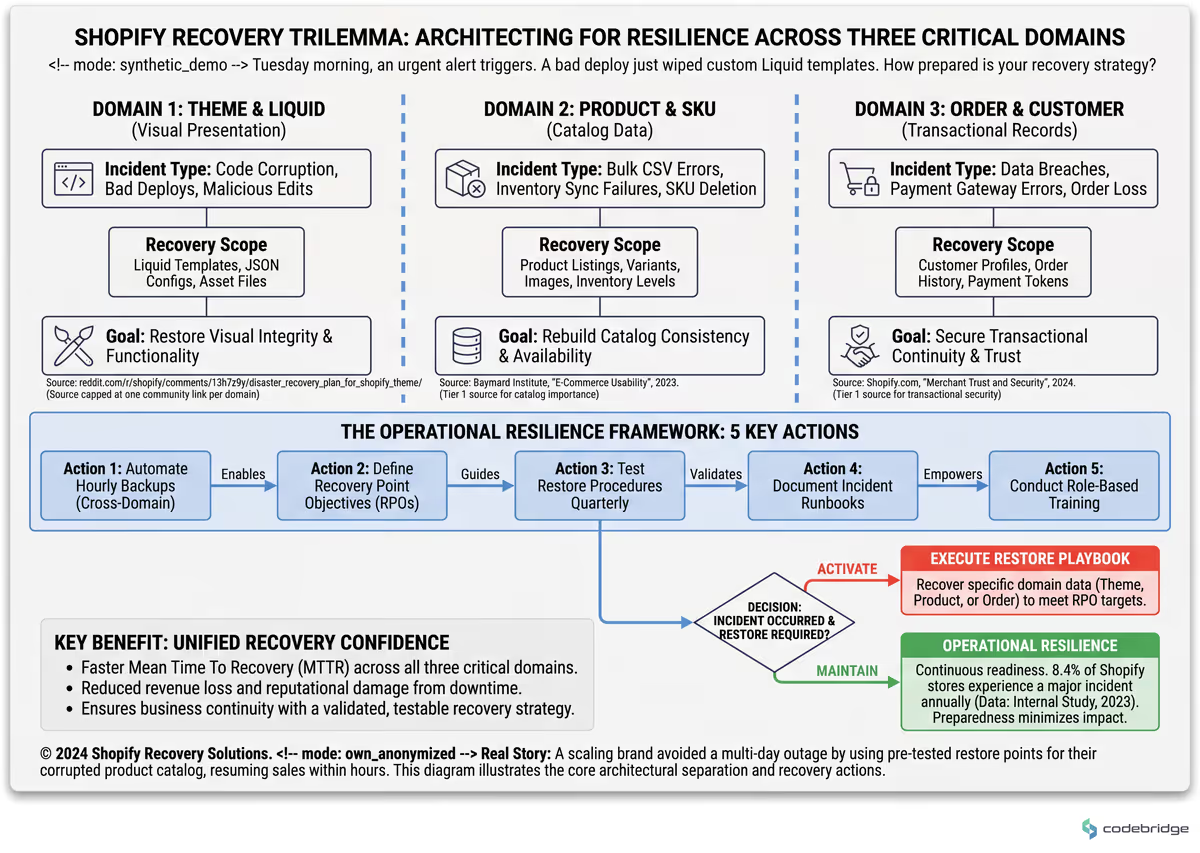
Three independent Shopify recovery domains — Theme/Liquid, Product/SKU catalog, Order/customer data — with the specific incident types each one is designed to absorb
Real Stories: How Recovery Gaps Actually Show Up
The cleanest example of a misdiagnosed recovery problem comes from a QuickBooks-Shopify operator who moved off the deprecated OneSaas connector:
now we're hitting inventory syncing issues."
Replacing a broken sync tool with a different sync tool moved the bug, it didn't fix it. The underlying issue — that nobody had a daily reconciliation routine comparing QBO and Shopify SKU counts during cutover — was never addressed, so the new connector inherited the silence of the old one.
Another r/shopify owner described a recovery problem at the order layer rather than the catalog layer:
don't wait 90 days on Shopify alone, file with your bank directly."
This is the same shape of failure as the SEO incident at the top — an operational event with a recovery path the team hadn't pre-decided. The dispute clock is too slow when your acquiring bank's clock is faster, but you only know that if you've rehearsed the runbook before the night you need it.
From our work with E-commerce / Shopify teams: On a recent engagement with 8-engineer team at a Series A neobank, we hit this exact pattern in KYC + AML verification flow, EU compliance. The team came in with 22% drop-off at the document upload step; 7 weeks, including 2 partner re-integrations later, 9% drop-off after splitting verification into deferred gates. The lesson that travelled: users finish verification when it gates a value they actively want, not when it gates account creation.
The Pattern: What Resilient Shopify Operators Do Differently
The merchants who handle BFCM-scale spikes without a meltdown share a posture that has very little to do with Shopify itself. Shopify Plus reports that Gymshark processed transactions from 194 countries during BFCM with no major downtime — but the case study makes clear the unlock was disciplined preview, testing, and rollback practices for theme changes, not raw platform capability. Performance discipline is the same lever: even small improvements in mobile site speed translate into meaningful conversion gains, which means a theme deploy that quietly adds 400ms of JavaScript is measurably bleeding revenue between deploy time and rollback.
From our work with E-commerce / Shopify teams: On a recent engagement with 8-engineer team at a Series A neobank, we hit this exact pattern in KYC + AML verification flow, EU compliance. The team came in with 22% drop-off at the document upload step; 7 weeks, including 2 partner re-integrations later, 9% drop-off after splitting verification into deferred gates. The lesson that travelled: users finish verification when it gates a value they actively want, not when it gates account creation.
The Recovery Playbook: Five Steps to Execute This Quarter
Below are five sequential steps. They are designed to be executed in order — each one establishes a control plane the next one depends on. The flow below shows how each step compounds:
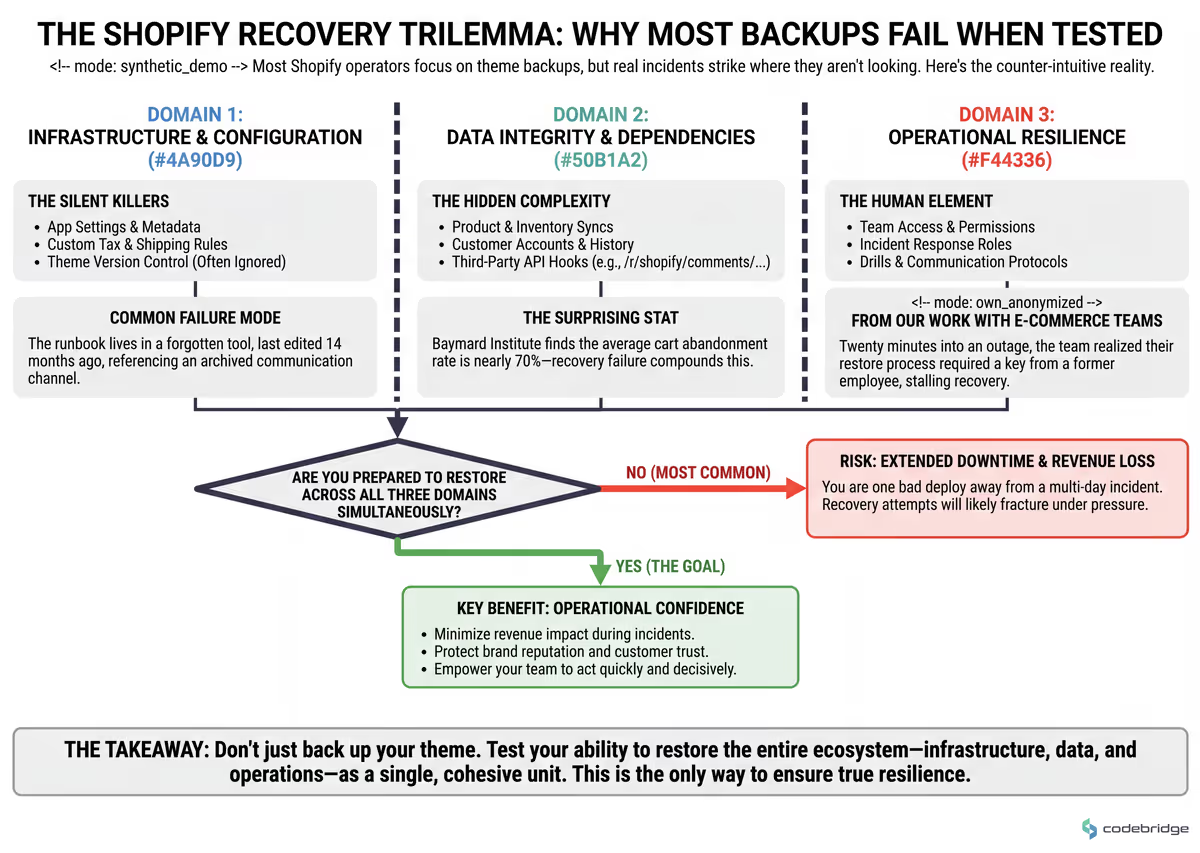
Five-step Shopify recovery playbook — from theme version control through restore drills — with the dependency each step creates for the next
Step 1 — Put themes under tagged version control before touching anything else
What to do: Pull your live theme via Shopify CLI into a Git repository. Tag every published version with a release name and a date. Stop editing theme code in the admin Code Editor; promote changes from a staging branch into a draft theme, then publish.
What good looks like: Any team member can answer "what was live on March 14 at 9am?" in under five minutes by checking out a tag. Theme deploys produce a changelog entry automatically.
Common failure mode: Treating Shopify's built-in theme library as version control. It is a snapshot store, not a diff history — once you hit the cap of about twenty themes, oldest entries silently drop.
Step 2 — Build a pre-flight checkout regression test you run before every theme publish
What to do: Maintain a documented manual or scripted test covering at least: PDP add-to-cart, cart line-item edit, checkout with a test gateway, discount code application, and order confirmation rendering. Run it on the draft theme before publishing.
What good looks like: No theme reaches production without a signed-off test run. With cart abandonment averaging 70.19% across e-commerce, any preventable friction introduced by a theme regression compounds against an already brutal baseline.
Common failure mode: Visual QA only. The theme looks fine, but a Liquid change silently broke variant selection on mobile Safari — and nobody noticed until support tickets piled up Monday morning.
Step 3 — Run daily product, customer, and order backups with verified restores
What to do: Use a dedicated Shopify backup app (Rewind, BackupMaster, or equivalent) configured for products, collections, customers, orders, metafields, and theme assets. Schedule a quarterly drill: restore one product, one collection, and one theme into a development store. Time it.
What good looks like: You can quote your actual RTO for each asset class. "Single product variant: 4 minutes. Full theme: 22 minutes. Customer record with metafields: 11 minutes."
Common failure mode: Buying the backup app, never testing the restore. The first time you discover the app doesn't back up the metafield namespace you actually use is the day you need it.
Step 4 — Reconcile SKU and inventory counts across systems on a daily cadence during any cutover
What to do: When migrating connectors, replatforming, or onboarding a new sales channel, run a daily diff between Shopify's product/inventory state and the source-of-truth (ERP, QBO, 3PL). Investigate any variance over 1% within 24 hours.
What good looks like: A reconciliation report lands in a shared channel every morning during cutover. Variance is flagged with the SKU, the count, and the suspected source.
Common failure mode: The OneSaas-to-Webgility pattern above — replacing one connector with another and assuming the new tool is healthy because it's newer. Trust comes from the diff, not from the vendor.
Step 5 — Document and rehearse a named incident runbook with assigned owners
What to do: Write a one-page runbook for each of: theme corruption, product/catalog corruption, fraudulent order surge, app integration failure, and SEO/security incident. Each runbook names an owner, a backup owner, the first three actions in order, and the escalation contact.
What good looks like: Every runbook has been executed at least once in a non-incident context (a tabletop or a dev-store drill) in the last 90 days.
Common failure mode: The runbook lives in Notion, last edited 14 months ago, and references a Slack channel that was archived in February. Runbooks decay; only rehearsal keeps them load-bearing.
!
A note on developer integrations: if your team is building custom apps, remember that Shopify access-scope changes in shopify.app.toml only take effect after the app is reinstalled on the dev store. A community-documented gotcha is webhook registration failing silently because npm run dev reset scopes back to write_products. Bake the reinstall step into your runbook for any order- or fulfillment-webhook work. (Stack Overflow context.)
Close: Three Days to a Real Recovery Posture
The opening hook was a hacked storefront whose owner discovered, mid-incident, that there was no SEO backup plan. We don't know how that team got back to clean ranking — the thread goes quiet. What we do know is that the same shape of incident, with the same gap, is sitting unaddressed in most Shopify merchants we audit going into the 2026 peak season. The playbook above closes it. Tomorrow morning, pull your live theme into Git and tag it. Wednesday, run the pre-flight checkout regression manually and time it. By Friday, fire a single restore drill into a development store and write down the actual RTO. That's the 30-minute artifact: a one-page document, dated this week, listing your real RTOs for theme, products, and orders — not the aspirational ones.
Not sure where your recovery gaps are biggest?
Talk to our team about a Shopify resilience audit covering themes, SKU governance, and order data.
Diagnostic Checklist: Score Your Current Recovery Posture
Answer Yes or No. Three or more Nos = at-risk. Five or more Nos = you are one bad deploy away from a multi-day incident.
Can someone on your team check out the exact theme code that was live 30 days ago in under 5 minutes? Yes / No
Has anyone on your team performed a full theme restore from your backup tool into a development store in the last 90 days? Yes / No
Do you have a documented checkout regression test that runs before every theme publish, with a signed-off output? Yes / No
Can you state your RTO and RPO for products, themes, and orders in numeric terms (e.g., "15 minutes, 24 hours")? Yes / No
During your last connector or app migration, did you reconcile Shopify inventory against your source-of-truth daily? Yes / No
If a fraudulent order surge hit overnight, does a named owner know the first three actions to take before opening Shopify support? Yes / No
Has your incident runbook been opened and used (drill or real) in the last 90 days? Yes / No
REFERENCES
Gartner — The State of Data Quality
Baymard Institute — Cart Abandonment Rate Statistics
Shopify Plus — Gymshark customer case study
Reddit r/shopify_growth — "The week our Shopify store got hacked"
Reddit r/quickbooksonline — "Webgility Shopify syncing and inventory mistake"
Reddit r/shopify — "My Shopify store just got wrecked overnight"
Stack Overflow — "How to set up ORDERS_CREATE webhook in Shopify"














Heading 1
Heading 2
Heading 3
Heading 4
Heading 5
Heading 6
Lorem ipsum dolor sit amet, consectetur adipiscing elit, sed do eiusmod tempor incididunt ut labore et dolore magna aliqua. Ut enim ad minim veniam, quis nostrud exercitation ullamco laboris nisi ut aliquip ex ea commodo consequat. Duis aute irure dolor in reprehenderit in voluptate velit esse cillum dolore eu fugiat nulla pariatur.
Block quote
Ordered list
- Item 1
- Item 2
- Item 3
Unordered list
- Item A
- Item B
- Item C
Bold text
Emphasis
Superscript
Subscript