Most companies lose control of an AI agent in stages. The agent starts by drafting responses, a few weeks later, it updates records, and then it sends messages and triggers workflows.
At some point, a customer or an auditor asks why it made a specific decision, and the team finds it kept no record of the reasoning.
That gap is caused by a monitoring problem, and it belongs to executives. Traditional software monitoring answers the question: Is the system running? AI agent monitoring has to answer a harder set. Is the agent working within its authority? Is the output acceptable? Is it using tools correctly and escalating when it should? Is it producing measurable value?
Cisco's AI Readiness Index 2025 found that only 24% of organizations can control agent actions with proper guardrails and live monitoring, compared to 84% of the most prepared companies, which it calls Pacesetters. The gap reflects whether a company can see what its agents are doing and act on what it sees.
AI Answer Summary
AI agent monitoring is the practice of tracking how an agent behaves inside a real workflow: what it decides, which tools it calls, which data it touches, when it escalates, what it costs, and whether it improves the business process.
For an executive, monitoring exists to answer four questions. Is the agent doing the right work? Is it staying within its authority? Can the team reconstruct what happened? Is there enough evidence to scale it safely?
This checklist covers nine steps that build that visibility before and during production, from defining the workflow and assigning ownership through tracing, evaluation, alerting, rollback, and the final decision to scale, restrict, or stop.
What Is AI Agent Monitoring?
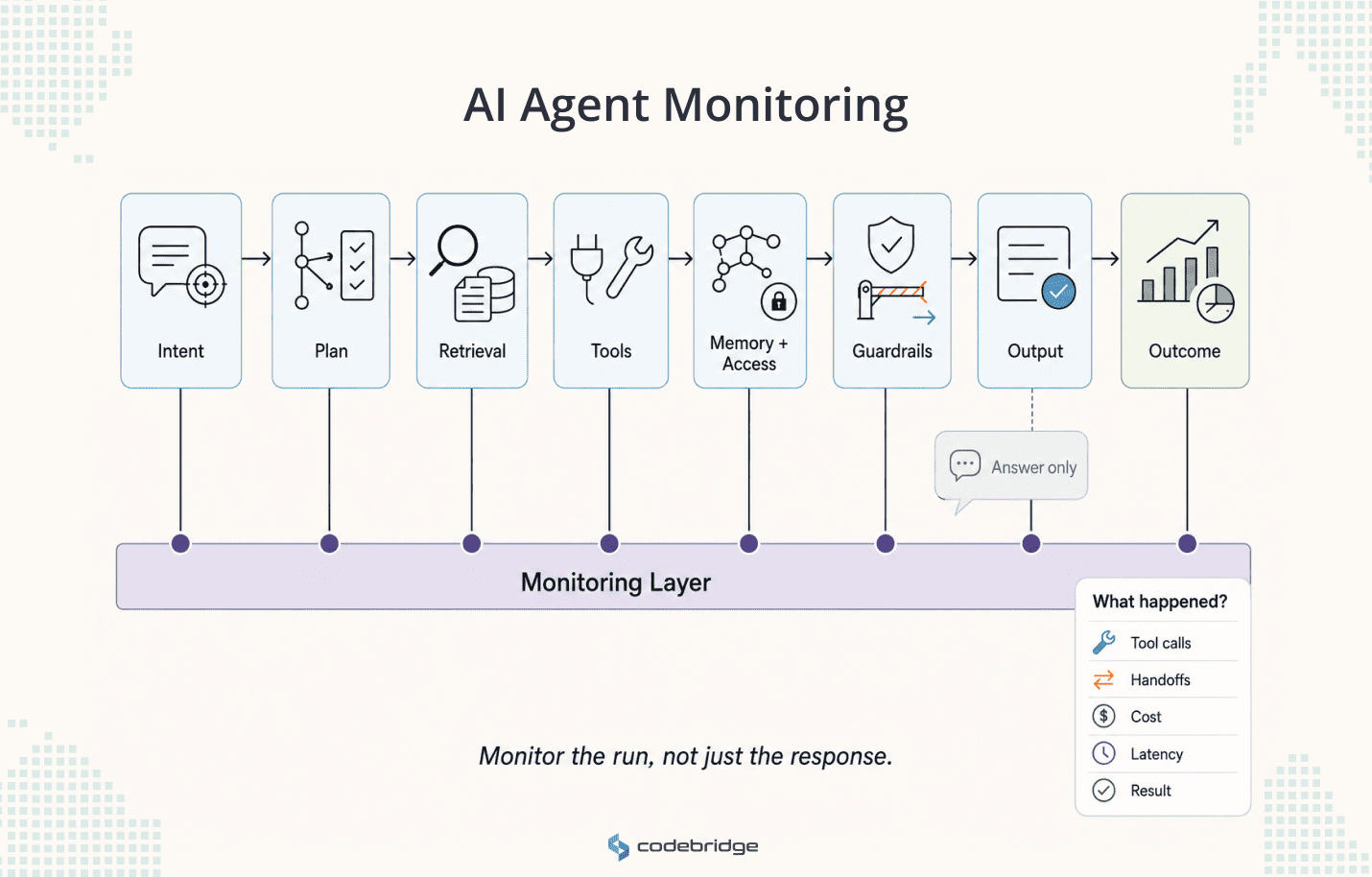
AI agent monitoring is broader than application observability because an agent does more than respond. It plans, selects tools, reads and writes to systems, uses memory, and sometimes acts on a person's behalf. OpenAI defines agents as applications that plan, call tools, collaborate across specialists, and hold enough state to complete multi-step work.
That scope sets what monitoring has to cover:
- User intent and inputs
- Model calls, tool calls, and retrieval steps
- Memory and permission use
- Guardrail triggers and handoffs to other agents or humans
- Final outputs, cost, and latency
- The business outcome
A chatbot can be judged on the answer it returns. An agent cannot. The answer is the last visible step, and the real failure usually sits earlier, in a wrong tool call or a decision that looked reasonable and still broke a business rule.
Why Traditional Monitoring Is Not Enough
Traditional monitoring reports on infrastructure health. It confirms the service is up, the API responded, latency is within range, and the error rate is low. This data is important, but none of that tells you whether the agent behaved correctly.
Agent monitoring has to see behavior and judgment: why the agent chose a tool, whether that call was allowed, whether the retrieved data was relevant, whether it exceeded its authority, and whether a human should have reviewed the action before it went out.
OpenAI's Agents SDK captures model generations, tool calls, handoffs, and guardrail events across a run, so teams can debug and monitor workflows in development and production. OpenTelemetry's GenAI conventions record model names, token counts, and durations by default, while prompt content, tool arguments, and tool results stay opt-in because they can hold sensitive data. Monitoring an agent means deciding, deliberately, what to capture.
This is why the checklist starts before the dashboard. The first steps are workflow, ownership, authority, and permissions.
The One-Minute Executive Triage
Before the detailed checklist, six questions tell an executive whether the company is ready to run an agent in production. Any answer of "no" is a reason to hold expansion, not a detail to resolve later.
AI Agent Monitoring Checklist: 9 Steps
Step 1. Define the workflow before you monitor the agent
The first decision is whether the workflow should use an agent at all. Monitoring a vague workflow produces vague results. "Monitor our AI agent" gives a team nothing to act on. "Monitor the refund-eligibility agent that reviews support tickets, checks order history, drafts a decision, and escalates exceptions" gives them a system with edges.
Map the workflow before instrumenting anything:
- Trigger and inputs
- Data sources it reads from, and systems it can write to
- Decision points and human checkpoints
- Outputs, their recipients, and the known failure points
Before Step 2, you need a named workflow, not a broad AI initiative.
Step 2. Assign business, technical, and operational ownership
/ima
Monitoring fails when everyone can see the dashboard and no one owns the consequence. Each monitored workflow needs named owners: someone accountable for the business outcome, someone for the architecture and reliability of the monitoring stack, someone for adoption and escalation inside the operating team, and someone for data boundaries and permissions. "The AI team" is not an owner. The full decision-rights model appears later in this article; at this stage, the requirement is simpler. Named accountability exists before the agent runs.
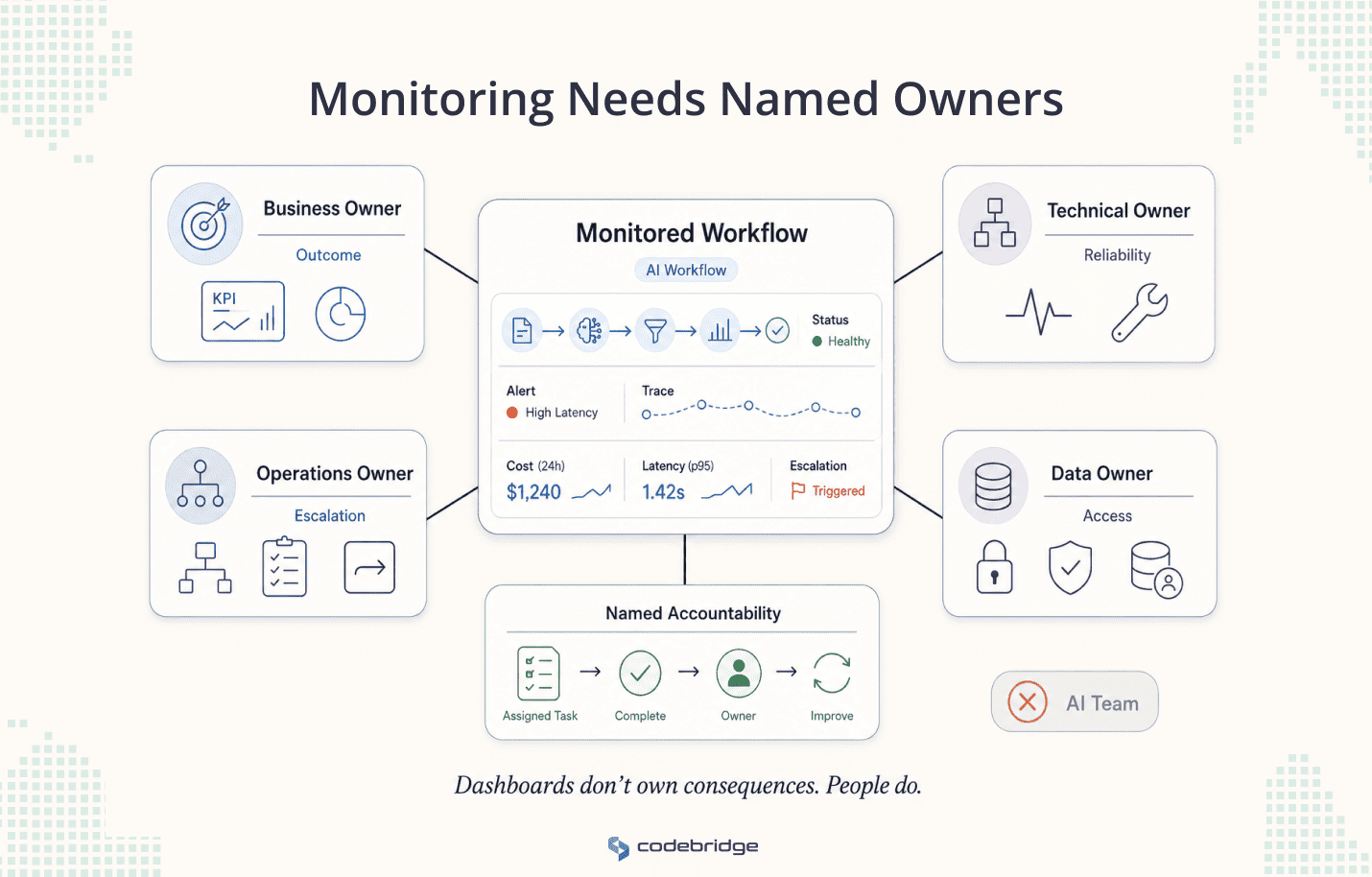
Before Step 3, every workflow has owners by name.
Step 3. Set the agent's authority and access boundaries
Authority is what the agent is allowed to do. Access is what is allowed to touch. Together, they define the blast radius and set how much monitoring the workflow needs. An agent that summarizes tickets does not carry the same risk as one that approves refunds.
OWASP's 2025 Top 10 for LLM Applications lists Excessive Agency (LLM06) as a primary risk: a system granted too much functionality, permission, or autonomy can take harmful actions when it misreads a situation or gets manipulated. IBM's 2025 Cost of a Data Breach Report found that among organizations that had an AI-related security incident, 97% lacked proper AI access controls.
Write the authority level down before launch.
Then map access with the least privilege in mind:
- Which tools, APIs, and databases can it reach
- Whether it can write, delete, send, or trigger, and with which credentials
- Whether it uses memory, and what sensitive data can enter prompts, traces, or logs
Before Step 4, you have a written authority model and a permission map.
Step 4. Define success, failure, and unacceptable behavior
Without defined success and failure states, teams measure what is easy instead of what matters. Decide what good and bad behavior look like across the dimensions that carry risk, and write it as a scorecard that the monitoring can check against.
Before Step 5, success and failure are measurable rather than intuitive.
Step 5. Instrument traces before production
If a customer, a manager, or a regulator asks why the agent made a decision, the final output will not answer them. The team needs a trace of the run, instrumented before production. Traces missing from the early rollout cannot be recovered later.
For each significant run, confirm the trace shows:
- The user input and the policy or prompt version in force
- The model used, retrieval steps, and every tool call with its output
- Handoffs and guardrail events
- The final output and any human review decision
- Cost and latency
Use OpenTelemetry-style conventions where possible, so traces, metrics, and logs connect across systems.
Before Step 6, end-to-end traces exist for test and shadow-mode runs.
Step 6. Measure behavior and evaluate quality
Observability tells you what happened. Evaluation tells you whether it was good enough. Most teams have the first and skip the second. LangChain's State of Agent Engineering survey found roughly 89% of teams have implemented agent observability, while 52% run offline evaluations. A dashboard can show a fast, available agent who is quietly producing wrong work.
Build the metric stack around six groups rather than a single health number:
- Reliability: completion rate, failed runs, tool errors
- Quality: task success, review score, correction rate
- Safety: policy violations, restricted-data events
- Cost: cost per task, token use, retry cost
- Speed: p50 and p95 latency, time to resolution
- Business value: backlog reduction, SLA improvement, first-contact resolution
Then evaluate, not just observe. Anthropic notes that agent evaluations are harder than standard model evals because agents act over many turns, change state, and adapt as they go, so mistakes propagate and compound. Build eval sets from real production failures, human-reviewed samples, and policy-sensitive cases, and rerun them after any prompt, model, tool, or policy change.
Before Step 7, the dashboard connects agent behavior to business value, and evaluations run on a schedule tied to real risk.
Step 7. Set alert thresholds and build the stop path
Monitoring without thresholds produces noise. A threshold turns a signal into an action, and each one needs a named responder.
The stop path has to exist before it is needed. An agent that cannot be paused is not production-ready. Build the controls to:
- Switch the agent to draft-only or read-only mode
- Disable specific tools or downgrade permissions
- Roll back to a previous prompt, model, or tool version
- Route all outputs to human approval
The EU AI Act sets this as an expectation for high-risk systems. Under Article 14, humans must be able to oversee the system and override, reverse, or interrupt it through a stop function that brings it to a safe state, and Article 15 requires accuracy, robustness, and cybersecurity across the lifecycle. Those obligations phase in on the revised timeline (December 2027 for standalone Annex III systems, August 2028 for embedded systems), and the control they describe is worth building now. NIST's AI RMF Playbook makes the operational point directly: monitor performance in real time so incidents get a rapid response.
Before Step 8, thresholds are documented with responders, and the rollback path has been tested.
Step 8. Monitor human behavior around the agent
An agent fails when the model is weak. It also fails when the people around it overtrust it, ignore it, or work around it. Monitoring the humans in the loop is part of monitoring the agent.
Track a few signals in the operating team:
- Adoption rate and manual workarounds
- Override rate and the pattern behind corrections
- Review-queue backlog and escalation quality
Feed what you find back into the system: update reviewer guidelines, adjust prompts and tools against real corrections, and run a short weekly failure review with the workflow owner. Cisco's readiness data ties this kind of oversight and change management to the companies that get value from agents rather than stall.
Before Step 9, you have data on human behavior, not only agent behavior.
Step 9. Decide whether to scale, improve, restrict, or stop
Monitoring exists to support one decision: does the agent have enough evidence behind it to take on more responsibility? Run a scale-gate review against the evidence, not the demo.
The review points to one of five decisions:
- Scale: stable, valuable, and controlled
- Improve: valuable, but quality or cost needs work
- Restrict: useful, but authority is too broad
- Pause: the risk or failure rate is unacceptable
- Stop: no clear value, or unsafe behavior
The scale-gate review is what separates an agent that runs from one that is ready for more responsibility.
Core AI Agent Monitoring Metrics
Each metric should support a decision. If a number cannot change what an executive does, it does not belong on the dashboard.
Who Should Own AI Agent Monitoring?
Ownership is shared, but decision rights have to be clear. Monitoring fails when the dashboard has an owner and the decision does not.
Common AI Agent Monitoring Mistakes
A few failure patterns show up repeatedly:
- Monitoring only uptime and latency, which hides tool misuse, weak escalation, and poor task quality
- Adding tracing after production, so early failures leave no evidence to learn from
- Treating evaluation as a one-time test when agents change with every prompt, model, and tool update
- Giving agents human-level permissions, which widens the blast radius and blurs accountability
- Shipping without a rollback path
- Measuring activity instead of value, where more agent runs get mistaken for better outcomes
Where Codebridge Fits
AI agent monitoring works best when it is designed before the agent goes live. The workflow map, evaluation process, escalation logic, and rollback path are cheaper to build in than to add after an incident.
Codebridge builds AI agent systems with that production architecture from the start: defined workflow boundaries, tool-execution controls, audit trails, monitoring metrics, human-review paths, and measurable outcomes.
In a multi-agent sales operations system we built, routing ran on a 90% confidence threshold, and anything below it was escalated to a person. That authority boundary was a design decision, not a fix added after the first failure. Response time to inbound leads dropped from around 24 hours to under two minutes, and the team recovered roughly 20,000 selling hours a month.
With 700+ projects delivered and roots in a Big Four practice at KPMG, the work tends to sit in regulated and complex domains where authority boundaries and audit trails are not optional.
Before scaling an agent, assess one workflow properly: what it can do, what it can access, how it fails, who owns the failure, and what evidence proves it is safe to expand.










Heading 1
Heading 2
Heading 3
Heading 4
Heading 5
Heading 6
Lorem ipsum dolor sit amet, consectetur adipiscing elit, sed do eiusmod tempor incididunt ut labore et dolore magna aliqua. Ut enim ad minim veniam, quis nostrud exercitation ullamco laboris nisi ut aliquip ex ea commodo consequat. Duis aute irure dolor in reprehenderit in voluptate velit esse cillum dolore eu fugiat nulla pariatur.
Block quote
Ordered list
- Item 1
- Item 2
- Item 3
Unordered list
- Item A
- Item B
- Item C
Bold text
Emphasis
Superscript
Subscript