Most AI readiness frameworks stay general. They check whether a company has a strategy, a data plan, a governance policy, and a culture capable of absorbing change. That tells you something useful about the organization.
But it does not tell a CTO whether one specific workflow is ready to run AI in production. Most leaders finish these frameworks with a broad maturity score and still no clear decision to act on.
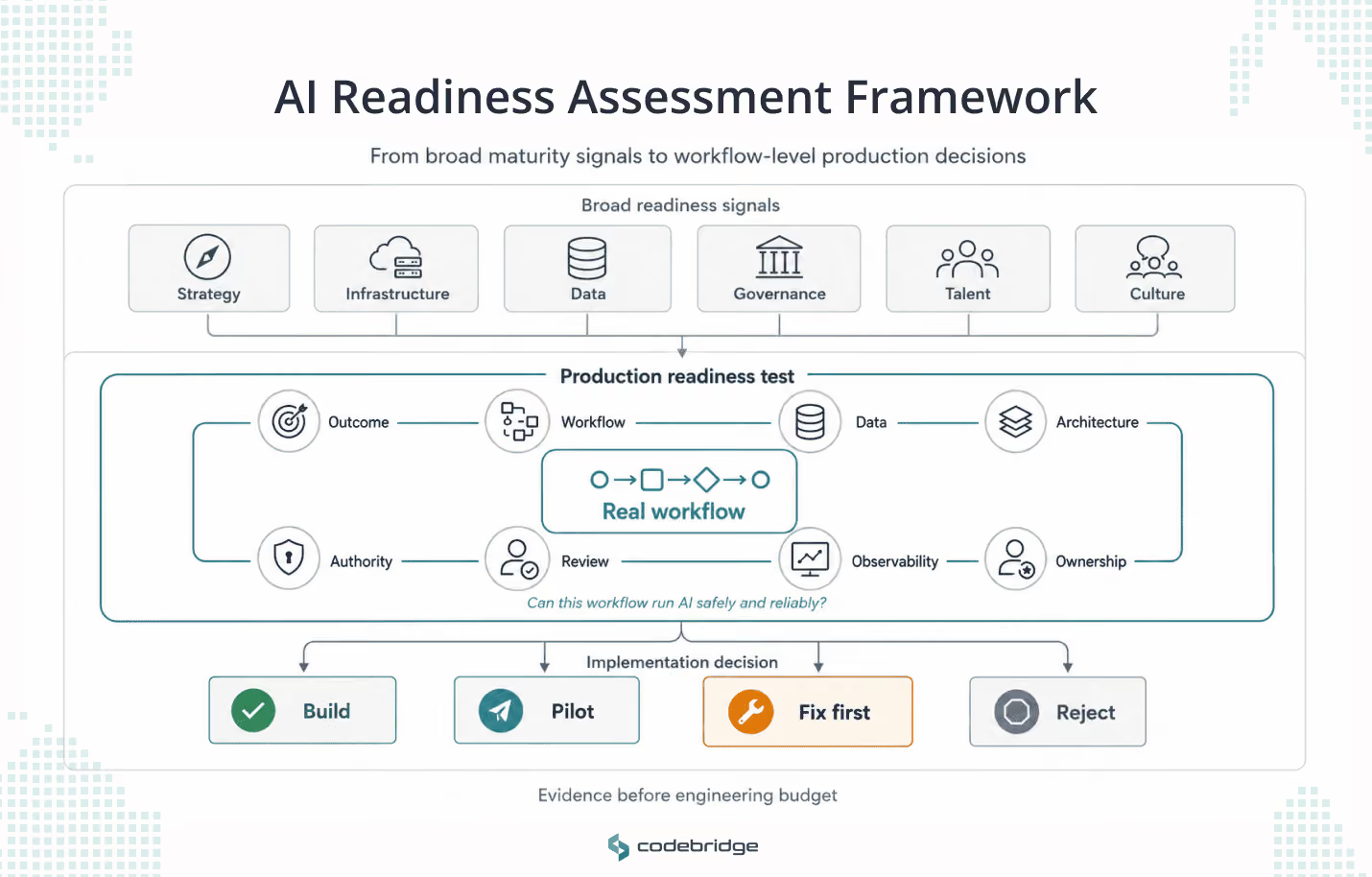
We built this framework from our recent delivery work and kept it intentionally narrow. It helps companies to answer the question of whether this workflow can survive AI in production. It runs that question through eight layers and ends with one of four decisions: build, pilot, fix first, or reject.
AI Answer Summary
An AI readiness assessment framework is a structured way to evaluate whether an organization, a workflow, a data environment, and a technical system are prepared to adopt AI successfully. Broad frameworks assess strategy, governance, infrastructure, data, people, and culture. Those help with enterprise planning, but they are not enough before you build production AI.
For implementation, readiness has to be assessed at the workflow level. A workflow is ready for AI only when the business outcome is measurable, the process is mapped, the data is usable, the integrations are feasible, the authority boundaries are defined, human review is designed in, observability is in place, and ownership is clear.
This framework breaks AI readiness into eight production layers. For each layer, it shows what to ask, who has to answer, what evidence is required, what breaks if you skip it, and how to decide whether to build, pilot, fix first, or reject the use case.
What Is an AI Readiness Assessment Framework?
AI readiness assessment framework is a structured method for evaluating whether a company, a team, a workflow, a data environment, and a technology stack are prepared to adopt AI successfully.
This framework narrows that question to production readiness. It assesses whether one real workflow can run AI safely and reliably after launch.
Most existing frameworks are broader. For example, Cisco's AI Readiness Index evaluates six pillars: strategy, infrastructure, data, governance, talent, and culture, and sorts organizations into readiness levels from Pacesetters down to laggards.
Those categories are valuable for strategic planning, but they still leave executives with the same problem. After reading the report, they do not know whether one specific workflow should move into design, pilot, or production.
A useful framework should stop bad AI projects before they turn into expensive software.
Why Production AI Readiness Needs a Different Framework
AI becomes more expensive and harder to control when it moves from answering questions to touching workflows. Once an AI system can call tools, route cases, or support decisions, readiness becomes an operating condition.
The market already shows what happens when teams skip this step. Gartner predicts that more than 40% of agentic AI projects will be canceled by the end of 2027, and points to three reasons: escalating costs, unclear business value, and inadequate risk controls. Those are the same three gaps a workflow-level assessment is designed to catch early.
Deloitte's research shows where most companies still sit: in its 2026 enterprise survey, about 37% use AI at a surface level with little change to existing processes, while only 30% redesign key processes around it. Deloitte also found that only one in five companies has a mature model for governing autonomous AI agents.
This framework produces real artifacts
Each layer is meant to produce something concrete. By the end of an assessment, you should hold:
- A business outcome brief
- A workflow map
- A data readiness map
- An integration map
- An AI authority model
- A human review flow
- An evaluation and observability plan
- An ownership and support model
- A final implementation decision
A maturity reading of "72% ready" is not a decision. A serious framework tells the executive team what to build, what to test, what to fix, and what to avoid.
How to Use the 8-Layer AI Readiness Assessment Framework

The eight layers are cumulative, and they are not eight independent checkboxes. Each layer protects the one after it.
You cannot assess data readiness until the workflow is clear. You cannot design AI authority until you know where the workflow carries risk. You cannot design human review until you know what the AI is allowed to do.
To keep the framework concrete, one example runs through all eight layers. A B2B SaaS company wants to build an AI sales research and outreach assistant. The assistant should research target accounts, enrich CRM records, prepare outreach messages, detect buying signals, and route qualified replies to sales.
This example is hypothetical, but it sits close to work we deliver in SalesTech and CRM automation, so the gaps it exposes are real ones.
Layer 1: Business Outcome
What this layer decides: whether the AI use case has a measurable business reason to exist.
Strong AI projects start as business problems, not as feature ideas. When the outcome is unclear, the team ends up measuring progress by how good the demo looks, not by what the business gained.
What business outcome should this AI system improve?
The CEO, the business owner, or the workflow owner has to answer this. A strong answer sounds like "reduce manual account research time by 50% for SDRs while keeping lead quality." A weak answer sounds like "make sales more efficient with AI."
The weak version describes a direction, not a business case. Until the team can name the metric that should move, hold off on technical discovery.
What is the current baseline?
This is for the business owner, operations, and finance if cost is involved. A strong answer puts a number on it: "SDRs spend 12 to 15 hours a week researching accounts before outreach."
A weak answer is "the process takes too long," which means the team will not be able to prove improvement later. Measure the current workflow for a week or two, or pull the figure from existing operational logs.
What changes if AI improves this workflow? The CEO, business owner, and workflow owner answer this. A strong answer ties the gain to revenue, cost, speed, quality, compliance, or retention: "sales can respond faster to intent signals and book more qualified meetings." A weak answer like "people will save time" is too generic to prioritize against everything else on the roadmap.
What happens if AI gets it wrong?
The business owner answers, with legal or compliance and the customer-facing team where relevant. A strong answer describes the consequence and the control: "a wrong recommendation produces irrelevant outreach, so sending stays human-approved at first."
A weak answer like "the model should be accurate enough" means the risk has not been turned into an operating control. Define the error consequences before you decide how much authority the AI gets.
Running example.
For the sales assistant, the outcome is not "automate outreach." A better outcome is to cut SDR manual research time by 50%, reduce response delay, and lift the qualified-meeting rate from target accounts.
Decision gate.
Move forward only if:
- One measurable business outcome is defined
- A current baseline exists or can be measured quickly
- The use case has a named business owner
- There is a clear reason this workflow deserves AI investment
Minimum evidence required: business outcome brief, baseline metric, target improvement, named workflow owner, initial value hypothesis.
What breaks if you skip this layer: the team builds something that looks useful in a demo and cannot be judged after launch. Nobody can say whether it helped the business or just created a new AI-shaped task.
Readiness trap: treating AI interest as if it were business value.
Layer output: business outcome brief.
Layer 2: Workflow Reality
What this layer decides: whether the real workflow is clear enough to automate, augment, or redesign.
AI cannot reliably improve a workflow the company cannot explain. The workflow written in the process document is often not the workflow people use.
Who does the work today, step by step?
The workflow owner, frontline users, and operations lead answer this. A strong answer walks the process from trigger to final output, including who touches it and where the handoffs happen.
A weak answer like "sales handles it" or "ops manages it" is a department-level abstraction. Interview the people doing the work and map the process from real examples.
Where does the workflow leave official systems?
Frontline users, operations, and engineering answer this. A strong answer is specific: "the CRM stores the account, but research happens on LinkedIn, notes go into Google Docs, and approvals happen in Slack."
An answer like "everything is in the CRM" usually describes the system of record, not the system of work. Ask users to walk through their last five completed cases.
Where do exceptions happen?
The workflow owner and frontline leads answer this. A strong answer names the common exceptions and how people resolve them.
A bad answer will sound like "there are not many exceptions" usually means nobody has checked. Review edge cases, escalations, rejected outputs, and manual overrides.
Running example.
The SaaS company finds that account research is not one task. SDRs check CRM history, LinkedIn activity, funding news, website changes, email threads, competitor mentions, and earlier outreach notes. The assistant cannot be scoped correctly until this real workflow is mapped.
Decision gate.
Move forward only if:
- The workflow is mapped from trigger to outcome
- Systems, handoffs, approvals, and exceptions are visible
- Human judgment points are marked
- The team understands what AI will support, not only what it will "automate"
Minimum evidence required: workflow map, exception list, handoff map, decision-point inventory, and a list of the systems used in reality.
What breaks if you skip this layer: you automate the official process while the real process still lives in Slack threads, spreadsheets, browser tabs, and one overloaded person who knows how it actually works.
Readiness trap: mapping the workflow from management memory instead of frontline behavior.
Layer output: workflow reality map.
Layer 3: Data Readiness

What this layer decides: whether the data the workflow needs is available, owned, fresh, contextual, permissioned, and usable.
Data readiness for AI is not the same as general data quality. Data is ready only when it can support the specific workflow, decision, risk level, and context the AI operates in.
For a deeper audit of this layer on its own, see our guide on data readiness for AI. The summary below is enough to assess the workflow in front of you.
What exact data does the system need to perform this workflow?
The workflow owner, data owner, and engineering lead answer this. A strong answer is scoped: "for each target account, the system needs CRM status, previous outreach, firmographics, recent buying signals, website data, and enrichment data."
Where does that data live, and who owns it?
The data owner, operations, and engineering lead answer this. A strong answer gives each source an owner, an access path, an update frequency, and known quality issues.
A weak answer like "marketing has some of it" or "it should be in HubSpot" means access and accountability are unclear. Build a source inventory before any model or agent design.
Is the data fresh enough for this workflow?
The workflow owner, data owner, and business owner answer this. A strong answer connects freshness to use: "buying-signal data has to refresh daily; firmographic data can refresh monthly."
Running example.
The sales assistant cannot personalize outreach safely if CRM notes are stale, earlier outreach context is missing, or LinkedIn and firmographic data cannot be accessed reliably. Bad data does not produce personalization. It produces confident, wrong messages that carry the company's name.
Decision gate.
Move forward only if:
- The required data sources are known
- Data owners are named
- Data quality issues are documented
- Access and permissions are feasible
- Sample records are available for testing
Minimum evidence required: data source inventory, data owner list, sample records, data quality notes, access and permission constraints, and data freshness requirements.
What breaks if you skip this layer: the system makes recommendations from stale, incomplete, or context-poor data. The output looks polished and is operationally wrong.
Readiness trap: checking whether data exists instead of checking whether it is usable for this specific decision.
Layer output: data readiness map.
Layer 4: System and Integration Readiness
What this layer decides: whether AI can access, read, write, and interact with the systems it needs without creating fragile architecture.
AI pilots usually run on exported files. Production systems run on live integrations. The two are different problems.
Which systems must AI read from and write to?
The CTO, engineering lead, system owners, and workflow owner answer this. A strong answer separates the access types: "the assistant reads from HubSpot, Gmail, enrichment APIs, and product usage data; it writes draft notes to the CRM but cannot send messages yet."
The answer like "it connects to the CRM" leaves the integration scope undefined. Separate read access, write access, draft creation, and action execution.
Are the required APIs stable and available?
The engineering lead, architect, and system owner answer this. A strong answer knows the API limits, authentication, rate limits, webhooks, and failure modes.
What happens when an integration fails?
The engineering lead, DevOps, and workflow owner answer this. A weak answer like "we will handle errors later" means the workflow is not production-ready. Define failure modes and fallback paths before launch.
What latency does the workflow require?
The product owner, workflow owner, and engineering lead answer this. A weak answer like "it should be fast" makes the architecture impossible to design properly.
A strong answer sets it by step: "lead routing has to happen within two minutes; enrichment can run async; message drafting can take up to 30 seconds."
Running example. The assistant uses CRM data, email history, enrichment APIs, and outreach tools. The first production version may only prepare CRM notes and draft messages. Sending outreach stays human-approved until the system proves its quality and safety.
Decision gate.
Move forward only if:
- An integration map exists
- Read and write boundaries are defined
- API constraints are known
- Failure modes are mapped
- Latency requirements are clear
Minimum evidence required: integration map, API and access review, permission model, latency requirements, failure and fallback plan, and an environment plan.
What breaks if you skip this layer: the system works in a controlled demo, then falls over when it meets rate limits, missing permissions, an API change, a broken webhook, and real users doing real-world things.
Readiness trap: building around exported files and calling it production architecture.
Layer output: system and integration readiness map.
Layer 5: Security, Risk, and Authority
What this layer decides: the authority boundary of the AI system. What it can read, suggest, prepare, execute, escalate, and never touch.
The more authority the AI gets, the more the project becomes a risk and architecture problem. Security here is not only about protecting the model. It is about controlling what the system can do.
This is where the established security frameworks earn their place. The OWASP Top 10 for LLM Applications 2025 names the risks that matter most for systems with tool access, including prompt injection (LLM01), sensitive information disclosure (LLM02), and excessive agency (LLM06). It also covers misinformation (LLM09), which is where overreliance now sits.
NIST and the EU AI Act support the same idea from a governance angle. Match the controls to the risk the system actually carries. The EU AI Act sorts systems into four risk tiers, from unacceptable through high, limited, and minimal, with stricter obligations as the risk rises.
What can AI see?
The CTO, data owner, security lead, and compliance, where relevant, answer this. A strong answer limits access to the data the workflow needs and logs it.
A weak answer like "it can access the database" means access is too broad. Apply least-privilege access and separate the data the workflow needs from the data that happens to be available.
Which actions require human approval?
The business owner, workflow owner, legal or compliance, and product owner answer this. A strong answer names the moments: any external message, risky account change, or sensitive recommendation needs approval.
What must AI never do?
The CEO or CTO, legal or compliance, risk owner, and workflow owner answer this. A strong answer is explicit: the system must never delete customer records, send outreach without approval, or override an opt-out.
"We trust the model not to do risky things" confuses model behavior with system control. Define the prohibited actions at the architecture level.
Running example. The sales assistant may suggest target accounts, prepare research summaries, and draft messages. In the first version it should not send messages on its own, change lifecycle stages, ignore opt-outs, or overwrite CRM data without approval.
Decision gate.
Move forward only if:
- Read and write permissions are defined
- High-risk actions are identified
- Approval rules exist
- Prohibited actions are documented
- Logging and audit requirements are clear
Minimum evidence required: AI authority model, risk register, approval rules, prohibited action list, access control requirements, and audit and logging requirements.
What breaks if you skip this layer: the AI gets tool access before anyone defines its limits. The result is a system that acts with confidence and admin-level reach, with nothing in place to stop a bad action.
Readiness trap: treating "we use a safe model" as a security strategy.
Layer output: AI security, risk, and authority model.
Layer 6: Human Review and UX
What this layer decides: whether people can understand, review, correct, override, and trust the AI system inside their real work.
Human review only works when it is designed into the workflow. Added late, it turns into a bottleneck, a checkbox, or a place where AI output goes to be ignored. Deloitte's research makes the same point from the other direction, saying that the companies that get value from AI tend to redesign the work around it rather than bolt AI onto the surface of an existing process.
Where does the user see AI output?
The product owner, UX designer, workflow owner, and users answer this. A strong answer puts the output inside the tool where the user already works, with context and a clear next action. A weak answer like "users can open a separate AI dashboard" risks creating extra work instead of removing it. Place AI output at the decision point, not in a disconnected interface.
What can the user do with the AI output?
The product owner, workflow owner, and users answer this. A strong answer gives them real actions: accept, edit, reject, escalate, or leave feedback. A weak answer like "they can review it" leaves the review behavior undefined. Design explicit review states and actions.
What context does the user need to trust the output?
The users, workflow owner, and product owner answer this. A strong answer shows sources, the relevant data, a signal of confidence or uncertainty, and an explanation where it helps. A weak answer like "the output should be clear enough" assumes trust. Identify what users need in order to verify the output quickly.
Does human review protect quality or create a new queue?
The workflow owner, operations lead, and users answer this. A strong answer makes the review risk-based and focused on uncertain or high-impact outputs. A weak answer like "every output goes to a human" moves the bottleneck rather than removing it. Define review by risk, confidence, and action type.
Running example. The sales assistant should show why it recommended an account, which sources it used, what earlier interactions exist, and the message it drafted. The SDR should be able to edit, approve, reject, or flag the output, and that feedback should feed into evaluation rather than disappear.
Decision gate. Move forward only if:
- User review points are designed
- Review actions are defined
- An escalation path exists
- Feedback is captured
- The workflow does not create a bigger bottleneck
Minimum evidence required: review flow, a UX wireframe or workflow mockup, a feedback mechanism, an escalation path, an adoption metric, and user acceptance criteria.
What breaks if you skip this layer: the system is technically impressive and operationally ignored. Users distrust it, overtrust it, or quietly build their own workaround.
Readiness trap: adding human review so late that it becomes a queue instead of a control.
Layer output: human review and UX flow.
Layer 7: Evaluation, Observability, and Monitoring
What this layer decides: whether the team can test, measure, trace, monitor, and improve AI behavior before and after launch.
Production AI needs visibility. Metrics tell you that something happened. Traces tell you how it happened across model calls, retrieval, tools, guardrails, and handoffs.
What does a good output look like?
The workflow owner, users, product owner, and business owner answer this. A strong answer comes with examples of acceptable, unacceptable, and borderline outputs. A weak answer like "the answer should be accurate" leaves the evaluation criteria too vague to use. Build a test set from real examples with expected behavior.
Which metrics diagnose system health?
The engineering lead, product owner, business owner, and operations answer this. A strong answer tracks business outcome, quality, latency, cost, escalation, approval, error, and failure. A weak answer like "we will track accuracy" measures the model and not the system. Group the metrics by what they diagnose.
Can the team replay what happened?
The engineering lead, DevOps, security, and product owner answer this. A strong answer can trace inputs, retrieval, model calls, tool calls, guardrails, outputs, and the user's decision. A weak answer like "we will check logs if something goes wrong" means debugging will be slow and incomplete. Define tracing requirements before production.
Who reviews failures, and how often?
The product owner, workflow owner, engineering lead, and support owner answer this. A strong answer sets a cadence: failures are reviewed weekly during the pilot and after every incident in production. A weak answer like "engineering will monitor it" leaves operational ownership unclear. Assign a review cadence and a failure owner.
Running example.
For the sales assistant, observability should track research time saved, SDR approval rate, message edit rate, qualified-meeting rate, bad-personalization incidents, enrichment failures, cost per researched account, and the change in response time.
Decision gate.
Move forward only if:
- Evaluation criteria exist
- A test set exists or can be created
- Key metrics are defined
- Tracing requirements are clear
- Failure review ownership exists
Minimum evidence required: evaluation plan, test set, monitoring dashboard requirements, trace plan, alert rules, and a failure review cadence.
What breaks if you skip this layer: the first thing that tells you the system is failing is an unhappy customer.
Readiness trap: tracking model accuracy while ignoring business outcome, user behavior, tool failures, cost, and escalation patterns.
Layer output: evaluation and observability plan.
Layer 8: Ownership and Support
What this layer decides: whether the AI system has business, technical, risk, and support ownership after launch.
A production AI system is not finished when it launches. It becomes part of operations. Someone has to monitor it, improve it, handle incidents, update prompts or policies, maintain integrations, review failures, and decide when to scale or roll back.
Who owns the system after launch?
The CEO or CTO, business owner, and product owner answer this. A strong answer splits ownership: business owns outcomes, engineering owns reliability, operations owns daily use, and risk or compliance owns controls where relevant.
Who handles incidents? The CTO, support lead, operations lead, and security or compliance answer this. A strong answer defines incident types, escalation paths, response owners, and rollback conditions.
Who approves changes to prompts, tools, data sources, or authority? The CTO, product owner, risk owner, and workflow owner answer this. A weak answer like "the team can adjust it when needed" lets the system drift without control. Define change management rules.
A strong answer reviews and logs changes based on risk.
Running example.
For the sales assistant, RevOps may own the workflow, sales leadership may own output quality, engineering may own integrations and reliability, and product or operations may own the improvement backlog. If nobody owns bad-personalization incidents, the system should not scale.
Decision gate.
Move forward only if:
- A business owner is named
- A technical owner is named
- A support owner is named
- A risk or compliance owner is named where needed
- Change management and incident response are defined
Minimum evidence required: ownership matrix, support process, incident response path, change management rules, scaling criteria, and rollback criteria.
What breaks if you skip this layer: the system launches, the team celebrates, and then nobody owns the slow work where value is actually won: support, monitoring, updates, user feedback, and steady improvement.
Readiness trap: treating launch as the finish line.
Layer output: ownership and support model.
The Layer Dependency Map
As was mentioned earlier, this framework is cumulative. A weak early layer does not stay in its box because it spreads into the layers that depend on it.
AI readiness is a chain, not eight separate checks. The weak link decides how far the rest of the chain can hold.
AI Readiness Scoring Model: Turning the Framework Into a Decision
Score each layer from 1 to 5. The scale stays simple enough for executives and structured enough for implementation planning.
Here is the running sales assistant scored across all eight layers.
The score matters less than the gap map. A readiness score tells you where you are. The gaps tell you what to do next.
Decision Matrix: Build, Pilot, Fix First, or Reject
A good AI readiness assessment ends with an implementation decision.
A 30-Day Plan to Run the Framework
Week 1: Choose and define the workflow
Select one workflow. Define the business outcome, assign an owner, capture the baseline, and identify the users and systems involved. Then decide whether the use case is even worth assessing further.
Output: business outcome brief, stakeholder list, initial value hypothesis.
Week 2: Map reality and data
Interview the people who do the work. Map the current workflow, identify exceptions, list systems and handoffs, collect sample data, and identify data owners.
Output: workflow map, data readiness map, exception list.
Week 3: Assess buildability and risk
Review APIs and integrations. Define access requirements and read and write boundaries, set AI authority levels, draft the human review flow, and identify security and compliance constraints.
Output: integration map, AI authority model, review flow.
Week 4: Score, decide, and scope the next move
Score all eight layers, identify the blockers, and decide whether to build, pilot, fix first, or reject. Define the pilot scope if there is one, assign ownership, and set the evaluation and monitoring requirements.
Output: readiness scorecard, gap map, implementation decision, pilot or remediation plan.
Where Codebridge Fits
For teams planning production AI, the hard part is turning a workflow into a reliable system that has the architecture, the integrations, the data flows, the permissions, the review paths, the observability, and the support model. That is the point where AI readiness becomes engineering work.
This is the work we do. Codebridge builds architecture-first AI and software for complex production systems, with deep experience in SaaS and multi-tenant platforms, HealthTech and secure data handling, SalesTech and CRM automation, high-load systems, and complex integrations.
Our recent project shows what the later layers look like when they hold.
In SalesTech, we built a multi-agent AI sales system for a B2B professional-services client. It cut response time from 24 hours to under two minutes, compressed the time to a first meeting from one to two weeks down to two to three days, and saved around 20,000 selling hours a month. The authority model, the human-approval points, and the observability behind those numbers are the same Layer 5 and Layer 7 questions this framework asks.
Before you build AI into a live workflow, pressure-test the workflow first. A gap you find in a planning session costs a fraction of the same gap found after the system ships.
Conclusion
AI readiness is not a mood, a leadership workshop, or a sense that the company should do something with AI.
It is the condition of the workflow, the quality of the data, the reliability of the architecture, the clarity of the authority model, the strength of human review, the visibility of system behavior, and the ownership model after launch.
Before AI touches customers, patients, revenue, operations, or regulated data, score the workflow through all eight layers. If it cannot pass them, the problem is not that the company is behind on AI. The problem is simpler and more useful to know: the workflow is not ready to survive production.









Heading 1
Heading 2
Heading 3
Heading 4
Heading 5
Heading 6
Lorem ipsum dolor sit amet, consectetur adipiscing elit, sed do eiusmod tempor incididunt ut labore et dolore magna aliqua. Ut enim ad minim veniam, quis nostrud exercitation ullamco laboris nisi ut aliquip ex ea commodo consequat. Duis aute irure dolor in reprehenderit in voluptate velit esse cillum dolore eu fugiat nulla pariatur.
Block quote
Ordered list
- Item 1
- Item 2
- Item 3
Unordered list
- Item A
- Item B
- Item C
Bold text
Emphasis
Superscript
Subscript