AI Answer Summary
AI sprawl is the uncontrolled spread of AI tools, agents, prompts, automations, and AI-enabled SaaS features across a company. It usually begins as useful experimentation, one team adopts a writing assistant, another uses an AI coding tool, sales tests an account research agent, and operations connects an AI workflow to a system of record.
The risk appears when nobody can clearly explain what data each AI system touches, what actions it can take, who owns it, how it is monitored, and how it can be retired. At that point, AI sprawl and becomes architecture debt.
The real question for companies is whether experimentation is turning into operational infrastructure faster than the company can design the controls around it. AI sprawl becomes dangerous when scattered tools, prompts, agents, and integrations enter real workflows without ownership, observability, permission boundaries, and lifecycle control.
Introduction: AI sprawl starts quietly
AI sprawl happens gradually. A company starts using more AI tools, assistants, copilots, and agents across teams, but the policies and boundaries do not grow at the same speed.
At first, this looks like healthy experimentation. Marketing drafts faster and sales researches accounts faster. But the risk appears when AI-generated work enter the operating rhythm of the company before architecture, governance, and ownership have caught up.
Glean’s 2026 Work AI Index shows the gap: 87% of digital workers use AI at work, 75% say it makes them more productive, and workers report saving roughly 11 hours per week through automation alone. Yet only 13% say AI has significantly improved their organization’s performance. Glean also found that 77% of digital workers juggle multiple AI tools every week, with 33% using four or more. Source: Glean Work AI Index 2026.
This is the productivity paradox behind AI sprawl. Individuals feel faster, but the company does not automatically become more coordinated or reliable. In many cases, local productivity improves while global complexity increases.
This article explains what AI sprawl is, why it is accelerating, how it differs from shadow AI and SaaS sprawl, where real companies are already seeing the problem, and how CEOs and CTOs can control AI sprawl before it becomes architecture debt.
What Is AI Sprawl?
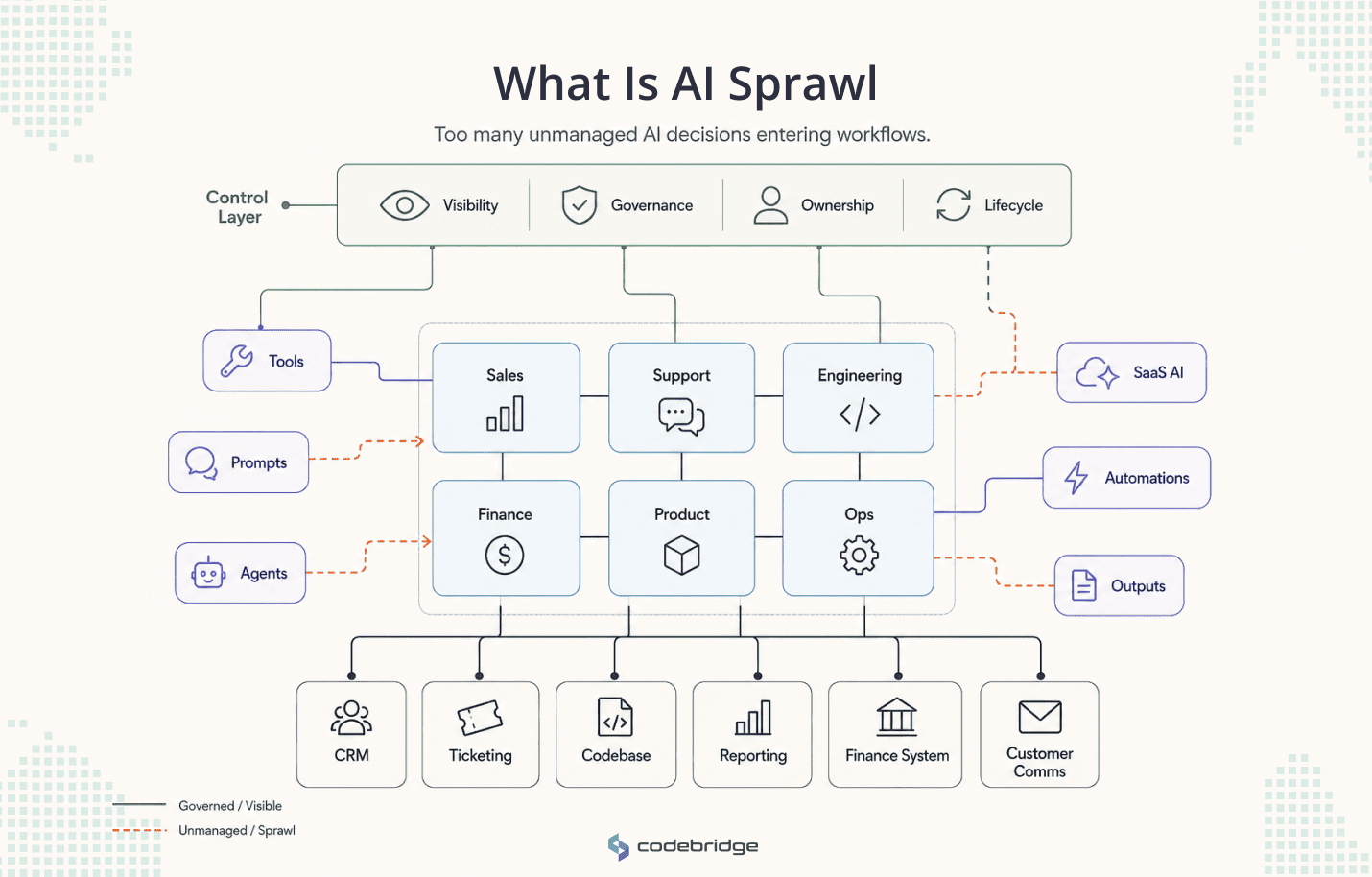
AI sprawl is the uncontrolled spread of AI tools, AI agents, prompts, AI-enabled SaaS features, automations, integrations, and AI-generated workflows across an organization without shared visibility, governance, architecture, or lifecycle ownership.
It can include approved AI tools used inconsistently, unapproved AI tools used by employees, agents connected to business systems, reusable prompts, workflow automations, and AI outputs entering customer-facing, financial, product, support, or engineering processes.
The important point is that AI sprawl is not limited to tools bought outside procurement. A company can have AI sprawl even when every vendor is formally approved. The problem is whether the organization understands how AI is actually being used inside work.
For example, a company may approve an enterprise AI assistant for general productivity. That may look controlled at the procurement level, but if sales uses it to summarize CRM notes and engineering uses it to generate technical documentation, the same tool now has different risk profiles in different workflows.
AI sprawl often includes several overlapping layers:
- AI tools adopted by different departments for similar tasks.
- AI prompts reused as informal workflow logic.
- AI agents created by employees or teams without a central registry.
- AI-enabled SaaS features activated without clear review.
- AI automations connected to business systems through APIs, browser extensions, or low-code platforms.
- AI outputs used in decisions, customer communication, code, reporting, or operational execution.
So in short, AI sprawl is too many unmanaged AI decisions entering company workflows.
Why AI Sprawl Is Accelerating Now
AI sprawl is accelerating because AI adoption no longer follows the traditional software-buying path. In the past, most business software entered the company through procurement, IT, security review, budget approval, onboarding, and administration. That process was not perfect, but it created some visibility.
AI does not always enter that way. It enters through browser tabs, SaaS feature updates, plugins, personal accounts, code editors, automation platforms, meeting assistants, and internal experiments. It also enters through employees who are under pressure to deliver faster and see AI as a practical way to remove friction from daily work.
AI is now embedded inside normal SaaS
AI is no longer something companies buy only as a separate platform. It appears inside CRMs, helpdesks, analytics tools, project management systems, design platforms, code editors, meeting tools, document systems, search tools, and productivity suites.
This makes AI adoption harder to track because AI can be activated inside software the company already uses. The procurement event happened years ago. The AI feature arrives later. A team may start using an AI summary, AI classification, AI recommendation, or AI drafting feature without anyone treating it as a new AI system.
For leaders, this creates a visibility problem. A company may believe it has approved three AI tools, while in reality twenty existing platforms now contain AI features that influence work. Some of those features may only draft text. Others may classify records, generate code, recommend next actions, or move data between systems.
The adoption pattern is therefore not linear.
Employees can adopt AI without procurement
Employees do not need IT to test AI. They can open a browser, install an extension, or connect a tool to a workflow. That speed is part of why AI is useful, but also why shadow AI becomes difficult to separate from legitimate experimentation.
CIO’s coverage of BlackFog research reported that nearly half of workers, 49%, admitted adopting AI tools without employer approval. The same coverage noted that many used free versions and that senior leaders were often comfortable prioritizing speed over privacy.
This matters because the first risk is not always dramatic. It may be as simple as a team pasting customer notes into a personal AI account, using an AI extension to process internal documents, or connecting an unapproved tool to a work application. Each action may look small but at scale, it creates unknown data flows and unknown decision paths.
However, it doesn't mean that companies should respond by banning every tool. That often drives usage further underground. The better response is to make safe usage easier than unsafe usage, and to create a practical route for teams to disclose, classify, and standardize AI workflows.
AI agents make experimentation operational
AI agents change the risk profile because they do not only generate text. They can maintain context, use tools, call APIs, retrieve documents, create tasks, write code, or coordinate other agents. A chatbot may influence a person. An agent may influence a system.
Deloitte’s 2026 State of AI in the Enterprise research shows how quickly this is moving. By 2027, 74% of respondents expect their companies to use AI agents at least moderately. Within that group, 23% expect extensive use, and 5% expect agents to be fully integrated as a core component of business operations. Deloitte also notes that approximately 80% of surveyed organizations currently lack mature governance capabilities for agentic AI, including clear boundaries, real-time monitoring, and audit trails.
Gartner gives an even sharper view of the coming scale. In April 2026, Gartner predicted that by 2028, an average global Fortune 500 enterprise will have more than 150,000 AI agents in use, up from fewer than 15 in 2025. Gartner also reported that only 13% of organizations think they have the right AI agent governance in place.
Whether every forecast lands exactly is less important than the direction of travel. Companies are moving toward many AI-enabled micro-workflows, many semi-autonomous agents, and many department-level experiments that can affect real work.
AI Sprawl vs. Shadow AI vs. Agent Sprawl vs. SaaS Sprawl
Many companies use “AI sprawl,” “shadow AI,” “agent sprawl,” and “SaaS sprawl” as if they mean the same thing. They do not. The differences matter because each problem requires a different control model.
A project management tool does not normally invent an answer or decide whether to escalate a customer issue. AI systems can do some or all of those things depending on how they are configured. Therefore, the risk is unmanaged behavior inside workflows.
Shadow AI is one part of the problem, but not the whole problem. A company can eliminate most unapproved AI usage and still have AI sprawl if approved tools are used without prompt control or lifecycle ownership.
Agent sprawl is more specific. It refers to the uncontrolled spread of autonomous or semi-autonomous AI agents. This is especially important because agents can move from advice to action. Once an agent has tools, memory, permissions, and access to business systems, the company must manage identity, authority, monitoring, and retirement.
Real Examples of AI Sprawl: The Problem Is Already Here
One of the simplest ways to avoid an expensive AI mistake is to learn from companies that are already facing the consequences. AI sprawl is visible in the way employees use multiple AI tools and AI systems begin touching code, data, and customer operations.
The point is to recognize the moment when experimentation starts becoming infrastructure.
Agent sprawl: FICO employees are creating dozens of agents every day
FICO is one of the clearest public examples of agent sprawl becoming operationally real. Mike Trkay, FICO’s CIO and Chief Customer Officer, publicly stated that FICO has 3,500 employees creating dozens of new AI agents every day. He described the opportunity as enormous, but also emphasized the responsibility that comes with it.
Source: Mike Trkay on LinkedIn
It is a useful example because it shows that agent sprawl can appear inside serious, sophisticated organizations that are actively thinking about governance. The issue is that agent creation is becoming easy to happen at scale across the organization.
When 3,500 employees can create dozens of agents every day, governance becomes an operating model problem. The company needs to know which agents exist, who created them, which workflows they affect, what data they use, what tools they can call, what costs they generate, what outputs they produce, which other agents duplicate them, and when they should be retired.
Enterprise agent sprawl: DaVita and more than 10,000 reported agents
The Wall Street Journal’s reporting on AI agent sprawl also pointed to DaVita, Lyft, GitLab, and FICO as companies dealing with the proliferation of independently created AI agents. The article reported that employees at DaVita had created more than 10,000 AI agents, according to CIO Madhu Narasimhan, and that the kidney-care company had developed internal controls to scale agent use safely and manage token spend.
Source: The Wall Street Journal
The DaVita shows two sides of the same reality. On one side, employees are creating agents at a scale that would have sounded extreme only a short time ago. On the other side, the company is not simply trying to eliminate AI. It is building internal mechanisms to manage safety, cost, and scalability.
That is the right direction. The problem is agent creation without a control system around identity, permissions, cost, usage, data, and lifecycle.
The Five Forms of AI Sprawl: The AI Sprawl Debt Map
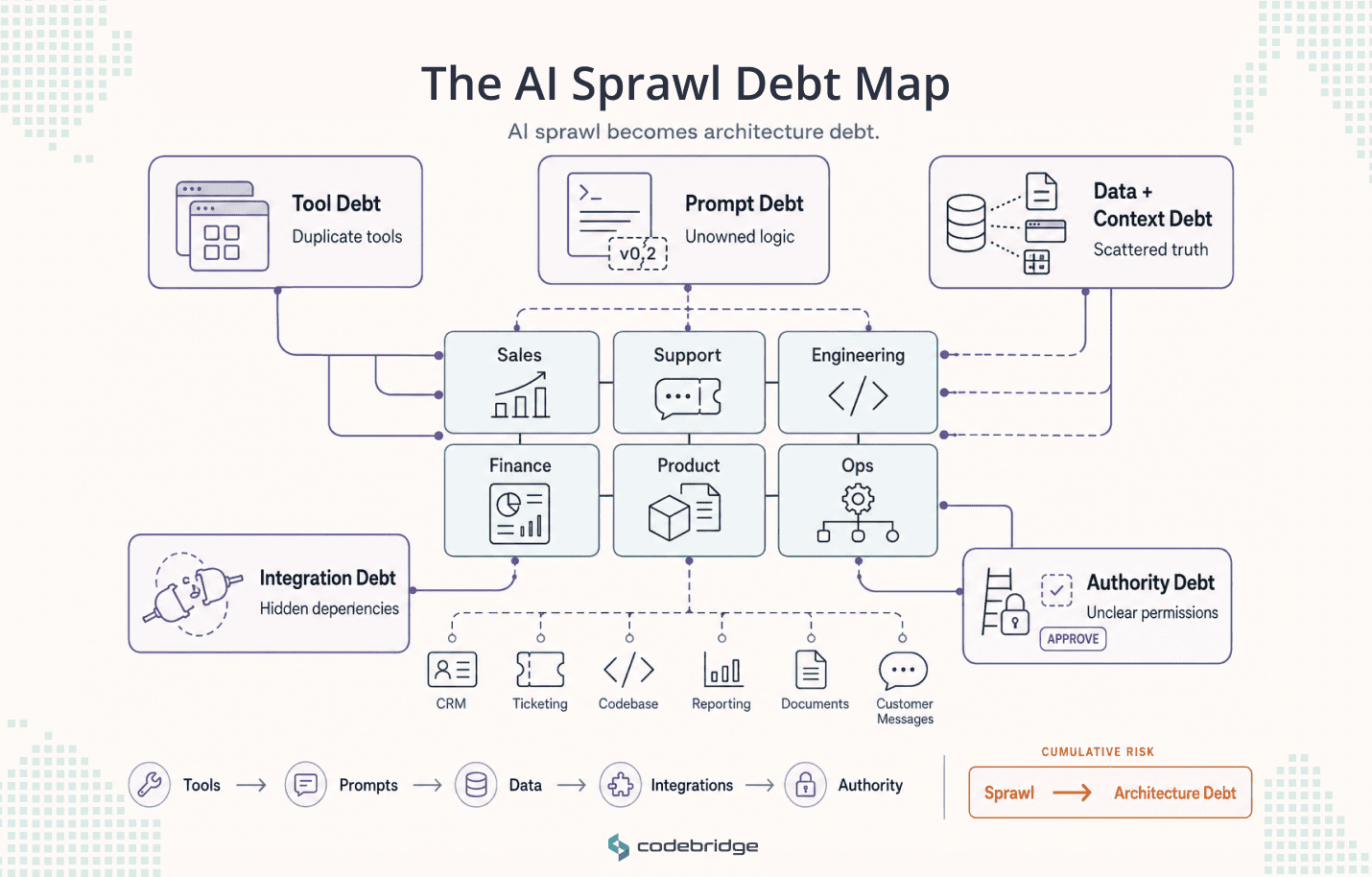
1. Tool debt
Tool debt appears when different teams use different AI tools for similar tasks without a shared view of vendors, accounts, usage, or data policies. This may include general-purpose assistants, meeting tools, content tools, coding tools, research tools, and AI features embedded inside SaaS platforms.
The problem is when experimentation creates permanent fragmentation. Multiple teams may pay for tools that solve the same problem or similar tasks may produce inconsistent outputs.
Tool debt does not mean every company needs one AI platform for everything. It means the company needs to understand which tools are used, for what workflows, with what data, and under what rules.
2. Prompt debt
Prompt debt appears when prompts become reusable operating assets without ownership or version control. Teams copy prompts into documents, internal wikis, Slack messages, and personal accounts. Over time, a prompt may become the unofficial method for writing sales emails or preparing legal summaries.
The risk is that prompts often become business logic without being treated as business logic. They influence outputs repeatedly, but nobody owns their quality. They may change without review or they may include outdated assumptions. They may also encode risky instructions that were acceptable for one use case but not another.
Prompt debt is one of the least visible forms of AI sprawl because it lives inside how teams work.
3. Data and context debt
Data and context debt appears when employees feed AI tools with CRM exports, support tickets, customer records, contracts, product specs, financial data, employee information, internal documentation, meeting transcripts, or code repositories without clear boundaries.
This creates two problems. The first is exposure: data may be processed, stored, retained, or used in ways the company has not reviewed. The second is quality: AI outputs depend heavily on context, and fragmented context produces fragmented answers. If different teams give different AI tools different versions of the truth, the company will get different answers from different systems.
Cisco’s 2025 AI Readiness Index coverage identified several early warning signs for AI value: 64% of organizations struggle to centralize data, only 26% have robust GPU capacity, and fewer than one in three can detect or prevent AI-specific threats.
This is directly relevant to AI sprawl. A company cannot control AI well if it cannot control the data context AI depends on. Scattered data creates scattered AI behavior.
4. Integration debt
Integration debt is when AI tools or agents get connected to systems through browser extensions, APIs, scripts, Slack bots, or internal experiments without architecture review.
This is where AI sprawl starts becoming architecture debt. A standalone assistant may be a productivity tool. An assistant connected to a CRM, database, ticketing system, codebase, or customer communication platform becomes part of the operating environment.
Integration debt creates undocumented dependencies. A small automation may become essential to a workflow, but nobody knows who built it. A browser extension may process sensitive records. A Slack bot may trigger actions in another system.
The moment an AI tool connects to a business system, it stops being only a personal productivity tool. It becomes part of the system architecture, whether leadership recognizes it or not.
5. Authority debt
In this case AI moves from generating suggestions to taking actions. That may include sending messages, updating records, approving tasks, or executing commands.
Authority is the line where AI risk changes. An AI summary can be wrong, but a person may still review it. An AI agent with permission to update a record, delete data, send a message, or deploy code can create direct operational impact.
Authority debt often appears because permissions are copied from humans, service accounts, or broad integrations. The agent receives access because it is easier to make the workflow function. Later, nobody knows whether that access is still appropriate.
A mature AI system should define what the AI can read, what it can write, what it can recommend, what it can execute, what requires human approval, and what it must never touch.
The AI Sprawl Risk Ladder
Companies should not govern all AI usage equally. Uniform governance creates two bad outcomes. If the rules are too light, high-risk use cases slip through. If the rules are too heavy, low-risk experimentation slows down and employees move to shadow AI.
A better approach is to classify AI usage by risk and authority.
Level 1 usage may only need basic acceptable-use rules and employee training. Level 2 requires data boundaries and source awareness. Level 3 needs workflow ownership, review rules, and quality checks. Level 4 requires architecture review, access control, logging, and monitoring. Level 5 requires strict authority boundaries, human approval checkpoints, rollback paths, incident ownership, and evidence trails.
Gartner has also warned that uniform governance across AI agents can lead to failure because different agents have different levels of autonomy, access, and risk. This supports a risk-based approach rather than a blanket policy approach.
The goal is to recognize when an experiment crosses into operational infrastructure.
Warning Signs That AI Sprawl Is Already Controlling the Company
AI sprawl is often invisible because companies look for it in the wrong place. They check the subscription list, but the real sprawl lives inside workflows, prompts, integrations, data movement, and informal operating habits.
The following warning signs indicate that AI sprawl may already be ahead of the company’s control model.
- Nobody can list all AI tools currently used across departments. This is the most basic visibility problem. If leadership cannot see the AI estate, it cannot classify risk, reduce duplication, or manage vendor exposure.
- Employees use personal AI accounts for work tasks. This does not always mean malicious behavior. Often it means the official tools are unavailable, too slow to access, or poorly matched to real work. But personal accounts create problems around data retention, confidentiality, and auditability.
- Teams use multiple AI tools for the same workflow. Tool diversity during experimentation is healthy. Permanent duplication creates inconsistent outputs, duplicated spend, and fragmented learning.
- AI outputs are used in customer-facing work without review rules. Customer-facing AI does not have to be fully automated to create risk. A human may still send the message, but if the AI draft becomes the default, the review process must be explicit.
- Prompts are reused but not versioned. When a reusable prompt affects recurring work, it should have an owner, a version, a purpose, and examples of expected output.
- AI tools touch customer, employee, product, financial, or legal data. These categories should automatically raise the level of review. The company needs to know where the data goes, what the tool retains, and who can access the output.
- AI agents connect to work systems without architecture review. Any AI that reads from or writes to systems of record should be treated as part of the system architecture, not just a productivity experiment.
- Nobody can distinguish “AI suggests” from “AI acts.” This is a critical boundary. Suggestion, recommendation, drafting, approval, and execution are different authority levels and should not be governed as if they are the same.
- There is no log of AI-assisted decisions or actions. If an AI output affects a customer, system, compliance process, financial decision, or production environment, the company needs enough evidence to reconstruct what happened.
- No one knows who owns AI incidents. If an agent sends the wrong message, changes the wrong record, leaks sensitive information, or deletes data, who owns response and remediation?
- AI vendors are approved, but workflows are not mapped. Vendor approval is not workflow governance. The same tool may be low-risk in one department and high-risk in another.
- AI costs are growing, but business impact is unclear. Token spend, subscriptions, embedded SaaS charges, API usage, and duplicated tools can grow quietly. Costs should be connected to workflows and outcomes.
- Teams cannot retire AI workflows because nobody knows what depends on them. This is a sign that an AI experiment has become infrastructure without lifecycle ownership.
The most dangerous AI sprawl is visible in the workflows nobody can explain anymore.
How to Control AI Sprawl Without Killing Innovation
After working with companies on complex software and AI systems for years, we have seen both sides of the same problem. Some teams want to implement AI everywhere at once, before they understand which workflows are actually ready for it. Others have already added too many AI tools and agents, and only later realize that they are dealing with AI sprawl.
That is why Codebridge experts use a practical AI sprawl control framework. It helps companies keep useful experimentation alive while preventing scattered AI usage from turning into unmanaged infrastructure.
The framework has six steps: discover, classify, contain, consolidate, architect, and govern the lifecycle.
Step 1: Discover AI by workflow, not by tool
Most companies begin with a tool inventory. That is useful, but it is not enough. AI risk depends less on the tool name and more on what the tool does inside the workflow.
A general-purpose assistant may be low-risk when used to summarize public articles. The same assistant may become high-risk if used to process customer contracts, employee records, or support tickets. A coding assistant may be helpful when used in a sandbox. It becomes more sensitive when its output enters production repositories without traceability.
The first step is to create an AI Workflow Inventory. It should capture:
- which departments use AI;
- which workflows involve AI;
- which tools, agents, prompts, or automations are used;
- what data is touched;
- whether outputs are internal or customer-facing;
- whether the AI only suggests or can take action;
- which systems are connected;
- who owns the workflow;
- what business value the workflow is supposed to create;
- what would break if the AI component disappeared.
This changes the conversation. Instead of asking, “Which tools do we have?” the company asks, “Where does AI affect real work?”
Step 2: Classify AI usage by risk and authority
Once AI usage is visible, it should be classified. The classification should be based on risk and authority, not brand name.
A practical classification can include:
- assistant-only usage;
- internal summarization;
- recommendation or decision support;
- workflow participation;
- system-connected AI;
- action-taking AI.
This prevents two common mistakes. The first mistake is treating all AI usage as equally risky. That slows down low-risk experimentation and frustrates employees. The second mistake is treating all AI tools as harmless productivity software. That allows high-risk workflows to spread without control.
The output of this step should be an AI Risk Ladder for the company. Every AI workflow should have a risk level, an owner, and a review requirement that matches its authority.
Step 3: Contain data, context, and access
AI systems need clear boundaries around what they can read, retrieve, write, store, and expose. This is especially important when AI tools touch customer data, employee information, contracts, financials, product roadmaps, source code, health data, legal documents, or regulated records.
Containment should include:
- approved data sources;
- prohibited data categories;
- retrieval boundaries;
- access scopes;
- redaction rules;
- vendor data-retention review;
- environment separation;
- human approval thresholds;
- logging expectations.
The company also needs to decide where context should live. If every team feeds different context into different AI systems, the company will get different interpretations of the same reality. That may be acceptable for brainstorming. It is not acceptable for operational decisions.
Step 4: Consolidate duplicate tools and workflows
Consolidation should come after discovery and classification, not before. If a company centralizes too early, it may kill useful experimentation. If it never consolidates, it creates duplication, cost, and inconsistent behavior.
The right questions are practical:
- Which tools perform the same function?
- Which teams are solving the same workflow problem separately?
- Which vendors overlap?
- Which tools are safe for general use?
- Which tools should be restricted to specific workflows?
- Which workflows should move to shared infrastructure?
- Which experiments should be retired?
The goal is not fewer AI tools for the sake of fewer tools. The goal is fewer unmanaged systems.
Some AI diversity will remain useful. A design team, engineering team, sales team, and compliance team may reasonably use different tools. But the company should not allow critical workflows to depend on disconnected AI systems with no shared control model.
Step 5: Architect reusable AI services
This is where AI sprawl control becomes more than governance. Companies that want durable AI value need reusable AI architecture.
Instead of letting every department build its own isolated AI workflow, the company can create shared services and patterns:
- a shared retrieval layer for approved knowledge sources;
- an approved model gateway;
- prompt and agent version management;
- agent identity and permissions;
- tool execution boundaries;
- observability and logs;
- evaluation and output-quality checks;
- cost monitoring;
- human approval mechanisms;
- rollback and retirement process.
This does not mean all AI must be centralized into one platform. It means the organization needs reusable foundations so that every new AI workflow does not reinvent security, access, context, monitoring, and lifecycle management from scratch.
This is the architecture shift many companies miss. They think they are adopting AI tools. In reality, they are creating a new operational layer. If that layer is not designed, it will still exist, but it will exist as debt.
Step 6: Govern lifecycle, not just access
Many companies focus on whether an AI tool can be used. That is only the beginning. Every AI workflow needs a lifecycle.
A practical lifecycle includes:
- request;
- approval;
- design;
- build or configuration;
- test;
- pilot;
- production release;
- monitoring;
- review;
- update;
- incident response;
- retirement.
The output should be an AI Lifecycle Register. It should show which AI workflows are live, which are experimental, which are restricted, which are under review, and which have been retired.
If an AI workflow cannot be retired safely, it was never properly owned. That is a useful test for whether an experiment has become infrastructure.
A Practical 30-Day AI Sprawl Audit
The first AI sprawl audit won't solve everything, but it will make the invisible system visible.
The goal of this audit is to understand where AI already exists, which workflows it affects, which risks need immediate containment, and which patterns should become part of a longer-term control layer.
Week 1: Find the AI already in use
Start with discovery. Use surveys, interviews, expense reviews, SaaS administration panels, browser extension reviews, API key audits, and team lead conversations.
Ask each department:
- Which AI tools do you use weekly?
- Which AI features are enabled inside existing SaaS platforms?
- Which prompts or custom assistants are reused?
- Which agents or automations have been created?
- Which tools are connected to work systems?
- Which workflows would slow down if AI disappeared tomorrow?
The goal is not to punish employees. If the audit feels punitive, people will hide usage. The audit should be framed as a way to keep useful AI work safe, funded, and scalable.
Week 2: Map AI to workflows
For each tool, agent, prompt, or automation, document the workflow context.
Capture:
- department;
- workflow;
- tool or agent name;
- business purpose;
- data touched;
- output type;
- human review requirement;
- connected systems;
- risk level;
- owner;
- cost;
- current business value;
- known issues;
- retirement dependency.
This is where companies often discover that the official AI map and the real AI map are different. Leadership may know about enterprise tools but not about team-level prompts, AI extensions, side automations, or agents created for internal reporting.
Week 3: Classify and contain
Once AI usage is mapped, classify it. Each use case should be marked as allow, restrict, standardize, rebuild, retire, or escalate for architecture review.
A simple model works well:
Containment should focus first on the highest-risk areas: customer data, employee data, financial data, legal data, product IP, codebases, production environments, and action-taking agents.
Week 4: Build the first control layer
The final week should define the first version of the control layer. This does not need to be a large platform. It can start as a structured operating mechanism.
Define:
- approved AI tools by risk level;
- prohibited data categories;
- high-risk workflows;
- review requirements;
- owner model;
- logging expectations;
- escalation path;
- cost review cadence;
- prompt and agent registry;
- retirement rules.
The company should end the 30 days with a visible map, an initial risk classification, immediate containment actions, and a roadmap for reusable AI architecture.
The first audit does not need to solve AI sprawl. It needs to make it governable.
What CEOs and CTOs Should Ask Before AI Sprawl Becomes Infrastructure
The most useful executive questions are not generic questions about whether the company is “using AI responsibly.” They are questions that expose whether AI has already entered the operating system of the business.
CEOs and CTOs should ask:
These questions are uncomfortable because they reveal whether AI is still experimental or already infrastructure. If leadership cannot answer them, AI sprawl has already moved beyond informal usage.
How Codebridge Helps Companies Control AI Sprawl
Codebridge helps companies move from scattered AI experiments to controlled AI systems. That means mapping where AI already appears in workflows, identifying where it touches data or systems, defining authority boundaries, designing reusable AI architecture, and creating the operating model needed to scale AI safely.
This work is not only about governance documents. For companies building or adopting AI inside real workflows, the practical questions are architectural:
- How should AI connect to existing systems?
- Which data should be available to which AI workflows?
- Where should human approval happen?
- What can an agent read, write, update, or trigger?
- How should prompts and agents be versioned?
- What evidence should be logged?
- Which workflows should become shared infrastructure?
- Which prototypes should be retired before they become hidden dependencies?
Codebridge’s role is strongest where AI meets complex software delivery: workflow mapping, architecture review, integration design, authority models, agent lifecycle management, observability, audit trails, data boundaries, reusable AI infrastructure, and production-grade governance.
Our Big Four roots show up in how we approach AI sprawl: not as a tool cleanup exercise, but as a system of risk, ownership, architecture, process discipline, and evidence. The goal is not to slow down innovation. The goal is to make AI adoption strong enough to survive real operations.
If your team is already using AI across departments and you are not sure where experimentation ends and infrastructure begins, start with an AI workflow and architecture review.
Conclusion: Control the system before the system controls you
AI sprawl is proof that adoption has moved faster than architecture.
That does not make experimentation bad. Companies should encourage employees to find useful AI applications. The real risk is unmanaged workflow dependency: the moment tools, prompts, agents, and automations become part of business operations without ownership, permission boundaries, observability, lifecycle control, or rollback paths.
The companies that handle AI sprawl well will not be the companies that ban every tool. They will be the companies that turn experimentation into an operating system: visible workflows, risk-based controls, reusable architecture, clear decision rights, and evidence that survives production.
AI sprawl becomes dangerous when nobody designed the system, but everyone has started depending on it.

















Heading 1
Heading 2
Heading 3
Heading 4
Heading 5
Heading 6
Lorem ipsum dolor sit amet, consectetur adipiscing elit, sed do eiusmod tempor incididunt ut labore et dolore magna aliqua. Ut enim ad minim veniam, quis nostrud exercitation ullamco laboris nisi ut aliquip ex ea commodo consequat. Duis aute irure dolor in reprehenderit in voluptate velit esse cillum dolore eu fugiat nulla pariatur.
Block quote
Ordered list
- Item 1
- Item 2
- Item 3
Unordered list
- Item A
- Item B
- Item C
Bold text
Emphasis
Superscript
Subscript