No one hires a VP of Sales or a Chief Revenue Officer to act as an expensive API between the CRM, the billing system, and a spreadsheet. Yet in many mid-market companies, that is the job. Teams spend their days reconciling records by hand and fixing routing errors that should never have reached a person.
Salesforce puts non-selling work, including administration and meeting prep, at roughly 70% of a sales rep's time. Not all of that is data entry, but a meaningful share is.
The mechanism behind this number is that a lead becomes an opportunity, the opportunity becomes a quote, the quote becomes an order, the order becomes an invoice. At each step the data does not move on its own, so someone moves it, and every handoff adds delay along with a fresh chance for error and rework. That friction is where EBITDA leaks.
What follows maps where the leak forms along the lead-to-cash path, separates the steps worth automating from the ones that need redesigning first, and sets out how to measure the result in cash and margin. It also marks where AI earns its place and where deterministic rules still have to govern pricing, approvals, and billing.
What Revenue Operations Automation Means
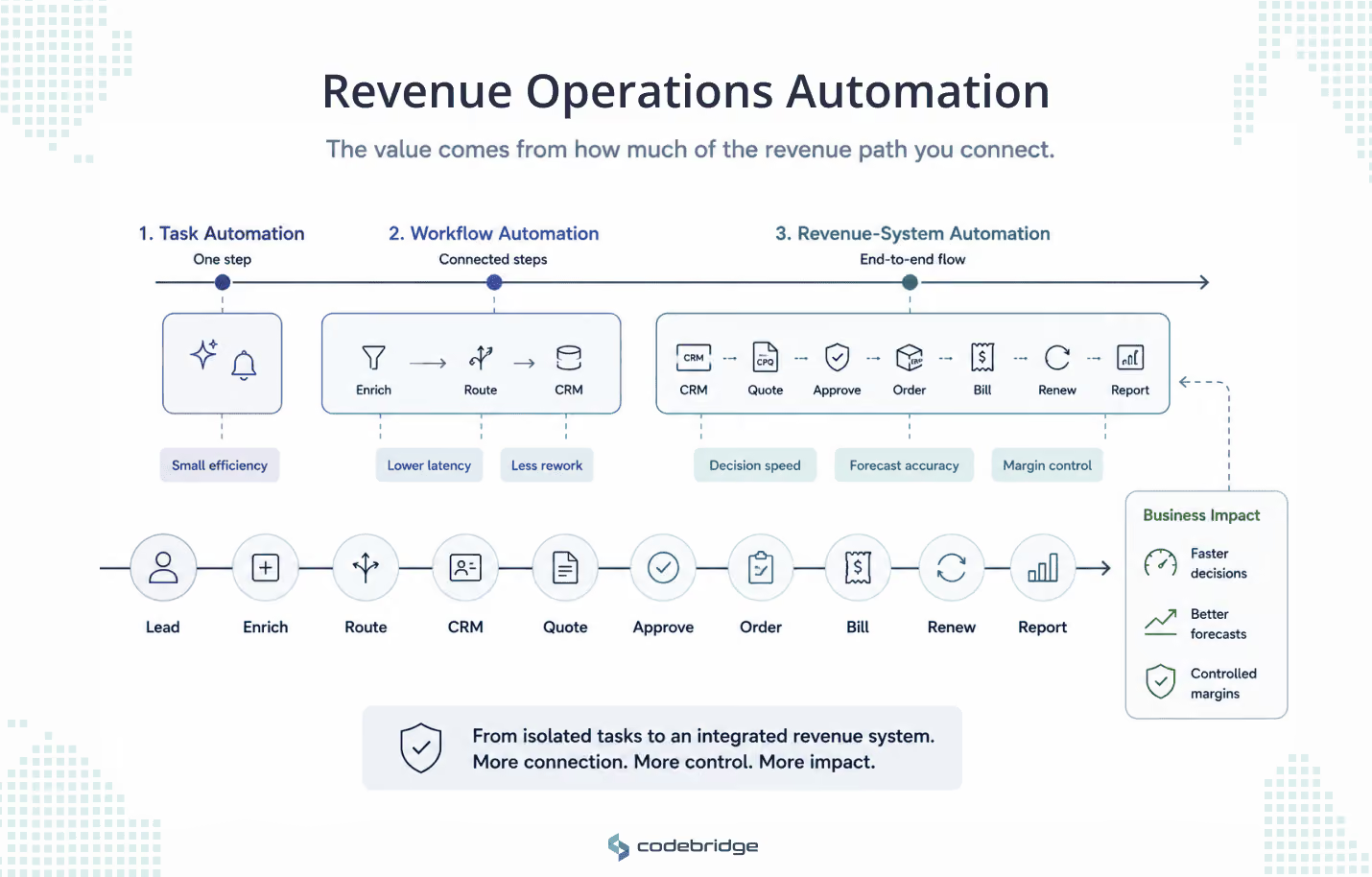
Revenue operations automation is the design of how revenue data moves from the first lead signal to recognized revenue. It covers the whole workflow: lead capture, enrichment, routing, CRM updates, quoting, approvals, order creation, the billing handoff, renewals, and reporting.
It is easy to mistake for a set of point shortcuts: a Slack alert when a lead lands, two fields kept in sync, a drafted outbound email, a model summarizing a call. Each one helps. None of them is the system that carries revenue data cleanly from one stage to the next. What separates a shortcut from a revenue system is how much of the path you actually connect, so it helps to keep three levels of maturity apart:
Task automation saves a rep a few minutes a day. Revenue-system automation changes how fast the company can decide, quote, and collect. That is why this is an architecture problem before it is an AI problem: the value comes from connecting the path, not from any single clever step on it.
The question worth asking is whether the business can run a reliable revenue data path across the systems it already depends on, and still own and maintain that path afterward. When it can, revenue grows without administrative headcount growing at the same rate.
This is the line that matters for teams building for scale. A company that cares about complex integrations and long-term ownership is not shopping for cheap one-off automations. It wants a revenue path it can trust in production and keep running without the vendor in the room.
The Real EBITDA Leak: Humans Acting as Revenue Middleware
EBITDA leaks at the joints, where one team's tools end and the next team's begin. Each time a lead turns into an opportunity, or a quote into an order, the data reaches a boundary it cannot cross on its own. Someone picks it up, checks it, and keys it in again on the other side. Do that across every stage of the revenue path and the people doing it become an integration layer the company never bought, paid for in salaries instead of software.
The same handoff shows up at every boundary:
None of these is a dramatic failure on its own. Each is a small, recurring cost, easy to overlook and hard to stop, which is why the leak rarely surfaces as a line item anyone owns.
It also explains why three executives describe one problem three different ways. The CFO sees margin and working capital tied up in rework. RevOps sees the bottleneck it clears by hand every week. To the CTO it reads as a missing integration and unclear data ownership sitting under all of it.
Same joints, different seats. The fix has to start with the path.
Start With Lead-to-Cash Automation
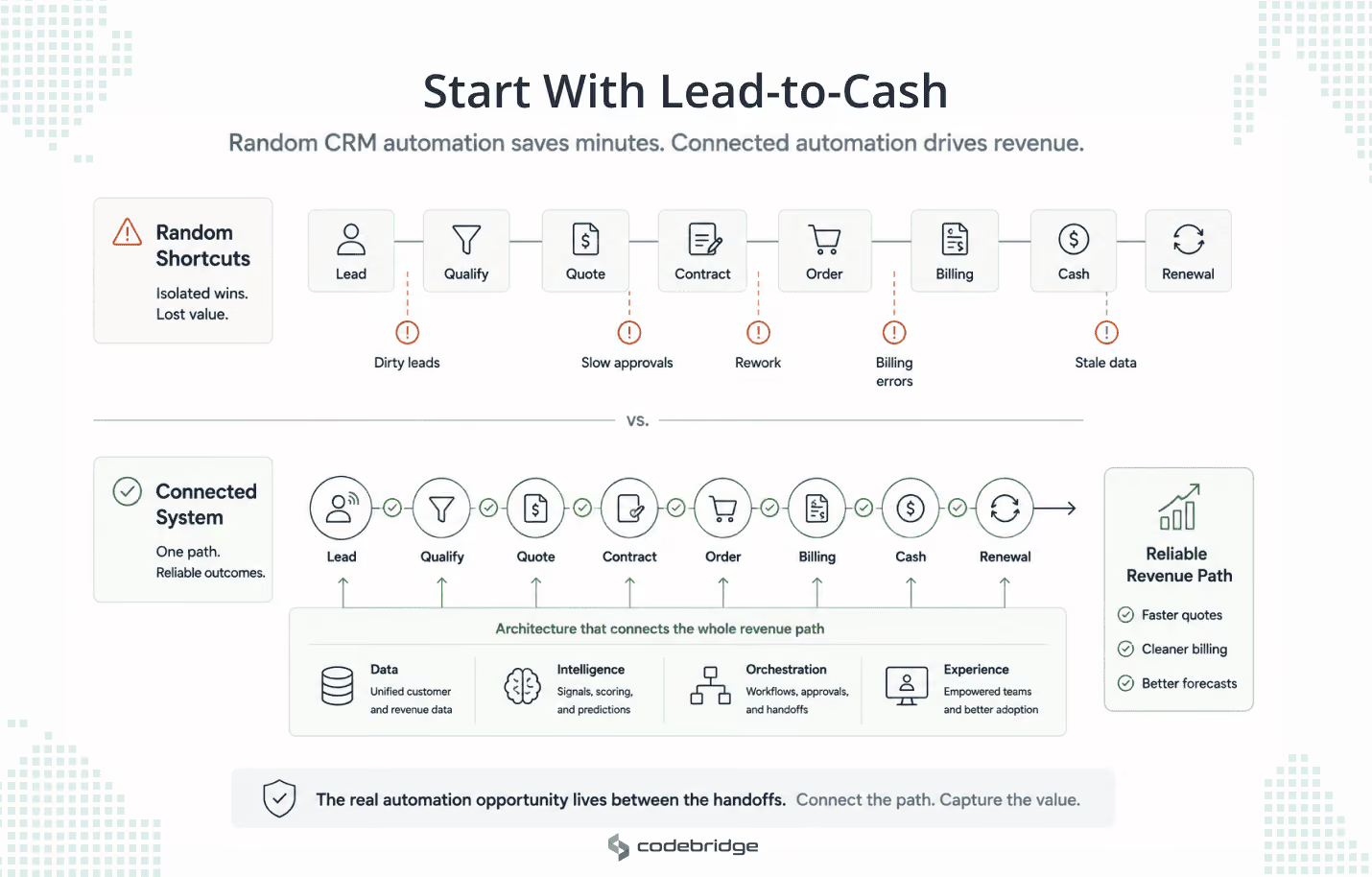
Most automation programs start by asking which CRM task to automate, and there is always an answer ready: notify a rep, sync a field, auto-log a call. Fixing one field while the billing handoff stays broken looks like progress and leaves the leak in place. The more useful question is where the lead-to-cash path slows down, or forces a team to reconcile reality by hand.
Lead-to-cash is the system underneath revenue operations. It runs across four functions that rarely share one source of truth: marketing captures and enriches leads; sales qualifies them, builds the opportunity, and produces the quote; legal reviews terms and routes approvals; finance turns the order into an invoice, then recognized revenue, then collected cash, while renewal and expansion signals feed back to the top. Research on B2B revenue operations describes this path as fragmented across these same functions, with disconnected systems producing duplicate entry, inconsistent customer records, and constant cross-department reconciliation. Automate one CRM task inside that picture and you save a few minutes. You do not stop the leak, because it lives at the boundaries between functions, not inside any one of them.
Mapping the path makes the manual work visible. The same question surfaces at every stage:
Each row is a place where a person does the integration the systems should be doing. The scale is measurable: research puts roughly 60% of organizations still running their critical revenue handoffs by hand, and the ones that automate across those boundaries cut process cycle times by 40 to 60%.
Closing those gaps so they stay closed takes more than point integrations. Research on lead-to-cash architecture converges on four layers, each answering a question an executive already weighs:
Two architectural choices decide whether any of this survives production. The first is modular over monolithic. Hybrid, composable designs hold integration and changeability in balance, so you can replace one component without rebuilding the whole system. The second is the boundary between deterministic rules and probabilistic models. The implementations that hold up keep a human in the loop: rules and audit trails govern anything that touches pricing, approvals, or billing, while machine learning takes the work that rewards pattern recognition. Skip either choice and the program stalls as a set of disconnected pilots that never reach production, each tool built in isolation instead of as part of one system.
The questions that decide all of this are ownership questions, not tooling ones. Which system owns the customer record? Which owns product and pricing logic? Where should AI extract context, and where do deterministic rules have to hold? Settle these early and automation reinforces the path. Leave them unanswered and it simply moves the mess faster.
Measuring Business Value in End-to-End Quote-to-Cash Automation
A CRM field update is not business value. The value lands further down the path: an approved quote that becomes an order without rework, an invoice that goes out right the first time, cash that arrives sooner. The metric that matters is not how much activity the automation produced. It is how much faster, and how much more accurately, the company turns approved commercial intent into cash.
Research on integrated quote-to-cash points to a consistent range: roughly 30 to 50% shorter cycle times, 12 to 25% lower DSO, and a 5 to 15% lift in captured revenue as leakage falls. Those gains are not abstract. They come from specific shifts at each point on the path:
A few metrics move early enough to be worth watching on their own. Invoice accuracy climbs from a manual 92–95% to 98–99% once billing reads the same data as fulfillment. Configuration errors on complex quotes fall from 5–12% to under 1% when validation lives in the system instead of in a rep's head. Quote-to-order cycles tighten by 15–25% once CRM and CPQ share one record. Each marks a point where the company stops paying people to fix what the systems got wrong.
The same logic rules some metrics out. Automations shipped, dashboards added, CRM fields touched: these measure how busy the system is, not whether it made money. A program can update forty fields a day and still send a wrong invoice. The numbers worth tracking follow the transaction, not the tooling: time from quote request to approved quote, approved quote to order, order fallout rate, invoice correction rate, DSO, margin leakage, and manual touches per transaction.
None of these means much without a baseline, and that is the step most programs skip. Record current performance before you change anything, then track the same metrics after. The value arrives in phases. Operational gains, shorter cycle times and fewer errors, usually show within the first few months; the financial gains in cash flow and margin follow over the next year as the process settles. And since most companies run several initiatives at once, the honest version of this work isolates what the quote-to-cash changes caused rather than claiming the whole quarter's improvement.
Read this way, the decision to keep scaling makes itself. Moving cycle time, leakage, and DSO mean the automation is paying for itself and the next workflow is worth funding. Flat numbers behind busy dashboards point upstream, to the architecture, not to the count of automated tasks. An SAP estate is where this gets concrete: the handoffs between CPQ, CRM, and the ERP are where those numbers actually move.
Case Study: Quote-to-Cash With SAP CPQ + CRM + ECC/S4HANA
In an SAP landscape, the handoffs stop being abstract. The revenue path runs through named systems: SAP CRM holds the opportunity, SAP CPQ builds the quote, and ECC or S/4HANA handles the order, the invoice, and revenue recognition. The ECC-versus-S/4HANA split matters here, because they are different ERP generations and many companies run both at once through a long migration, which adds seams of its own.
Every metric from the last section maps to a boundary between these systems. Cycle time depends on how fast a quote moves from CPQ to an order in the ERP. Leakage depends on whether the discount approved in CRM is the one that reaches billing. DSO depends on whether the invoice matches what was delivered.
In a clean implementation, each stage owns its job and keeps the right data in sync with the next:
StagePrimary systemWhat must stay in sync across the boundaryOpportunitySAP CRMAccount data, product catalogueQuotationSAP CPQProduct data, pricing rulesOrder managementSAP CRM / ERPQuote-to-order handoff, availability checkFulfillmentSAP ERP / S/4HANAOrder details, delivery instructionsBillingSAP ERP / S/4HANADelivery confirmation, contract termsRevenue recognitionSAP S/4HANAContract performance, milestonesCollectionSAP S/4HANAInvoice data, customer accounts
These same boundaries are where SAP environments tend to break, and the failure points are consistent enough to name:
Two kinds of work happen at these boundaries, and each needs a different tool. AI fits the intelligence: reading terms out of a messy email thread, summarizing the context behind an approval request, flagging a quote that contradicts the order, predicting which deals are likely to stall. None of that touches the money directly. The work that does belongs to deterministic rules. Pricing conditions, discount thresholds, billing triggers, and revenue recognition logic need an audit trail and a named human owner. A probabilistic model is the wrong instrument for a control that has to be right every time and explainable after the fact. In an SAP quote-to-cash flow, AI is the intelligence layer. It is not the authority layer.
The questions to settle before automating are the same ownership questions, now made specific by the systems involved: which system owns the customer master, which owns product configuration and pricing, where a quote becomes an order and what has to match for it to pass, how discounts are approved and whether that approval is auditable, and where billing ends up correcting what sales or fulfillment got wrong.
What this looks like when it works is documented. A global manufacturer running SAP CPQ, CRM, and S/4HANA for industrial equipment started from the familiar position: manual quoting, disconnected order management, little visibility across stages. It set a baseline across fifteen metrics and tracked them for eighteen months. Quote cycle time fell from 12 days to 4. Quote-to-order conversion rose from 28% to 37%.
Revenue leakage dropped from 5.2% of revenue to 1.8%. DSO improved from 58 days to 44, and invoice accuracy moved from 93% to 98.5%. The financial case came to roughly $28M in annual benefit against $14M in cost, with the largest single piece from leakage the integrated system stopped losing. The same metrics from the previous section, moving the same direction, in one real environment.
Codebridge's role here is not to bolt an AI agent onto SAP CPQ. It is to map which system owns what, find the boundaries where the money leaks, and decide which to automate, which to put under stricter rule-based control, and which to leave to human judgment. That mapping takes a few weeks, and it is where the next section starts.
The Decision Filter: Automate, Redesign, or Leave It Alone?
Mapping the path produces a list of manual steps, and the instinct is to automate all of them. That instinct is wrong. Some steps should be automated, some should be redesigned before anyone automates them, and a few should be left exactly as they are. Which is which comes down to three things: volume, what an error costs, and who owns the outcome.
A short filter sorts them:
The mature answer is often not "automate it." Sometimes the better move is to stop doing the step, to move it upstream so the data is right before it enters the system, or to make one system the source of truth so the reconciliation disappears. Each of those removes the work instead of speeding it up.
This is the part a vendor tends to skip. Selling automation rewards automating everything, so the real job of an architecture partner is the opposite: telling a client which steps not to automate, and which to fix at the source first. That is the lens Codebridge brings to a revenue path, deciding for each manual step whether to automate it, integrate around it, redesign it, keep it under human approval, or leave it alone until someone owns the data behind it.
Conclusion: Revenue Leaks Through the Handoffs
EBITDA rarely leaks in one visible moment. It leaks in the ordinary friction of a week: a rep re-keys quote data, finance corrects an order before it can ship, billing waits on a contract term no one sent over, and leadership makes a call on a forecast it does not fully trust. No single one of these is a crisis. Together they are the running cost of a revenue path held together by manual handoffs.
So the useful question is not how digital the company looks. It is whether commercial intent moves through the business with less friction, fewer corrections, and clearer ownership of the data at each step. Every decision in this article comes back to two tests. Can the workflow run reliably across the CRM, CPQ, ERP, and billing systems already in place? And does it measurably cut cost, speed up cash, or protect margin? A workflow that fails the first is a liability waiting to surface. One that fails the second is activity, not value.
If your lead-to-cash path still runs on manual CRM updates, spreadsheet reconciliation, or disconnected SAP handoffs, the first move is not to automate. It is to map where the path actually leaks, then decide which parts to automate, which to put under tighter control, and which to redesign before touching them at all. That assessment is the work Codebridge does first, and it takes a few weeks, not a transformation.

















Heading 1
Heading 2
Heading 3
Heading 4
Heading 5
Heading 6
Lorem ipsum dolor sit amet, consectetur adipiscing elit, sed do eiusmod tempor incididunt ut labore et dolore magna aliqua. Ut enim ad minim veniam, quis nostrud exercitation ullamco laboris nisi ut aliquip ex ea commodo consequat. Duis aute irure dolor in reprehenderit in voluptate velit esse cillum dolore eu fugiat nulla pariatur.
Block quote
Ordered list
- Item 1
- Item 2
- Item 3
Unordered list
- Item A
- Item B
- Item C
Bold text
Emphasis
Superscript
Subscript