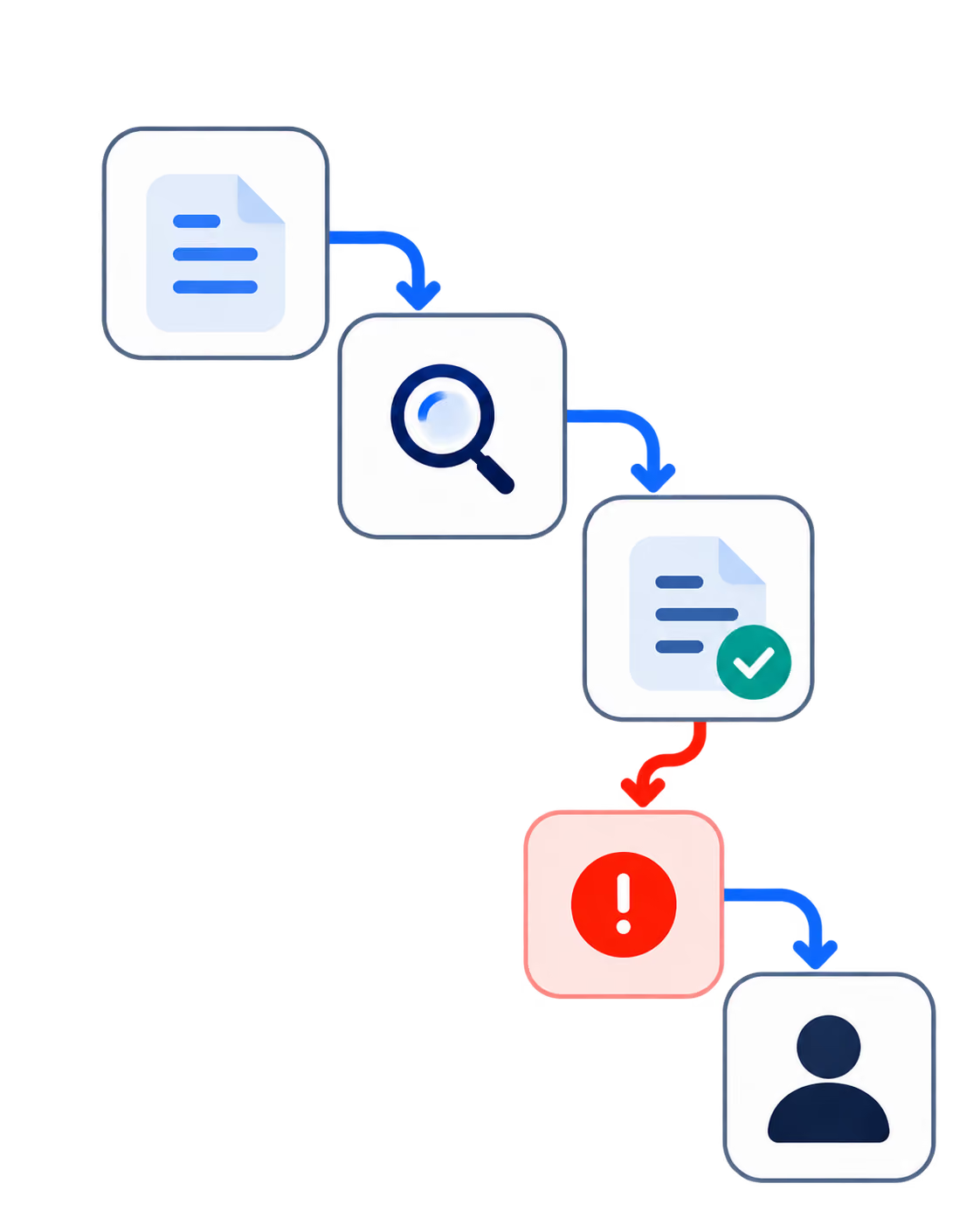
A matter is approved in an intake system, and the integration sends a request to create its workspace in iManage. The connection times out. The workspace may already exist, but the intake record has no link and the integration has no confirmed result, so repeating the request could create a duplicate, and reporting success would leave the task unfinished.
An iManage API integration is judged by whether that business task reaches its intended end state. Authentication gives the application access to begin the work, and reliability depends on everything after it: the source event, the execution identity, the target records, verification and recovery. For IT directors, engineering leads and legal technology teams, the practical starting point is one bounded business operation with success criteria anyone can observe.
Define the Business Operation Before Selecting API Calls
Start with one sentence describing the intended result, such as: "When a matter passes the firm's required approval, prepare its iManage workspace and return a verified reference to the source record." That sentence raises the decisions that matter. Which system owns approval, which record identifies the matter, what makes the workspace ready, who may open it, and where an incomplete job should show up?
Record the target deployment, tenant, library and test environment alongside those decisions, and confirm the supported operations and authorization requirements for that environment. Cloud and on-premises installations each need their own compatibility and configuration checks. iManage's Universal API developer training covers development setup, documentation, testing and troubleshooting, and the current API reference available to your team is the authority for request paths, schemas and operation-specific behavior.
Write an acceptance statement before development starts. In this example, completion means the intended workspace exists, its required profile and access have been verified, and the source record holds the correct reference. The integration also needs an owner, and a visible status whenever any part stays incomplete.
Establish Application Registration and the Execution Identity
Registration decides which application may call iManage. The execution identity decides whose permissions apply to each operation, and the two need separate answers.
Register and Configure the Application
iManage's application documentation describes OAuth 2.0 authorization and registered client applications for integrations. Organizations outside the Technology Partner program use iManage's OAuth application request form, supplying tenant and application details, and receive a Client ID and Secret once the request is processed. Inside the firm, managing the Applications page in Control Center requires a Global Management role with the App Management privilege, so settle at the start who holds that role for your integration.
Record the supported authorization flow, the relevant application settings, redirect configuration where it applies, and token-renewal behavior. Test the configured flow in your environment, and treat documented defaults as starting points to check.
Identify Whose Permissions Apply
Write down the identity performing each business operation. A flow a user starts may run through a configured connection whose permissions need their own review, and a user may be allowed to use an application while lacking permission to change a particular workspace or document. So include ordinary users, restricted users and privileged administrators in the test plan, each with its expected behavior recorded.
Application access has its own rules. Since July 2026, administrators can grant it to global groups as well as named users, so group membership belongs in the access review.
Work that must run without an active user session needs a supported execution model. iManage documents service accounts as non-interactive accounts with scoped API access, created and managed in Control Center, with optional trusted IP ranges to limit where they sign in.
So a generic service account isn't a universal answer for unattended work. Choose a model iManage supports for the actual task, and confirm its available operations before designing around it.
Plan the Credential Lifecycle
Assign responsibility for secure storage, renewal, rotation and revocation, and decide what happens when authorization expires or access is removed: which jobs pause, who hears about the failure, and what it takes to resume them. Diagnostics should name the affected job and failure category while keeping tokens and unneeded client content out of logs, and support staff should be able to investigate using only the records they're permitted to see.
During early testing, separate read-only inspection from operations that change state. Establish which identity can inspect the intended library and representative objects, then enable only the mutations the workflow needs, recording any extra privilege and its purpose. That gives the team a reviewable access baseline before the pilot handles live business events.
Map Workspaces, Folders, Documents, and Metadata
Separate the business records from the iManage objects the integration inspects or changes: the workspace, relevant folders, document records and versions, and profile information. Use the actual schemas and identifier contracts for each operation. The mapping below is conceptual, built for the matter example:
Define ownership field by field. The source system might own the matter description while a target-system team maintains other information, so a later source event updates only the fields the integration is authorized to maintain. Keep a missing value, an invalid value and an intentional request to clear a field distinct, and check each operation's documented update semantics before sending changes.
Use confirmed target identifiers for every later operation, since names and descriptions help people inspect results and make poor keys. Record which mapping configuration each job used, too. A paused job may resume after a library, template or access policy has changed, so revalidate the proposed change against the current approved configuration before continuing, and keep the earlier reference to explain the original attempt.
Choose Between Configured Automation and Custom Integration
Test existing capabilities against the complete workflow before commissioning custom components. The iManage Work Power Automate connector is available to customers connecting through cloudimanage.com, and its configured connection and iManage permissions are part of the design.
Microsoft's connector catalogue lists actions including workspace creation from a template, along with triggers for selected documents, selected workspaces, workflows and forms. Match the starting event to the trigger contract, because a user selecting a workspace and an automatic notification for every upload are different requirements. Operation-specific privileges matter too: the connector's documentation says setting a specific workspace owner requires administrator privileges, so check rules like that before deciding how a mapping will be applied.
Each requirement points to a different starting point, with its own checks:
Complexity alone doesn't call for a complete custom system, and a limited extension may close a specific gap. A workflow platform can be a sound foundation, and the integration still needs answers for duplicate delivery, uncertain outcomes and incomplete steps wherever its orchestration runs. If the requirement is moving or co-editing documents between repositories, our iManage SharePoint integration guide covers that separate problem.
Example: From Approved Matter to Verified Workspace
This illustrative design connects an existing intake or matter-management system to iManage. The firm's business approval stays authoritative, and the integration consumes that result to prepare the workspace through supported operations.
1. Validate the Source Event
Receive the event through a supported source-system mechanism, then confirm the matter's current status, identifier and required fields before changing anything in iManage. An event describes something that already happened, and the source record may have changed since, so define how the integration rechecks eligibility and handles a withdrawn approval or a newer update.
2. Create or Locate a Durable Job
Use a stable business key that combines the source, environment and matter. Repeated delivery then finds the existing job, and concurrent workers coordinate through the integration's own storage. Record enough state to tell an unstarted operation from an attempted creation whose result is unresolved, which supports recovery after a worker restart as well as after a network failure.
3. Resolve the Target Configuration
Identify the intended library, approved template, field mappings, execution identity and access configuration, and validate them before issuing the creation. An unknown matter category or missing access mapping moves the job to review. Set the right access at creation, too, since a workspace left open to everyone until someone restricts it is exposed in the meantime.
4. Inspect Known Target State
If the job already holds a confirmed workspace identifier, inspect that mapping and resume from the right step. If an earlier attempt has an unknown outcome, reconcile it first, using a validated lookup that can tell the intended object apart from similar records. If the evidence can't settle it, the job goes to an operator.
5. Create and Verify the Workspace
Run the documented operation or supported connector action, record the information the mapping needs, then verify the required profile, structure and access. Verification covers both the execution identity and the intended user roles. If a required check fails, readiness stays incomplete until an authorized owner investigates and corrects the result through the supported process.
6. Write the Reference Back
Once the target is verified, update the source matter with its workspace reference, and mark the job complete only when the agreed source and target conditions both hold. If writeback fails, keep the verified mapping so recovery resumes the missing update, and give support staff a view of which step is outstanding without rebuilding the run from raw logs.
7. Maintain the Relationship
Later matter changes use the stored target identifier and the agreed field-ownership rules, with each update checked for relevance before it's applied. A reconciliation queue surfaces incomplete jobs, failed mappings and unresolved outcomes, with an owner who records how each case is resolved.
Define the business lifecycle as well. A cancelled and later reopened matter may need its existing workspace, or a separately approved new one, and that decision belongs in workflow policy. An event-delivery identifier alone should never decide whether another workspace gets created.
Handle Retries, Unknown Outcomes, and Partial Completion
A rejected request and a request with an unknown result need different recovery. Invalid input stays invalid however many times it's sent, while a creation that succeeded on the server before the connection dropped will repeat its effect if sent again.
RFC 9110, section 9.2.2, separates idempotent methods from the rest, and limits automatic retries of non-idempotent requests when their outcome is uncertain. Apply that principle to the verified contract of each operation, with a recovery policy for every situation:
A local deduplication record coordinates the integration's own workers, and it says nothing about whether a timed-out server operation happened. A client-generated correlation identifier helps investigation, and it deduplicates on the server only if the interface documents that support. Verify any conditional-write or deduplication feature before relying on it, and follow the real pagination and filtering rules in reconciliation queries, because reading part of a result set can suggest an object is absent when it exists.
Set retry and reconciliation limits together. If a job reaches a limit, keep the evidence, stop the repetition, and hand the job to its support owner. Microsoft's retry-pattern guidance covers transient failures and repeated side effects in general, and each operation still needs its own decision. Review the retry settings in SDKs, connector actions and workflow runners alongside your own worker's, so one layer never repeats a state-changing request while another treats its outcome as unresolved, and include that combined behavior in the lost-response test.
A useful recovery record holds the business key, the attempted step, the configuration reference, the attempt time, any known target identifier, and why the job stopped, along with an operator's correction and the step resumed. Keep it separate from unrestricted copies of request bodies or documents, under the agreed access and retention rules. Treat rollback as its own design question too, since deleting a created workspace may be wrong once people or other processes have started using it, and recovery should complete or correct the business operation under an agreed policy.
Test Access and Operational Behavior Before Go-Live
Use a test environment and representative identities to run both normal work and interruption paths. Define the expected outcome, keep the evidence, and give each test an accountable role:
Failures in required access separation block release of the affected scope, and if a source category, operation or configuration can't meet its requirements yet, narrow the pilot and say so. For access, check both the configured policy and real user behavior, because an operator's ability to read the new workspace says nothing about whether the matter team can use it or a restricted user is kept out.
Run the support process as part of acceptance: ask the responsible person to find an incomplete job, explain what happened, and demonstrate the permitted recovery, then record which configuration and mapping changes would require repeating those checks after launch. During the pilot, watch the age of incomplete jobs, unresolved outcomes, repeated attempts and time spent waiting for an owner, and compare completed business jobs with accepted events. A healthy count of successful requests can hide a backlog of missing writebacks, and these measures expose it.
Decide Whether Custom Development Is Justified
Compare the complete task with the available connector, packaged integrations and configuration options, and name the requirement each can meet and the gap that remains. Custom work earns its place where the workflow needs transformations, coordination across systems, reconciliation, or an application experience existing tools don't provide, and a limited component may be enough.
Before commissioning it, ask for a scope covering the identity model, data mapping, supported operations, durable execution state, acceptance tests and operating responsibilities, with development effort kept apart from recurring platform, hosting, licensing and maintenance costs. Assign owners on both sides of the integration, people who can resolve changes in either system, from approval rules and metadata to credentials and access policies. The proposal should then make the business outcome, assumptions, exclusions and recovery obligations reviewable before implementation begins.
Frequently Asked Questions
Plan One Integration With a Clear Completion and Recovery Path
Bring the business event, the systems involved and the outcome your users need. Codebridge can help assess the implementation options, mapping, access requirements and recovery plan, through our custom software development services.













Heading 1
Heading 2
Heading 3
Heading 4
Heading 5
Heading 6
Lorem ipsum dolor sit amet, consectetur adipiscing elit, sed do eiusmod tempor incididunt ut labore et dolore magna aliqua. Ut enim ad minim veniam, quis nostrud exercitation ullamco laboris nisi ut aliquip ex ea commodo consequat. Duis aute irure dolor in reprehenderit in voluptate velit esse cillum dolore eu fugiat nulla pariatur.
Block quote
Ordered list
- Item 1
- Item 2
- Item 3
Unordered list
- Item A
- Item B
- Item C
Bold text
Emphasis
Superscript
Subscript