Summary
Context engineering and prompt engineering solve different problems. Prompt engineering is the practice of writing better instructions for a model, such as the task, role, format, and examples.
Context engineering is the practice of designing the information environment in which the model operates: the data it retrieves, the memory it keeps, the tools it can call, the permissions that bind it, the workflow state it tracks, and the rules that decide what it should ignore.
Prompt engineering still works for single-turn tasks such as summarizing, extracting, rewriting, or classifying. Context engineering becomes a real discipline once an AI system runs within a workflow or makes decisions that must be explained later.
The distinction matters because a better prompt cannot fix missing or unauthorized context. For AI agents, context engineering is production architecture.
The Prompt Is Usually Not the Whole Problem
Most teams try to fix an unreliable AI agent by rewriting the prompt. Sometimes it helps, but often it does not. And the team rewrites it again, then a third time, convinced that the right combination of words is one iteration away.
The problem is what the model sees before it follows the instruction. Documentation that changed three months ago, a CRM field nobody filled in, two policies that contradict each other, a tool the agent should never have been allowed to call, or a record the user was never supposed to see.
Prompt engineering improves the shape of an answer. Context engineering changes the conditions under which the answer gets produced.
The difference is easy to ignore in a demo, where the data is clean and the workflow is one step long. It becomes expensive in production, where the data is messy, the workflow has nine steps, and a wrong answer triggers a refund or an email to a customer.
So before getting to agents and architecture, the basic comparison deserves a clear answer.
What Is Prompt Engineering?
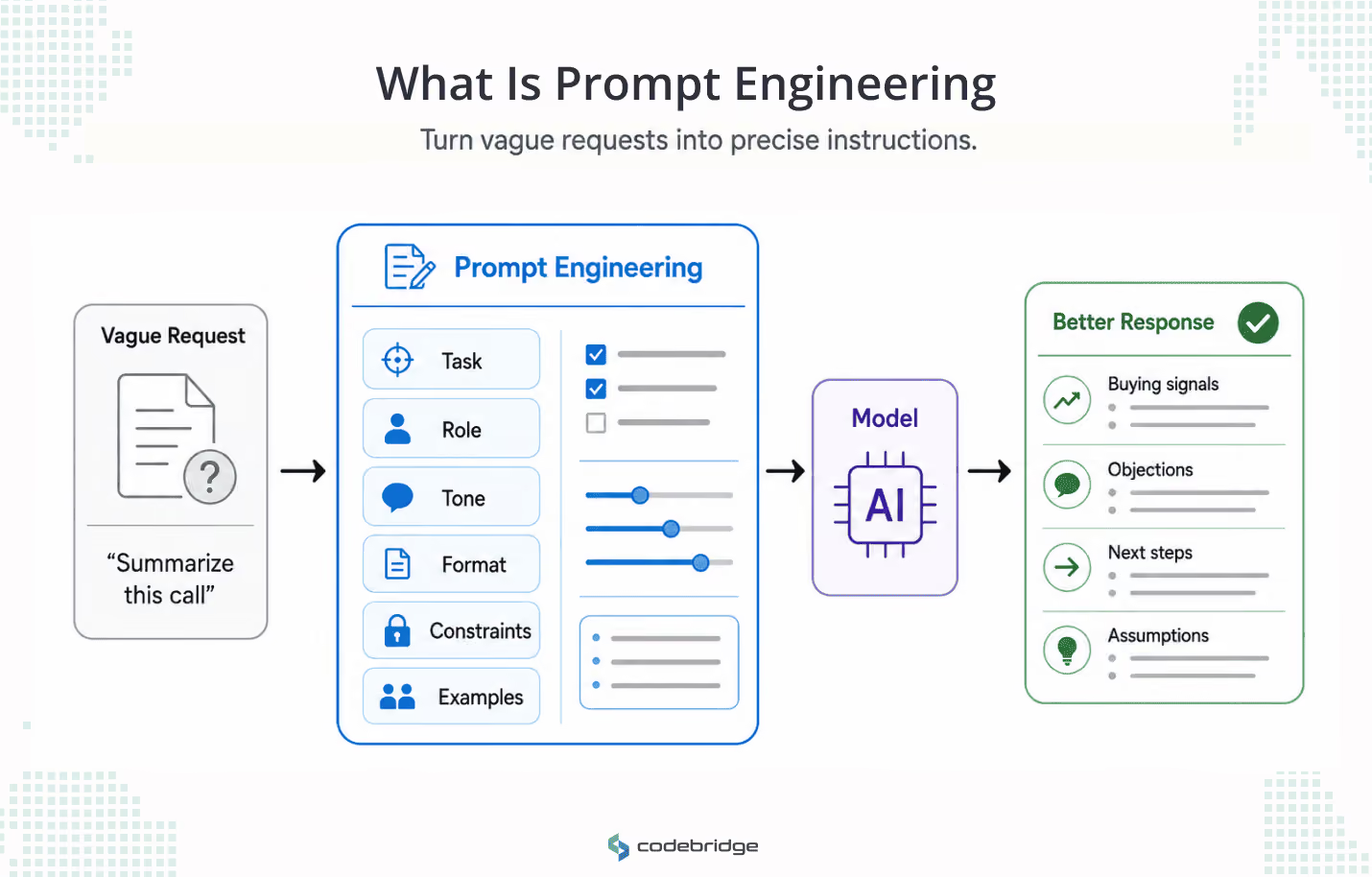
Prompt engineering is the practice of designing the instructions, examples, constraints, and output format that help a model produce a better response. It works on the part of the interaction you write directly.
A good prompt controls several things at once: the task itself, the role the model should adopt, the tone, the output structure, the level of detail, the reasoning style, and the examples that show the model what good looks like. Done well, it turns a vague request into a precise one.
Weak prompt: "Summarize this customer call."
Better prompt: "Summarize this customer call for a VP of Sales. List buying signals, objections, competitor mentions, and follow-up tasks. Separate confirmed facts from assumptions. Use short bullets."
The second version produces a more useful summary on any capable model, because it removes ambiguity about audience, structure, and what matters.
Prompt engineering earns its place in content generation, summarization, rewriting, classification, structured extraction, brainstorming, and most single-turn internal work where the required information already sits inside the prompt. In those cases, the model has everything it needs in front of it, and the only variable left is how clearly you ask.
But prompt engineering carries a hidden assumption. It assumes the model already has the right task, the right data, and the right boundaries in front of it. That assumption holds for a summary of a document you pasted in. It breaks the moment the model has to operate inside a workflow that changes while it runs.
What Is Context Engineering?
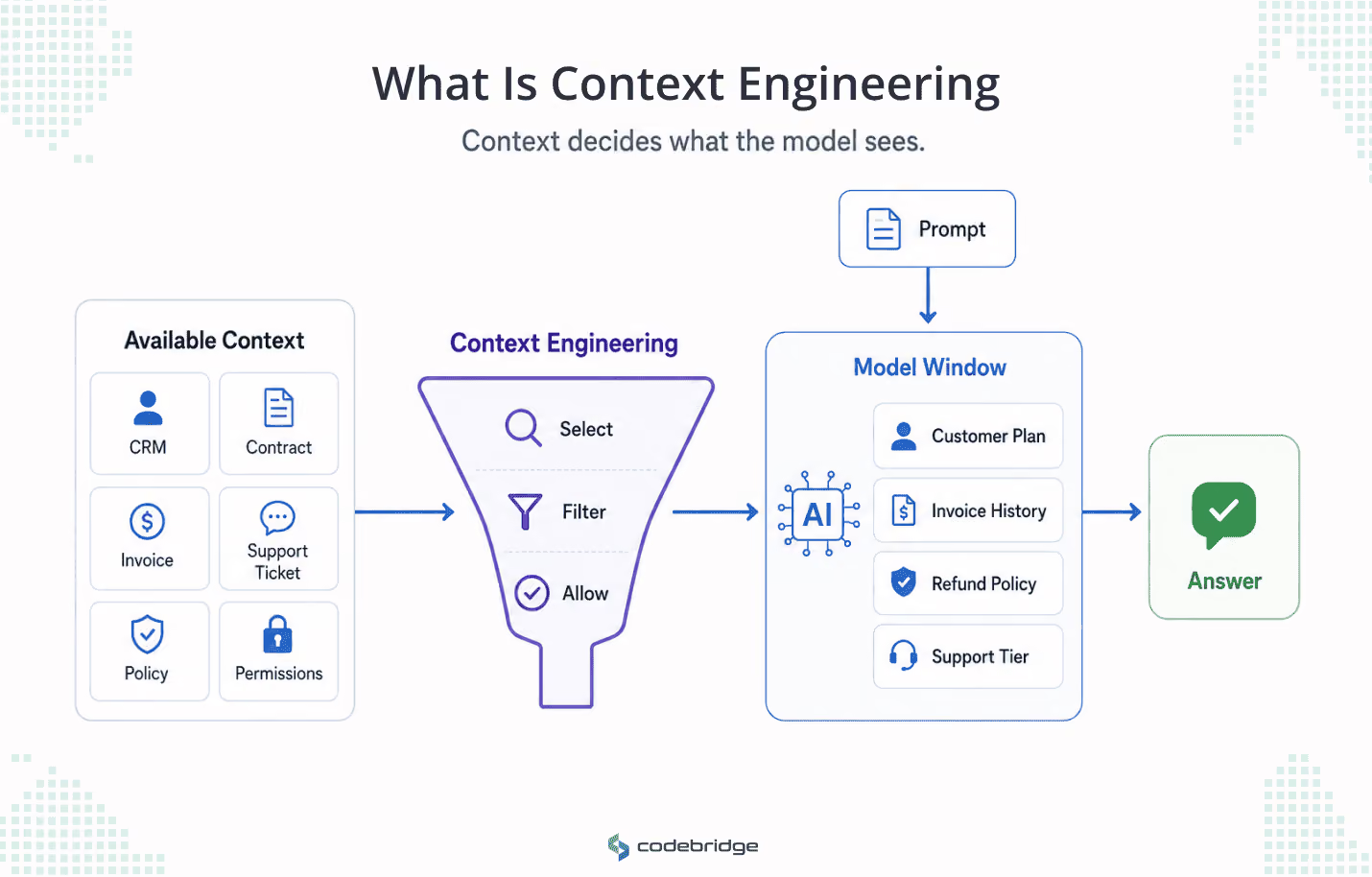
Context engineering is the design of the information environment around a model. It decides what the model can see, retrieve, remember, ignore, use, and act on while it works on a task.
Where prompt engineering writes the instruction, context engineering assembles everything else that reaches the model. It includes the system instructions, API responses, the user's role and permissions, the compliance constraints, etc.
Context engineering is the term Anthropic's engineering team uses for what it calls the natural progression of prompt engineering, and the definition is narrow on purpose. Context engineering is the set of strategies for curating the right tokens in the model's window during inference, including everything that lands there outside the prompt itself. The model does not reason over your database or your CRM. It reasons over whatever made it into the window. Context engineering governs that window.
A concrete case makes the gap obvious. Picture a support copilot answering a billing question. A perfectly written prompt cannot answer it. The copilot needs the customer's plan, their contract terms, invoice history, current pricing, support tier, region, refund policy, and the boundary that decides which of those it is allowed to reveal. Get that context wrong, and the output is wrong, no matter how elegant the instruction. Get it right, and a mediocre prompt still produces a usable answer.
There is a reason this discipline appeared now rather than three years ago. Early LLM work was mostly prompting because most use cases were one-shot, such as classify this, rewrite that, generate this. Agents changed the shape of the problem. An agent runs in a loop, pulls information in at each step, calls tools, and accumulates state. At step fourteen, the context is the product of thirteen earlier steps that could have pulled almost anything into the window. Nobody writes that context by hand. It has to be designed as a system, which is what context engineering is.
Context Engineering vs Prompt Engineering: The Full Comparison
The difference is easiest to see laid side by side. Each discipline controls a different layer of the same system.
The table is less a comparison of opponents than a map of which problem you are actually solving when an agent misbehaves.
Is Context Engineering Replacing Prompt Engineering?
No. Context engineering is not replacing prompt engineering. It is absorbing it into a larger discipline.
Prompt engineering still matters because the model needs clear instructions. But in a production system, the prompt is one layer among several, and it is not the layer that fails most often. The system also needs context selection, retrieval, memory, tool control, permissions, evaluation, and observability. Each is a separate concern with its own failure mode.
It helps to see the layers explicitly:
- Prompt engineering is the instruction layer.
- RAG is the retrieval layer.
- Memory is the continuity layer.
- Tool use is the action layer.
- Permissions are the access layer.
- Evaluation is the quality layer.
- Observability is the inspection layer.
- Context engineering is the system that coordinates all of them.
Read that list, and the relationship stops looking like succession and starts looking like containment. Prompt engineering did not get replaced. It got demoted from "the job" to "one layer of the job," which is the normal life cycle of any skill that matures into an engineering discipline.
The pattern is familiar. Early web work treated design as one undivided skill, then the field matured and split into UI and UX: related but distinct, each with its own tools and owners. AI is going through the same separation now. Prompting was the whole job when the whole job was answering a question. It is one specialty now that the job is running a system.
A better prompt can improve a response. It cannot decide which customer data the agent is allowed to see, which policy is current, or whether the agent should call the billing API.
This is also why the comparison changes completely when you move from a chatbot to an agent. A chatbot answers. An agent acts. The moment a model can act, every other layer becomes a place where a wrong action can originate, and the prompt is no longer where most of the risk lives.
When Prompt Engineering is Enough
Prompt engineering is enough when the task is self-contained, low-risk, and does not depend on context that changes while the model works. If everything the model needs is already in the prompt, and a wrong answer is cheap to catch and reject, you do not need an architecture. You need good instruction.
The common thread is that nothing outside the prompt has to be true for the task to succeed. The model is not reaching into a database, choosing a tool, remembering a prior step, or acting on behalf of a specific user with specific permissions.
A short checklist captures it. Prompt engineering is usually enough when:
- The model does not need live business data.
- No tools are called.
- No memory is required;
- No user-specific permissions apply.
- The task finishes in one or two turns.
- A human can catch errors easily.
- The output does not trigger an operational, financial, legal, or customer-facing action.
If all of those hold, invest in the prompt and stop there. Bolting retrieval, memory, and an evaluation harness onto a task that summarizes a pasted document is over-engineering, and over-engineering is its own kind of failure. Maturity is knowing which problem you have.
The moment any one of those conditions disappears, prompt engineering stops being the main discipline. Usually, they disappear together.
When Context Engineering Becomes Necessary
Context engineering becomes necessary the moment the model has to operate inside a real business workflow. The shift is not gradual. One day, the agent summarizes text; the next, it is reading live data, choosing tools, and carrying state across steps, and the discipline that governs its reliability changes underneath it.
Each row is a place where a perfectly written prompt is irrelevant to the outcome. A sales agent working from outdated pricing is confidently wrong about the number, and no instruction fixes a number the model never had. A HealthTech assistant that retrieves the wrong patient's context is dangerous regardless of how carefully you told it to be careful.
Notice the pattern in those failures. The output is not malformed. It is well-written and wrong. That is the signature of a context problem. Prompt failures look like bad formatting and vague answers. Context failures look like confident, plausible answers built on the wrong inputs, which is the more expensive kind, because it survives review.
This is also where the cost structure flips. In a single-turn task, a wrong answer costs one rejected output. In a multi-step workflow, a wrong input at step two propagates through every later step, and the agent spends the rest of the run reasoning carefully from a false premise. The better the model, the more convincingly it defends the mistake.
Why AI Agents Fail When Context is Treated Like a Prompt
Here is the claim the rest of this article rests on: most AI-agent failures are context failures wearing a prompt failure's clothes. The team sees a bad output, assumes the instruction is at fault, and rewrites it. The output improves slightly, then breaks again on the next edge case, because the instruction was never the broken part.
There are seven common ways context breaks. Each one has a different fix, and rewriting the prompt fixes none of them.
1. Missing context. The agent does not receive the information it needs to complete the task. A sales agent drafts renewal messaging with no contract terms, no usage data, and no view of open support tickets. The instruction was fine. The inputs were not there.
2. Stale context. The agent retrieves information that used to be true. A support copilot quotes a refund policy that changed three months ago, confidently and in the customer's own region, because the old policy is still sitting in the index.
3. Noisy context. Too much irrelevant information enters the window. An engineering assistant receives every log line from the last hour instead of the handful tied to the failed deployment, and the signal it needs is buried under thousands of lines it does not.
4. Conflicting context. The model sees two sources that disagree and has no rule for which one wins. A pricing page, an internal spreadsheet, and a CRM record show three different enterprise prices. The model picks one. It has no way to know it picked wrong.
5. Permissionless context. The agent receives data the user should never have seen. A customer-facing assistant can read internal escalation notes, or worse, another tenant's data, because the retrieval layer was never scoped to the user asking.
6. Tool-confused context. The agent has too many tools, or overlapping tools, and chooses the wrong one. An operations agent can update CRM, billing, and support records, and no rule defines which action needs approval. It updates billing when it is meant to log a note.
7. Unobservable context. Nobody can inspect what the model saw before it acted. A wrong answer gets reported, and the team cannot reconstruct which documents, which memory, which tool outputs, or which user state shaped it. The failure is real, and the cause is invisible.
If the team keeps rewriting the prompt while these problems remain, it is polishing the sentence and ignoring the system. The sentence was never the issue. These are not exotic edge cases, either. LangChain catalogs a similar set under names like context poisoning, distraction, confusion, and clash, and the engineering team at Cognition has described context engineering as the single biggest job in building agents. The vocabulary varies, but the diagnosis remains the same: the model is reasoning correctly over the wrong inputs, and no instruction changes the inputs.
The fix is a layer that decides, on purpose, what reaches the model before the model reasons at all. That layer needs a name and a shape, which is the subject of the rest of this article.
The Context Control Plane: A Better Way to Design AI Agent Context
A production AI agent needs a context control plane because someone has to decide what the model sees before it speaks, reasons, retrieves, or acts. In most teams, that decision is made by accident, scattered across a retrieval script, a system prompt, and whatever the last engineer happened to wire in.
A Context Control Plane has eight components, plus one question of ownership that decides whether the other eight survive contact with production. Treat the set as a design checklist for any agent that touches a real workflow.
1. Context Sources
Define where the agent can pull information from: documents, databases, CRM, ERP, product analytics, tickets, logs, APIs, user profiles, policy repositories, and prior conversations.
The discipline here is restraint. Not every available source should become an agent source. Connecting an agent to everything is the fastest way to poison it, because every extra source is another way for stale, irrelevant, or unauthorized information to reach the window. Decide what the agent draws on before you decide how it draws on it.
2. Context Selection
Define what is relevant for this specific step. For any given action, the system has to answer four questions: what does the agent need right now, what should be excluded, which source is authoritative, and what is the minimum useful context.
The default should be the smallest sufficient set, not the largest available one. Selection is where the attention budget gets spent or wasted. An agent given exactly what it needs reasons well. An agent given everything it could possibly need reasons worse, slower, and at a higher cost.
3. Context Permissions
Define what the agent is allowed to access for this user, role, tenant, region, and workflow. That includes role-based access, tenant isolation, PII and PHI handling, redaction, approval boundaries, and a clear line between internal and external visibility.
In a multi-tenant or regulated system, this is not a feature. It is the line between a product and an incident. A prompt that says "only show data the user is allowed to see" is a wish. A permission layer that filters context before it reaches the model is a control.
4. Context Memory
Define what the agent can remember: short-term task memory, long-term user memory, account-level memory, workflow state, expiration rules, and the things that must never be stored at all.
Memory is where reliability quietly erodes. Memory that is never pruned becomes a slow leak of stale and unsafe information, and an agent that remembers the wrong thing is harder to debug than one that remembers nothing. Deciding what the agent forgets matters as much as deciding what it keeps.
5. Context Tools
Define which tools the agent can call and under what conditions: read-only tools, write tools, high-risk actions, approval rules, and validation of tool outputs.
A test worth stealing: if a human engineer cannot say with certainty which tool to use in a given situation, neither can the agent. Tool sprawl is a context problem in disguise. Every tool schema occupies space in the window, and an overloaded tool set produces exactly the tool-confused failures from the previous section. Fewer, clearer tools beat more, overlapping ones.
6. Context Compression
Define how long or complex information gets summarized without losing the critical signal: summarization, chunking, ranking, source references, and dropping irrelevant history.
The goal is a high signal-to-noise window, not a full one. Compression is what lets an agent run a long task without degrading as the conversation grows, and its absence is why some agents get worse the longer they run.
7. Context Evaluation
Define how context quality gets tested, before and after launch, across relevance, freshness, sufficiency, permission fit, conflict detection, traceability, latency, and cost.
Most teams test the model's output. Few test the context the output was built from, which is where the defect usually lives. Evaluating context means asking not just "Was the answer good?" but "Did the model have the right information, at the right freshness, that this user was allowed to see, with conflicts resolved?" A good answer from bad context is luck, and luck does not scale.
8. Context Observability
Define how the team inspects what the agent saw and why it behaved a certain way: context logs, retrieved sources, tool outputs, memory state, prompt versions, approval events, and error traces.
As LangChain's Harrison Chase has put it, traces are where the source of truth for an agent now lives. Code tells you what the system can do. Traces tell you what it actually saw at the moment it acted. Without them, every production failure becomes a guess.
A model without context observability is not an intelligent system. It is a confident black box with access to your workflow.
The Ninth Question: Ownership
The eight components are technical. The ninth is organizational, and it is the one most teams skip. Someone has to own the context layer after launch. Not the prompt, not the model, the context: the sources, the permissions, the memory rules, the evaluation suite, the logs.
When ownership is unassigned, context decays. Sources go stale, permissions drift, memory bloats, and nobody is accountable because the model is the visible part and the model gets the blame. The checklist later in this article returns to this, because it is the single question that best predicts whether an agent survives.
Context Engineering in Real AI Systems
Frameworks are easy to nod along to and hard to apply. The clearest context engineering examples are the ones where a good prompt was never going to be enough, and the fix was structural. This case, drawn from the kinds of systems Codebridge builds, shows what the Context Control Plane changes in practice. It starts from a reasonable instruction, a clean demo, and a production environment that exposes everything the instruction never knew.
A HealthTech Workflow Assistant
Scenario. A HealthTech platform adds an AI assistant to help clinicians navigate patient information and move through a workflow.
The prompt-only version. The team instructs the assistant to be careful, conservative, and medically responsible. The instruction is sincere and almost beside the point. The real risks are structural: surfacing the wrong patient's context, leaving no audit trail, leaving escalation undefined, or exposing data outside the clinician's role. None of those is a wording problem. You cannot instruct your way out of a missing permission model.
The context engineering fix.
- Patient-specific retrieval, scoped to the case in front of the clinician
- Role-based access, so each role sees what it is entitled to and nothing more
- An audit trail that records what the assistant retrieved and surfaced
- Human approval for any high-risk action
- Source references on every clinical claim, so the clinician can verify rather than trust
- A hard boundary between administrative support and clinical judgment
The lesson. In a regulated domain, context engineering is a safety and compliance requirement. Codebridge's RadFlow AI, an AI-powered radiology workflow assistant, was built on exactly this premise.
A HIPAA-compliant system integrated into existing PACS infrastructure, designed to augment radiologists rather than replace them, with its results validated by the client's clinical governance board and an independent double-blind study before anyone trusted a number. The intelligence sat inside a controlled context layer. That is what made it deployable in a hospital rather than impressive in a demo. Earlier work, from a cancer treatment management tool to a Big Four knowledge platform, followed the same discipline: the model was the easy part, and the context architecture was the product.
When something goes wrong in a hospital, "the model made a mistake" is not an acceptable answer. The audit trail and the source references exist so that a clinician and later a regulator can reconstruct exactly what the assistant saw and why it surfaced. That is, observability is treated as a clinical requirement, not an engineering nicety.
Context Engineering vs RAG: Are They The Same?
A common shortcut treats context engineering and RAG as the same thing. They are not. RAG is one technique inside context engineering, an important one, but it answers a narrow question.
RAG retrieves external information and adds it to the model's window. That is valuable, and it is most of what many production systems do today. But retrieval alone does not decide whether the information should have been retrieved, how to rank it against other sources, whether this user is allowed to see it, how it combines with memory and tools, or what the system should do when two retrieved sources disagree. Those are context engineering questions, and RAG does not answer them.
The industry has started to say this out loud. In one 2026 survey of data and IT leaders, more than three-quarters agreed that RAG on its own is not enough for reliable production AI, and that bigger context windows do not rescue it, because more capacity without better curation just makes more room for noise.
RAG can bring documents into the room. Context engineering decides which documents belong there, who is allowed to read them, and what the agent should do when they disagree.
How to Know Whether Your AI Problem is a Prompt Problem or a Context Problem
Before rebuilding an AI system, find out what kind of failure you are looking at. The fix for a prompt problem and the fix for a context problem have almost nothing in common, and teams waste weeks applying one to the other.
The symptom usually tells you what it is.
The split is clean enough to act on. If the output is badly shaped, start with the prompt. If the output is well-shaped and built on the wrong facts, the wrong user state, the wrong tools, the wrong memory, or the wrong permissions, the prompt is not your problem, and rewriting it is motion without progress.
A CTO Checklist Before Building an AI Agent
Before building an AI agent, map the context it needs. Most teams map the model and the prompt, then discover the context layer in production, one incident at a time. The architecture should answer these questions before the workflow scales, not after:
Run this list as a design review, not a launch checklist. Every question you cannot answer before building is a question production will answer for you, at a worse time and a higher price. The teams whose agents survive are the ones who decided, on purpose and in advance, what their agents were allowed to know.
Conclusion
The comparison between context engineering and prompt engineering is a practical distinction between improving an instruction and designing the system around it.
Prompt engineering still matters. It gives the model a clear task, and a clear task is not optional. But an AI agent needs more than a clear task. It needs current data, reliable retrieval, controlled memory, safe tools, permission-aware access, preserved workflow state, evaluation, observability, and an owner. Those are architectural concerns.
The next time an agent fails, resist the reflex to open the prompt. Ask what the model saw before it answered. If your AI agent keeps failing after the prompt has been rewritten ten times, the prompt is probably not the problem. The system is asking the model to act inside a context layer that was never designed.
Before you scale an agent, take one workflow and map the context architecture behind it: the data, the tools, the permissions, the memory, the evaluation, and the ownership. That single exercise tells you more about whether the agent is ready than any prompt review ever will.
At Codebridge, this is the layer we design first. If you are building or evaluating an AI agent and its reliability is not where it needs to be, the fastest diagnosis is rarely a better prompt. It is an honest look at the context the agent is running in.

















Heading 1
Heading 2
Heading 3
Heading 4
Heading 5
Heading 6
Lorem ipsum dolor sit amet, consectetur adipiscing elit, sed do eiusmod tempor incididunt ut labore et dolore magna aliqua. Ut enim ad minim veniam, quis nostrud exercitation ullamco laboris nisi ut aliquip ex ea commodo consequat. Duis aute irure dolor in reprehenderit in voluptate velit esse cillum dolore eu fugiat nulla pariatur.
Block quote
Ordered list
- Item 1
- Item 2
- Item 3
Unordered list
- Item A
- Item B
- Item C
Bold text
Emphasis
Superscript
Subscript