Six weeks of silence, then a Slack message: "Tada — it's done." That's the moment a marketing site migration turns into a forensic investigation. The build looked right. The blog categories no longer connected to posts. Resource pages had lost their tags and internal links. The HubSpot forms rendered perfectly and quietly stopped syncing leads to the CRM — which nobody noticed until someone asked why the demo pipeline had gone flat.
That sequence comes from a walkthrough of an enterprise SaaS site migrated onto Webflow by an outside partner, where the visual rebuild survived and the data relationships underneath it did not.
"If your partner disappears for 6 weeks and then says 'Tada, it's done,' you're almost guaranteed to find surprises later."
Webflow migration walkthrough, YouTube
If your redesign is already stalled — second vendor, third timeline, a homepage that's been "two weeks out" since Q1 — the instinct is to hire faster. That instinct is what produced the stall. This is a hiring playbook: seven steps, each with what to do, what good looks like, and the failure mode that kills it. It's built for a fixed window, and the close tells you which day to run which step.
KEY TAKEAWAYS
Portfolio review is a near-zero-signal vetting method for Webflow. Class-naming chaos, unoptimized assets, broken semantic structure and fragile automations are invisible in screenshots and surface 6-12 months post-launch as rebuild pressure.
Organic search drives 53.3% of website traffic, which makes a structurally weak build a revenue defect rather than a design complaint.
The most frequent post-engagement failure is editorial dependency — the client can't change text, swap an image, or publish a page without a quote and an invoice from the vendor.
Webflow talent supply is expanding faster than Webflow architectural depth, with job postings up roughly 45% and a 3.5M+ user ecosystem, widening the gap between what candidates claim and what they ship.
The 2026 vetting question has shifted from "can you build in Webflow" to "where would Webflow break for us" — seat pricing, CMS ceilings, and code-export portability are now board-level cost variables.
The Hidden Problem: You're Buying an Architecture, Not a Website
Website redesigns don't usually stall on technical execution. Impact Networking published a candid post-mortem of its own seven-month rebuild and located the drift in upfront alignment, scope creep, and stakeholder coordination — process failures, not build failures. The same write-up cites a figure that reframes what's actually at stake in the build itself: 53.3% of all website traffic comes from organic search, and 49% of users say they use Google to discover a new product.
Read those two numbers together and the vetting problem sharpens. A Webflow developer who names classes carelessly, nests divs six deep, ships unoptimized hero images, and treats heading hierarchy as a font-size control is not making an aesthetic choice. They're setting a ceiling on your organic acquisition, and you won't see the ceiling for two or three quarters — long after the invoice cleared and the engagement closed.
Webflow's own customer reporting shows what the platform does when it's used well. Ramp rebuilt its site on Webflow under a tight timeline by giving marketing, design, and engineering shared ability to move without handoff queues, and reported a 26% increase in page views. The same source documents Responsival growing average engagement price 8x with fewer dev resources after leaning into Webflow's Experts Program. Both outcomes are real; neither is a property of the tool. They're properties of who was holding it.
"You are not just hiring someone to design a Webflow site. You are choosing an architecture, a maintenance burden, and a set of risks your company will live with for years." A poor build can lead to technical debt, stalled SEO growth, broken automations, and in the worst cases, a complete rebuild long before you expected it.
Anish Aryal, Blankboard Studio
Aryal names the structural reason this is hard for a CEO to solve by intuition: Webflow's low barrier to entry makes it very easy to look competent and very hard to prove real engineering depth. That gap is dangerous specifically for non-technical buyers, who default to visual review because it's the only evaluation surface they've been handed.
What the Failure Actually Looks Like
Three patterns show up repeatedly in practitioner accounts, and each one maps to a step in the playbook below.
Pattern one: the site ships and your team loses the keys
Aminat Yakubu — three years of Webflow delivery across nine agencies and 1,000+ build hours — reports that the single most common thing businesses say after a bad agency engagement has nothing to do with looks.
"The most common thing we hear from businesses coming off the back of a bad agency experience is that they can't update their own website without paying someone to do it." A text change, a new image, a sold out product. All of it requiring a call, a quote and an invoice.
Aminat Yakubu, Webflow developer, LinkedIn
Yakubu's diagnosis of the cause is the sentence to carry into every vendor call: "Webflow is only as good as the developer using it. The tool gets blamed for a lot of decisions that were made by humans." Spacing, naming conventions, responsiveness, CMS structure — small decisions compounding into a site that either publishes smoothly or bills you every time you touch it.
The commercial contrast is documented. LoudFace's Icypeas rebuild describes a B2B lead-enrichment platform with 99.9% uptime and GDPR compliance that was losing enterprise deals because its site looked like a side project, and where every content update required a developer. The rebuild used a component-based Webflow architecture with a CMS the internal team operates without engineering — feature pages, pricing changes, blog posts. LoudFace reports prospects started raising the website unprompted on sales calls, and the full rebrand plus site shipped in under 90 days.
"Icypeas had a product that worked. Their website didn't." Buyers in the sales data space make trust decisions fast. If the website looks cheap, the product gets discounted.
LoudFace, Webflow design and build agency
Pattern two: nobody built for the marketer
A recurring account from agency owners describing conversations with companies whose web programs had stalled points to a supply problem rather than a platform problem — sites grew until they became unmanageable and teams migrated away instead of fixing them.
"They couldn't find the good ones — the ones who actually built for marketers and non-tech people in mind."
Agency owner, on Webflow delivery
Pattern three: the platform's edges are hidden from you until you hit them
A different practitioner account comes from an agency that had standardized on Webflow for enterprise clients and then moved off it. Per-seat licensing starting in 2024 made mid-size clients uneconomical — being asked to pay for roughly ten seats — while limited external and headless CMS support blocked larger accounts. They shifted to self-hosted or low-tier headless CMS plus a separate static page builder.
"The only reason we use Webflow now is if Webflow marketing has already influenced the client and they want nothing else."
Agency practitioner, on Webflow's relevance as a skill in 2026
Take that as illustration of a real cost pressure, not as a verdict on the platform. The point for vetting is narrower and it holds regardless: a candidate who cannot tell you where Webflow becomes expensive or constrained for your specific setup is either inexperienced or selling. That instinct has a market-level counterpart worth tracking — Webflow practitioner Zlatko Marjanović, describing his own move away from the official partner program, frames the shift bluntly: "The barrier to coding something great is gone. The barrier to affording Webflow is constantly rising." A segment of advanced practitioners now architects for code-export portability toward Next.js and headless CMS stacks rather than long-term platform residency. You need to know which kind of builder you're hiring before you sign.
The Pattern: Vetting for Debuggability, Not Delivery Speed
Teams that get this right converge on the same move. They stop evaluating what a candidate can produce and start evaluating what the candidate leaves behind for people who aren't in the room.
The market conditions make this urgent rather than optional. Webflow now sits in a 3.5M+ user ecosystem with job postings up roughly 45%, and no-code tooling is projected to account for around 65% of new digital experiences by 2027. That combination is exactly the condition under which visual-portfolio hiring fails: an expanding pool of practitioners who can produce a credible-looking build, and a slow-growing pool who can produce a maintainable one.
Practitioners debating AI-generated sites land on the sharpest formulation of the underlying economics: a site that took twenty minutes to make will take longer than that to diagnose when something goes wrong six months later. Build time is the smallest line in the total cost. Diagnosis time, publishing time, and the cost of every future change are the large ones — and they're the ones no portfolio discloses.
The two hiring approaches diverge in cost profile, not just outcome quality. Consider the comparison below:
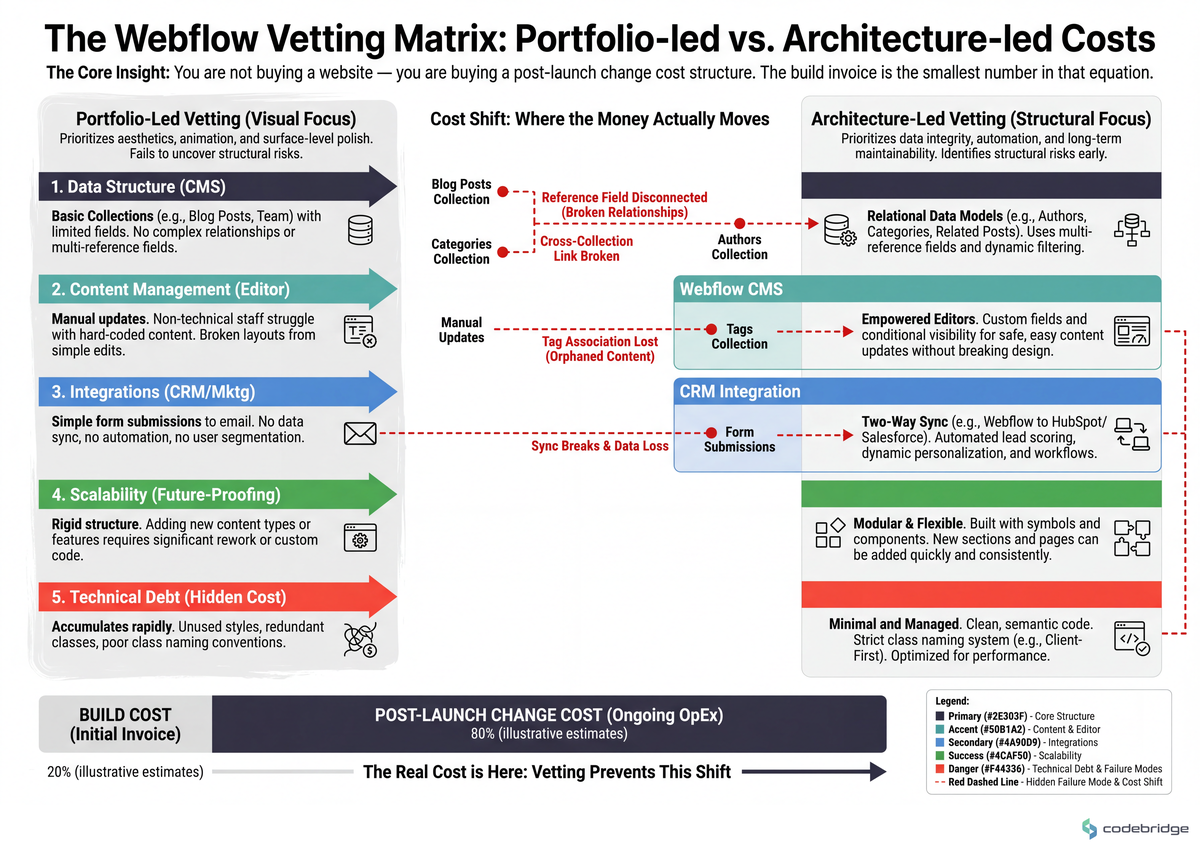
Notice that the two approaches look nearly identical for the first eight weeks. That's precisely why portfolio-led hiring survives — the divergence is invisible during the period when you're still congratulating yourself on the decision.
The Seven-Step Vetting Playbook
Step 1: Write the post-launch operating spec before you write the job post
What to do: One page, before any outreach. List the ten most frequent site changes your team made in the last twelve months (pricing update, new feature page, case study, hero copy test, careers listing, event landing page). Next to each, write the target: who executes it, and in how long, six months after launch.
What good looks like: At least eight of ten are executable by a non-technical marketer in under 30 minutes with no developer involvement. This document becomes your acceptance criteria and it goes into the contract.
Common failure mode: Writing a design brief instead. A design brief specifies the deliverable; this specifies the capability you're buying. Yakubu's framing is the test — if the answer to "who changes this text?" is "the agency," you've bought a subscription, not a website.
Step 2: Ask the platform-limits question first, and score the honesty
What to do: In the first call, ask: "At our size, with our content volume and team headcount, where does Webflow become the wrong choice? Where do seat pricing and CMS limits bite us?"
What good looks like: A specific answer with numbers — named seat thresholds, CMS item ceilings, localization constraints, and a stated integration path when you exceed them. The agency account above hit exactly this wall at roughly ten seats for mid-size clients.
Common failure mode: Unconditional platform defense. "Webflow can do anything" is a sales answer. It reliably precedes a mid-project discovery that a core requirement needs custom code nobody scoped.
Step 3: Run a live debug test on a broken page
What to do: Give the finalist a genuinely broken page — a real one from your current site, or a deliberately mis-structured Webflow clone. Sixty minutes, screen shared, thinking out loud. You are not grading the fix. You are grading the diagnostic sequence.
What good looks like: They open the navigator and inspect structure before touching styles. They check heading hierarchy and semantic tags unprompted. They name the class-naming system in use (Client-First, BEM-derived, or their own documented convention) within the first ten minutes and can say why it matters for the next person.
Common failure mode: Skipping straight to visual repair. Fast cosmetic fixes on a structurally broken page are the exact skill that produces the 20-minute build nobody can diagnose in month six. If a candidate refuses a paid working session, that's your answer — pay for their time, and treat the refusal as disqualifying.
Step 4: Demand a written CMS and content-relationship migration plan
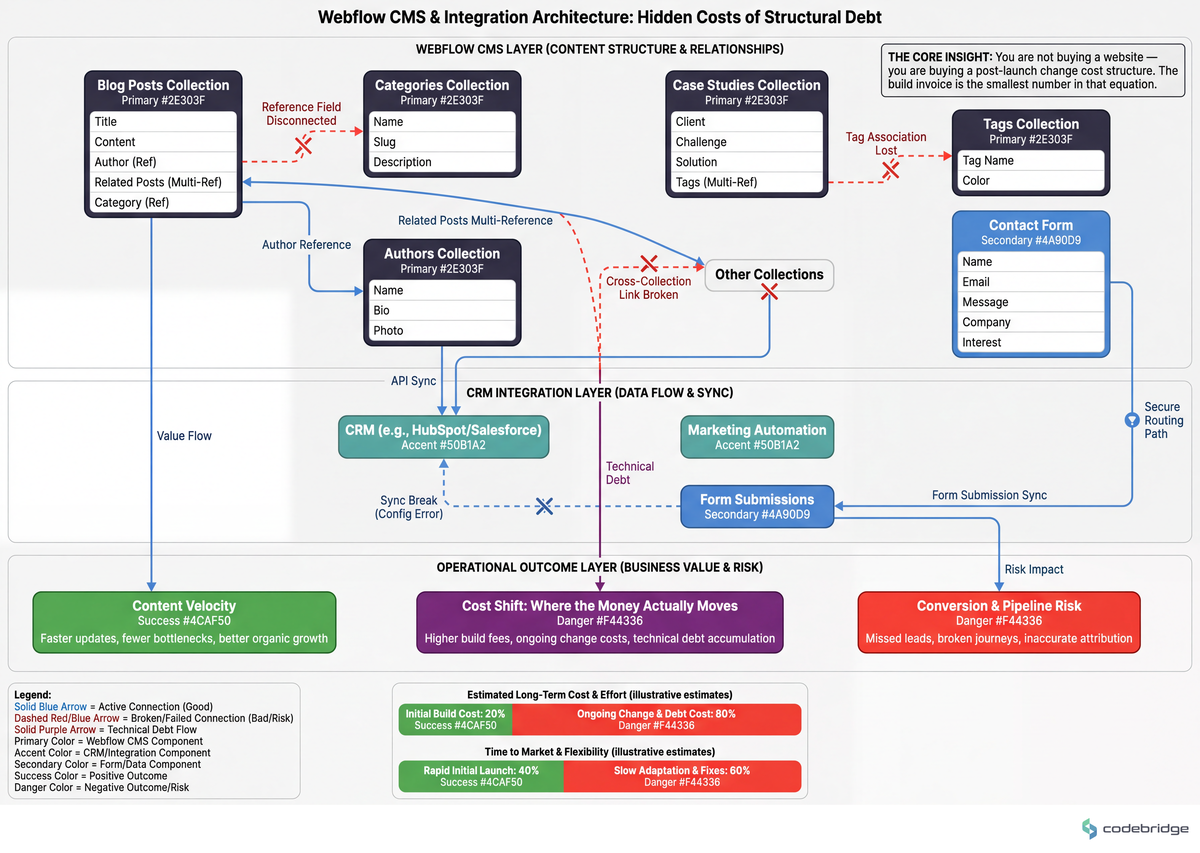
What to do: Before contracting, require a document that maps every existing content relationship to its post-migration structure: blog category to post, resource to tag, author to article, form to CRM field, plus a redirect map for every URL that changes.
What good looks like: Collection schemas with field types and reference fields named explicitly. Form-to-CRM mappings listed field by field with a stated test method — because a HubSpot form that renders correctly and silently stops syncing is the exact failure in our opening case, and it is invisible to visual QA.
Common failure mode: Accepting "we'll handle the migration" as a plan. Content relationships break silently; layouts break loudly. Only one of those gets caught at handoff.
The relationship map is what you're actually buying. This is the layer that visual review never touches:
Step 5: Contract staging access from week one, with a weekly review cadence
What to do: Write into the agreement: staging environment access from day five, and a standing 30-minute weekly review where your team clicks through navigation, CMS logic, and templates as they're built. No six-week silences. Payment milestones tied to review completion, not to calendar dates.
What good looks like: The vendor proposes this before you do. Yakubu's operating note is the standard here: "Speed of communication matters more than speed of delivery. A client who hears from you every day feels calmer than one waiting on a 'nearly there.'"
Common failure mode: Treating weekly reviews as a trust insult and waiving them for a vendor you like. The "Tada, it's done" pattern isn't caused by bad intentions. It's caused by the absence of a checkpoint.
Step 6: Scope to a post-launch metric, not to a page count
What to do: Attach at least one measurable post-launch commitment to the engagement. Pick from: publishing velocity (pages your team ships per month without the vendor), Core Web Vitals thresholds at 30 days, organic sessions at 90 days, or conversion lift on a named page.
What good looks like: The vendor engages with the metric and proposes a measurement window. Some agencies push this to its logical end — offering selected clients no fee in exchange for a percentage of measured conversion lift, describing it as fair to the client and pressure on themselves. You don't need that structure. You need a vendor whose answer to "what does success look like three months after launch?" isn't "the site is live."
Common failure mode: Scoping to deliverables only. A page-count scope makes handoff the finish line, and handoff-as-finish-line is how redesigns stall in the first place.
Step 7: Verify the security and maintenance baseline the build inherits
What to do: Ask what the candidate's approach inherits from the platform versus what they own personally: SSL and certificate renewal, hosting-level backups and restore procedure, form spam handling, dependency and custom-code surface, and who patches what. Get it in writing.
What good looks like: A clean split. Platform-managed items named as platform-managed; custom code, third-party scripts, and integration credentials named as owned, with a named owner. Practitioners weighing AI-generated custom sites against platform builds put the risk plainly — fast builds ship fine as prototypes and fall apart on security and access control once real client data is involved.
Common failure mode: Never asking, because the site is "just marketing." Marketing sites carry lead data, CRM credentials, and tracking pixels. A bespoke stack nobody has budgeted to maintain is a larger long-run liability than a managed platform with a documented baseline.
Steps 3, 4, and 5 are the load-bearing ones. If your timeline only allows three, run the debug test, demand the migration plan, and contract staging access from week one — those three catch the failures that portfolio review structurally cannot see.
Scoring the Finalists
Run every finalist through the same grid and keep the scores. The point is to make the comparison legible to your board and to whoever inherits the vendor relationship after you.
| Evaluation surface | Weak signal | Strong signal |
|---|---|---|
| Class naming | Cannot name a system; "I just style what I need" | Names a documented convention and explains the handoff cost of abandoning it |
| CMS design | Describes pages | Describes collections, reference fields, and who publishes what |
| Platform limits | "Webflow can do anything" | Names seat and CMS thresholds where your setup breaks, plus the exit path |
| Debug behavior | Fixes visually, fast | Inspects structure first, narrates the diagnosis |
| Success definition | "The site is live" | Names a post-launch metric and a measurement window |
| Communication | Proposes milestone check-ins only | Proposes staging access and weekly review before you ask |
Stalled mid-redesign and unsure whether to restart or rescue the existing build?
Talk to our team about auditing your current Webflow architecture before you sign the next vendor.
Close: What to Do This Week
The opening case is not a story about a bad agency. It's a story about a review cadence that didn't exist — six weeks of silence is a contract defect, and it's fixable in a paragraph. Certified partner status helps as a floor, and Webflow's Experts Program is a real external signal in a market where self-attestation is otherwise all you get. It is not a substitute for watching someone debug a broken page while you're in the room.
Tomorrow morning, write the one-page post-launch operating spec from Step 1 — ten changes, named owner, target time. It takes under 30 minutes and it is the single artifact that reframes every vendor conversation that follows. Wednesday, send the platform-limits question from Step 2 to every candidate still in your pipeline, in writing, and score the answers for specificity. Thursday, prepare the broken page for Step 3. By Friday, you'll have run one live debug session and you will know more about your finalists than four weeks of portfolio review would have produced.
Then run the diagnostic below against the build you already have — because if you're mid-stall, the question of whether to rescue or restart is the one that decides your budget.
Diagnostic: Rescue or Restart?
Answer yes or no. Score one point per yes.
In the last 90 days, did any routine content change — text, image, a new landing page — require contacting your vendor for a quote? Yes / No
Open your current site's Webflow project and look at the style panel: are there more than five classes whose names you cannot explain to a new hire in one sentence? Yes / No
Submit a test entry through every live form today. Did any of them fail to appear in your CRM within 15 minutes? Yes / No
Pull organic sessions for the 90 days before and after your last launch. Was post-launch flat or down? Yes / No
Ask your marketing lead how many pages they published without engineering help last quarter. Was the answer zero? Yes / No
Can anyone currently on your payroll name who owns SSL renewal, backups, and the custom-code surface on your site? If nobody can — count this as a yes. Yes / No
Does your current Webflow plan require seats you're not using, or are you paying for tiers you were told you'd need "later"? Yes / No
0-2 yes: Healthy build. Your stall is a scoping and alignment problem, not an architecture problem — fix the operating spec and the review cadence, keep the site.
3-4 yes: At risk. Rescue is viable, but scope a structural audit before any new feature work, and make the audit findings a precondition of the next contract.
5+ yes: Rebuild territory. The compounding cost of editorial dependency plus flat organic will exceed the rebuild cost inside four quarters. Run the seven-step playbook against a new shortlist rather than extending the current engagement.
REFERENCES














Heading 1
Heading 2
Heading 3
Heading 4
Heading 5
Heading 6
Lorem ipsum dolor sit amet, consectetur adipiscing elit, sed do eiusmod tempor incididunt ut labore et dolore magna aliqua. Ut enim ad minim veniam, quis nostrud exercitation ullamco laboris nisi ut aliquip ex ea commodo consequat. Duis aute irure dolor in reprehenderit in voluptate velit esse cillum dolore eu fugiat nulla pariatur.
Block quote
Ordered list
- Item 1
- Item 2
- Item 3
Unordered list
- Item A
- Item B
- Item C
Bold text
Emphasis
Superscript
Subscript