The third rewrite is where the pattern becomes undeniable. A team maintaining a first-party UI framework across a sprawling product portfolio — document libraries, lists, settings panels, the works — watched their design system get rebuilt from the ground up for the third time, shipping breaking changes alongside a new client while performance and accessibility regressions were still open. The visible symptom wasn't the regressions. It was that the same button, the same empty state, the same table header rendered differently depending on which surface you landed on.
"The same UI elements look different across pages, lists, document libraries, and settings panels" — and signs already point to the next throwaway version.
Commenter, Hacker News
Now add LLM code generation to that portfolio. If you are a CTO running an MSSP platform — a multi-tenant console, an analyst triage app, a client-facing reporting portal, a mobile alerting surface — you are about to discover that the design-system drift problem and the generative-UI problem are the same problem, arriving at ten times the speed. Every application your agents touch becomes an independent sample from a distribution. And in a SOC, an interface that renders "Critical" one way in the triage queue and another way in the client report is not an aesthetic complaint. It is an incident-response defect.
KEY TAKEAWAYS
LLM-generated interfaces are structurally stable but stylistically variable. A 2025 systematic review found generative UI systems "approximate acceptable solutions rather than reason about best ones" — apparent coherence masks the absence of design reasoning.
Drift has two opposite failure modes, and the fix is the same artifact. Unconstrained agents converge on generic defaults; agents pushed off-distribution without a written spec diverge per application. Both are solved by machine-readable design DNA plus an automated audit step.
Linters and type checks do not detect coherence failures. Micro-level code hygiene and macro-level semantic consistency are different problems inspected by different tools; naming, interaction grammar, and error conventions live above the layer static analysis reads.
Grounding output in traceable evidence produced a greater than 40% credibility increase (P < 0.001) in peer-reviewed research, against a baseline the authors describe as "often fictitious evidence generated by LLMs."
Developers took 19% longer with AI tooling while believing they were 20% faster — a roughly 40-point perception gap that makes velocity-based planning for agent-assisted UI work unreliable.
The Hidden Problem: Coherence Lives Where No Linter Looks
The dominant assumption is that a large, well-trained model produces coherent UI because it has seen millions of coherent UIs. The research says something more specific. A 2025 systematic literature review of generative UI systems in Computers concluded that these systems "approximate acceptable solutions rather than reason about best ones, reflecting statistical regularities of prior designs rather than intentional design planning," and that "design decisions appear stable at the structural level yet variable at the stylistic level." The same review found that generative UI systems "encode implicit design priors" and "lack transparent reasoning about why particular design choices are appropriate in context."
Read that against a multi-application MSSP platform and the operational consequence is direct. Structural stability is why every generated screen looks plausible in isolation. Stylistic variability is why nine screens across four applications will not agree with each other. The model cannot self-justify a design choice, which means it cannot recognize when a choice contradicts one it made in a different repository last Tuesday.
Empirical work on production-adjacent systems confirms the failure surface. Researchers at KTH Royal Institute of Technology, working with Bontouch (Framna), built AdaptFit, an Android application using GPT-4.1-nano for user-driven iterative UI refinement through natural language, and tested it with users. Their finding: "structural limitations that could not render or parse many of the LLM's creative outputs, leading to broken interfaces or missing features. Users also struggled to articulate their requests clearly, and vague prompts frequently led to hallucinated or unimplementable results. there was often a mismatch between the proposals generated by the LLM and the actual implemented UI, leading to frustration and unmet expectations."
That gap between what the model proposes and what the rendering layer can execute is the mechanism behind most cross-app incoherence. And there is a second gap, one level up, that engineers have started naming explicitly.
"The issue is the gap between micro-level code hygiene and macro-level semantic coherence."
Commenter, Hacker News
Linters and static analysis closed the micro gap. Nothing in your CI inspects whether "Critical" in the triage app and "P1" in the client portal are the same concept, whether both apps use the same acknowledge-then-assign interaction grammar, or whether a failed enrichment call renders as a toast in one surface and an inline banner in another. Those are the failures your analysts will feel at 3 a.m.
Passing lint and type checks proves nothing about cross-application consistency. Coherence needs its own budgeted check — a shared vocabulary registry, contract tests on shared components, cross-app screen review — not a hope that clean code implies consistent code.
The stakes scale with what your platform is for. Accenture puts the annual global cost of cybercrime at $10.5 trillion, and reports that 86% of business leaders believe geopolitical instability is likely to produce a catastrophic cyber event within two years. PwC's 2026 Global Digital Trust Insights, drawn from 3,887 business executives, establishes the baseline expectation enterprises now hold for MSSP-delivered tooling. Our reading of those two data points together: the tolerance for "the AI-generated console is a bit inconsistent" is structurally lower in this vertical than in almost any other, because the interface is where a client decides whether to trust a finding.
Two Failure Modes, One Artifact
Before you can fix drift, you have to name which drift you have. There are two, and they are opposites.
A practitioner writing on dev.to analyzed why AI coding agents produce interchangeable interfaces across separately generated applications, and built an open-source design skill that audits generated code against a catalogue of 65 anti-patterns and can extract "design DNA" from existing screenshots or URLs. The diagnosis was not what most teams expect.
"It's not about quality — it's about uniformity." The generated interfaces are technically competent but visually indistinguishable.
rams901, dev.to
Every agent, on every generation, converged on the same on-distribution defaults — one sans font, purple gradients, nested cards — because they were all trained on the same component libraries and utility-CSS examples. That is convergent drift: consistent, competent, and not yours. Your MSSP console ends up indistinguishable from every other vendor's console, which is a positioning problem before it is a usability one.
Push the agents off-distribution without a written spec and you get the inverse. Divergent drift: each application independently invents its own severity palette, its own table density, its own modal-versus-drawer convention. The comparison below lays out how the two modes present and what each one costs you.
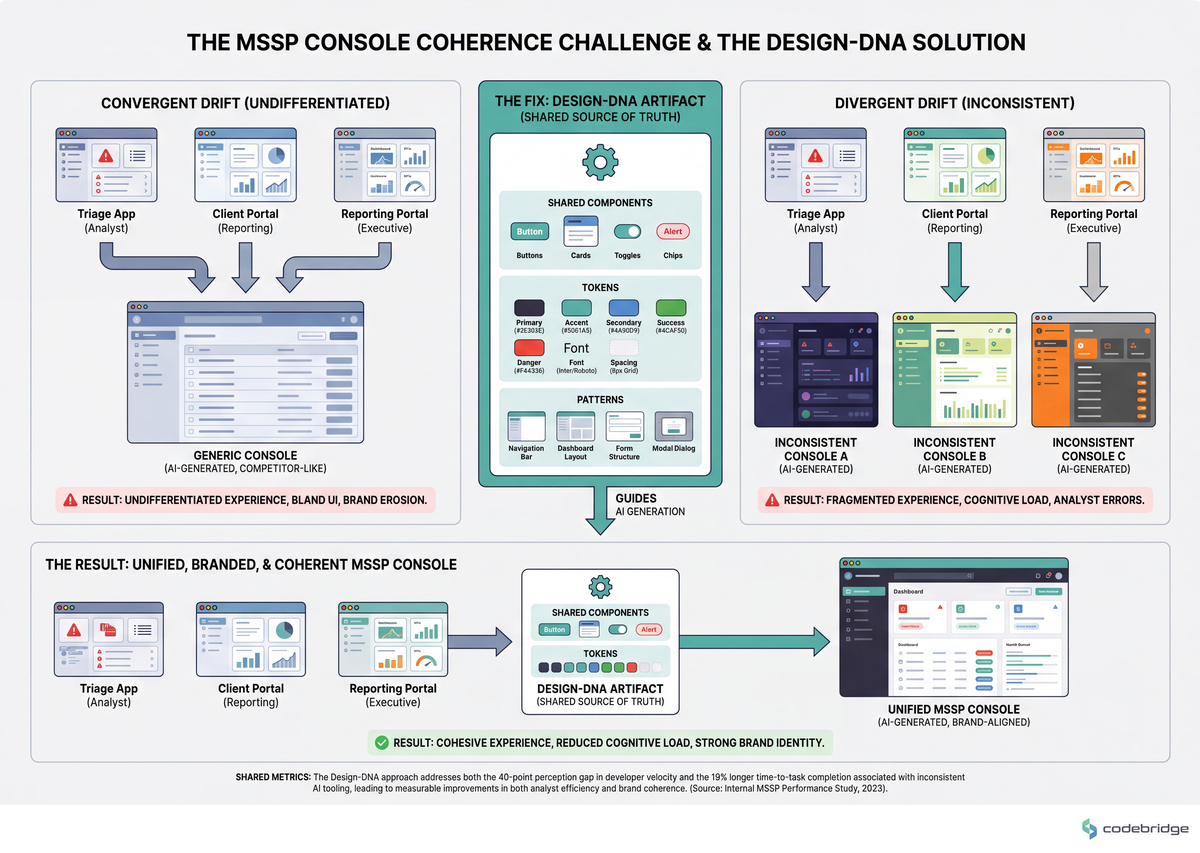
The fix is identical for both: an extracted, machine-readable design DNA plus an automated audit step in CI that scores generated screens against explicit anti-patterns, so coherence is enforced by a linter rather than by reviewer taste. Which brings us to the reason most teams never build that artifact.
Under a discussion of tooling that reduces AI front-end sloppiness, an experienced UI/UX practitioner argued with users who had no design-spec background about where the real bottleneck sits.
"If you don't generate exact specs, these LLMs will generate stuff that looks like generic forms that people made with PHP tutorials in 2005."
Commenter, Hacker News
The counterargument in that thread was equally sharp: writing the spec requires years of UX documentation experience most teams do not have. Both sides are right, and the split is the actual decision point. If you have UI/UX depth in-house, prescriptive instruction beats generic anti-slop tooling. If you don't, you buy or generate the spec artifact first — a shared token set and a component contract — because no amount of prompting compensates for its absence, and every application will independently invent its own defaults.
The Pattern: What Teams That Hold Coherence Actually Do
The teams that keep multi-application platforms coherent under agent-assisted development share one structural property: the agent can check its own work. Everything else follows from that.
The evidence for verification-loop dependence is strong across domains. Peer-reviewed research published in Nature Communications on the LINS framework reported "a greater than 40% increase in credibility across various tasks (P < 0.001)," which the authors attribute "primarily... to LINS's ability to provide fully authentic and traceable evidence, in contrast to the often fictitious evidence generated by LLMs." The study's domain is medical Q&A, not UI generation, so read the transfer carefully: what generalizes is not the number but the mechanism. Ungrounded LLM output is systematically less trustworthy than it appears to the person consuming it, and anchoring output to a traceable, authentic source is what closes the gap. A design token file is exactly that kind of anchor for generated UI.
Here is how that mechanism shows up in practice, from someone who ran both experiments on the same project.
"When I got it to focus on making the download service, which just collates all the data locally, including giving it a web hook to test its results, it just ran until completion."
Commenter, Reddit r/ChatGPTCoding
One more thing separates the teams that hold coherence: they do not plan the work on how fast it feels. A controlled study of experienced developers working on issues in codebases they already knew found they took 19% longer to complete issues with AI tooling available — while having forecast a 24% speedup, and still believing afterward that they had been sped up by 20%. That is a roughly 40-point perception gap that does not close with experience.
The Playbook: Seven Steps to Cross-Application UI Coherence
What follows is sequential. Steps 1 through 3 produce artifacts; 4 through 6 make those artifacts binding; step 7 protects the whole thing from erosion. The dependency chain is shown below.
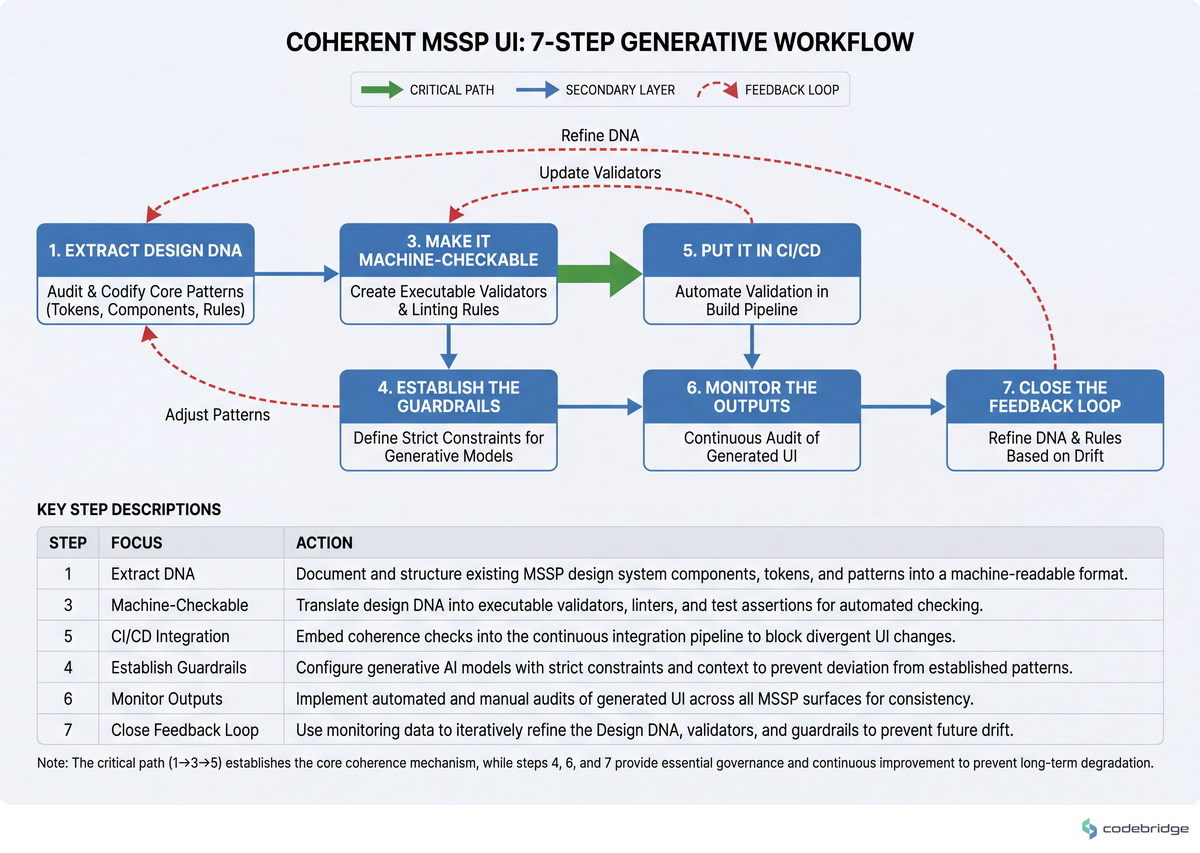
Step 1 — Extract design DNA as machine-readable data, not a PDF
What to do: Produce a token file (colors, type scale, spacing scale, radii, elevation, motion durations) plus a component contract that names every shared component, its required props, and its permitted variants. If you have no design system, extract the DNA from your highest-traffic existing surface — the tooling in the dev.to case does this from screenshots or URLs against a catalogue of 65 anti-patterns.
What good looks like: The artifact is JSON or TS, is imported by at least two applications, and an agent given only that file plus a screen description produces output that matches an existing screen on token values without further prompting.
Common failure mode: The spec exists as a Figma library and a Confluence page. Agents cannot read either. If your design system is not resolvable by the model at generation time, it does not exist for this purpose.
Step 2 — Write a ranked priority ordering, not an unranked style guide
What to do: Add a values document that the agent reads on every task, and rank the values explicitly so the model knows what to sacrifice under conflict.
"Tell it your values — 'I value correctness over getting things done, and getting things done properly over speed' solves many of those problems."
Commenter, Hacker News
For an MSSP platform the ordering usually reads: severity-semantics fidelity > cross-app vocabulary consistency > token compliance > visual polish > delivery speed. Write your version in that shape.
What good looks like: When two rules conflict, the agent's output picks the higher-ranked one and says so in its summary. That practitioner's stated shift was from per-task prompting to maintaining explicit values/meta-documents — measurable as a drop in per-task correction prompts.
Common failure mode: The document accretes defensive scoping written for older models and becomes pure token cost. Re-read it every model upgrade and delete what the current model no longer needs.
Step 3 — Build a cross-application vocabulary registry, and generate it with the LLM but apply it with a codemod
What to do: One registry mapping each domain concept to exactly one label, one severity color, and one icon, across every application. Severity levels, alert states, asset classes, disposition verbs, tenant-scope terms. Then use the model for judgement and a deterministic tool for application.
"The LLM was given read-only access and had the task of generating a CSV of before/after mappings" — regular refactoring tools were then used to apply these mappings.
mwcampbell, Lobsters
What good looks like: The model proposes the mapping (component X in app A corresponds to component Y in app B; these six labels collapse to one term), emits it as reviewable structured data, and codemods apply it. The diff is auditable and consistency is mechanically guaranteed rather than re-sampled per file.
Common failure mode: Letting the model edit across many files directly. That is what the practitioner above abandoned as untrustworthy before inverting the workflow.
Step 4 — Decompose UI generation to screen or component units, each with an accepted reference
What to do: Never hand an agent a whole-application UI port or rebuild. Break it into screen-level or component-level units, and attach an accepted reference implementation to each. Ensure at least one human on the review path can judge idiomatic correctness in the target framework.
An experienced developer two weeks into porting a Windows desktop application from Python to C#/Avalonia UI with an agentic tool — and zero prior experience in either the target language or the UI framework — described what the whole-app framing produced:
"It didn't end well. A frustrating set of prompts that seemed to result in the implementation going in circles with constant problems being introduced, breaking-fixing-breaking."
Commenter, Hacker News
What good looks like: Every generation task names a reference screen or component it must match. The agent has an anchor to converge on instead of taking a fresh sample from the distribution each iteration.
Common failure mode: Nobody on the team can distinguish "working" from "plausible" in the target framework. If that is true, the decomposition does not save you — hire or borrow the expertise before starting.
Step 5 — Put a machine-checkable coherence signal in CI
What to do: Three gates, all executable: token linting (fail on any hardcoded color, spacing, or font value outside the token set), visual regression diffs on a per-screen baseline, and component-usage assertions (fail if an app defines a local component whose name or role duplicates a registry entry). Add a design-anti-pattern audit that scores generated screens against an explicit catalogue.
What good looks like: An agent can run the gate itself and iterate to green before a human sees the PR. This is the verification loop from the r/ChatGPTCoding case, applied to UI — the difference between the session that stalled and the session that ran to completion.
Common failure mode: Treating this as advisory. Instruction files are read inconsistently; prebuild scripts and CI gates enforce architecture and structure that general-purpose linters do not cover.
Step 6 — Version the design contract separately from the component implementation, and gate releases on joint migration
What to do: Publish tokens and component contracts as their own versioned package with its own semver and a written migration contract. Make "every surface migrates together" a hard release gate for major versions.
What good looks like: No application is more than one minor version behind the contract package. The measurable signal that you need this: if any two of your applications are currently pinned to different major versions of your design system, visual drift is already guaranteed and you are paying for it in support tickets.
Common failure mode: The one from the opening — a ground-up rewrite every few years, shipped with breaking changes and unresolved regressions, with no migration contract. Each app freezes on a different major, and the design system becomes the source of incoherence rather than the cure for it.
Step 7 — Put change control on the enforcement layer itself
What to do: Protect the CI gates, prebuild scripts, and token files with CODEOWNERS and required review, the same way you protect production config. A deleted check is invisible.
A developer enforcing architectural and style conventions on an agent-assisted codebase in a team setting found that instruction files alone did not hold; prebuild scripts checking each convention were the durable fix. Then the process broke socially:
"Problems start when a colleague might just remove some of those due to personal preference without discussion."
Commenter, Hacker News
What good looks like: Removing or weakening a coherence gate requires the same approval path as changing a deployment target. Named owner, explicit review.
Common failure mode: A gate is disabled to unblock a release and never re-enabled. Add a scheduled job that asserts the expected gate set exists.
One thing to explicitly not do: regenerate an existing, in-use screen from a spec. A natural-language spec complete enough to pin down UI behaviour would be as complex as the code itself, so regeneration always loses undocumented behaviour. As one engineer put it, "Ask yourself if you have ever worked on a non-trivial piece of software where you could randomly regenerate 10% of the implementation while keeping to the spec without seeing a flurry of bug reports" (Hacker News). Treat existing UI behaviour your analysts have learned as an undocumented contract. Capture visual and interaction regressions before letting an agent rebuild a screen.
Why This Gets Harder in 2026, Not Easier
Two architectural shifts are compounding the problem on exactly your timeline. LLM-based multi-agent systems are emerging as the dominant pattern for distributed security automation — decomposing threat classification, triage, and vulnerability guidance across specialized agents in ways single-model approaches cannot (survey of LLM-MAS research). More agents producing more surfaces means more independent samples, each needing the same coherence contract. Separately, research on the LLM application ecosystem documents rapid adoption arriving alongside compounding security, privacy, and output-quality risk, pushing quality governance down to the platform layer.
The market pressure is real too. Trustwave's April 2025 integration of Devo's cloud-native SIEM into the MXDR platform for co-managed SOC capabilities is the shape of where MSSP tooling is going: more integrated surfaces, more co-managed views, more places where a severity label has to mean the same thing to two organizations at once (MarketsandMarkets managed security services report). Our reading: every integration you add multiplies the coherence surface rather than adding to it, which is why the artifact-plus-gate approach has to land before the integration count grows, not after.
Close: Your Week
The team in the opening had the same UI element rendering four different ways across pages, lists, document libraries, and settings panels — after three rewrites of the design system meant to prevent exactly that. Agent-generated UI does not create that problem. It removes the friction that used to slow it down, and it will produce that state across your MSSP platform in a quarter rather than in three years.
Tomorrow morning: open your two most-used applications side by side and screenshot the same concept in each — the severity chip, the alert-detail header, the acknowledge action. That is a 20-minute exercise and it will tell you within one screen whether you have convergent drift (identical and generic) or divergent drift (different per app). Write which one you have at the top of a document.
Wednesday: build the vocabulary registry for one concept only — severity. Every label, color, and icon your platform uses for it, in one table, per application. Give it to a model read-only and ask for the consolidated mapping as structured data. Do not let it edit anything.
By Friday: land one token lint rule in CI on one application. One rule — hardcoded colors fail the build. That single gate is the smallest possible version of the verification loop, and it is the difference between an agent that converges and an agent that samples fresh every time.
The 30-minute artifact, if you do only one thing this week: the side-by-side screenshot document from Tuesday morning. Name your drift mode. Everything in this playbook branches from that answer.
Diagnostic Checklist: Score Your Platform
Run these against your own system. Answer honestly — each Yes is one point.
Are any two of your applications currently pinned to different major versions of your design system or token package? Yes / No
Can an agent read your design spec at generation time, or does it live only in Figma and Confluence? Only in Figma/Confluence = Yes
Does the same severity or alert-state concept have more than one label, color, or icon across your applications? Yes / No
Is there any CI check that would fail a PR for a hardcoded color or spacing value outside your token set? No such check = Yes
Could a single engineer delete a convention-enforcement script without triggering a required review? Yes / No
In the last quarter, did you hand an agent a whole-screen or whole-app UI task with no accepted reference implementation attached? Yes / No
Do you have visual regression baselines captured for the screens your analysts use daily, taken before any agent-assisted rebuild? No baselines = Yes
Is your sprint planning for agent-assisted UI work based on measured cycle time, or on how fast the work feels? Feels-based = Yes
0-2 points: healthy. Your coherence controls are load-bearing; keep step 7 (change control on the enforcement layer) tight as the team grows.
3-5 points: at risk. You have artifacts but they are advisory rather than binding. Prioritize steps 3 and 5 — the vocabulary registry and the CI gate — before adding another application.
6-8 points: drift is already priced into your platform and your analysts are absorbing the cost silently. Stop new agent-assisted UI generation on client-facing surfaces until steps 1, 3, and 5 are in place. Regenerating more screens on this foundation compounds the debt.
Not sure which drift mode you have?
Talk to our team about auditing UI coherence across your multi-application platform.














Heading 1
Heading 2
Heading 3
Heading 4
Heading 5
Heading 6
Lorem ipsum dolor sit amet, consectetur adipiscing elit, sed do eiusmod tempor incididunt ut labore et dolore magna aliqua. Ut enim ad minim veniam, quis nostrud exercitation ullamco laboris nisi ut aliquip ex ea commodo consequat. Duis aute irure dolor in reprehenderit in voluptate velit esse cillum dolore eu fugiat nulla pariatur.
Block quote
Ordered list
- Item 1
- Item 2
- Item 3
Unordered list
- Item A
- Item B
- Item C
Bold text
Emphasis
Superscript
Subscript