Choosing between React and Angular is a strategic business decision. The framework you choose can shape your hiring pipeline, time-to-market, long-term maintenance costs, and even your SEO rankings. If you’re evaluating React vs Angular, you need a decision framework grounded in current ecosystem realities, not 2018 blog posts.
Both frameworks are mature, backed by huge communities, and proven at scale. The difference lies in how they think about application architecture, the trade-offs they make, and how well they fit your team’s goals and constraints. In this guide, we’ll break down performance, DX, state management, hiring markets, TCO, and end with a decision matrix you can actually use. If you want a hands-on audit, prototype, or migration plan, explore our custom software development services.

Executive Summary: React vs Angular in 2026 (What’s Changed & Why It Matters)
React (Meta): Still the most widely adopted front-end library, with unmatched flexibility, a vast ecosystem (Next.js, Remix, Vite), and the largest hiring pool. Its new Server Components and concurrent rendering patterns are now stable, bringing first-class SSR/streaming capabilities.
Angular (Google): A fully integrated, opinionated framework with built-in TypeScript, DI, routing, RxJS, and now Signals for reactive performance improvements. It’s particularly strong in enterprise environments that value convention, stability, and long-term support.
When each wins
- Choose React if: You need fast startup hiring, maximum flexibility in stack choices, and a wide array of UI libraries. Ideal for design-system-heavy apps, consumer products, and startups iterating quickly.
- Choose Angular if: You need a comprehensive framework with built-in tooling, strong typing from day one, and an opinionated structure. Ideal for regulated industries, enterprise-scale dashboards, or teams that want fewer architectural decisions.
Architecture & Paradigms: How They Think
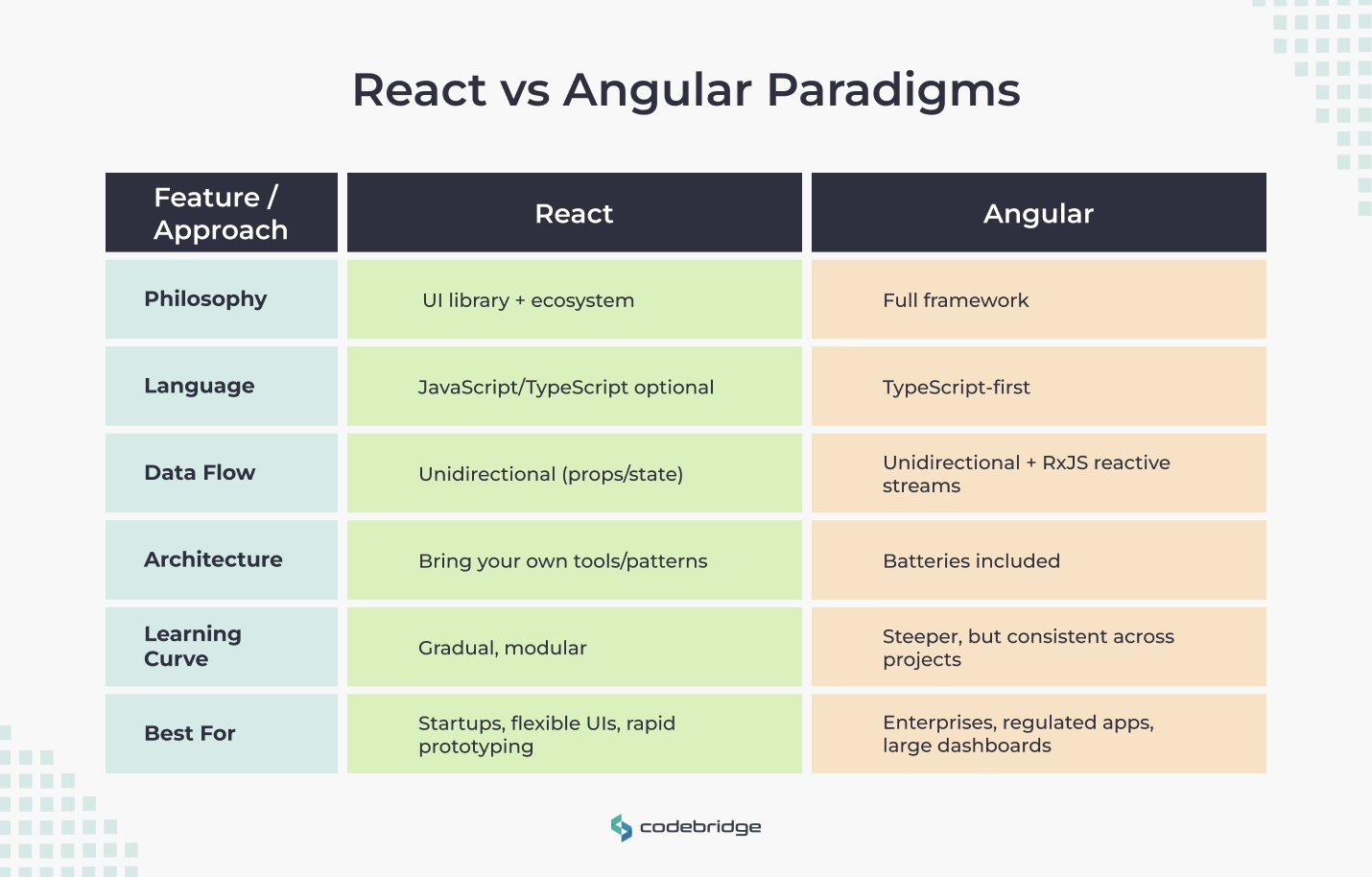
React is often called a “library” rather than a framework because it focuses on the view layer. You bring your own router, state management, build system, and data-fetching patterns (or use ecosystem standards like Next.js or Remix). This flexibility is a double-edged sword: you get freedom, but you also need discipline to maintain consistency.
- JSX lets you write HTML-like syntax directly in JavaScript.
- Hooks (introduced in 2019) replaced most class-based components for cleaner logic reuse.
- Server Components allow SSR and streaming without bundling server-only code into the client build.
Angular is a full-featured framework. From routing to forms, HTTP clients, and testing utilities, it’s all included, with TypeScript as the default.
- Dependency Injection (DI) is built-in, enabling clear service lifecycles and testability.
- RxJS provides reactive streams for async data, though it has a steeper learning curve.
- Opinionated architecture means less flexibility but more consistency, especially across large teams.
Rendering & SEO: SSR/SSG/ISR and Core Web Vitals
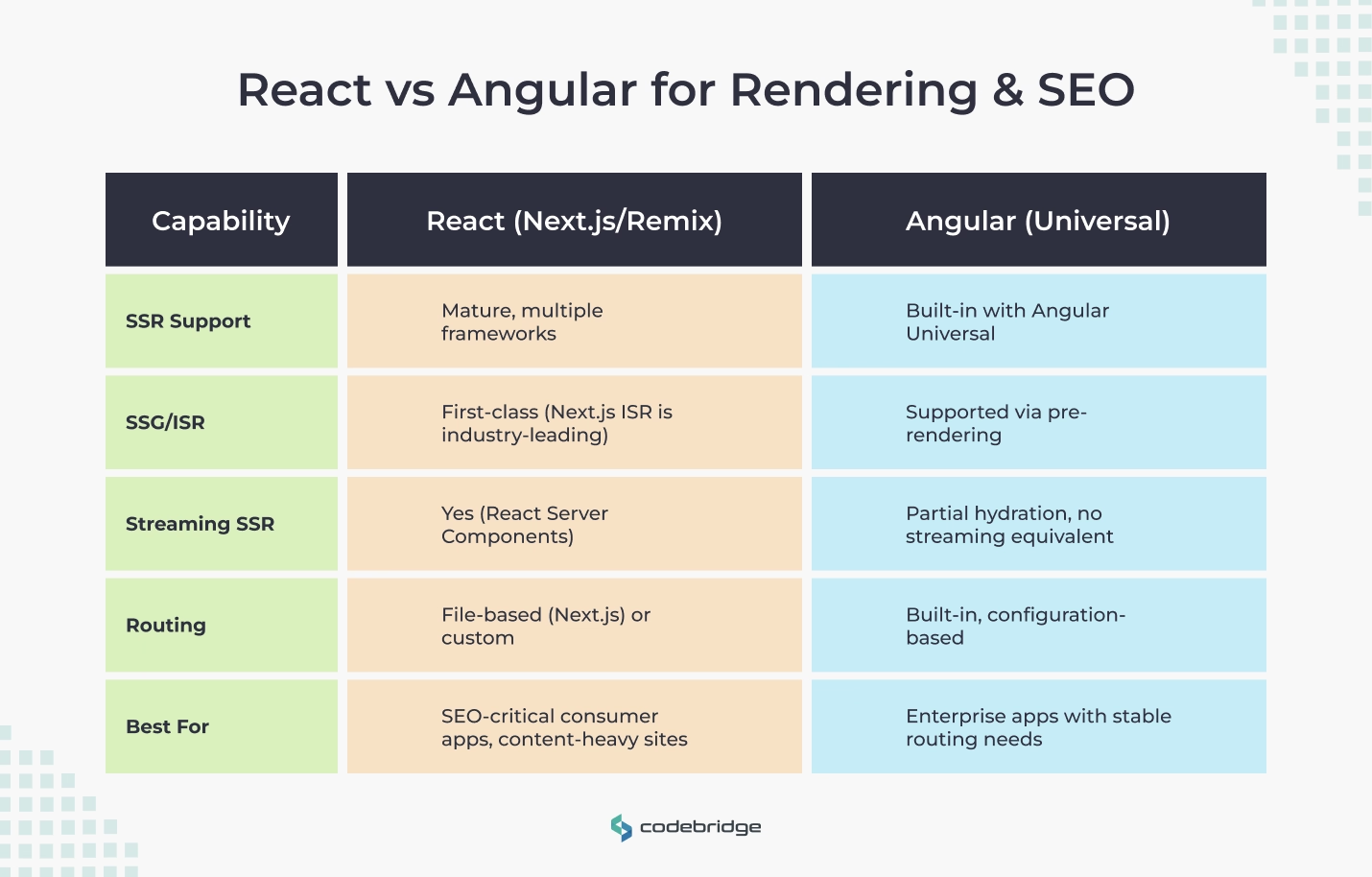
React’s flexibility shines here. With frameworks like Next.js, you can choose SSR (Server-Side Rendering), SSG (Static Site Generation), ISR (Incremental Static Regeneration), or even streaming SSR with React Server Components.
- Next.js: SEO-friendly, hybrid rendering, route-based code splitting.
- Remix: Emphasizes nested routing, server data loading, and progressive enhancement.
Angular’s Universal package provides SSR capabilities with pre-rendering options. The newer hydration and partial hydration features improve load times, and it’s now easier to integrate SSR into CI/CD pipelines without heavy config work.
Performance: React vs Angular Performance in Real Products
When comparing React vs Angular performance, the conversation isn’t just about raw framework speed. Both are optimized enough for most production use cases; the real differentiators are architecture choices, build size, and ongoing discipline.
Bundle size & loading
- React: Typically produces smaller bundles if you tree-shake unused libraries. With tools like Vite or Next.js, you get aggressive code splitting and modern build outputs.
- Angular: Historically heavier, but recent releases with differential loading and Signals have narrowed the gap. Angular CLI auto-optimizes builds with AoT (Ahead-of-Time) compilation.
Runtime characteristics
- React: Uses a virtual DOM diffing algorithm and memoization patterns to minimize unnecessary renders. With Server Components, you avoid shipping server-only code to the browser.
- Angular: Traditionally relied on zone.js change detection, but Signals now provide fine-grained reactivity, reducing re-renders and boosting p95 interactivity metrics.
Budgets & monitoring
Regardless of framework, set Core Web Vitals (CWV) targets:
- LCP < 2.5s
- INP < 200ms
- CLS < 0.1
Tip: Performance is 50% framework, 50% developer discipline. Measure p95 TTI and INP in staging with real devices before launch.
State & Data: From Local State to Server Cache
Managing state is one of the biggest differentiators in day-2 complexity between React and Angular projects.
React state ecosystem
- Local: useState, useReducer, Context API.
- App-wide: Redux Toolkit (still popular for enterprise), Zustand (lightweight), or Jotai/Recoil for smaller projects.
- Server cache: TanStack Query (React Query) for data fetching, caching, and background updates.
Angular state ecosystem
- Local: Component state.
- App-wide: Angular Services (DI-powered singletons), NgRx Store (Redux-inspired, RxJS-powered), or the new Signals Store.
- Data fetching & caching: Angular HttpClient with interceptors, RxJS operators for stream control.
Tooling, DX & Monorepos
Developer experience (DX) impacts your delivery speed and long-term maintainability as much as framework choice.
React tooling
- Build tools: Vite (fast HMR), Next.js (full-stack React), CRA (deprecated in favor of Vite/Next).
- Component development: Storybook for isolated UI building.
- Linting & formatting: ESLint, Prettier.
- Testing: Jest/Vitest with React Testing Library.
Angular tooling
- CLI: Angular CLI scaffolds components, modules, services with one command, and applies opinionated best practices automatically.
- Schematics: Custom generators for repeatable patterns.
- Strict TypeScript: Enforced from day one, reducing runtime errors.
Monorepo support
Both React and Angular can thrive in monorepo setups with Nx or Turborepo, which provide caching, task orchestration, and consistent tooling across projects.
Testing & Quality
Testing strategy often reflects the framework’s opinionation level.
React
- Unit/Integration: Jest or Vitest + React Testing Library (RTL) for DOM assertions.
- E2E: Cypress or Playwright, with strong community support.
- Visual regression: Chromatic (Storybook) or Percy.
- Accessibility: @testing-library/jest-dom + axe-core for automated WCAG checks.
Angular
- Unit/Integration: Angular Testing Library (built on top of Jasmine/Karma or Jest) with built-in TestBed utilities.
- E2E: Cypress, Playwright, or the older Protractor (deprecated).
- Accessibility: Strong template-driven forms validation; lint rules for a11y baked into Angular ESLint.
Regardless of framework, build accessibility audits into CI/CD and aim for WCAG 2.2 AA compliance.
Mobile & Cross-Platform
Your choice here depends on whether your web and mobile teams will share code.
React
- React Native: Deep ecosystem, supports code sharing with React web apps.
- Expo: Simplifies RN development but limits access to some native modules.
- PWA: Works well with Next.js/CRA apps.
Angular
- Ionic + Capacitor: Hybrid apps with Angular frontend.
- NativeScript: Angular syntax but native widgets.
- PWA: Supported with Angular Service Worker package.
Talent, Community & Ecosystem Health
This is often the deciding factor for CTOs, can you hire and onboard quickly?
React
- Talent pool: Very large, with many bootcamp grads.
- Ecosystem: Huge library selection, but quality varies.
- Release cadence: Fast-moving, frequent minor changes.
Angular
- Talent pool: Smaller but strong in enterprise/regulated sectors.
- Ecosystem: More curated and official solutions.
- Release cadence: Twice-yearly major releases, with LTS.
Hiring tip: If your project needs strict TypeScript discipline, Angular developers tend to have it by default.
Total Cost of Ownership (TCO) & Delivery Speed
React
- Build cost: Lower for MVPs, higher for large-scale apps without strong conventions.
- Run cost: SSR setups (Next.js) may need extra infra compared to pure CSR.
- Upgrade path: Incremental, you can update piece by piece.
Angular
- Build cost: Higher upfront due to learning curve, lower over time with consistent patterns.
- Run cost: Predictable thanks to CLI-managed builds.
- Upgrade path: Managed migrations, but must be done in sync with Angular’s release cycle.
Decision Matrix, Choose with Confidence
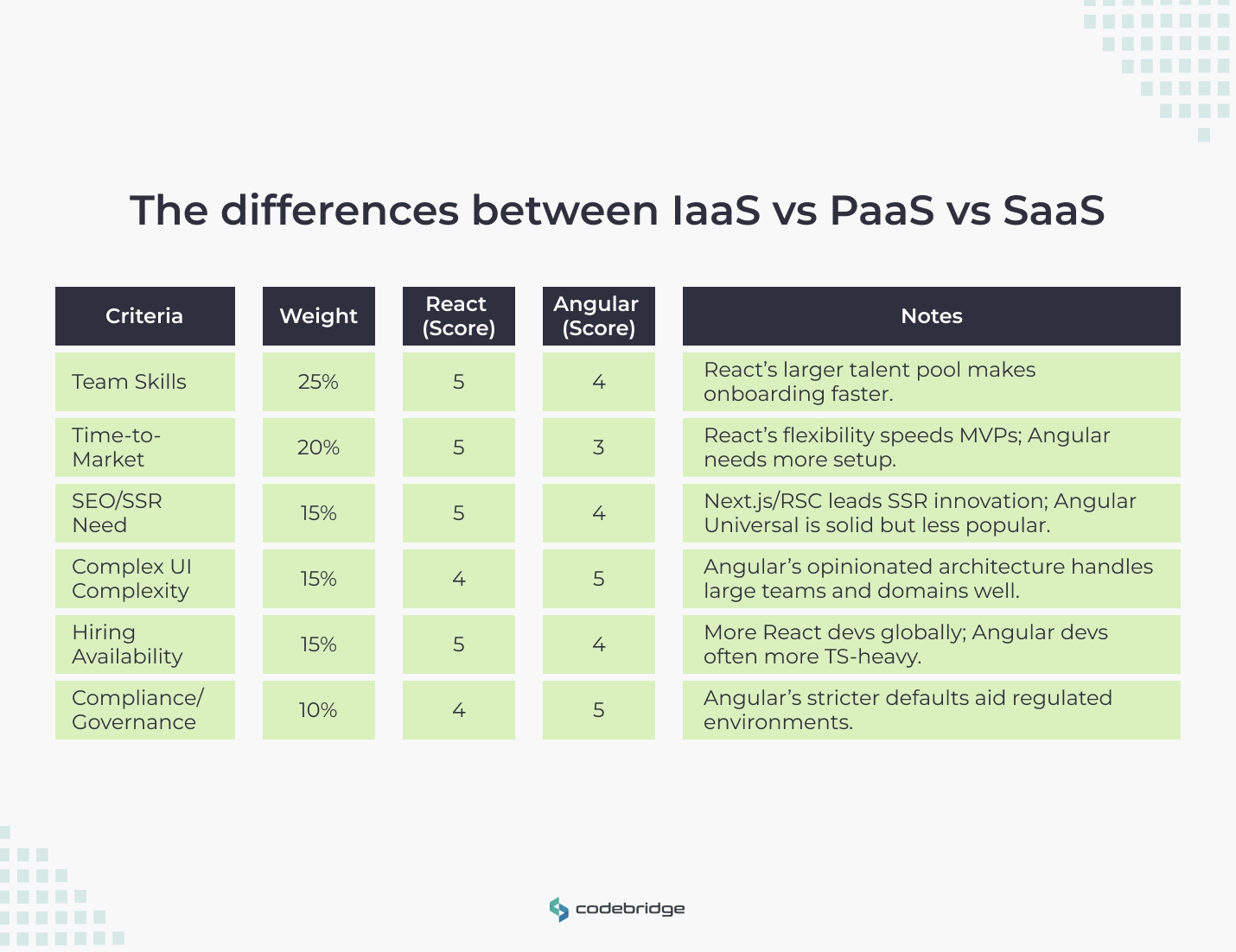
Weighted criteria (adjust for your priorities):
- Team skills (25%)
- Time-to-market (20%)
- SEO/SSR need (15%)
- Complexity handling (15%)
- Hiring availability (15%)
- Compliance & governance (10%)
30/60/90-Day Evaluation Plan
0–30 Days, Define & Prototype
- List business requirements (SEO, compliance, mobile, scaling).
- Spike SSR routes in both frameworks.
- Define performance budgets (e.g., LCP < 2.5s, INP < 200ms).
31–60 Days, Build Thin Vertical Slices
- Create a vertical slice in each (auth, dashboard, API integration).
- Measure developer time, bugs, Core Web Vitals.
- Collect feedback from internal QA and a small user group.
61–90 Days, Decide & Operationalize
- Score both using your weighted matrix.
- Write reference architecture in the chosen framework.
- Create CLI scripts, scaffolds, and coding standards.
Conclusion
Choosing between React and Angular in 2026 isn’t about hype; it’s about matching framework strengths to your product’s needs, team skills, and compliance realities.
For startups chasing speed, React often wins. For enterprises managing complexity at scale, Angular shines. Book a free consultation to make your decision with confidence.
FAQ
What is the key difference between React vs Angular?
The main difference between React vs Angular is that React is a JavaScript library focused on building user interfaces, while Angular is a comprehensive front-end framework. React offers flexibility and freedom to choose supporting tools, whereas Angular provides an opinionated structure with everything built in, from routing to dependency injection.
How does performance compare in React vs Angular?
When it comes to performance, React vs Angular shows distinct strengths. React is generally faster due to its virtual DOM and efficient component re-rendering. Angular can be heavier because of two-way data binding, but it performs well in large-scale enterprise apps thanks to Ahead-of-Time (AOT) compilation and Ivy rendering.
Which is better for SEO, React or Angular?
In terms of SEO, React often has an advantage in React vs Angular comparisons because of its compatibility with server-side rendering using tools like Next.js. Angular, while SEO-friendly with Angular Universal, can require more setup. Both frameworks can deliver excellent SEO performance when properly optimized for indexing and page speed.
What is the difference in developer experience between React vs Angular?
React vs Angular offers different experiences for developers. React is simpler, lightweight, and highly flexible, ideal for teams that value freedom in tool selection. Angular provides a consistent, structured environment with TypeScript, making it a good choice for large teams that prefer well-defined workflows and coding standards.
How do hiring and talent availability compare for React vs Angular?
In the job market, React developers are typically easier to find due to the larger React ecosystem and popularity among startups and SaaS companies. Angular developers are often in demand in enterprise and corporate environments where long-term maintainability and structure are key. Both skills are valuable, but React tends to have broader community support.
Which is more cost-effective: React vs Angular?
From a cost perspective, React vs Angular depends on your project goals. React projects may require extra time to integrate libraries for routing, state management, or testing, potentially increasing setup costs. Angular’s all-in-one approach can reduce integration time but may require more specialized (and higher-paid) developers. The total cost often balances out depending on your team’s experience.














Heading 1
Heading 2
Heading 3
Heading 4
Heading 5
Heading 6
Lorem ipsum dolor sit amet, consectetur adipiscing elit, sed do eiusmod tempor incididunt ut labore et dolore magna aliqua. Ut enim ad minim veniam, quis nostrud exercitation ullamco laboris nisi ut aliquip ex ea commodo consequat. Duis aute irure dolor in reprehenderit in voluptate velit esse cillum dolore eu fugiat nulla pariatur.
Block quote
Ordered list
- Item 1
- Item 2
- Item 3
Unordered list
- Item A
- Item B
- Item C
Bold text
Emphasis
Superscript
Subscript