In 2026, mobile apps are essential tools for engaging customers, streamlining operations, and launching new digital products. But before launching your next project, the big question is: How much does it cost to develop an Android app?
The answer isn’t one-size-fits-all. Costs vary based on your app’s complexity, design, integrations, and whether you choose native or cross-platform development frameworks like Flutter. The good news? With the right choices, you can reduce app development costs by up to 40% without sacrificing quality or user experience.
Let’s break down what goes into the Android app development cost, how to budget wisely, and why Flutter is changing the game.
What Affects Android App Development Cost?
Several factors contribute to the total cost of building an Android app. Understanding these early helps with budgeting and choosing the right approach.
App Complexity and Number of Features
Apps range from basic utilities to enterprise-grade platforms. A simple to-do list app will cost far less than a feature-rich marketplace with user accounts, chat, payments, and AI.
- Simple app: Login, lists, and minimal UI
- Medium complexity: Authentication, payment gateway, API connections
- Complex apps: Real-time sync, maps, social features, ML components
App Design Requirements
- Custom UI/UX design adds polish but requires time and skill.
- Complex animations or brand-specific visual elements also increase cost.
Backend Infrastructure
Apps often require a backend for user data, content management, and real-time updates.
- Firebase or Supabase can speed things up.
- Custom backend development is more flexible but more expensive.
Number of Integrations and APIs
- Payment systems (Stripe, PayPal)
- Social media logins
- External data feeds (weather, maps, booking APIs)
Each integration takes time to test and secure — adding to development costs.
Platform Choice: Native vs Cross-Platform
- Native Android development (Java/Kotlin) often means building separately for iOS later.
- Cross-platform frameworks like Flutter allow one codebase for both Android and iOS — reducing time and cost.
Average Android App Development Costs
So, what’s the ballpark?
.avif)
Cost to Build a Simple Android App
- Estimated cost: $10,000 – $25,000
- Features: Basic UI, form input, local storage
Cost to Develop a Mid-Level Android App
- Estimated cost: $25,000 – $60,000
- Features: API integration, user accounts, notifications, cloud backend
Cost for Complex Android Applications
- Estimated cost: $60,000 – $150,000+
- Features: Real-time updates, video, AI/ML, advanced backend, multi-role system
Average Hourly Rates for App Development by Region
As noted above, costs can be optimized by choosing development teams in Eastern Europe or Asia, where hourly rates are more competitive without sacrificing skill.
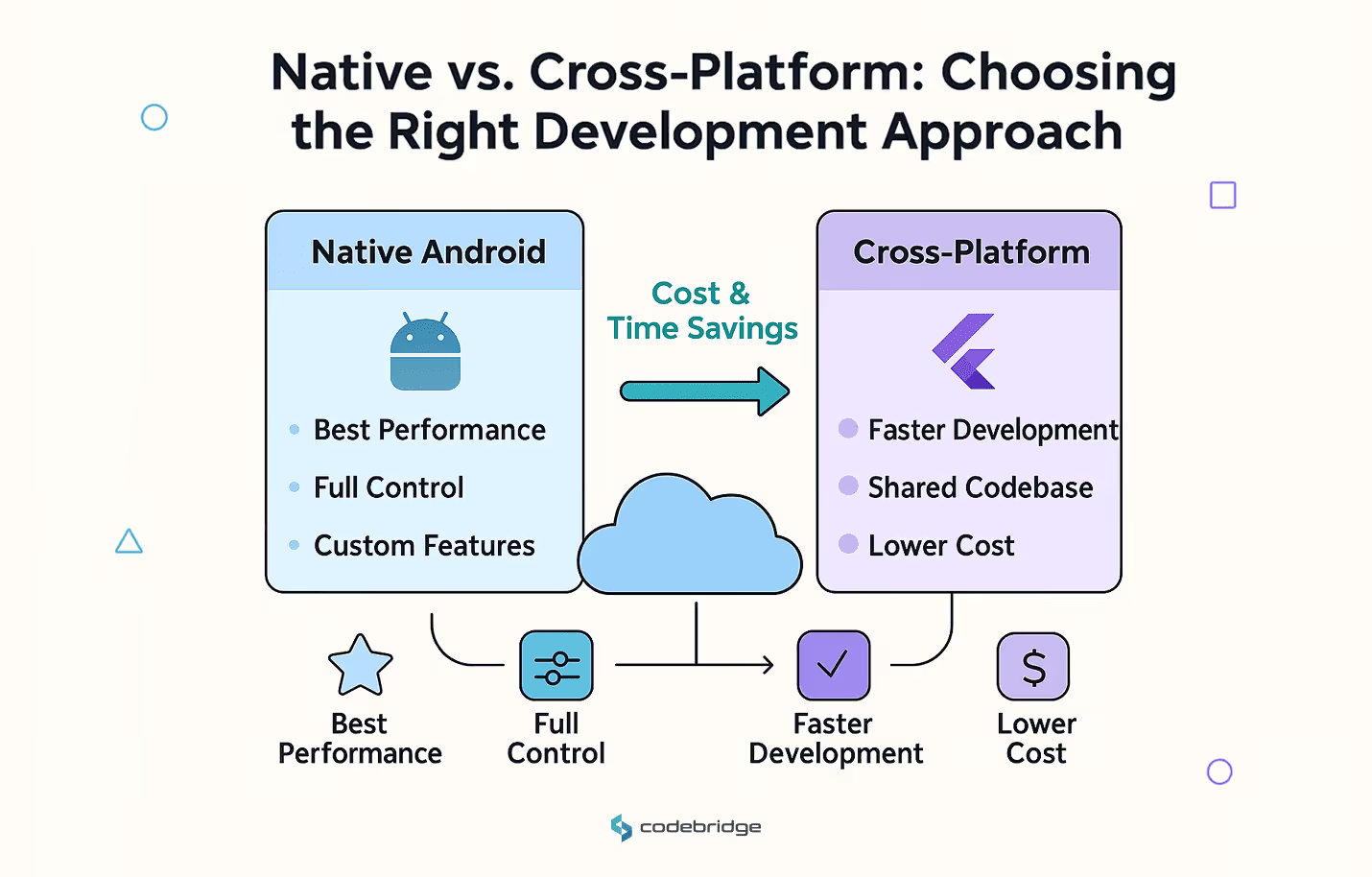
Native vs Cross-Platform App Development
Choosing between native vs cross-platform app development affects your total budget and long-term maintenance.
Pros and Cons of Native Android Development
Pros:
- Optimal performance and access to native APIs
- Deep platform customization
Cons:
- Higher development and maintenance costs
- Slower updates across platforms
Pros and Cons of Cross-Platform Development
Pros:
- Faster and cheaper development
- Shared codebase for Android and iOS
- Easier long-term maintenance
Cons:
- May require extra work for advanced platform-specific features
- Slight performance trade-offs for very high-performance apps
Why Choose Flutter for Android App Development?
Flutter has become a top choice for building high-quality, fast Android apps without the full cost of native development.
Flutter App Development Cost Benefits
- Reduces total cost by up to 40% vs native Android + iOS development
- Shared codebase = one team instead of two
- Built-in widgets for rapid UI development
Reduced Time-to-Market with Flutter
Thanks to hot reload and reusable components, you can go from MVP to market in weeks — not months.
Single Codebase Advantage for Android and iOS
Maintain one codebase. Update once. Test once. That’s serious long-term savings.
Real-World Examples of Flutter Apps
- Google Ads
- Alibaba
- BMW
Startups and scale-ups alike use Flutter to deliver premium experiences without overspending.
Want to build with Flutter? Hire Flutter developers
How to Reduce Your App Development Costs Without Compromising Quality
Choose Cross-Platform Frameworks
Flutter or React Native can significantly cut development time and budget.
Start with an MVP Version
Focus on core features. Add advanced functionality post-launch.
Use Pre-Built Modules and Third-Party Integrations
Why reinvent the wheel? Leverage battle-tested SDKs for payments, auth, chat, and more.
Partner with Experienced Cross-Platform Developers
A seasoned team can help you make the right tech choices, avoid rework, and deliver faster. Check out our Android development services for tailored solutions.
Final Thoughts
So, how much does it cost to make an Android app? The answer depends on your goals, but with smart planning and the right framework, it doesn’t have to break the bank.
Choosing Flutter or another cross-platform tool can:
- Cut development time in half
- Reduce total budget by up to 40%
- Simplify long-term maintenance
Need help building a cost-effective Android app? At Codebridge, we specialize in cross-platform mobile development using Flutter and other modern frameworks. Whether you're building an MVP or a full-scale enterprise app, we’ll help you launch faster, smarter, and on budget.
FAQ
What factors determine the cost of developing an Android app?
The cost depends on app complexity, number of features, design requirements, backend development, third-party integrations, and developer rates. More advanced features—such as real-time chat, GPS, payments, and AI—require significantly more time and budget.
How does app complexity affect Android development pricing?
Simple apps with basic screens cost far less than complex apps that include custom dashboards, user authentication, offline mode, or advanced animations. As complexity increases, the development hours and testing workload rise, resulting in higher overall pricing.
Why do design and user experience influence Android app development cost?
A premium UI/UX with custom animations, polished visuals, and interactive elements takes more design and development effort. High-quality design improves user engagement and retention but adds to the total project cost. Minimalist or template-based designs reduce expenses.
How do backend and API integrations impact Android app cost?
Apps that require user accounts, cloud databases, payment gateways, or integrations with external systems need more backend development. Setting up secure servers, APIs, and real-time synchronization increases the project scope and overall cost.
How much do developer rates vary for Android app development?
Developer rates differ by region, expertise, and project type. Developers in North America or Western Europe typically charge more, while teams in Eastern Europe, Latin America, or Asia offer more affordable rates. Specialized skills like AI or IoT integration increase pricing.
How can startups reduce the cost of developing an Android app?
Startups can reduce costs by launching an MVP first, prioritizing essential features, choosing cross-platform development when possible, and avoiding unnecessary customizations. Clear specifications and partnering with experienced Android developers also prevent costly rework.
















Heading 1
Heading 2
Heading 3
Heading 4
Heading 5
Heading 6
Lorem ipsum dolor sit amet, consectetur adipiscing elit, sed do eiusmod tempor incididunt ut labore et dolore magna aliqua. Ut enim ad minim veniam, quis nostrud exercitation ullamco laboris nisi ut aliquip ex ea commodo consequat. Duis aute irure dolor in reprehenderit in voluptate velit esse cillum dolore eu fugiat nulla pariatur.
Block quote
Ordered list
- Item 1
- Item 2
- Item 3
Unordered list
- Item A
- Item B
- Item C
Bold text
Emphasis
Superscript
Subscript